Loopy Pro: Create music, your way.
What is Loopy Pro? — Loopy Pro is a powerful, flexible, and intuitive live looper, sampler, clip launcher and DAW for iPhone and iPad. At its core, it allows you to record and layer sounds in real-time to create complex musical arrangements. But it doesn’t stop there—Loopy Pro offers advanced tools to customize your workflow, build dynamic performance setups, and create a seamless connection between instruments, effects, and external gear.
Use it for live looping, sequencing, arranging, mixing, and much more. Whether you're a live performer, a producer, or just experimenting with sound, Loopy Pro helps you take control of your creative process.
Download on the App StoreLoopy Pro is your all-in-one musical toolkit. Try it for free today.
Comments
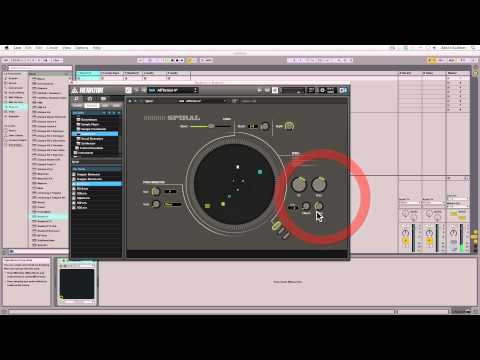
When the 'conventional bases' are sort of covered I certainly want to look into more far-out concepts. Where can I read about this Spiral 2.0?
I think what Odessa shows s not just about features. The layouts and ideals behind the interface is at least as important as what it can ultimately accomplish technically.
Think of similar drum machine apps on iOS. I have had many. Some do pretty much the same really, yet some feel so much better to use due to their interface. Now think about choosing the interface you want, matched to the sound source of your choosing! It’s going to make music making so much more accessible and enjoyable for many.
Try not to think of Odessa as a one only final product. Think of the possibility’s of endless choice and modular possibilities.
Nowhere, you must make it
Indeed Odessa looks great and perfect for an iOS device. I love the LFO‘s just from seeing them.
Since it‘s an AUM thing, could i use it also as midi out to drive a few plug-ins?
To Spiral, i just love the concept of it. Similar things are there already but i just love how easy but still complex can things get with a great visual feedback:
Edited: This is shorter and more to the point:
Now run that through GlitchBreaks or Turnado and we can call it real music.
Another great concept beside Spiral and some other really obscure sequencers is this one.
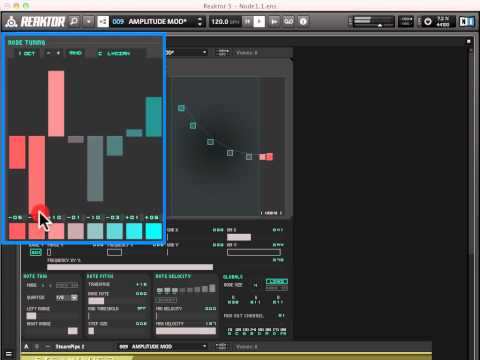
I think we (or maybe it’s just me) would like to see this on a multi/touch screen:
These 2 videos remind me of Seaquence app. Gonna fire it up and send midi to Zeeon.
I have Seaquence too but it‘s not the same really.
But i love the GUI
I still wonder why there aren‘t more concepts like these in iOS. Would make even more sense on a touch screen maybe.
I tried to create my own sequencers in Reaktor but i gave up. I have more fun to play them rather than create them.
Sure I agree with this. But on the other hand, few people would not say that JI sounds better than ET for music that doesn't change keys. Because that's how choirs and acoustic ensembles play. Forcing pad patches into ET is what sounds "wrong".
Are we there yet?! Are we there yet?! Are we there yet?! Are we there yet?!
In general I support the review process. But not this time.
mr @brambos apps needs no review
@brambos - OT question while we wait... How come Ruis FM only has 6 sounds when Ruis has 8?
FM was a bit more CPU hungry. Back when I was working on FM there were still quite a few iPad 4 around, and I wanted both plugins to work equally well, even on the lowest possible configurations.
I recall it was due to CPU usage that we could not freely select any of the drum-types for all the pads in the original Ruismaker? (I might be wrong here though).
Thanks. If that situation changes as devices get refreshed, I was thinking it would be nice to have an 8 lane MIDI sequence and be able to interchange Ruis and Ruis FM. No biggie though, more curious than anything.
How soon is soon?
appshopper.com seems to be down (site works but shows no apps) so what other 'tools' do we have to check when apps drop?
@Samu said:
I'll post on this forum - if someone else doesn't beat me to it (wouldn't be the first time )
)
17 pages of pre. Pretty impressive
Thanks!
Can the Odessa modules be loaded to the insert slots in AUM?(I'm thinking about 'house-keeping' in AUM).
(Meaning I could load all the AUv3-Midi Plug-Ins on one AUM channel and save the rest of the screen for the instruments).
For now they go into the input slot, but I think Jonatan is thinking about alternative visualizations.
Ok, makes sense. Separating Audio and Midi AUv3's in the UI feels like something that needs to be done.
For example the AUv3 Midi Generators (since they can not be 'routed' like Audio) could be just round circle-icons on either side of the screen. As for the 'midi-routing' tap'n'hold source icon then tap destination icon to connect them.
Who knows, maybe GarageBand will get AUv3 midi support some day too
(GarageBand does many things 'right' imho already, but some features are still missing arghhhhhh).
I noticed Spiral was mentioned above. That’s definitely a really cool concept for sequencing. Also worth checking out is Nod-E...another Reaktor build. There’s quite a lot of innovative “things” built in Reaktor that might / could / should be brought to a touchable surface.
+1 for Jonatan's alternative visualizations
I use this too, but it seems to get the news out a little later than Appshopper.
https://www.iosnoops.com/
Very. Overwhelmingly impressive. Can't keep up.
At 3:01 you can see he loses interest. He did listen attentively for a few seconds though before zoning out. Just like my wife.
Haha good catch. Slackin’ 60 Minutes ‘special’ reporters. What she played was very impressive though. Enjoyed the ‘thinking it out’ she did beforehand