Loopy Pro: Create music, your way.
What is Loopy Pro? — Loopy Pro is a powerful, flexible, and intuitive live looper, sampler, clip launcher and DAW for iPhone and iPad. At its core, it allows you to record and layer sounds in real-time to create complex musical arrangements. But it doesn’t stop there—Loopy Pro offers advanced tools to customize your workflow, build dynamic performance setups, and create a seamless connection between instruments, effects, and external gear.
Use it for live looping, sequencing, arranging, mixing, and much more. Whether you're a live performer, a producer, or just experimenting with sound, Loopy Pro helps you take control of your creative process.
Download on the App StoreLoopy Pro is your all-in-one musical toolkit. Try it for free today.
Two (iPads) Live Crew

Anybody here rocking two ipads on stage? I am contemplating picking up a 7th gen ipad to run alongside my 6th gen, keeping one for AUM vocal fx chain or quantiloop and the other for playing backing tracks in AUM thru Turnado.
Anybody using a similar setup live? I have only performed once with iOS but recently sold all my hardware (rented a way too expensive house for a while) and in the interim ive become pretty cozy on my iPad.
Comments
I own two iPads, but have not decided a good way to use them at the same time. iConnectAudio4 seems like it works, but then I read one person complaining about stability and I am scared.
So, I am also interested in this. Very interested.
As long as you’re nasty as you wanna be
yeah i am thinking just headphone out of 6th gen into audio interface of 7th gen, just for backing tracks,i dont necessarily need to sync anything except for a simple tap tempo (to keep vocal delay etc in line with tempo of backing track)
me love it long time
Two? Try Paul+Phil’s five!
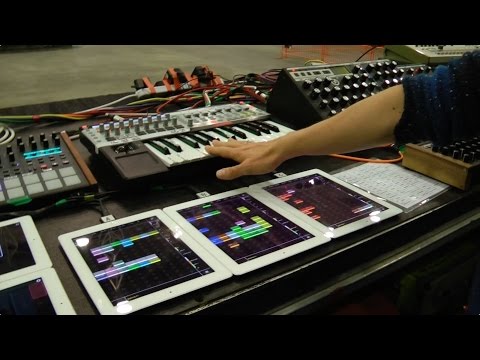
and we have a winner
I haven’t for live set ups but when I do bedroom mixes I use two iPads and an iPhone just to spread out the cpu hit, have something dedicated to Turnado and transitions, and something for some extra midi control since I just have a nanopad at the moment
I do! I use:
I love it. I was wrangling a lot more hardware a year ago but I got extremely sick of trying to coordinate songs across multiple devices. Now I try to write smaller song chunks on a device and then create a "set" that I mix together. I still run a few hardware FX and a drum machine (Tanzmaus). Maybe it'd be way easier for me to just do more sampling but I love directly interacting with my projects live.
I have an iPad and 2 iPhones and I'm planning on using all 3. Here's what I have in mind.
IPad would be the main mixer via Audiobus, but will be used solely with Launchpad app, and L7 Looper, for adding pads, drum loops, FX, etc. It will be connected to my 2 channel Audio interface which will all be recorded via Multitrack DAW (or Audioshare) via Audiobus.
One audio input connected to my phone would be for my instrument. Guitar, Bass, 61 key keyboard, or Akai MPK mini keyboard. Each instrument requires different effects, so it makes sense to not overload the iPad, but run it independently via the phone. Roxsyn has been my go to for guitar and bass, while I use Gadget and other apps for keyboard or Akai (or both if I use my bluetooth adapter)
The other audio input is for vocals either for a microphone/my other iphone (Voloco autotune), or as an input if I want to collaborate with someone else's iPad. I can also send this audio into Looper L7 on the iPad if I want to live loop a section.
So I'm really only using one instrument and controlling my session with the iPad. Makes it easier to focus on the performance, instead of trying to bounce between 5 apps.
I use 2 ipads crossfaded with a DJ mixer, its so I can play my tracks continuously without any stops (or crashes)
For those not using iConnectAudio, are you using separate audio interfaces and patching from into
another or headphones out to a main audio interface for primary iPad?
Tried to get my Ipads to talk to each other via bluetooth, just get the spinning gears. They recognise my yahama bluetooth midi. Tried switch on of bluetooth, switch on and off wifi, rebooting nothing works. Would love to use Mididesigner with Touchviz (a great app) or in AUM with other apps. No chance. Both Ipads cant find Xbox One either.
I only have one audio interface, I use the headphone out on my other devices. I often run signals in mono so I can have two discrete streams per device.
Also fwiw I don't bpm sync my iOS devices currently, though I may try to do so over bluetooth. I do have my Lemur iPad doing some control of my iPhone utilizing midimittr.
How do you like the K-Mix? I've been looking at that unit for a while now but there's not a lot of feedback from iOS users online that I have found.
I think its the best option for what I do but it's got some issues that could get in the way for a lot of folks. Mostly its just not great to perform on if you like doing a lot of mixer tweaks live. It does have a relative fader mode so the touch-faders don't jump when you touch them, but the sliders just aren't very responsive.
The one I have now is the 2nd one I have bought. I sold the 1st one after using it stand-alone and being annoyed with above. But its excellent if you want to control/modulate it via midi. I use it as an interface that I can interact with directly if I need to (or run stand-alone to jam with friends). Its nice that it has built-in mixer functionality like VU meters, EQs, comp, reverb (well the verb is pretty poor). I've had no problems with it talking to my iPad and often multi-track record into AUM while I perform.
Sometimes you can get them for ~$300 used which is competitive with similar interfaces with no touch functionality.
I aim to please...or for the head
Cool, thx for the review!
@quartzite I bought a 10.5 used, it runs things decently, but the touch screen is very unreliable. It sort of makes it not a candidate for live use, or much of anything audio related. Have you ever had a problem with yours? I have read about a lot of people that have had problems that do not seem to be hardware related but also not fixable.
Huh! No I really haven't... I've used an iPad in pretty much all my shows and haven't had any touchscreen issues. Maybe you got a sneaky-refurb that wasn't done very well? How is it unreliable?
Hello,
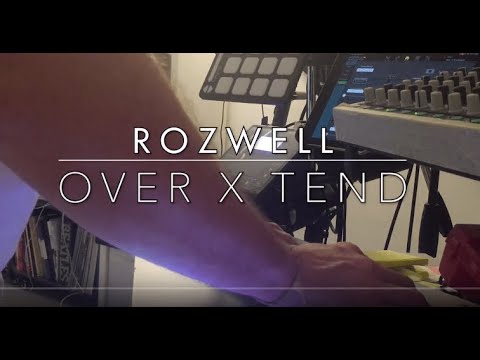
Using 4 ...And 4 is bigger than 2, but less than 5 !
Damn that iPad tower is rad! How did you set that up?
Wow! That was epicallly awesome then...
Didn’t think that was my thing but there’s so much to like there.
That is an awesome jam. What is the Synth with the vocoder mic?
And those harmonies. Wow.
@Ben thanks ! I'm using an Novation Mini Nova for the Vocoder.
@Jes thanks a lot
@quartzite , thanks , well, it's not that complicated, 3 iPads having their sound card, with a 6.35 out stereo pair connected to an Allen & Heath Qu-sb , the 4th iPad is connected with USB to the A&H.
Then my other hardware devices are connected to the A&H.
They all are midi connected, it's a kind of midi 1.0 augmented as I can handle 4x16 midi channels.
So it's not like the new midi 2.0 standard (with 16x16 midi channels as far as I remember) but I can handle more channels this way...
@crony which sounds cards are you using for each iPad?
I'm using a Mackie MDB-USB, super stable, nice sound.
But I could have done the same thing cheaper (but I had some midi interfaces I wanted to use...) with a Mackie Onyx Producer 2.2 for instance, or something equivalent.
It works alright until you are doing more than casual touches, such as playing a keyboard or drum pads. Even in editing, or tweaking knobs, some touches are not acknowledged by the device, across many apps. Other people reported a similar problem when gaming. It seems to be CPU intensive work.
I ended up buying a Mini 5 and now I have no problems, need to sell the Pro to a casual consumer.
Makes sense, how do you have them all mounted vertically like that?
That's weird, I've had no problem with my two 2nd Gen 10.5 pros -shrug-
@crony, that was excellent! Wish I could have such a set-up live but, ummm, no.
Pictured is one version of my live rig.
I create music for an improv dance class, and often travel by bicycle w/trailer. So my set-up has to be lightweight and, for when we're doing outreach workshops, I often need to be able to set up quickly. The output from the little Rolls mixer goes into (believe it or not) a Logitech Z623 speaker system. (I simply attached the satellite speakers with black duct tape onto the top of the subwoofer to make it all in one package.)
iPad Pro 12.9 2nd Gen., and iPad Air (original). Looking to add a newer iPad by the summer, though not sure what size yet.
Variations:
Novation Launchkey49 Mk2 instead of the smaller keyboard and NanoKontrol
instead of the Roland Handsonic, an iPhone5 running Impaktor, triggered by an e-drum pad via iRig
Now working on creating a more percussion-based triggering set-up using the Handsonic, old Roland SPD8, KMI BopPad, and Impaktor, given that I'm much more of a drummer than I am a pianist. Very much looking forward to how I can (eventually) use Drambo with this!
Just using a simple mic stand and an iKlip something...
@MarkR really cool setup ! Much more lighter than mine...I started with 1, then I thought 2 would be enough...then...3...then 4...
It became quite big, I don't regret it as I can play lots of synths.
Only thing I'm missing is a proper advanced midi sequencer, or DAW.
X2 still the best thing until now I've used....or Modstep...but as it is an abandonware
Thanks! One thing I currently don't have with my set-up is the ability to sync the various i-devices tempo-wise. That's my next bit of research...