Loopy Pro: Create music, your way.
What is Loopy Pro? — Loopy Pro is a powerful, flexible, and intuitive live looper, sampler, clip launcher and DAW for iPhone and iPad. At its core, it allows you to record and layer sounds in real-time to create complex musical arrangements. But it doesn’t stop there—Loopy Pro offers advanced tools to customize your workflow, build dynamic performance setups, and create a seamless connection between instruments, effects, and external gear.
Use it for live looping, sequencing, arranging, mixing, and much more. Whether you're a live performer, a producer, or just experimenting with sound, Loopy Pro helps you take control of your creative process.
Download on the App StoreLoopy Pro is your all-in-one musical toolkit. Try it for free today.
Comments
How do you disconnect the patch cables?
Long press on the cable
Took me a while to figure that one out too. But there’s a link to the manual somewhere in the app.
Awesome. Thank you.
So it appears the end of this story is piss off four eyes. We don't need you stinking diminished eyesight users anyway. But thanks for you're purchase, come again!
Were the problems not fixed in an update? I assumed they had been.
@richardyot , @Spidericemidas and soi!
We really need your skillllls and presets!!
Branches doesn’t have a preset system (yet).
That’s right
The only way to share them would be state saving in aum and sharing aum sessions. A rough work around LOL
@kennylovrin did say in this very thread (Page 5) that a preset system was on his to-do list. Any news on this?
So can it not even save internal aum presets? Of it can do that you could share aum presets rather than sessions
You can save AUM presets. It’s just slightly more advanced than taking polaroids of your modular. Bit too old skool for my taste 🤣
Polaroids of your modular,lol. Yeah Sam Izrael Branches cable patching screenshot collection, yours for only 3 bucks. I am very curious about this synth, mind you, despite having cables (I would prefer a matrix) and not having presets it looks very interesting.
I can recommend it. I use it to try out patches for my Volca Modular, amongst other things.
No, not fixed.
@kennylovrin To solve some of the scaling issues, I suggest that you turn off Dynamic Type for your text boxes. It seems like all the other full-screen music apps I have do this. That allows them to control the layout more rigidly.
I have to confess I’ve not returned to branches since I got the microfreak, but the other day I opened the standalone for a few minutes to a patch I had from who knows when, and I was shocked about how good it sounds. The reverb and delay modules, which are missing from the AU, are worth it by themselves. It is the most organic, buchlaesque-sounding synth in the market, hands down.
For presets, I had lots of fun and learning by following the patches from the 0Coast manual
http://www.makenoisemusic.com/content/manuals/0-coast_manual.pdf
Anything for the moog mother 32 and of course the volca modular will give you good starting points. There’s also good things to learn from the famous manual to the Easel by Allen Strange, “Programming and metaprogramming in the electr-organism.” https://buchla.com/guides/Buchla_Music_Easel_Manual.pdf
You like it better than RippleMaker? Or miRack set up with a “west coast” architecture?
I love Buchla-esque synths (spent countless hours working in Audulus to come up with something to explore that territory) but have found this synth promising but disappointing.
@espiegel123 I do! I consider the interface to be a work-in-progress and have high hopes for it; the sound engine is already there and beyond. I’ve also spent a good amount of time with ripplemaker, as well as building things in mirack, drambo, and audulus, and I still think the LPG and effects in branches are unique: woody, layered, deep and not “digital-sounding” at all.
It also has two channels of midi in, a sequencer, and a quantizer, all in a single screen. You’d need tiny ant-knobs or scroll until the cows come home in mirack/drambo to get that kind of integration. If the UI was as fluid as ripplemaker it would be the perfect of its kind. Right now I’d call it a tie between them.
I mean this is what I do all day and I love it but maybe it’s not everyone’s thing.
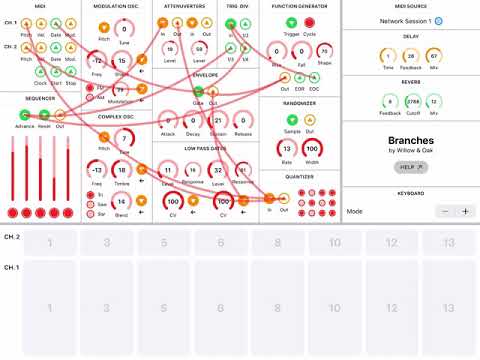
Missing from the above, the fact that the sequencer can be used modulate all the params is one of the things where it opens possibilities that ripplemaker doesn’t.
Interesting. I find the envelopes in Branches frustrating. They don't seem capable of the same sort of 'snappy' 'plucky' envelopes one associates with Buchla-type synths.
Well they still have to be dialed in. I get the best results with complex, low sounds, high mid Decay, no sustain, a bit of release, and then adjust the LPG’s response and level until it’s there—I’m happy with some of the sounds I get; harder to do with the others, IMO.

Cool trick I learned with the MF for extra snappy envelopes: patch the output of the envelope to its own decay input. Unfortunately branches doesn’t have mod inputs for the envelope, but it works well in ripplemaker.
Seems that although parameters are exposed they are not actually working - I’ve tried modulating a few things which should be extremely noticeable, but the knobs are not moving and there is zero impact on sound when I send an lfo to this. Can anyone confirm? Have already emailed the dev, just checking if others have the same issue
Can confirm there's no visual or audio sign of midi control from other apps. I thought I was going senile!
OK you and anyone else who found this can maybe email the dev so he knows it's not an isolated problem. Has automation never worked in this? That's pretty crazy considering the time taken to organise the parameters into lovely subfolders.
will do!
Done. I can’t see what I’m doing wrong so maybe it’s a bug!
Pretty sure it's a bug, I think I saw someone else mention it way back in the thread. Must have been overlooked by the dev. Cheers!