Loopy Pro: Create music, your way.
What is Loopy Pro? — Loopy Pro is a powerful, flexible, and intuitive live looper, sampler, clip launcher and DAW for iPhone and iPad. At its core, it allows you to record and layer sounds in real-time to create complex musical arrangements. But it doesn’t stop there—Loopy Pro offers advanced tools to customize your workflow, build dynamic performance setups, and create a seamless connection between instruments, effects, and external gear.
Use it for live looping, sequencing, arranging, mixing, and much more. Whether you're a live performer, a producer, or just experimenting with sound, Loopy Pro helps you take control of your creative process.
Download on the App StoreLoopy Pro is your all-in-one musical toolkit. Try it for free today.
Comments
May I present to you Hammerhableton. Sorry the clips aren’t mixed but I just wanted to demonstrate clip launching with Hammerhead, Atom, and a launchpad
Thanks! I’m pretty sure it doesn’t, unless I’m doing something wrong.
I’ll check and put it on the list for 1.0.1
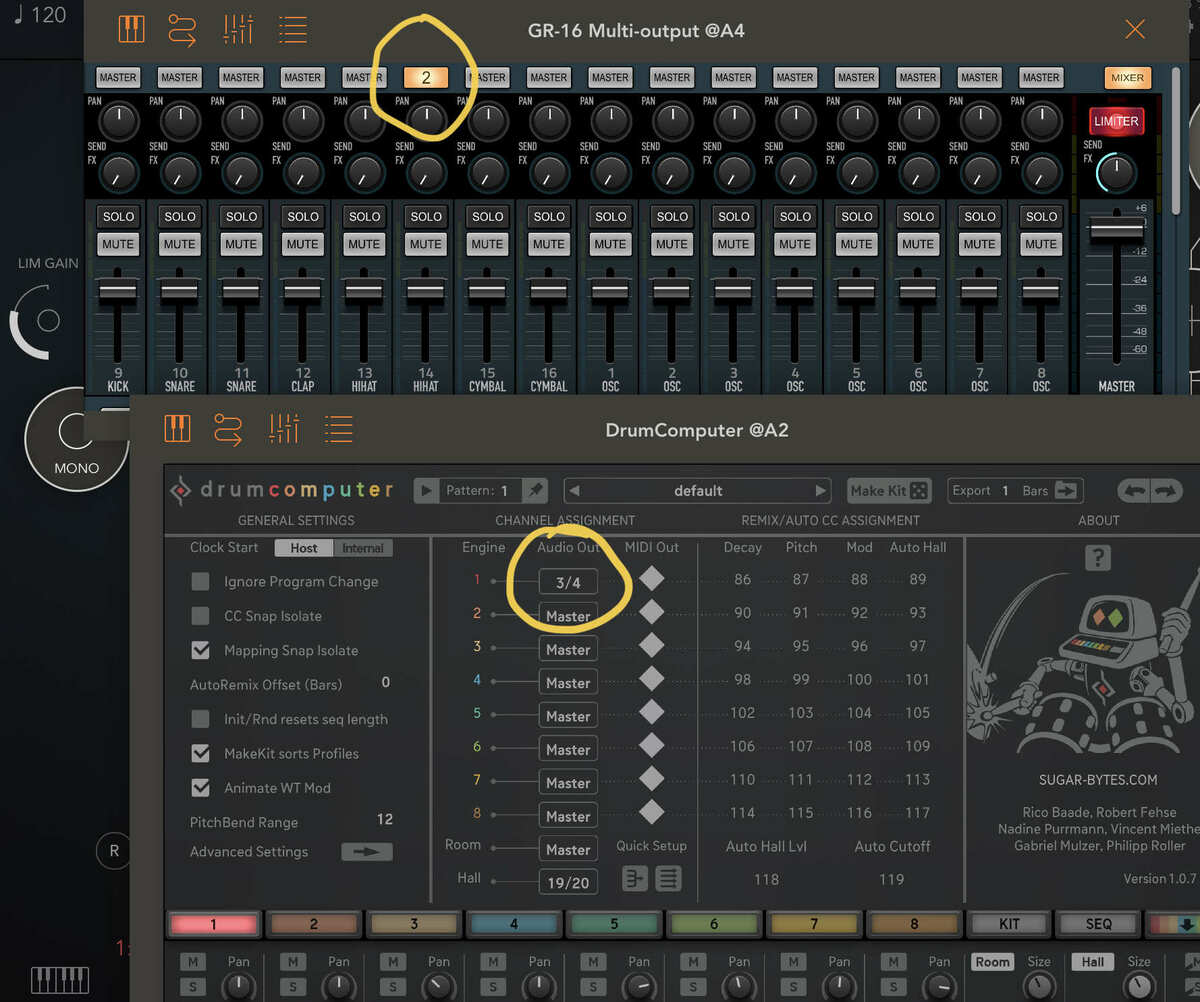
multi-output works like duplicating sound of each channel to separate output . seems bug 🤔
DreadHammer.....Heavy dub....and you WILL like it
Thank you
That's what multi-output is... If you mean you have 2 copies now it's because you have the master output connected too. I'd suggest disconnecting that.
Ok, I took the plunge even though this ain’t my type of thing. Please help me understand something. If I wish to trigger sounds in Slammer then how do I tell Hammerhead to send out notes on C, C#,D,D#,E,F and so on?
Is it possible? My apologies if this is a daft question... Ta.
Back again to praise the mutation. Even to just a basic ABCs kick-snare with a lively hihat pattern, it keeps things lively enough to not get bored with repeating and jamming on it. Maybe the Rozeta one was always this good too, but I feel like the way this one adjusts to the type of patterns is more advanced and natural. It seems if you have a very simple pattern, it still stays very simple with mutation, which is very nice. No 4th beat snare hits ruining the straight groove or anything like that.
Oh, and flam!
Not a daft question.
Hammerhead outputs notes on the Ruismaker mappings (see image). Slammer doesn’t let you configure the incoming notes. To map them to 8 of the Slammer pads you will need a midi mapper app to transpose the notes like Midi Tools, Mozaic or StreamByter etc.
Thank you @gusgranite I’ll get streambyter 👍
Is StreamByter free now?
For anyone who has Midi Tools, here’s a preset mapping Hammerhead to Slammer. To map it to a different drum app you just need to change the transpose values for each range.
I actually prefer Rozeta X0X to Slammer because of the velocity variation control (Slammer has something like round robin - different hits on different velocities). Or you can use another midi tool app for that too!
But this is not best solution. I use, for example, only one plugin channel in separate output, but for this I need to create 7 additional outputs in order to hear the rest instead of remaining only these 7 on master out. Some examples how easy to do:
It totally does! Still a classic ...
@Fingolfinzz Holy crap man!!!! That’s insane.
I too prefer the GR-16 way of allowing you to pick the output for each channel.
On the other hand, FAC handles this differently but still simply by having the ability to mute each drum from the main output.
Either way works for me. I don't much like it when multi-out apps don't give you this kind of flexibility.
Am I overlooking something? When triggering patterns from the keyboard in Cubasis, the trigger note is also recorded (C0 etc.). I guess that’s the way it has to be, considering it’s all MIDI entry?
Feature request/question also… can the Chance-Mutation be assigned to just specific channels/sounds?
Such a nice app!
Acid Head
Can we use Hammerhead multi out inside Drambo? Not seeing multi out listed ?
Same for me, but with Audiobus
The multi-out is in the standard Audio Unit, there's no separate multi-out version of the plugin.
Mix/master output = channel 0
Instrument 1 = channel 1
Instrument 2 = channel 2
etc.
Well I don't know you or what kind of music you make but I know that you're a Cubasis and Drum Computer user from previous threads.
HH works beautifully with CB3. Midi output to CB3's piano roll is rock solid. Even better though is that HH patterns can be triggered by holding down a note (c0 for pattern 1, c#0 for pattern 2 etc). Release the note and the pattern stops. In practice this makes for quick and easy song building as well as for fun cut-up drum n bass style madness.
Add in crazy good glitch and mutation randomness, a really versatile and powerful sequencer, great built-in samples, simple but powerful synth, a fun easy mixer with compression and distortion controls and sample import.
A devastatingly powerful but intuitive drum machine for peanuts.
Yeah the pattern triggering, combined with the simplicity of pattern making is just wonderful, and with the mutation / chance / glitch makes this so lovely to build with…
Ah. Ok, got it, thank you!
(I was under the wrong impression that I could route each channel to a separate (audio) lane in Audiobus, since i think i saw that in another video, and I thought my other multiout apps were letting me do that with them too. But the video i watched was using AUM, not Audiobus, and my other multiout apps actually cannot do it either.
But it’s no problem for me to just have, for example, three instances of Hammerhead each running the same preset, but different channels soloed and with their own lane so I can add separate effects chains and such to those separate channels.
But I’m new to Audiobus, so if there actually is a way to separate out one instance of a multiout app’s channels to their own audio lanes like AUM, someone please let me know.)
@brambos …. Hmmmm. Nasty crash happened here.
What happened: I was using Atom2 to sequence pattern changes.. I was fooling around and did not like how pattern 2 was not being cutoff when going back to pattern 1. Prolly cause there was a longer sample in there that was playing. Soooooo I am an idiot and went in and clicked choke off to see if any changes would happened and it crashed…. I lost my whole kit( my bad for not saving it). But FYI. I can reproduce consistently on new IPad M1 Pro 12.9 with latest iOS.
Thanks, going to fix that right away.
Hmmm, I can't reproduce the crash with choke's on my iPad Air 2 (iPadOS14.6) but I did notice that there's no way to set the 'choke' for the samples under the 'Classic' tab nor is there a way to change the 'length' of them (double speed loops etc.).
So far HammerHead has been very stable for me...
@brambos The more I use HH the more I love it. I just adore the drum synth's deceptive simplicity: there's so much joy in that one FM knob alone. HH is the antidote to overcomplicated musical rigs. You've done a great thing m'man.
Ya it could have been me just clicking to many things. Sorry to bother you on a Sunday 😕.
@Samu yes It has been rock solid but I must have had some combination that when I clicked that choke it just killed everything.