Loopy Pro: Create music, your way.

What is Loopy Pro?Loopy Pro is a powerful, flexible, and intuitive live looper, sampler, clip launcher and DAW for iPhone and iPad. At its core, it allows you to record and layer sounds in real-time to create complex musical arrangements. But it doesn’t stop there—Loopy Pro offers advanced tools to customize your workflow, build dynamic performance setups, and create a seamless connection between instruments, effects, and external gear.

Use it for live looping, sequencing, arranging, mixing, and much more. Whether you're a live performer, a producer, or just experimenting with sound, Loopy Pro helps you take control of your creative process.

Download on the App Store

Loopy Pro is your all-in-one musical toolkit. Try it for free today.

OCTACHRON MIDI Drum Sequencer AUv3 by Markus Teufel

1373840424347

Comments

  • @ZenMaster said:

    1. And if it were used in a host like AUM, could they still be assigned to separate MIDI channels, or would I need a different instance of Octachron for each MIDI channel?

    You wouldn't need different instances. AUM would preserve the MIDI channel out.

    Thanks for the reply! So, AUM preserves the Octoachron mapping essentially?

    I'm not sure what you mean by mapping, but the output channel in Octachron is the channel that the midi goes out on in AUM.

    And bummer on only saving patterns on the project level. I can envision a situation where hot swapping out some parts could be interesting from a performance standpoint.

    I guess I can see that. Cross-instance copy and paste would work well for that. I tried though and it doesn't work.

    Do you know of any drum sequencers on iOS tha either allow loading of patterns on the track level (so just for the kick, snare, ect.), or at some sort of "scene" level?

    I can't think of any.

    Well, any of them can save a preset, so you could load a preset as a starter template. That doesn't suit your purpose really though.

    I think what I would do is just leverage multiple instances. Load my preset patterns in a separate instance mix them together.

  • edited February 2025

    Hey everybody!

    Happy new year to everyone and sorry for not being so active in this forum for the last few weeks. We were concentrating on finishing our next free update for you. Our new Beta is now including this exciting new features:

    1. Offset, back and forth, for microtiming
    2. Gate length, especially for longer sounds, like melody synthesizes
    (Double Tap on fader columns to reset every mod parameter now, + shift to reset all)
    3. Clock divider per pattern and per track, also allowing e.g. triplet rhythms

    Also older user presets should load correctly now.
    Dear Beta Testers: How do you like it? And does everything work as expected? Looking very forward to your opinions!

    Enjoy, and best greetings from Munich ✌️🎶😊
    Tas

  • @TasTax said:
    Hey everybody!

    Happy new year to everyone and sorry for not being so active in this forum for the last few weeks. We were concentrating on finishing our next free update for you. Our new Beta is now including this exciting new features:

    1. Offset, back and forth, for microtiming
    2. Gate length, especially for longer sounds, like melody synthesizes
    (Double Tap on fader columns to reset every mod parameter now, + shift to reset all)
    3. Clock divider per pattern and per track, also allowing e.g. triplet rhythms

    Also older user presets should load correctly now.
    Dear Beta Testers: How do you like it? And does everything work as expected? Looking very forward to your opinions!

    Enjoy, and best greetings from Munich ✌️🎶😊
    Tas

    Wooo! Fabulous news! Thanks for hard work on this!

  • edited February 2025

    Hi. @TasTax @reinerspass.
    Great update! I’m looking forward to the completion(?) of the update. Thank you so much.

    *
    In my environment, Octachron crashes with the following steps.

    Load AUM (= host app) on iPad.
    Load “AUv3 TestFlight OCTACHRON v2.1.0 (201)” on AUM.
    Tap VELOCITY in the lower left corner of the window of AUv3 Octachron.
    Tap OFFSET.
    Edit any vertical bars of OFFSET by any arbitrary amount(?).
    Tap OFFSET in the lower left corner of the window of AUv3 Octachron to go to OFFSET window. (Or, tap and hold OFFSET to go directly to OFFSET window.)
    Tap CLEAR.
    Tap an area outside OFFSET window to make the OFFSET window disappear.
    AUv3 TestFlight OCTACHRON crashes.

    *
    My test environment:
    TestFlight OCTACHRON v2.1.0 (201)
    iPadOS v16.7.2 (Note: The latest version on my device should be iPadOS v17.7.5. So I’m not an ideal tester. I’m sorry.)
    iPadPro 10.5 inch (2017)
    AUM / the latest v1.4.7 (352)

  • @cramdog said:
    Hi. @TasTax @reinerspass.
    Great update! I’m looking forward to the completion(?) of the update. Thank you so much.

    *
    In my environment, Octachron crashes with the following steps.

    Load AUM (= host app) on iPad.
    Load “AUv3 TestFlight OCTACHRON v2.1.0 (210)” on AUM.
    Tap VELOCITY in the lower left corner of the window of AUv3 Octachron.
    Tap OFFSET.
    Edit any vertical bars of OFFSET by any arbitrary amount(?).
    Tap OFFSET in the lower left corner of the window of AUv3 Octachron to go to OFFSET window. (Or, tap and hold OFFSET to go directly to OFFSET window.)
    Tap CLEAR.
    Tap an area outside OFFSET window to make the OFFSET window disappear.
    AUv3 TestFlight OCTACHRON crashes.

    *
    My test environment:
    TestFlight OCTACHRON v2.1.0 (210)
    iPadOS v16.7.2 (Note: The latest version on my device should be iPadOS v17.7.5. So I’m not an ideal tester. I’m sorry.)
    iPadPro 10.5 inch (2017)
    AUM / the latest v1.4.7 (352)

    Oh yes, the same with iOS 18. We will check this, thx! 😊

  • edited February 2025

    @TasTax
    Additional report:
    When I do the same steps/procedures/tests on “VELOCITY, STEP REPEAT” as in the above-mentioned OFFSET, “VELOCITY, STEP REPEAT” crash, in my test environment.

  • edited February 2025

    @TasTax @reinerspass
    Note: I’m not sure if the following is an issue or not, but I report it here just in case.

    Issue(?) / TestFlight OCTACHRON v2.1.0 (201):
    If a Pattern is copied/pasted, the value of CLOCK DIVIDER of the Pattern is not copied and pasted [or, not copied or pasted], and becomes “1”.

  • edited February 2025

    @TasTax @reinerspass
    Note: I’m not sure if the following is an issue or not, but I report it here just in case.

    Issue(?) / TestFlight OCTACHRON v2.1.0 (201):
    There is no CLOCK DIVIDER in SEQUENCER SETTINGS.

  • @cramdog said:
    @TasTax @reinerspass
    Note: I’m not sure if the following is an issue or not, but I report it here just in case.

    Issue(?) / TestFlight OCTACHRON v2.1.0 (201):
    If a Pattern is copied/pasted, the value of CLOCK DIVIDER of the Pattern is not copied and pasted [or, not copied or pasted], and becomes “1”.

    Yes, thx. Would you like to have the clock setting copied with the pattern?

  • @cramdog said:
    @TasTax @reinerspass
    Note: I’m not sure if the following is an issue or not, but I report it here just in case.

    Issue(?) / TestFlight OCTACHRON v2.1.0 (201):
    There is no CLOCK DIVIDER in SEQUENCER SETTINGS.

    Yes, we thought that would be too much. But would you still like to have it?

  • @TasTax said:

    @cramdog said:
    @TasTax @reinerspass
    Note: I’m not sure if the following is an issue or not, but I report it here just in case.

    Issue(?) / TestFlight OCTACHRON v2.1.0 (201):
    If a Pattern is copied/pasted, the value of CLOCK DIVIDER of the Pattern is not copied and pasted [or, not copied or pasted], and becomes “1”.

    Yes, thx. Would you like to have the clock setting copied with the pattern?

    @TasTax said:

    @cramdog said:
    @TasTax @reinerspass
    Note: I’m not sure if the following is an issue or not, but I report it here just in case.

    Issue(?) / TestFlight OCTACHRON v2.1.0 (201):
    There is no CLOCK DIVIDER in SEQUENCER SETTINGS.

    Yes, we thought that would be too much. But would you still like to have it?

    I have no idea, I’m sorry.
    I think you might want to ask opinions of Octachron users on this thread. (I’m very interested in their thoughts. Because I have no idea how a sequencer should work, and I’d love to read and learn from their thoughts.)

  • @TasTax

    I have a 100% reproducible issue with Octachron failing to reload on Drambo. This is with latest shipping versions of Drambo and Octachron. Opening a saved session which has Octachron instances leads to "Error" being displayed in the plugin slot instead of the Octachron instances. Is this a known issue? Happy to help debug. Let me know what to do.

  • @TasTax said:
    Hey everybody!

    Happy new year to everyone and sorry for not being so active in this forum for the last few weeks. We were concentrating on finishing our next free update for you. Our new Beta is now including this exciting new features:

    1. Offset, back and forth, for microtiming
    2. Gate length, especially for longer sounds, like melody synthesizes
    (Double Tap on fader columns to reset every mod parameter now, + shift to reset all)
    3. Clock divider per pattern and per track, also allowing e.g. triplet rhythms

    Also older user presets should load correctly now.
    Dear Beta Testers: How do you like it? And does everything work as expected? Looking very forward to your opinions!

    Enjoy, and best greetings from Munich ✌️🎶😊
    Tas

    Wow! Really really great additions, especially the offset. Looks beautiful! Looking forward to trying it out when it’s ready for release.

  • edited February 2025

    @isal said:
    @TasTax

    I have a 100% reproducible issue with Octachron failing to reload on Drambo. This is with latest shipping versions of Drambo and Octachron. Opening a saved session which has Octachron instances leads to "Error" being displayed in the plugin slot instead of the Octachron instances. Is this a known issue? Happy to help debug. Let me know what to do.

    Hey @isal ,

    Thx for reporting. We will check this!

  • @TasTax said:
    Hey everybody!

    Happy new year to everyone and sorry for not being so active in this forum for the last few weeks. We were concentrating on finishing our next free update for you. Our new Beta is now including this exciting new features:

    1. Offset, back and forth, for microtiming
    2. Gate length, especially for longer sounds, like melody synthesizes
    (Double Tap on fader columns to reset every mod parameter now, + shift to reset all)
    3. Clock divider per pattern and per track, also allowing e.g. triplet rhythms

    Also older user presets should load correctly now.
    Dear Beta Testers: How do you like it? And does everything work as expected? Looking very forward to your opinions!

    Enjoy, and best greetings from Munich ✌️🎶😊
    Tas

    Wow! An amazing set of updates. Fantastic work @TasTax and team.

  • edited February 2025

    @TasTax said:

    @cramdog said:
    @TasTax @reinerspass
    Note: I’m not sure if the following is an issue or not, but I report it here just in case.

    Issue(?) / TestFlight OCTACHRON v2.1.0 (201):
    If a Pattern is copied/pasted, the value of CLOCK DIVIDER of the Pattern is not copied and pasted [or, not copied or pasted], and becomes “1”.

    Yes, thx. Would you like to have the clock setting copied with the pattern?

    @TasTax said:

    @cramdog said:
    @TasTax @reinerspass
    Note: I’m not sure if the following is an issue or not, but I report it here just in case.

    Issue(?) / TestFlight OCTACHRON v2.1.0 (201):
    There is no CLOCK DIVIDER in SEQUENCER SETTINGS.

    Yes, we thought that would be too much. But would you still like to have it?

    I thought about these questions again.
    And I write my preferences at the moment.

    Note:
    The following are not requests/suggestions.
    -For example, if there are multiple options suggested by the developers of Octachron (= @TasTax @reinerspass ) and I can choose any one of them, I would do so. However / On the other hand, I do not want to make any requests or suggestions that would increase the costs of developing Octachron.

    *
    If a CLOCK DIVIDER value(?) of a copied pattern is (for example) 3/2, then I would like the CLOCK DIVIDER value of the pasted pattern to be the same 3/2.

    *
    If a CLOCK DIVIDER value(?) of a particular row in a copied pattern is (for example) 3/4, then I would like the CLOCK DIVIDER value of the particular row in the pasted pattern to be the same 3/4.

    *
    I would prefer to have a global(?) CLOCK DIVIDER in SEQUENCER SETTINGS. In other words, I would prefer to have 3 different CLOCK DIVIDERs (= global[?], pattern, row) in Octachron.

    [However, if having 3 different CLOCK DIVIDERs in Octachron would increase the costs of developing Octachron, then I have no problem with the loss of the global(?) CLOCK DIVIDER feature from SEQUENCER SETTINGS. In other words, I have no problem with the 2 types (= pattern and row) of CLOCK DIVIDERs chosen by Octachron developers @TasTax and @reinerspass.]

  • @ZenMaster said:

    And bummer on only saving patterns on the project level. I can envision a situation where hot swapping out some parts could be interesting from a performance standpoint.

    Do you know of any drum sequencers on iOS tha either allow loading of patterns on the track level (so just for the kick, snare, ect.), or at some sort of "scene" level?

    Oh man… This is like bad Deja vu…
    Here comes 100 posts about people pushing Drambo…

  • @cramdog said:

    @TasTax said:

    @cramdog said:
    @TasTax @reinerspass
    Note: I’m not sure if the following is an issue or not, but I report it here just in case.

    Issue(?) / TestFlight OCTACHRON v2.1.0 (201):
    If a Pattern is copied/pasted, the value of CLOCK DIVIDER of the Pattern is not copied and pasted [or, not copied or pasted], and becomes “1”.

    Yes, thx. Would you like to have the clock setting copied with the pattern?

    @TasTax said:

    @cramdog said:
    @TasTax @reinerspass
    Note: I’m not sure if the following is an issue or not, but I report it here just in case.

    Issue(?) / TestFlight OCTACHRON v2.1.0 (201):
    There is no CLOCK DIVIDER in SEQUENCER SETTINGS.

    Yes, we thought that would be too much. But would you still like to have it?

    I thought about these questions again.
    And I write my preferences at the moment.

    Note:
    The following are not requests/suggestions.
    -For example, if there are multiple options suggested by the developers of Octachron (= @TasTax @reinerspass ) and I can choose any one of them, I would do so. However / On the other hand, I do not want to make any requests or suggestions that would increase the costs of developing Octachron.

    *
    If a CLOCK DIVIDER value(?) of a copied pattern is (for example) 3/2, then I would like the CLOCK DIVIDER value of the pasted pattern to be the same 3/2.

    *
    If a CLOCK DIVIDER value(?) of a particular row in a copied pattern is (for example) 3/4, then I would like the CLOCK DIVIDER value of the particular row in the pasted pattern to be the same 3/4.

    *
    I would prefer to have a global(?) CLOCK DIVIDER in SEQUENCER SETTINGS. In other words, I would prefer to have 3 different CLOCK DIVIDERs (= global[?], pattern, row) in Octachron.

    [However, if having 3 different CLOCK DIVIDERs in Octachron would increase the costs of developing Octachron, then I have no problem with the loss of the global(?) CLOCK DIVIDER feature from SEQUENCER SETTINGS. In other words, I have no problem with the 2 types (= pattern and row) of CLOCK DIVIDERs chosen by Octachron developers @TasTax and @reinerspass.]

    Thx everybody and thx @cramdog for your thoughts. Also, thanks for thinking about the costs. But it isn’t that bad in this case, because we are already on this features.

    And I think I agree with the first two points with copying the divider settings.

    But why would you like to also have the global divider?

    Just curious, to be able to make the best product for you 🙂

    And what do the others think?

  • edited February 2025

    @TasTax said:
    Thx everybody and thx @cramdog for your thoughts. Also, thanks for thinking about the costs. But it isn’t that bad in this case, because we are already on this features.

    And I think I agree with the first two points with copying the divider settings.

    But why would you like to also have the global divider?

    Just curious, to be able to make the best product for you 🙂

    And what do the others think?

    I may simply have a vague anxiety about the loss of a feature that is/was there.
    And I don't think there is any rational basis, reason or logic for my concern.

    (The following is 50% Off-topic.)
    I guess I was asked a question by you before on this thread, ‘Do you think "1" is necessary for NUMBER OF STEPS?’ or something along those lines. (Note: It may not have been a question, but a rhetorical question.) And I was vaguely worried about the loss of "1" feature. Because I have no idea whether the loss of what is/was there would be good or bad for Octachron or Octachron users. (Even now, I have no idea if the "1" feature is necessary or not.) My concern about the loss of CLOCK DIVIDER from SEQUENCER SETTINGS is for the same reason as this "1" feature topic.
    [Note to readers: The "1" feature is still there.]

    (Note: I’m not trying to say that my anxiety is serious, I’m just trying to say that my anxiety is meaningless. Don’t get me wrong.)

  • edited February 2025

    @TasTax
    If I had to say, I would consider the aforementioned Global CLOCK DIVIDER as a “SHIFT button to select and edit all CLOCK DIVIDERs” feature, or a “pseudo-reset button of all CLOCK DIVIDERs” feature, at the moment.
    However, I’m not sure if this makes sense as a workflow or not.

    (EDIT)
    My apologies!! I realized that the idea of two features (Practically one feature) above is based on my incorrect assumption that ‘Global CLOCK DIVIDER’ overwrites ‘Pattern CLOCK DIVIDERs’ and ‘Row CLOCK DIVIDERs’. I’m super stupid.

  • edited February 2025

    @TasTax
    I have come to my conclusion.
    I have no problem without Global CLOCK DIVIDER.
    Because I mistakenly confused Global CLOCK DIVIDER with the aforementioned fictitious "SHIFT button to select and edit all CLOCK DIVIDERs" feature and "pseudo-reset button of all CLOCK DIVIDERs" feature in my head. However, these two features do not actually work. So, I do not need the Global CLOCK DIVIDER, which I mistakenly thought I needed it to use these two features.
    (And I’m not going to request or suggest these two features [Practically one feature?].)

  • edited February 2025

    Note to readers:
    Having said that(?), please do not refer to what I wrote on my post on this thread above.
    Because, on second thought, if users need the ‘previous / old’ workflow (≒ changing CLOCK DIVIDER of all Patterns at once) of Octachron in the future, then it may be better to have Global CLOCK DIVIDER.

    I do not have enough knowledge or experience to think about this topic/subject, especially when it comes to workflows or use cases.
    So I think it is important to share your opinions and thoughts with @TasTax (= One of two developers of Octachron) on this thread.

  • @cramdog said:
    @TasTax
    I have come to my conclusion.
    I have no problem without Global CLOCK DIVIDER.
    Because I mistakenly confused Global CLOCK DIVIDER with the aforementioned fictitious "SHIFT button to select and edit all CLOCK DIVIDERs" feature and "pseudo-reset button of all CLOCK DIVIDERs" feature in my head. However, these two features do not actually work. So, I do not need the Global CLOCK DIVIDER, which I mistakenly thought I needed it to use these two features.
    (And I’m not going to request or suggest these two features [Practically one feature?].)

    Thx for your thoughts 🙂
    Does anybody else have an opinion on this?

  • @TasTax said:

    @cramdog said:
    @TasTax
    I have come to my conclusion.
    I have no problem without Global CLOCK DIVIDER.
    Because I mistakenly confused Global CLOCK DIVIDER with the aforementioned fictitious "SHIFT button to select and edit all CLOCK DIVIDERs" feature and "pseudo-reset button of all CLOCK DIVIDERs" feature in my head. However, these two features do not actually work. So, I do not need the Global CLOCK DIVIDER, which I mistakenly thought I needed it to use these two features.
    (And I’m not going to request or suggest these two features [Practically one feature?].)

    Thx for your thoughts 🙂
    Does anybody else have an opinion on this?

    By the way, after that I read a hardware groove box manual and probably realized/understood the aforementioned Global CLOCK DIVIDER may be overkill.
    In other words, three (= Global, Pattern, Track) CLOCK DIVIDERs may be too much as you said.
    Two (= Pattern, Track) would be enough. [Blade Runner meme]

  • edited February 2025

    @TasTax
    The following 2 reports are about my confirming:

    1.
    I rechecked and confirmed the three issues below were fixed. Thanks.
    -After CLEAR feature of edited-VELOCITY or edited-STEP REPEATS or edited-OFFSET is used, OCTACHRON crashes.

    2.
    I tested and confirmed that both “Pattern's CLOCK DIVIDER value” and “Tracks' CLOCK DIVIDER values” are copied/pasted as is.
    (I consider the “copied/pasted as is” above is an improvement—not a fix—for Octachron users. Thanks.)

  • edited February 2025

    @TasTax
    The following are 3 (or 4 or 5) issues of TestFlight Octachron v2.1.0 (202)
    (Note: I used the 2 Spoiler feature below for 4 screenshots and 1 after-mentioned ‘timeline’.)

    Issue #1
    “On or after a 2nd loop / On a 2nd and subsequent loops” of AUv3-Octachron, a first step’s “sound” (or all first steps’ “sounds”) of a pattern may not sound. However, I have no idea what exact conditions or procedures are necessary to reproduce this issue.
    [Incidentally, this issue probably does not occur when using AppleAppStore-Octachron v2.0.5.]

    I can reproduce this issue in my environment with the following settings.
    [Note: I routed(?) AUv3-Octachron with AUv3-Poison-202 synth on AUM (= host app).]

    AUv3-Octachron settings:
    Only the following 2 things need to be changed/edited in AUv3-Octachron. (No preset loading or other operations are required.)
    1. Only the 1st step in the 1st Track needs to be filled. However, for the purpose of this test, it is better to fill all 16 steps to auditorily(?) and visually confirm the issue/phenomenon of no sound.
    2. Set all 16 GATE LENGTH of the 1st Track to 0% using SHIFT button.

    AUM settings:
    -The only AUM’s Sample Rate I tested was 44.1 kHz. (It was a rough test using only an iPad, and I did not test at any other Sample Rate. So I have no idea if the issue can be reproduced in other environments.)
    -I think AUM Buffer Size larger than 512 (e.g., 1024 or 2048) are more likely to reproduce the issue. Incidentally, AppleAppStore Octachron v2.0.5 does not have this issue with any Buffer Size setting from 32 to 2048. However, I may be misunderstanding something about how TestFlight-Octachron's GATE LENGTH feature works. In other words, I may be reporting something as an issue now that is not an issue. In that case, I’m sorry.
    -The AUM’s tempo for my testing were 120 (= default) and 20 (= minimum). And the issue could/can be reproduced at either tempo.

    Routing:
    -Route AUv3-Octachron to any AUv3 synth. (I used AUv3-Poison-202 synth.)
    -If a synth preset for testing has low values for Atack and Release in ADSR, I guess it is easy to confirm the issue/phenomenon that no sound is output from the 1st step.

    Issue #2
    When loading a session save data including AUv3-Octachron on AUM, pre-edited steps of all patterns of AUv3-Octachron are not displayed at all. Because they are temporarily “invisible” due to this issue. However, the pre-edited steps exist, so the first loop can output “MIDI notes / routed synth app’s sounds” correctly.
    -After a first loop finished, all patterns (= pre-edited steps) are displayed.
    -Alternatively, tapping on any pattern will display all patterns (= pre-edited steps) even if the first loop is still unfinished, or even before AUM’s ▶️ button is tapped.

    Issue #3
    The “gray-moving-playback-position(?)” on “8th-Track of total-8-Tracks” appears and disappears with each loop**.
    Note:
    -I have no idea how to reproduce this issue. I’m sorry.
    -I have no idea if the same or similar issue occurs when the NUMBER OF TRACKS is other than 8.

    **The actual timeline of my test is below.

    I tapped AUM’s ▶️ button.
    1st loop: (I may have not realized this issue, and I did not take a screenshot.)
    2nd loop: (I may have not realized this issue, and I did not take a screenshot.)
    3rd loop: (I may have not realized this issue, and I did not take a screenshot.)
    4th loop: The gray-moving-playback-position of 8th Track disappears from screen. (I took the screenshot A below.)
    5th loop: The gray-moving-playback-position of 8th Track appears on screen. (I took the screenshot B below.)
    6th loop: The gray-moving-playback-position of 8th Track disappears from screen. (I took the screenshot C below.)
    7th loop: The gray-moving-playback-position of 8th Track appears on screen. (I did not take a screenshot, but I confirmed this phenomenon.)
    8th loop: The gray-moving-playback-position of 8th Track disappears from screen. (I did not take a screenshot, but I confirmed this phenomenon.)
    9th loop……
    10th loop……
    I tapped AUM’s ⏸️ button.

    Screenshot A
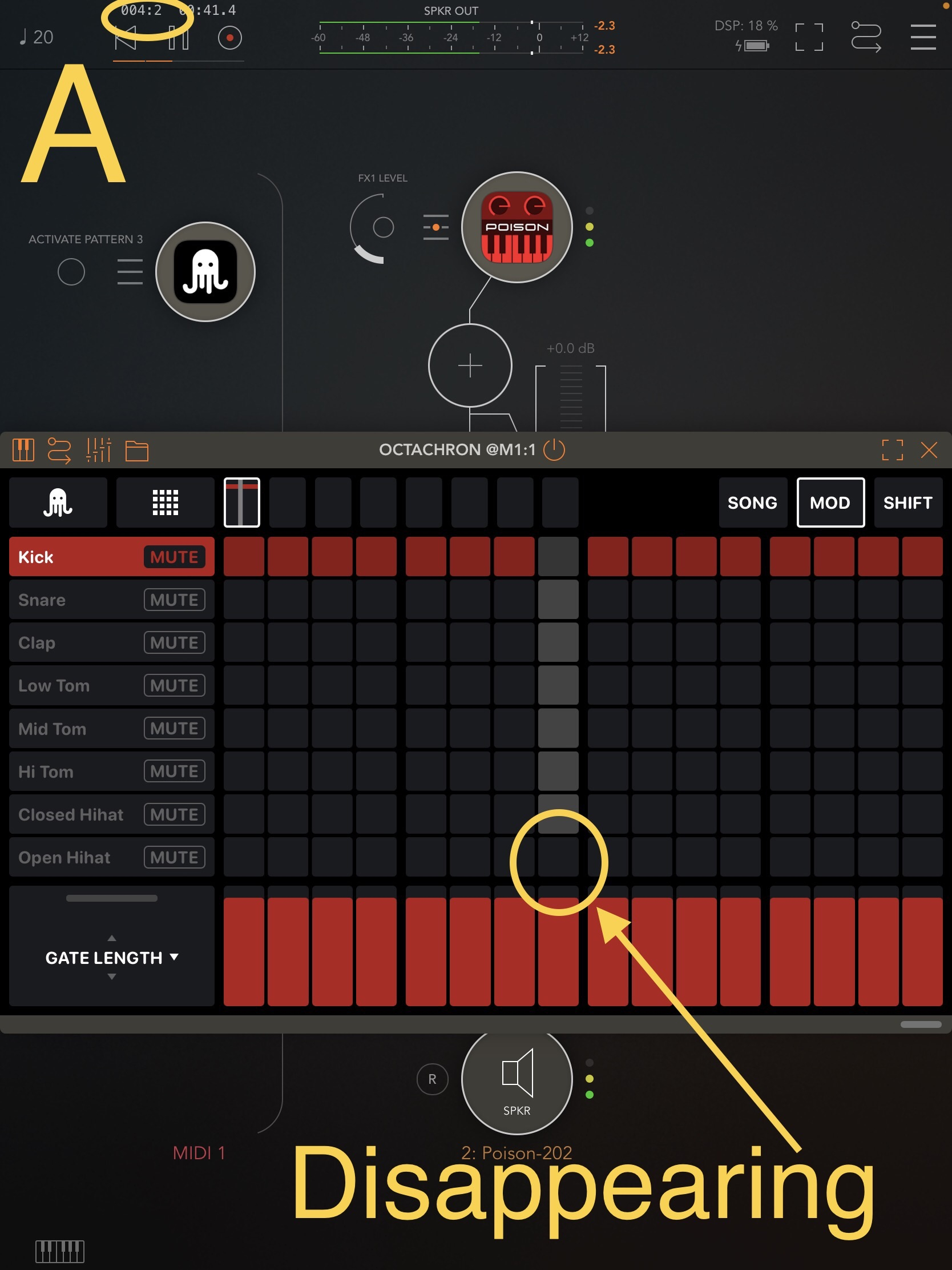
    Screenshot B
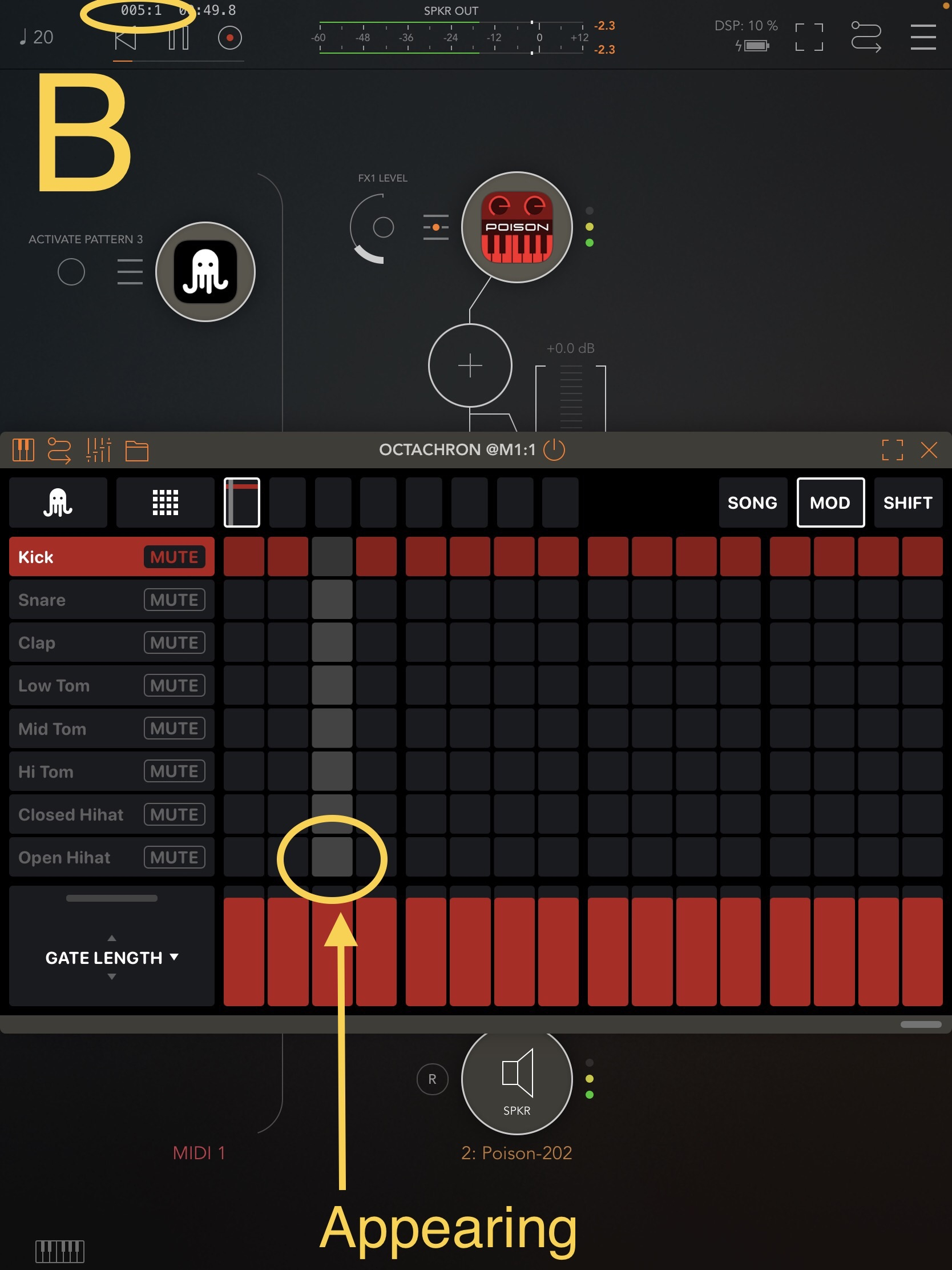
    Screenshot C

    [Sorry for my very poor explanation above.]

    Issue(?) #4
    When editing a step during pattern playback(?), all gray-moving-playback-position“s” disappear for a short time.

    Issue(?) #5
    The gray-moving-playback-position“s” are not displayed on tracks where MUTE buttons are enabled. (Having said that, this behavior of Octachron may be intended by the developers. In that case, I’m sorry, since it’s not an issue.)

  • @cramdog said:
    @TasTax
    The following are 3 (or 4 or 5) issues of TestFlight Octachron v2.1.0 (202)
    (Note: I used the 2 Spoiler feature below for 4 screenshots and 1 after-mentioned ‘timeline’.)

    Heyhey! Thx again for your very detailed testing and feedback. This is very valuable to us. And we will definitely check these issues. ✌️😊

  • @TasTax said:

    1. Offset, back and forth, for microtiming
    2. Gate length, especially for longer sounds, like melody synthesizes
    (Double Tap on fader columns to reset every mod parameter now, + shift to reset all)
    3. Clock divider per pattern and per track, also allowing e.g. triplet rhythms

    Thanks @TasTax . Those are wonderful features. I was waiting for this.
    Offset works correctly for me and seems to be well implemented. Very cool!
    I still need to test more the clock divider. That's cool and I like the possibility to use it per pattern and per track, but I'm wondering if it should also have an impact on how it is represented visually (are you sure the larger space between columns should always be after 4 divisions? I'm just questioning here, not sure at all)
    Small remark: if I double tap on clock divider, It should certainly come back to 1

  • @SamSamSam said:

    @TasTax said:

    1. Offset, back and forth, for microtiming
    2. Gate length, especially for longer sounds, like melody synthesizes
    (Double Tap on fader columns to reset every mod parameter now, + shift to reset all)
    3. Clock divider per pattern and per track, also allowing e.g. triplet rhythms

    Thanks @TasTax . Those are wonderful features. I was waiting for this.
    Offset works correctly for me and seems to be well implemented. Very cool!
    I still need to test more the clock divider. That's cool and I like the possibility to use it per pattern and per track, but I'm wondering if it should also have an impact on how it is represented visually (are you sure the larger space between columns should always be after 4 divisions? I'm just questioning here, not sure at all)
    Small remark: if I double tap on clock divider, It should certainly come back to 1

    Thank you, really glad you like it. And yes, we were thinking about another visual representation as well. But this comes with some issues. But we are still thinking about it.
    And yes, reset via double tap everywhere is also on our list 🙂

  • @cramdog said:
    @TasTax
    The following are 3 (or 4 or 5) issues of TestFlight Octachron v2.1.0 (202)
    (Note: I used the 2 Spoiler feature below for 4 screenshots and 1 after-mentioned ‘timeline’.)

    Issue #1
    “On or after a 2nd loop / On a 2nd and subsequent loops” of AUv3-Octachron, a first step’s “sound” (or all first steps’ “sounds”) of a pattern may not sound. However, I have no idea what exact conditions or procedures are necessary to reproduce this issue.
    [Incidentally, this issue probably does not occur when using AppleAppStore-Octachron v2.0.5.]

    I can reproduce this issue in my environment with the following settings.
    [Note: I routed(?) AUv3-Octachron with AUv3-Poison-202 synth on AUM (= host app).]

    AUv3-Octachron settings:
    Only the following 2 things need to be changed/edited in AUv3-Octachron. (No preset loading or other operations are required.)
    1. Only the 1st step in the 1st Track needs to be filled. However, for the purpose of this test, it is better to fill all 16 steps to auditorily(?) and visually confirm the issue/phenomenon of no sound.
    2. Set all 16 GATE LENGTH of the 1st Track to 0% using SHIFT button.

    AUM settings:
    -The only AUM’s Sample Rate I tested was 44.1 kHz. (It was a rough test using only an iPad, and I did not test at any other Sample Rate. So I have no idea if the issue can be reproduced in other environments.)
    -I think AUM Buffer Size larger than 512 (e.g., 1024 or 2048) are more likely to reproduce the issue. Incidentally, AppleAppStore Octachron v2.0.5 does not have this issue with any Buffer Size setting from 32 to 2048. However, I may be misunderstanding something about how TestFlight-Octachron's GATE LENGTH feature works. In other words, I may be reporting something as an issue now that is not an issue. In that case, I’m sorry.
    -The AUM’s tempo for my testing were 120 (= default) and 20 (= minimum). And the issue could/can be reproduced at either tempo.

    Routing:
    -Route AUv3-Octachron to any AUv3 synth. (I used AUv3-Poison-202 synth.)
    -If a synth preset for testing has low values for Atack and Release in ADSR, I guess it is easy to confirm the issue/phenomenon that no sound is output from the 1st step.

    Issue #2
    When loading a session save data including AUv3-Octachron on AUM, pre-edited steps of all patterns of AUv3-Octachron are not displayed at all. Because they are temporarily “invisible” due to this issue. However, the pre-edited steps exist, so the first loop can output “MIDI notes / routed synth app’s sounds” correctly.
    -After a first loop finished, all patterns (= pre-edited steps) are displayed.
    -Alternatively, tapping on any pattern will display all patterns (= pre-edited steps) even if the first loop is still unfinished, or even before AUM’s ▶️ button is tapped.

    Issue #3
    The “gray-moving-playback-position(?)” on “8th-Track of total-8-Tracks” appears and disappears with each loop**.
    Note:
    -I have no idea how to reproduce this issue. I’m sorry.
    -I have no idea if the same or similar issue occurs when the NUMBER OF TRACKS is other than 8.

    **The actual timeline of my test is below.

    I tapped AUM’s ▶️ button.
    1st loop: (I may have not realized this issue, and I did not take a screenshot.)
    2nd loop: (I may have not realized this issue, and I did not take a screenshot.)
    3rd loop: (I may have not realized this issue, and I did not take a screenshot.)
    4th loop: The gray-moving-playback-position of 8th Track disappears from screen. (I took the screenshot A below.)
    5th loop: The gray-moving-playback-position of 8th Track appears on screen. (I took the screenshot B below.)
    6th loop: The gray-moving-playback-position of 8th Track disappears from screen. (I took the screenshot C below.)
    7th loop: The gray-moving-playback-position of 8th Track appears on screen. (I did not take a screenshot, but I confirmed this phenomenon.)
    8th loop: The gray-moving-playback-position of 8th Track disappears from screen. (I did not take a screenshot, but I confirmed this phenomenon.)
    9th loop……
    10th loop……
    I tapped AUM’s ⏸️ button.

    Screenshot A

    Screenshot B

    Screenshot C

    [Sorry for my very poor explanation above.]

    Issue(?) #4
    When editing a step during pattern playback(?), all gray-moving-playback-position“s” disappear for a short time.

    Issue(?) #5
    The gray-moving-playback-position“s” are not displayed on tracks where MUTE buttons are enabled. (Having said that, this behavior of Octachron may be intended by the developers. In that case, I’m sorry, since it’s not an issue.)

    Thx again. And yes #5 is on purpose.

    But actually, I can’t re-create any of the other issues.
    Does anybody else have this problems?

Sign In or Register to comment.