Loopy Pro: Create music, your way.
What is Loopy Pro? — Loopy Pro is a powerful, flexible, and intuitive live looper, sampler, clip launcher and DAW for iPhone and iPad. At its core, it allows you to record and layer sounds in real-time to create complex musical arrangements. But it doesn’t stop there—Loopy Pro offers advanced tools to customize your workflow, build dynamic performance setups, and create a seamless connection between instruments, effects, and external gear.
Use it for live looping, sequencing, arranging, mixing, and much more. Whether you're a live performer, a producer, or just experimenting with sound, Loopy Pro helps you take control of your creative process.
Download on the App StoreLoopy Pro is your all-in-one musical toolkit. Try it for free today.
Drambo by BeepStreet released
This discussion has been closed.
Comments
Certainly not. Drambo is not made to replace the workflow of specific hardware, it's rather made to build your own individual rig. Feature-wise, it may be possible but I don't know the SP-16.
Any ETA on midi export?
@Owgill Let's hope someone owning an SP-12 will chime in...
Not sure as its complicated ( theory )
Would you be able to add a bypass to the midi chance. So that when knob is off ( left ). Keys can still pass through drambo?
You could go from a sequence to keys.
Not sure as I envision a different synth anyway if a track were muted but would still be cool as I could work on a single pattern and toggle the sequence off with chance and allowing keys to take over ( and a mixture ) of keys and sequence ( with chance ) when knob is in middle.
I can route a keyboard also to the synth in aum matrix. So when chance is off. The keyboard wont be affected by chance but I use drambo to route to synths. So need a way to bypass the chance with keys, when chance is off.
I feel dopey asking, but I searched around and couldn’t find anything... is the crossfader automation recordable? I can’t seem to get it to record haha.. looking to not p-lock on a specific trig but sweep a couple parameters over like half a bar using the crossfader. Thx!
Errmmm.
Fellow dRambonauts.
@giku_beepstreet has made dRambo available on the Mac mini M1's.
It came up on FB.
Go for it.
If I ever get an M1 (probably gonna wait for the gen 2 products though), Drambo is seriously like 80% of the reason.
It's the only reason why I'm going to get one.
What I can do with two iPads is crazy enough.
Combined with an M1 and dRambo?
Oh wow...
Wondering if anyone can help me out here.
I am building a LFO merger MIDI rack (8 LFOs) so that I can mix them together for complex shapes and control parameters of external synths. I'm running into an issue where I can't figure out how to attenuate the LFO in a way that does not drop it past the base level of the parameter on my synth.
For example, on my Digitone, if I have the filter set to 70 (out of 127), I want the LFO from Drambo to have a base level of 70 and modulate up to 127, then back to 70. However, what's happening is that the LFO will send it's own levels, so if I turn it all the way up, it goes from 0-127, not 70-127. I can't figure out which module to use or how to change this so that I can do what I am trying to accomplish.
Thanks!
The Graphic Shaper inserted into a signal line will do all range adjustments you're dreaming of!

I think there are two modules, Scale and Offset that would help with this.
Try this.
I had a similar issue when using the SF-1 Filter from Kai Aras
when I needed to have the filter modulate between a fixed range.
I think you could do a similar thing using the number module.
I prefer to use the knob module as I can change the frequency start point
and adjust the range in the LFO module.
I'm sure there are other ways of doing the same thing.
@slicetwo
You see....😏
Just loaded this up. Seems to be working. I'll just need to figure out exactly how to manage it. Thanks for the input.
I'll give that a shot.
I tried those first and didn't quite get the result for which I was searching. Thanks for the idea.
@slicetwo
No worries.
I'm liking @rs2000's as it uses less modules.
Tapping on the stamp sized diagram of the Graphic Shaper will open the half screen editor where you can tweak the line points live while playing so you can hear what you're doing.
Any hopes of Drambo and perhaps also Zeeon going on sale around Xmas?
@rs2000 and @Gravitas the graphic shaper seemed to work. I'm struggling to get it to be more percussive sounding when routing it to external synths, though.
This is me exploring the idea initially on the Digitone. I then made a synth in Drambo with the same idea and got good thing going.
However, when I route the MIDI version of the LFO section in that 2nd video to the same patch on the Digitone as the first with the internal LFOs turned off, the sound is nowhere near as percussive. I've tried LFOs and the Graphic Modulator, but it's not working.
Any ideas on that one? I can post a video later of what I've got, or even share the MIDI rack,m if y'all are interested.
If you get the M1 you've gotta give a full report about programming Drambo on it! Depending on the review, it may be the deciding factor for me to get an Air M1 over a new iPad.
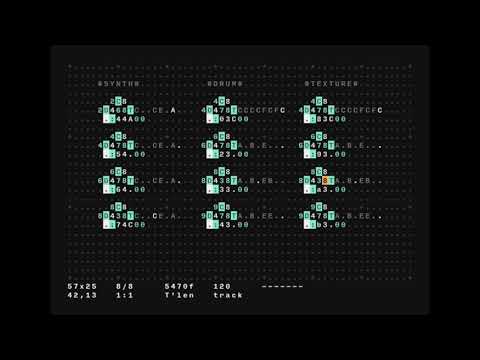
On the plus side, with Drambo on the Mac I'd finally have a reason to learn Orca.
I cannot wait for Auv3 in drambo tbh. whenever I work in there, I’m always like “this would be really cool if I could bring another app into this patch”
So excited!
@slicetwo I ca pn only judge the mod signal from the oscilloscope but that looks good.
Either there's something else in your patch or the Digitone does some smoothing itself?
Try this:
Open AUM, load LK and draw an automation with that sawtooth shape. Also try short spikes, needles, peaks to see how fast the Digitone really follows.
I most certainly will.
Until then...
I'm using dRambo as a studio/live performance tool, as a synth,
sampler, sequencer, effects processor with midi generative tools.
including using it as midi channel matrix for multi-timbral apps,
a modulator for Auv3's hosted in AUM and with Auv3 on the horizon?
as an all in one Mastering Matrix.
This list is in no way exhaustive.
It's the tip of the iceberg.
Been a few weeks since I’ve ridden the Drambo train, so i decided to give the latest Beta a ride. Really enjoying the auv3 hosting feature of Drambo now. It’s a self contained package of greatness:
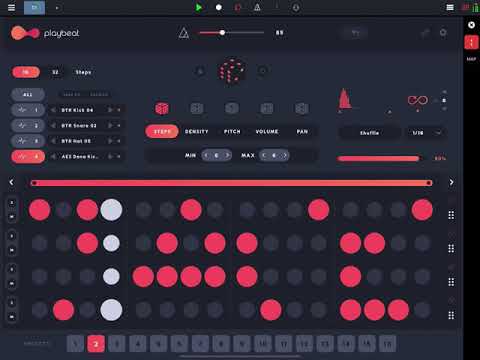
Posted with permission @giku_beepstreet 👊🏼💕
Well, throw GR-16 Auv3 into that and .....
Unbelievable... Hope it is released this weekend... both..
Piano roll, midi import and export... Ableton Live set export for Ableton live 11... Well...
I am also playing around with Drambo AU beta and I have to say that it instantly became THE AU host for me and I don't need any other host anymore. I am currently building a bit crazy live setup with APC40 controller and... it's just amazing
Instrument racks, where you can include MIDI AU, instrument AU, and effects chain AU, or combine them however you want with Drambo units + exposing only some controls you need from the rack is unlocking completely new world of using AUs on iOS. You can build very complex instruments tailored to your needs wile not limited only to Drambo units.
Currently I am experimenting with a setup for "endless" live performance where I just switch such instrument racks on tracks and using some Mozaic script magic to keep unified control over pattern switching and macros, no matter what AUs (or Drambo units) are inside the rack. Therefore I use controller to just "play the instrument" and don't care that much, what is inside so you can focus on the performance.
On top of that, I have managed to e.g. use multi-out instrument like Ruismaker to be easily connected to e.g. 2 tracks, so you can separate e.g. kick + snare and hi-hats+percussions, for better control while playing live.
This way you can play your ideas in a DJ-style, just instead of grabbing a new record from a bag, you choose instrument rack for a single layer of your set and mix it into already playing stuff. Only missing thing is handling multiple outputs for external audio interfaces, but that is supposed to come soon to Drambo after this AU update.
To sum it up: this is really a revolution to me. I tried to achieve something like this for years, since I switched to iOS for music. All other hosts were missing such flexibility to achieve it reasonably, but now Drambo seems to fill the gap.