Loopy Pro: Create music, your way.

What is Loopy Pro?Loopy Pro is a powerful, flexible, and intuitive live looper, sampler, clip launcher and DAW for iPhone and iPad. At its core, it allows you to record and layer sounds in real-time to create complex musical arrangements. But it doesn’t stop there—Loopy Pro offers advanced tools to customize your workflow, build dynamic performance setups, and create a seamless connection between instruments, effects, and external gear.

Use it for live looping, sequencing, arranging, mixing, and much more. Whether you're a live performer, a producer, or just experimenting with sound, Loopy Pro helps you take control of your creative process.

Download on the App Store

Loopy Pro is your all-in-one musical toolkit. Try it for free today.

Decent Sampler DS

12346»

Comments

  • edited October 2021

    Anyone knows if the issue that DS forgets the preset in Cubasis that @jakoB_haQ reported in the video about loopop‘s contest is also fixed?

  • @White said:

    @ashh said:

    @White said:
    Version 1.2.3 is out:

    • Support for native host automation
    • Added delay, chorus and phaser effects
    • Improved sample library loader–there is now a nice dialog box with a bar that shows sample loading progress
    • When controlling the onscreen keyboard with your computer keyboard, you can change octaves by hitting the z and x keys
    • Fixed a bug that was causing the overall volume control to display the wrong value when linked to one of the instrument’s knobs
    • When a dspreset file contains invalid XML, Decent Sampler now shows an error message
    • Labels and sliders now scale up correctly when the window size is increased
    • MIDI bindings now respond to control as well as labeled_knob
    • Added a “Developer Tools” sub-menu with a “Save Preset…” option. This is very useful if you are a sample creator and want to see what Decent Sampler is seeing under the hood

    Thank you to everyone who has reported bugs. I really am reading all of the emails even if I don’t reply immediately.

    Is this your app?!

    No, I just posted the info about the update 😊

    Aha! I thought it was you saying that thing about reading all emails.

    I'm not a fan of Decent Sampler. Bit of a misnomer imo.

  • @krassmann said:
    Anyone knows if the issue that DS forgets the preset in Cubasis that @jakoB_haQ reported in the video about loopop‘s contest is also fixed?

    There’s a new version out today that appears to fix the preset loading issue, at least in AUM. There have been a flurry of bug fix releases, so that’s good!

  • I can confirm that the latest bug fixes have cured my problems with loading libraries, reloading presets when opening a host project, and creation of extraneous temp libraries.

    In conjunction with the advice I received from other users here about restricting it to disc streaming and playing with the buffer settings, the above fixes have made DS a much more usable proposition.

    I’d also like to say that the dev was very responsive to my bug report via the DS site: quick reply, and explanation that fixes were already in the works, which have now appeared. So it’s still in very active development.

  • Wow! Really loving this app! Such beautiful free samples! Venus Theory Thyssia is so amazing!
    Broken piano free sample is so cool too! Tried them in AUM with some FAC Alteza reverb and wow!

  • @Tones4Christ said:
    Wow! Really loving this app! Such beautiful free samples! Venus Theory Thyssia is so amazing!
    Broken piano free sample is so cool too! Tried them in AUM with some FAC Alteza reverb and wow!

    There are loads of free instruments available on Pianobook.co.uk as well. Among my favourites are Winter Piano, Dusty Rings Keys and Frozen Glock.

  • @timfromtheborder said:

    @Tones4Christ said:
    Wow! Really loving this app! Such beautiful free samples! Venus Theory Thyssia is so amazing!
    Broken piano free sample is so cool too! Tried them in AUM with some FAC Alteza reverb and wow!

    There are loads of free instruments available on Pianobook.co.uk as well. Among my favourites are Winter Piano, Dusty Rings Keys and Frozen Glock.

    These are fab (especially that Rings one)! Thanks for the recc! I’ll add this acoustic guitar one, sounds amazing: https://necatuss.gumroad.com/l/SigmaAcousticGuitar

  • Btw, if you have experienced Decent Sampler to be unstable in the past, it is worth trying this: go to File...|Preferences|Engine, and switch from "Auto" to "Disk streaming".

  • Awesome!!! Can't wait to try these!

    Yes! I changed to disk streaming as I need as much ram available at all times lol.

    @timfromtheborder said:

    @Tones4Christ said:
    Wow! Really loving this app! Such beautiful free samples! Venus Theory Thyssia is so amazing!
    Broken piano free sample is so cool too! Tried them in AUM with some FAC Alteza reverb and wow!

    There are loads of free instruments available on Pianobook.co.uk as well. Among my favourites are Winter Piano, Dusty Rings Keys and Frozen Glock.
    @Squishy said:

    @timfromtheborder said:

    @Tones4Christ said:
    Wow! Really loving this app! Such beautiful free samples! Venus Theory Thyssia is so amazing!
    Broken piano free sample is so cool too! Tried them in AUM with some FAC Alteza reverb and wow!

    There are loads of free instruments available on Pianobook.co.uk as well. Among my favourites are Winter Piano, Dusty Rings Keys and Frozen Glock.

    These are fab (especially that Rings one)! Thanks for the recc! I’ll add this acoustic guitar one, sounds amazing: https://necatuss.gumroad.com/l/SigmaAcousticGuitar

    @bleep said:
    Btw, if you have experienced Decent Sampler to be unstable in the past, it is worth trying this: go to File...|Preferences|Engine, and switch from "Auto" to "Disk streaming".

  • Does anyone know how to transfer downloaded Decent Sampler files between iPad?

  • @Tones4Christ said:
    Does anyone know how to transfer downloaded Decent Sampler files between iPad?

    The only option I have found for the Pianobooks instruments that download as loadable zips is to save them
    Into the iCloud/Downloads directory and install them individually to my iPad, iPhone and MacBook. No PC for me
    Which would require transferring Downloaded instruments to the PC’s accessible file system. I don’t think there’s
    An Android app.

    I think Dave Hilowitz respects the instrument creators licensing but it’s interesting that the Decent Sampler instrument
    Zip files decompress and expose a “Sample” subdirectory of wave files typically named with metadata. So, repurposing the samples in Koala, Chameleon, etc is possible for your own uses. The PianoBook instruments are typically recorded samples packed into the Decent Sampler packaging and Metadata to define the UI and internal FX options.

    Making a new instrument can be started by hacking an existing XML *.dspreset file with your own samples.

    New Decent Sampler instruments appear on PianoBook.co.uk every month… you can end up with 200GB of instruments
    Without spending any money.

  • Oh wow so interesting! So the free sample packs I already downloaded via the Decent Sampler browser, I would then need to re-download like you said as Zip files then drop those in the DS folder in the files app?

    I am downloading these sample packs on my Android phone, then I will transfer to my iPad via small flash drive.

    But, I couldn't find a Decent Sampler folder either on my Ipad or iCloud. Sob
    weird until I went in the DS app itself a d tried to load a sample packs from my iPad then it did show a folder in the files app! So I set that as a favorite and now I was able N to see it outside of the DS app.

    Thanks man for all the info! I am really enjoying all this free content. I have 512 gb so I want to take advantage of good stuff in pianobook.

    @McD said:

    @Tones4Christ said:
    Does anyone know how to transfer downloaded Decent Sampler files between iPad?

    The only option I have found for the Pianobooks instruments that download as loadable zips is to save them
    Into the iCloud/Downloads directory and install them individually to my iPad, iPhone and MacBook. No PC for me
    Which would require transferring Downloaded instruments to the PC’s accessible file system. I don’t think there’s
    An Android app.

    I think Dave Hilowitz respects the instrument creators licensing but it’s interesting that the Decent Sampler instrument
    Zip files decompress and expose a “Sample” subdirectory of wave files typically named with metadata. So, repurposing the samples in Koala, Chameleon, etc is possible for your own uses. The PianoBook instruments are typically recorded samples packed into the Decent Sampler packaging and Metadata to define the UI and internal FX options.

    Making a new instrument can be started by hacking an existing XML *.dspreset file with your own samples.

    New Decent Sampler instruments appear on PianoBook.co.uk every month… you can end up with 200GB of instruments
    Without spending any money.

  • Managing DS instruments from Pianobooks is fairly easy, since they download in a web browser. I store mine in FE File Explorer and share them to DS. I don't believe the DS folder in Files has any particular use at all. It does not contain the instruments installed in DS.

    The instruments downloaded using the DS internal browser are more of a problem. I cannot see how to make them visible outside the DS app. You may need to download them separately on each device.

  • @uncledave said:

    The instruments downloaded using the DS internal browser are more of a problem. I cannot see how to make them visible outside the DS app. You may need to download them separately on each device.

    You can download and save these zip files from the website.
    Sorted by “Price, low to high,” all free files are displayed first.
    https://www.decentsamples.com/?orderby=price

  • Super sweet! Thanks! Will check it out.

    @uncledave said:
    Managing DS instruments from Pianobooks is fairly easy, since they download in a web browser. I store mine in FE File Explorer and share them to DS. I don't believe the DS folder in Files has any particular use at all. It does not contain the instruments installed in DS.

    The instruments downloaded using the DS internal browser are more of a problem. I cannot see how to make them visible outside the DS app. You may need to download them separately on each device.

    @ZankFrappa said:

    @uncledave said:

    The instruments downloaded using the DS internal browser are more of a problem. I cannot see how to make them visible outside the DS app. You may need to download them separately on each device.

    You can download and save these zip files from the website.
    Sorted by “Price, low to high,” all free files are displayed first.
    https://www.decentsamples.com/?orderby=price

  • I have tried and tried to create an account so I can use the app, I have emailed “support”. No response. Would love to be able to use the app, but right now it is unusable for me.

    If anyone has a contact I would love some help.

  • @Mojotele65 said:
    I have tried and tried to create an account so I can use the app, I have emailed “support”. No response. Would love to be able to use the app, but right now it is unusable for me.

    If anyone has a contact I would love some help.

    Hi. You can use the app without an account. Download the free instruments from the Decent Samples web page, or from Pianobook and share them with the app.

  • >

    Thanks man for all the info! I am really enjoying all this free content. I have 512 gb so I want to take advantage of good stuff in pianobook.

    Hehe I’m in the opposite boat. 64gb iPad Pro; sometimes I curse ever finding decent sampler. Every new great sounding DS bank I find, I have to decide what app to uninstall to make room 🤪

  • @uncledave said:

    @Mojotele65 said:
    I have tried and tried to create an account so I can use the app, I have emailed “support”. No response. Would love to be able to use the app, but right now it is unusable for me.

    If anyone has a contact I would love some help.

    Hi. You can use the app without an account. Download the free instruments from the Decent Samples web page, or from Pianobook and share them with the app.

    For me, this does not work. Both the decent sampler web page and piano book make you create an account to download.

    The decent sample page, I have tried to create an account and it says email already used, reset pw, so I try to do that and never get the reset pw email, and stuck in a loop

  • @Mojotele65 said:

    @uncledave said:

    @Mojotele65 said:
    I have tried and tried to create an account so I can use the app, I have emailed “support”. No response. Would love to be able to use the app, but right now it is unusable for me.

    If anyone has a contact I would love some help.

    Hi. You can use the app without an account. Download the free instruments from the Decent Samples web page, or from Pianobook and share them with the app.

    For me, this does not work. Both the decent sampler web page and piano book make you create an account to download.

    The decent sample page, I have tried to create an account and it says email already used, reset pw, so I try to do that and never get the reset pw email, and stuck in a loop

    As far as I remember you do need to create a Pianobook account to download but for Decent Samples you can install the app and download directly in the app.

    If you download from Pianobook, unzip first as there may be other folders and docs in the original zip.

    You then re-zip the folder which has Decent Sampler waves and presets.

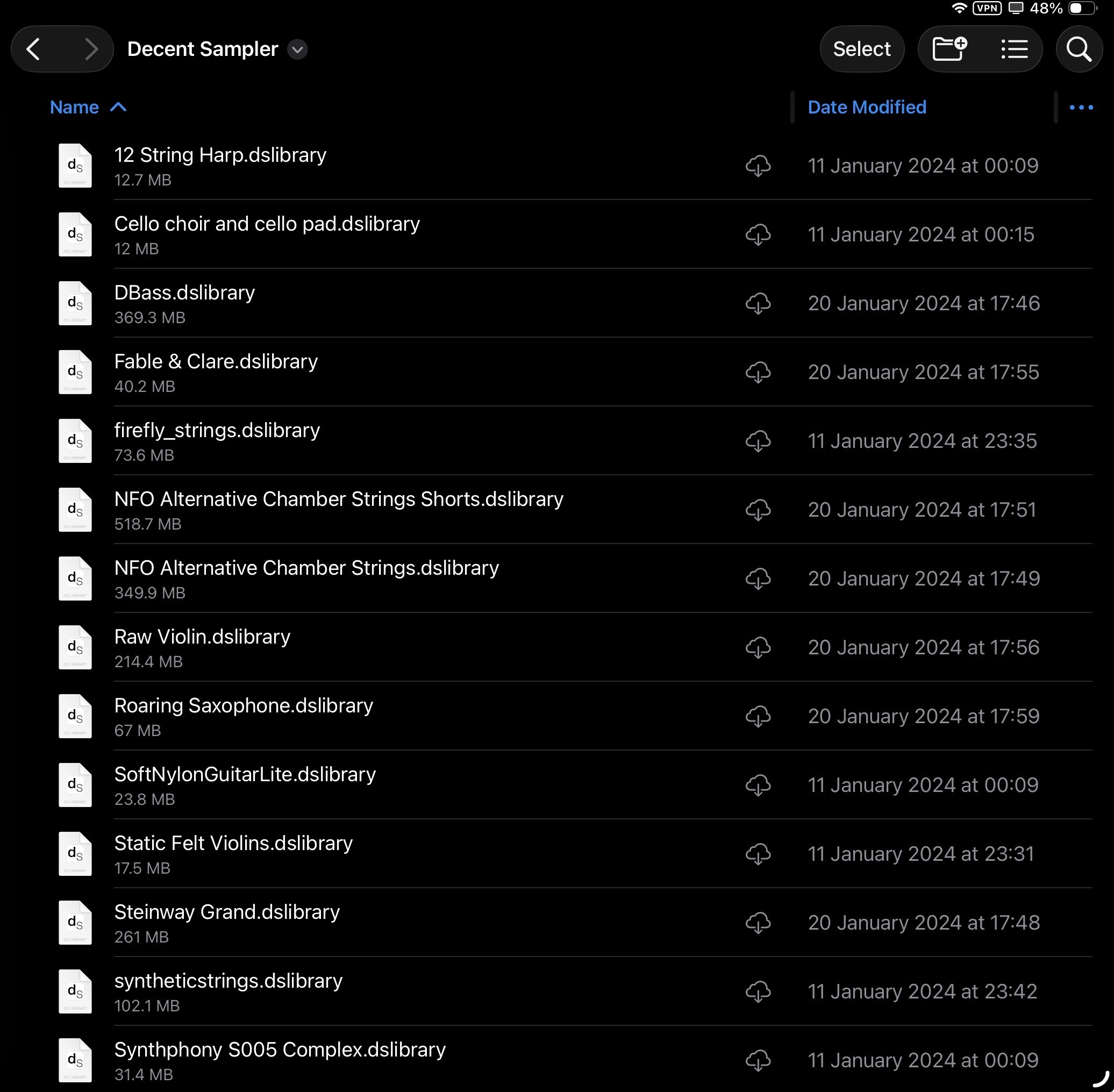
    Now, to get it to be recognised and work in DS, you need to change the file extension from .zip TO .dslibrary

    Then add this to files/iCloud and you’ll be able to open in DS

    This is what mine looks like in iCloud.
  • Thank you for the help. I was able to get some samples from Piano book to download and play in Ds.

  • Yep, I feel your pain. I was there with my old 5th Gen iPad. But, was able to get a used M1 Pro for cheap thank God!
    I would still download them amd put the samples on an external drive and use the CCK USB reader to share them with DS. That way you can always have the ones you really love available and remove the not so used ones.

    @Squishy said:

    >

    Thanks man for all the info! I am really enjoying all this free content. I have 512 gb so I want to take advantage of good stuff in pianobook.

    Hehe I’m in the opposite boat. 64gb iPad Pro; sometimes I curse ever finding decent sampler. Every new great sounding DS bank I find, I have to decide what app to uninstall to make room 🤪

  • @Tones4Christ said:
    Yep, I feel your pain. I was there with my old 5th Gen iPad. But, was able to get a used M1 Pro for cheap thank God!
    I would still download them amd put the samples on an external drive and use the CCK USB reader to share them with DS. That way you can always have the ones you really love available and remove the not so used ones.

    @Squishy said:

    >

    Thanks man for all the info! I am really enjoying all this free content. I have 512 gb so I want to take advantage of good stuff in pianobook.

    Hehe I’m in the opposite boat. 64gb iPad Pro; sometimes I curse ever finding decent sampler. Every new great sounding DS bank I find, I have to decide what app to uninstall to make room 🤪

    Very true! Don’t own an external HD and rather than picking one up I’m just gonna save for a new iPad with more space (I’ve also hit that wall of not being able to use new apps due to outdated iOS 😬). Appreciate the thought tho, thank ya kindly!

Sign In or Register to comment.