Loopy Pro: Create music, your way.

What is Loopy Pro?Loopy Pro is a powerful, flexible, and intuitive live looper, sampler, clip launcher and DAW for iPhone and iPad. At its core, it allows you to record and layer sounds in real-time to create complex musical arrangements. But it doesn’t stop there—Loopy Pro offers advanced tools to customize your workflow, build dynamic performance setups, and create a seamless connection between instruments, effects, and external gear.

Use it for live looping, sequencing, arranging, mixing, and much more. Whether you're a live performer, a producer, or just experimenting with sound, Loopy Pro helps you take control of your creative process.

Download on the App Store

Loopy Pro is your all-in-one musical toolkit. Try it for free today.

Audiokit released their 909 app

13468917

Comments

  • @wim said:

    @gusgranite said:
    What do you think of the framework itself @wim ?

    I'm not qualified to answer that in any meaningful way. I state marginally informed opinions as though they are fact all the time, but that would be waaayyyy over the top. :D

    Personally, I hope it gets rounded out to specifically make developing AUv3's easier. It may be further along than when I last looked, though.

    There’s concerns about it being based on Swift and the high DSP and bloat associated with that. A discussion for the developers, for sure!

  • @FPC said:

    @AnalogCortex said:

    @wim said:

    @AnalogCortex said:

    @realdawei said:

    @AnalogCortex said:
    Loving the sounds, but when I try to record in GarageBand via AU, the timeline is empty despite being able to hear what was just recorded. What am I missing?

    It means the Auv3 doesn’t support MIDI out. Which for me makes it unusable (beyond the timing issue)

    Thanks for the info. So...this app is useless for GarageBand users?

    No. Only the sequencer is, and only then if you require the midi to be recorded in GarageBand. It's useful for playing the app from GarageBand's sequencer.

    Thanks, but I still don’t quite understand. I open 909 as an AU in GarageBand. I pick a 909 preset pattern. I hit record in GarageBand, and the pattern plays through, appearing to be recorded in GarageBand. When I go to track view in GarageBand there appears to be nothing recorded. Though, when I press play I can hear what was recorded.

    How do I record a preset 909 pattern in GarageBand and have visible output to work with on the GarageBand timeline? I apologize for being a doofus.

    I’m sure wim will chime in here but as far I understand it 909 doesn’t output its midi sequencer data. So when you say “appearing to be recorded in GarageBand” what do you base this on? Are you seeing any midi note data written to the GB track timeline? Or just that you heard the beat playing whilst you were recording? Are you sure that when you press play you’re not just playing the synced signal from the 909 app again?

    I’m with you. My workflow means that any drum machine or groove box that doesn’t output it’s sequencers midi data to a DAWs timeline is of limited use to me (come on PureAcid :'( )

    When I say “appearing to be recorded in GarageBand, I mean that I get the 909 preset cued up, hit the record button on Garageband, get the 4 count and then recording begins and the 909 pattern plays through while the GarageBand timeline shows red, as if it’s recording the 909 pattern being played.

    Then I go back to GarageBand’s track view, and the 909 track shows nothing. Yet, when I hit play it does, in fact, play the 909 pattern I had just recorded despite the 909 track being blank.

  • @AnalogCortex said:

    @FPC said:

    @AnalogCortex said:

    @wim said:

    @AnalogCortex said:

    @realdawei said:

    @AnalogCortex said:
    Loving the sounds, but when I try to record in GarageBand via AU, the timeline is empty despite being able to hear what was just recorded. What am I missing?

    It means the Auv3 doesn’t support MIDI out. Which for me makes it unusable (beyond the timing issue)

    Thanks for the info. So...this app is useless for GarageBand users?

    No. Only the sequencer is, and only then if you require the midi to be recorded in GarageBand. It's useful for playing the app from GarageBand's sequencer.

    Thanks, but I still don’t quite understand. I open 909 as an AU in GarageBand. I pick a 909 preset pattern. I hit record in GarageBand, and the pattern plays through, appearing to be recorded in GarageBand. When I go to track view in GarageBand there appears to be nothing recorded. Though, when I press play I can hear what was recorded.

    How do I record a preset 909 pattern in GarageBand and have visible output to work with on the GarageBand timeline? I apologize for being a doofus.

    I’m sure wim will chime in here but as far I understand it 909 doesn’t output its midi sequencer data. So when you say “appearing to be recorded in GarageBand” what do you base this on? Are you seeing any midi note data written to the GB track timeline? Or just that you heard the beat playing whilst you were recording? Are you sure that when you press play you’re not just playing the synced signal from the 909 app again?

    I’m with you. My workflow means that any drum machine or groove box that doesn’t output it’s sequencers midi data to a DAWs timeline is of limited use to me (come on PureAcid :'( )

    When I say “appearing to be recorded in GarageBand, I mean that I get the 909 preset cued up, hit the record button on Garageband, get the 4 count and then recording begins and the 909 pattern plays through while the GarageBand timeline shows red, as if it’s recording the 909 pattern being played.

    Then I go back to GarageBand’s track view, and the 909 track shows nothing. Yet, when I hit play it does, in fact, play the 909 pattern I had just recorded despite the 909 track being blank.

    A fix is being looked at already for this. A few people have contacted me about this problem and I’ve passed on the info. They did say they had an idea what the issue might be. For me, when I use an app like this inside a DAW I always program my grooves in the daws piano roll.

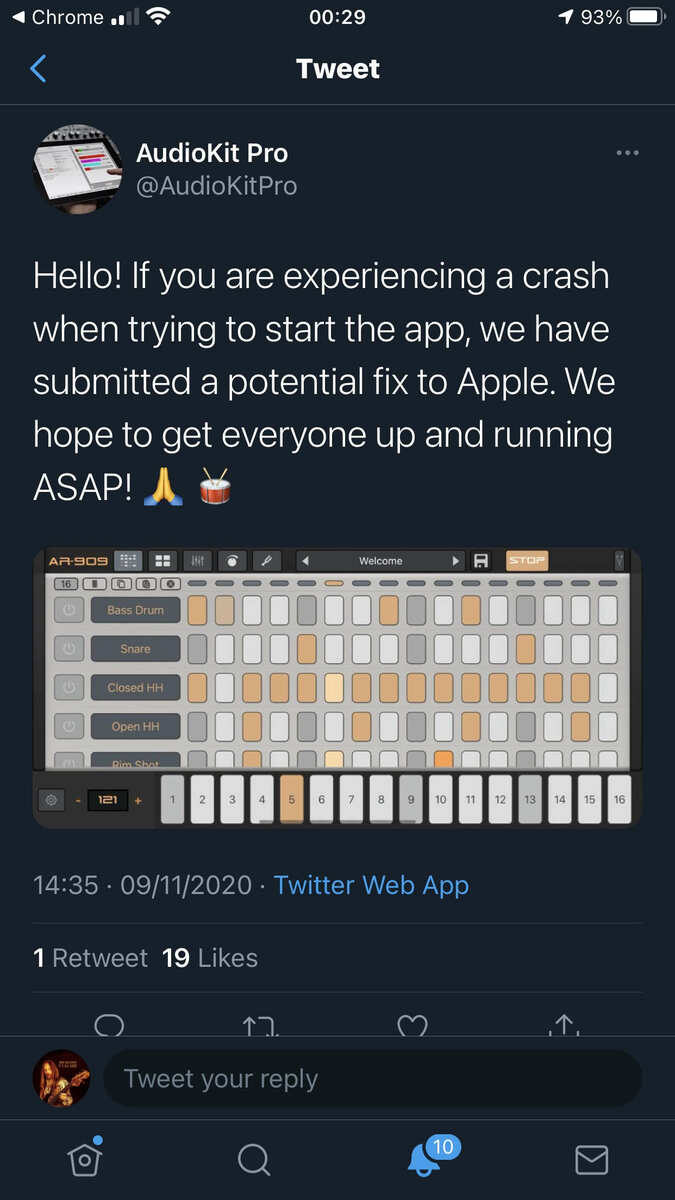
  • For people experiencing start-up issues-
  • wimwim
    edited November 2020

    @AnalogCortex said:
    When I say “appearing to be recorded in GarageBand, I mean that I get the 909 preset cued up, hit the record button on Garageband, get the 4 count and then recording begins and the 909 pattern plays through while the GarageBand timeline shows red, as if it’s recording the 909 pattern being played.

    Then I go back to GarageBand’s track view, and the 909 track shows nothing. Yet, when I hit play it does, in fact, play the 909 pattern I had just recorded despite the 909 track being blank.

    I think you get this already now, but the record button lighting up is effectively just saying "I'm recording any midi you send me." Unfortunately 909 isn't sending anything, so there's nothing to record. Maybe some day, but not now.

    I wouldn't call this a bug. It's a "missing feature". Unless of course they thought it was working and it isn't.

  • @AnalogCortex said:

    @wim said:

    @AnalogCortex said:

    @realdawei said:

    @AnalogCortex said:
    Loving the sounds, but when I try to record in GarageBand via AU, the timeline is empty despite being able to hear what was just recorded. What am I missing?

    It means the Auv3 doesn’t support MIDI out. Which for me makes it unusable (beyond the timing issue)

    Thanks for the info. So...this app is useless for GarageBand users?

    No. Only the sequencer is, and only then if you require the midi to be recorded in GarageBand. It's useful for playing the app from GarageBand's sequencer.

    Thanks, but I still don’t quite understand. I open 909 as an AU in GarageBand. I pick a 909 preset pattern. I hit record in GarageBand, and the pattern plays through, appearing to be recorded in GarageBand. When I go to track view in GarageBand there appears to be nothing recorded. Though, when I press play I can hear what was recorded.

    How do I record a preset 909 pattern in GarageBand and have visible output to work with on the GarageBand timeline? I apologize for being a doofus.

    Also when it appears to play back what you recorded..it’s actually still the 909 playing itself
    via its own sequencer synced (somewhat) with GB’s transport

  • For the price of a cup of coffee i get a killer, crunchy, boomin’ 909? I will never complain about that...alot of the fun of this is watching apps start out herky jerky and then improving rapidly...just give them some time, it’ll all work out...it’s only been a day...just politely suggest problems and ideas and watch how fast the creators work on it...thank u Audiokit.
  • The user and all related content has been deleted.
  • @ehehehe said:
    Please fix this timing issue devs

    I hope folks realize that they need to send reports to the AudioKit developers since the AK developers may not be keeping tabs on the forum.

  • The user and all related content has been deleted.
  • @espiegel123 said:

    @ehehehe said:
    Please fix this timing issue devs

    I hope folks realize that they need to send reports to the AudioKit developers since the AK developers may not be keeping tabs on the forum.

    Yes, very likely they are not reading these, contact the devs directly folks

  • edited November 2020

    Just want to confirm that at least as far as any DSP display is concerned, this is using quite a bit. 29% for just a simple beat, standalone in AUM I know DSP meters aren't reliable but just thought I'd confirm this appear to be using a lot of CPU and as a result finger presses are extremely laggy. No complaints for the price and the sounds are really great. You just have to know it takes a 1/2 second to register a fingerprint!

    edit: Bass 808 is exactly the same. 29% DSP.

  • @Gavinski said:

    @espiegel123 said:

    @ehehehe said:
    Please fix this timing issue devs

    I hope folks realize that they need to send reports to the AudioKit developers since the AK developers may not be keeping tabs on the forum.

    Yes, very likely they are not reading these, contact the devs directly folks

    No @analog_matt is reading. He's not responding, but before this dropped his profile showed he hadn't been active since October, I checked this on Thursday or sometime later last week. I checked this morning and it says he was last active this month. So I'm sure he's reading. There's a lot of frustration towards them here and I understand why they have distanced themselves. I just hope that he and AK see that we just want quality products and not another round of missed opportunities and lost promises.

    This app sounds good with much potential. It's a shame they waited so long to release it and still haven't worked out the bugs and it dropped right after Drumcomputer. It's a bad mix of unfortunates.

    But going forward I hope they learn from this and the house mark I release. Don't keep teasing and pushing the date back. Develop a solid product and release it. Mark I was a successful release for them.

  • Bitcrusher is Whirled to Hear...🥂

  • @BITCRUSHER said:
    Bitcrusher is Whirled to Hear...🥂

    Ah, so you Can speak in prose as well as verse? 😜

  • If the verse is a curse, then to prose’ where I goes...my outlets are your tributaries...

  • Have I missed this somewhere? What's the midi mapping if I want to drive with Ochtachron? Doesn't seem to be General Midi?

  • @Lil_Stu07 said:

    @Gavinski said:

    @espiegel123 said:

    @ehehehe said:
    Please fix this timing issue devs

    I hope folks realize that they need to send reports to the AudioKit developers since the AK developers may not be keeping tabs on the forum.

    Yes, very likely they are not reading these, contact the devs directly folks

    No @analog_matt is reading. He's not responding, but before this dropped his profile showed he hadn't been active since October, I checked this on Thursday or sometime later last week. I checked this morning and it says he was last active this month. So I'm sure he's reading. There's a lot of frustration towards them here and I understand why they have distanced themselves. I just hope that he and AK see that we just want quality products and not another round of missed opportunities and lost promises.

    This app sounds good with much potential. It's a shame they waited so long to release it and still haven't worked out the bugs and it dropped right after Drumcomputer. It's a bad mix of unfortunates.

    But going forward I hope they learn from this and the house mark I release. Don't keep teasing and pushing the date back. Develop a solid product and release it. Mark I was a successful release for them.

    FWIW, he has in the past asked people to submit bug reports to them via email or web site rather than here. (FWIW, that is true of most developers though there are some exeptions).

    Even if a developer visits the forum, you can't count on that being a timely way to get your feedback to them.

  • @ExAsperis99 said:
    Have I missed this somewhere? What's the midi mapping if I want to drive with Ochtachron? Doesn't seem to be General Midi?

    GM from rozeta worked for me.

  • wimwim
    edited November 2020

    @ExAsperis99 said:
    Have I missed this somewhere? What's the midi mapping if I want to drive with Ochtachron? Doesn't seem to be General Midi?

    It's just chromatic up from C2 (Note 36), starting at the Bass Drum.

    (Note 32 might be labeled with a different octave, depending on what your sending from. I'm referring to the AUM keyboard here. It's C1 in GarageBand.)

    Added note from the 909 app page:

    • MIDI FOR drum triggers (Bass Drum, Snare, etc) start on "C" MIDI Note 36 (C1 in GarageBand)
    • MIDI for pattern triggers start on "C" MIDI Note 12 (C-1 in GarageBand)
  • GM from Rozeta works but the mapping is not right. The bass drum in Rozeta will not be mapped to the bass in 909, for example. The Axon settings in Rozeta work better. Of course Rozeta only has 8 channels. Is there a nice AU drum sequencer with more channels? Or do you guys just hack something together using 2 instances.

    By the way, it looks like for now the best solution to timing issues is simply to use external sequencers like Rozeta, Octachron etc. The 909 sounds fantastic, just trigger it with something other than its own sequencer.

  • wimwim
    edited November 2020

    @Gavinski said:
    GM from Rozeta works but the mapping is not right. The bass drum in Rozeta will not be mapped to the bass in 909, for example. The Axon settings in Rozeta work better. Of course Rozeta only has 8 channels. Is there a nice AU drum sequencer with more channels? Or do you guys just hack something together using 2 instances.

    By the way, it looks like for now the best solution to timing issues is simply to use external sequencers like Rozeta, Octachron etc. The 909 sounds fantastic, just trigger it with something other than its own sequencer.

    It's still off even from other sequencers.

  • @wim said:

    @Gavinski said:
    GM from Rozeta works but the mapping is not right. The bass drum in Rozeta will not be mapped to the bass in 909, for example. The Axon settings in Rozeta work better. Of course Rozeta only has 8 channels. Is there a nice AU drum sequencer with more channels? Or do you guys just hack something together using 2 instances.

    By the way, it looks like for now the best solution to timing issues is simply to use external sequencers like Rozeta, Octachron etc. The 909 sounds fantastic, just trigger it with something other than its own sequencer.

    It's still off even from other sequencers.

    Really? Oh dear....

  • wimwim
    edited November 2020

    @Gavinski said:

    @wim said:

    @Gavinski said:
    GM from Rozeta works but the mapping is not right. The bass drum in Rozeta will not be mapped to the bass in 909, for example. The Axon settings in Rozeta work better. Of course Rozeta only has 8 channels. Is there a nice AU drum sequencer with more channels? Or do you guys just hack something together using 2 instances.

    By the way, it looks like for now the best solution to timing issues is simply to use external sequencers like Rozeta, Octachron etc. The 909 sounds fantastic, just trigger it with something other than its own sequencer.

    It's still off even from other sequencers.

    Really? Oh dear....

    It's closer if you manually set the buffer to match the host, but it's still behind the beat. An AU should never need to have the buffer adjusted. In fact an AU shouldn't even have this setting.

    I've been rushed today and haven't had time to do up a decent bug report to send to them directly. Hopefully others have reported the issue. I'm sure they'll sort it out.

  • @wim said:

    @Gavinski said:
    GM from Rozeta works but the mapping is not right. The bass drum in Rozeta will not be mapped to the bass in 909, for example. The Axon settings in Rozeta work better. Of course Rozeta only has 8 channels. Is there a nice AU drum sequencer with more channels? Or do you guys just hack something together using 2 instances.

    By the way, it looks like for now the best solution to timing issues is simply to use external sequencers like Rozeta, Octachron etc. The 909 sounds fantastic, just trigger it with something other than its own sequencer.

    It's still off even from other sequencers.

    Yeah, I was sequencing it with Drambo and it would hiccup a lot and was even more noticeable than with its own sequencer

  • @wim said:

    @Gavinski said:

    @wim said:

    @Gavinski said:
    GM from Rozeta works but the mapping is not right. The bass drum in Rozeta will not be mapped to the bass in 909, for example. The Axon settings in Rozeta work better. Of course Rozeta only has 8 channels. Is there a nice AU drum sequencer with more channels? Or do you guys just hack something together using 2 instances.

    By the way, it looks like for now the best solution to timing issues is simply to use external sequencers like Rozeta, Octachron etc. The 909 sounds fantastic, just trigger it with something other than its own sequencer.

    It's still off even from other sequencers.

    Really? Oh dear....

    It's closer if you manually set the buffer to match the host, but it's still behind the beat. An AU should never need to have the buffer adjusted. In fact an AU shouldn't even have this setting.

    I've been rushed today and haven't had time to do up a decent bug report to send to them directly. Hopefully others have reported the issue. I'm sure they'll sort it out.

    Matthew from Audiokit says they're definitely looking into it...

  • Thanks for the update @enkaytee 👍🏼

  • Yeah, he also recommended turning the buffer down

  • edited November 2020

    i noticed the timing issue when watching Doug.s video .. wondered how it wasn.t addressed there , wobbly off sync with their own 808 app. thank god for the lovely people of the AB forum. and yes how did this escape the beta’s ?

  • @SpartanClownTide said:

    @ashh said:
    When I open it, it shows the splash screen and then closes. Or shows it, blinks, shows it once more and then closes. I have reinstalled, same thing happens again.

    Any ideas anyone?

    e2a: opens fine in AUM. Guessing it's not standalone then?

    Opens fine in standalone for me. iPad 6th gen 13.7.

    Good call. 2018 iPad Pro, 14.2.

Sign In or Register to comment.