Loopy Pro: Create music, your way.

What is Loopy Pro?Loopy Pro is a powerful, flexible, and intuitive live looper, sampler, clip launcher and DAW for iPhone and iPad. At its core, it allows you to record and layer sounds in real-time to create complex musical arrangements. But it doesn’t stop there—Loopy Pro offers advanced tools to customize your workflow, build dynamic performance setups, and create a seamless connection between instruments, effects, and external gear.

Use it for live looping, sequencing, arranging, mixing, and much more. Whether you're a live performer, a producer, or just experimenting with sound, Loopy Pro helps you take control of your creative process.

Download on the App Store

Loopy Pro is your all-in-one musical toolkit. Try it for free today.

Audio Damage Axon 3 (released)

13567

Comments

  • edited April 2024

    .

  • edited April 2024

    @yellow_eyez said:

    @skiphunt said:

    @yellow_eyez said:
    Well if no one tried a Drum machine then I’ll buy it hoping it works

    If it doesn’t I’ll ask for a refund, and it’s $4 so I’ll use my credit card

    Most don’t know this but Apple don’t give you a refund if you used an Apple gift card code to add money to your account, you could only be refunded if you buy with a credit/debit from non Apple like visa, Amex, PayPal

    But Apple won’t refund their own store credit even if it’s legitimate and you have water tight case

    I don’t know if this is what you’re asking about, but for midi out you need to hit the midi/io button at top left, then mid learn where you want the nodes to go:

    Exactly what I was looking for! Ooooooooo
    I gotta get this now
    Thanks skip

    Actually, midi/io button is top right. :)

  • edited April 2024

    @yellow_eyez said:
    Left ?Right?: what’s the difference man?!

    What matters is it is randomized very smart, polyrhythmic and midi mappable to external drum machine hardware pieces so I’m in!

    Right :)

    I know some are put off by the dev’s tact toward users sometimes… but they do make very interesting, well designed apps. Some of my favs. I’ve never had the stability issues that some report, but im also typically using the latest OS and I don’t typically use more than a couple instances of audio damage apps at a time.

    I’ve purchased all of their apps with no regret… and I’ll be purchasing this one as well. I’m just glad they’re still launching apps for iOS at all.

  • wimwim
    edited April 2024

    @bygjohn & @NoncompliantBryant - here's the response from Chris regarding the needed settings to sync. I'll have to noodle over why the offset needs to be this way, but I suppose it'll make sense to me at some point. It does seem to work.

    Chris Randall — Today at 8:21 PM
    Make the offset one larger (four in this case) and make sure you have Seq Reset set to anything besides "Never" and this should result in what you're looking for.
    Look at Preset 01 for an example. You will see that Node 2 hits on the quarter note.

  • @wim said:
    @bygjohn & @NoncompliantBryant - here's the response from Chris regarding the needed settings to sync. I'll have to noodle over why the offset needs to be this way, but I suppose it'll make sense to me at some point. It does seem to work.

    Chris Randall — Today at 8:21 PM
    Make the offset one larger (four in this case) and make sure you have Seq Reset set to anything besides "Never" and this should result in what you're looking for.
    Look at Preset 01 for an example. You will see that Node 2 hits on the quarter note.

    I will give it a go... I'm not understanding why... I'm going to take a closer look at preset 1 I suppose. Thanks for reporting back, @wim!

  • @yellow_eyez said:
    Re: midi out

    does any of you have any drum machine hardware to try it out on? ?

    Midi out btw was not specifically for hardware. It can also just be for sending midi to other AUv3 instruments. That is working, for sure, so it will work with hardware too.

  • edited April 2024

    There is also no need to touch midi learn. You just need to make sure that the midi notes out per node are the notes you want. Also - any app with midi out could be used to sequence any external hardware - as long as you have the control to make sure the notes it's sending out are the notes you need.

    @Gavinski said:

    @yellow_eyez said:
    Re: midi out

    does any of you have any drum machine hardware to try it out on? ?

    Midi out btw was not specifically for hardware. It can also just be for sending midi to other AUv3 instruments. That is working, for sure, so it will work with hardware too.

  • @yellow_eyez said:
    Well if no one tried a Drum machine then I’ll buy it hoping it works

    If it doesn’t I’ll ask for a refund, and it’s $4 so I’ll use my credit card

    Most don’t know this but Apple don’t give you a refund if you used an Apple gift card code to add money to your account, you could only be refunded if you buy with a credit/debit from non Apple like visa, Amex, PayPal

    But Apple won’t refund their own store credit even if it’s legitimate and you have water tight case

    @yellow_eyez said:
    Well if no one tried a Drum machine then I’ll buy it hoping it works

    If it doesn’t I’ll ask for a refund, and it’s $4 so I’ll use my credit card

    Most don’t know this but Apple don’t give you a refund if you used an Apple gift card code to add money to your account, you could only be refunded if you buy with a credit/debit from non Apple like visa, Amex, PayPal

    But Apple won’t refund their own store credit even if it’s legitimate and you have water tight case

    It may be region dependent, they definitely refund gift card purchases here in the UK. Pretty much all my purchases are using gift cards and they have refunded to my account balance no problem.

  • I've noticed that preset/patch selection doesn't respond well to the Apple Pen, but seems to work better when I use my finger.

    Was doubletapping with the Apple Pen and not getting consistent results, also the folders weren't opening when selected. Using my finger plus a long-ish hold seems to fix this issue

  • I guess it's beyond the scope of the app, but I wish it had the groovebox style of loading the next patch on the beat....so I could launch different Axon patches/patterns one after another in sync

  • It does sound great, but.. such small micro dials and fonts.

  • @skiphunt said:

    @Robin2 said:
    Is the oscilloscope working for anyone? Tried in three hosts but it doesn’t display anything in any of them?

    There was a lot of crashing of the app in the last few betas. I think they figured out the scope was somehow causing the crashes and disabled it in the last beta before launch. After they did that it was rock solid. I figured they’d re-enabled it before launch, but I guess not.

    Cool, thanks for clarifying @skiphunt.

  • @drewinnit said:
    I've noticed that preset/patch selection doesn't respond well to the Apple Pen, but seems to work better when I use my finger.

    Was doubletapping with the Apple Pen and not getting consistent results, also the folders weren't opening when selected. Using my finger plus a long-ish hold seems to fix this issue

    Yes, i noticed this behaviour as well.

  • edited April 2024

    @yellow_eyez said:
    Well if no one tried a Drum machine then I’ll buy it hoping it works

    If it doesn’t I’ll ask for a refund, and it’s $4 so I’ll use my credit card

    Most don’t know this but Apple don’t give you a refund if you used an Apple gift card code to add money to your account, you could only be refunded if you buy with a credit/debit from non Apple like visa, Amex, PayPal

    But Apple won’t refund their own store credit even if it’s legitimate and you have water tight case

    I was refunded for another app and I only use gift cards. The money was added back as store credit.

  • edited April 2024

    I am really loving the app! Only one small thing: Have anyone figured out how to audition the individual drum synths? I can only trig them by the sequencer, which is a little awkward when tweaking the sounds.

  • @yellow_eyez said:

    @kirmesteggno said:

    @yellow_eyez said:
    Well if no one tried a Drum machine then I’ll buy it hoping it works

    If it doesn’t I’ll ask for a refund, and it’s $4 so I’ll use my credit card

    Most don’t know this but Apple don’t give you a refund if you used an Apple gift card code to add money to your account, you could only be refunded if you buy with a credit/debit from non Apple like visa, Amex, PayPal

    But Apple won’t refund their own store credit even if it’s legitimate and you have water tight case

    I was refunded for another app and I only use gift cards. The money was added back as store credit.

    Ok in the US they have denied any refund ever used with store credit/never given back store credit. (I bought an auv3 that didn’t even open. It would crash and ask to report, checked online and found reviews of don’t get this, referenced the reviews in their own store and they still denied it .)

    The devs don’t have any say in a refund according to the process ; so that means Apple refuses to refund anything from my account, but maybe it’s just a strange phenomenon with me or I don’t know what to say but I’ve tried about 5 refunds over the course of my Apple ID and they were all denied :confused:

    They also have done weird things with my devices in general , so idk ! I’m over it. I’ll just buy things and say hey if it works good, if not fuck it, it was ($x) for a hot dog or something

    Could be an EU or maybe even German thing. I gave a reason for the return of that app, but I think you don't even have to give one over here. Though the law gets often abused by physical product online buyers who can't decide what to buy and then send the other stuff back.

  • edited April 2024

    @catbox said:
    I am really loving the app! Only one small thing: Have anyone figured out how to audition the individual drum synths? I can only trig them by the sequencer, which is a little awkward when tweaking the sounds.

    I think you can using the level knob in the mixer section (turning down the levels of the other nodes), also make sure you don't use an FX send to another node. Solo somehow isn't enough (finding it out right now).

  • edited April 2024

    @kirmesteggno said:

    @catbox said:
    I am really loving the app! Only one small thing: Have anyone figured out how to audition the individual drum synths? I can only trig them by the sequencer, which is a little awkward when tweaking the sounds.

    I think you can using the level knob in the mixer section (turning down the levels of the other nodes), also make sure you don't use an FX send to another node. Solo somehow isn't enough (finding it out right now).

    Thanks! :-) However what I meant (I probably was a bit unclear) was I was looking for some kind of button to press to trig a voice manually, which I haven’t found. (But yes, the other way can work as workaround.)

  • edited April 2024

    @wim said:
    @bygjohn & @NoncompliantBryant - here's the response from Chris regarding the needed settings to sync. I'll have to noodle over why the offset needs to be this way, but I suppose it'll make sense to me at some point. It does seem to work.

    Chris Randall — Today at 8:21 PM
    Make the offset one larger (four in this case) and make sure you have Seq Reset set to anything besides "Never" and this should result in what you're looking for.
    Look at Preset 01 for an example. You will see that Node 2 hits on the quarter note.

    Thanks for passing that on, @wim , I’ll give it a try later on. I did notice yesterday after posting that some of the presets seem to manage to be dead on the beat, so that explains the phenomenon. But as for why it’s like that, off the top of my head I’m mystified. Maybe that’s a good thing! 🙃

  • @yellow_eyez said:

    @kirmesteggno said:

    @catbox said:
    I am really loving the app! Only one small thing: Have anyone figured out how to audition the individual drum synths? I can only trig them by the sequencer, which is a little awkward when tweaking the sounds.

    I think you can using the level knob in the mixer section (turning down the levels of the other nodes), also make sure you don't use an FX send to another node. Solo somehow isn't enough (finding it out right now).

    Yes you guys are lucky with consumer protection. We don’t have that here at all. Still the Wild West of capitalism in the good ol Us of A

    Idc either way AD deserve to be supported for rolling out this app at $4…that’s a rollout! And for something so expansive…their on my list of dev to keep on eye on

    How are you liking it so far (and all you guys)?

    If you’re into creative and versatile delays, Other Desert Cities is a triumph. Definitely worth a look.

  • @yellow_eyez said:
    How are you liking it so far (and all you guys)?

    I like it, I'm still going through the presets and I'm trying it on a Techno beat. Here's a screen cap (the delay between my actions and the button presses are a bit weird though): https://streamable.com/tdssdl

  • @kirmesteggno said:

    @yellow_eyez said:
    How are you liking it so far (and all you guys)?

    I like it, I'm still going through the presets and I'm trying it on a Techno beat. Here's a screen cap (the delay between my actions and the button presses are a bit weird though): https://streamable.com/tdssdl

    Nice! B)

  • edited April 2024

    @yellow_eyez said:

    @kirmesteggno said:

    @yellow_eyez said:
    How are you liking it so far (and all you guys)?

    I like it, I'm still going through the presets and I'm trying it on a Techno beat. Here's a screen cap (the delay between my actions and the button presses are a bit weird though): https://streamable.com/tdssdl

    Very cool. Are you sequencing DC with it? Or are they internal synth drum sounds and your combining with DC?

    Thanks! I'm using DC to sequence all those tracks except Axon (frees some of its slots for synth sounds). Axon is just adding the percussive layer that you can hear when I unmute the Axon track. > @Slush said:

    @kirmesteggno said:

    @yellow_eyez said:
    How are you liking it so far (and all you guys)?

    I like it, I'm still going through the presets and I'm trying it on a Techno beat. Here's a screen cap (the delay between my actions and the button presses are a bit weird though): https://streamable.com/tdssdl

    Nice! B)

    Thanks!

  • @bygjohn said:

    @yellow_eyez said:

    @kirmesteggno said:

    @catbox said:
    I am really loving the app! Only one small thing: Have anyone figured out how to audition the individual drum synths? I can only trig them by the sequencer, which is a little awkward when tweaking the sounds.

    I think you can using the level knob in the mixer section (turning down the levels of the other nodes), also make sure you don't use an FX send to another node. Solo somehow isn't enough (finding it out right now).

    Yes you guys are lucky with consumer protection. We don’t have that here at all. Still the Wild West of capitalism in the good ol Us of A

    Idc either way AD deserve to be supported for rolling out this app at $4…that’s a rollout! And for something so expansive…their on my list of dev to keep on eye on

    How are you liking it so far (and all you guys)?

    If you’re into creative and versatile delays, Other Desert Cities is a triumph. Definitely worth a look.

    +1 Agreed. Probably one of my top 3 fav Audio Damage apps and the one from them I use most often

  • @Slush said:
    It does sound great, but.. such small micro dials and fonts.

    I agree. Quite fiddly innit?

  • @Kashi said:

    @Slush said:
    It does sound great, but.. such small micro dials and fonts.

    I agree. Quite fiddly innit?

    My God, what where they thinking?! Need my pen for this, super unpractical. Great app, especially for Smurfs.

  • @Slush said:

    @Kashi said:

    @Slush said:
    It does sound great, but.. such small micro dials and fonts.

    I agree. Quite fiddly innit?

    My God, what where they thinking?! Need my pen for this, super unpractical. Great app, especially for Smurfs.

    :D

  • @Slush said:

    @Kashi said:

    @Slush said:
    It does sound great, but.. such small micro dials and fonts.

    I agree. Quite fiddly innit?

    My God, what where they thinking?! Need my pen for this, super unpractical. Great app, especially for Smurfs.

    Maybe it's by purpose to create more happy accidents hiiting knobs you don't want to hit 😅

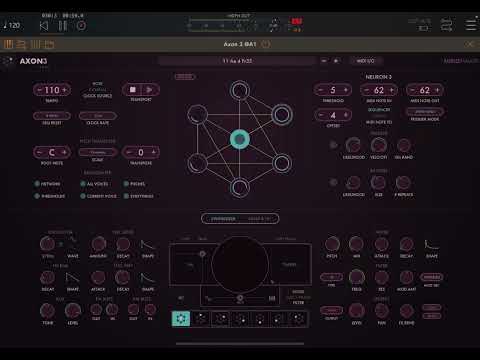
  • Demo and a Giveaway, if anyone's interested
  • edited April 2024

    @catbox said:

    @kirmesteggno said:

    @catbox said:
    I am really loving the app! Only one small thing: Have anyone figured out how to audition the individual drum synths? I can only trig them by the sequencer, which is a little awkward when tweaking the sounds.

    I think you can using the level knob in the mixer section (turning down the levels of the other nodes), also make sure you don't use an FX send to another node. Solo somehow isn't enough (finding it out right now).

    Thanks! :-) However what I meant (I probably was a bit unclear) was I was looking for some kind of button to press to trig a voice manually, which I haven’t found. (But yes, the other way can work as workaround.)

    There’s a little speaker icon above the first kit selection pads/button at the bottom of the screen. Turn that on and the pads will trigger the sounds.

Sign In or Register to comment.