Loopy Pro: Create music, your way.
What is Loopy Pro? — Loopy Pro is a powerful, flexible, and intuitive live looper, sampler, clip launcher and DAW for iPhone and iPad. At its core, it allows you to record and layer sounds in real-time to create complex musical arrangements. But it doesn’t stop there—Loopy Pro offers advanced tools to customize your workflow, build dynamic performance setups, and create a seamless connection between instruments, effects, and external gear.
Use it for live looping, sequencing, arranging, mixing, and much more. Whether you're a live performer, a producer, or just experimenting with sound, Loopy Pro helps you take control of your creative process.
Download on the App StoreLoopy Pro is your all-in-one musical toolkit. Try it for free today.
Comments
If you record something done with it, would be curious to listen... (I say this for everyone, ofc).
Following @Gavinski recent video, finally went and made a purchase.
Feels cool (and I'm grateful for developers to support outdated OS versions). My main concern currently though is how it drains battery quicker than other apps. Guess it's very CPU hungry (and I'm on 9.7" iPad Pro from 2016).
Would love if it had randomisers for e.g. whole patch/all sounds only/selected sound as well - similar to the way Axon 3 has different levels of randomisation, which works really well for starting something completely new vs. making adjustments to a patch that's nearly there.
Would be super awesome to have something like step components from op-z, to assign on each step of selected voices. But perhaps that would be too ambitious...
+1 for randomizer.
Who still uses this? I always pull it up and have fun poking around but I’m never quite sure what to do with it in a song structure. Any good examples of this, it’s older sibling on desktop, or the hardware they’re based on?
I think it sounds really great but it's definitely a bit of a faff to use. It's a quirky ui, I'm just not really sure it's a very well designed ui from the point of view of enjoying using it to make music.
I’ve been watching Dragon Ball Z and the first few notes sound like something that would come from Motto Akemie.
It’s great for all sorts of weird bleeps, percussion stuff & plucks.
I don't use it often as its battery drain is high on my 2016 era iPad but it's still very cool app to have...
Updated with 10 exposed parameters, not clear which? It's a start I guess...
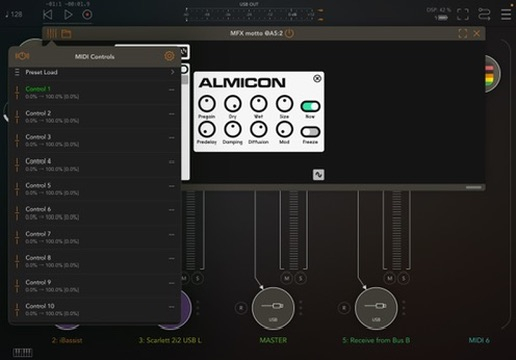
Edit: You choose parameters by clicking the sine symbol down on the right.
Yes, seems like an OK solution to the problem of the app's flexible architecture. I doubt many people would want to map more than 10 at a time anyway. Note that this is the wrong thread though Pxlhg. The app with the recent update is MFX Motto, but this is the Motto Akemie thread
Would love to be able to MIDI control each separate channel on this one
Oh crap, yeah my bad, I was at the end of a long day. Hopefully message gets through.