Loopy Pro: Create music, your way.

What is Loopy Pro?Loopy Pro is a powerful, flexible, and intuitive live looper, sampler, clip launcher and DAW for iPhone and iPad. At its core, it allows you to record and layer sounds in real-time to create complex musical arrangements. But it doesn’t stop there—Loopy Pro offers advanced tools to customize your workflow, build dynamic performance setups, and create a seamless connection between instruments, effects, and external gear.

Use it for live looping, sequencing, arranging, mixing, and much more. Whether you're a live performer, a producer, or just experimenting with sound, Loopy Pro helps you take control of your creative process.

Download on the App Store

Loopy Pro is your all-in-one musical toolkit. Try it for free today.

Jim Audio New App, GROOVERIDER 2 In Store.

1272830323335

Comments

  • @Szklak said:

    @wim said:
    Long press on the Layer button and select Redefine AU Knobs. 👍🏼

    Tap a control knob. It will flash, and you'll see "Touch AU control for knob (#)" at the top. Open the AU interface and move a control. It'll now be linked to the flashing knob. The next control knob will be auto-selected and you can keep going, or close the AU window to finish.

    Does it work for you with drambo loaded as auv3 in GR2? Been trying to map the knobs of its new mutable instruments oscillator for easier access but it just doesn't seem to work with drambo.

    That's different. Drambo doesn't expose AUv3 Parameters, which is what the control knobs are meant for.

    If I remember correctly, you can't pass CC's into AUv3 instrument layers. I don't think you can do what you would like to with Drambo in GR2.

  • edited January 22

    Is there a way to copy samples from one pad to another in a drum rack? Related, where are samples recorded in a drum rack stored? Can they be accessed?

    I’m resampling an app then triggering the recorded loops in a drum rack. I want to make variations of pads with different pitches, start times, etc

    edit. I found the share button so you can export and reimport. But if there’s a more elegant method I’d love to hear about it. And in case anyone’s wondering it looks like you can delete an exported file from the files app that has been imported and the sample remains in the GR2 project.

  • wimwim
    edited January 22

    @ecamburn said:

    Is there a way to copy samples from one pad to another in a drum rack? Related, where are samples recorded in a drum rack stored? Can they be accessed?

    I’m resampling an app then triggering the recorded loops in a drum rack. I want to make variations of pads with different pitches, start times, etc

    edit. I found the share button so you can export and reimport. But if there’s a more elegant method I’d love to hear about it.

    Long press on the first layer name at the top and select copy. Select the pad you want to copy to, long-press that layer name at the top, and select paste.
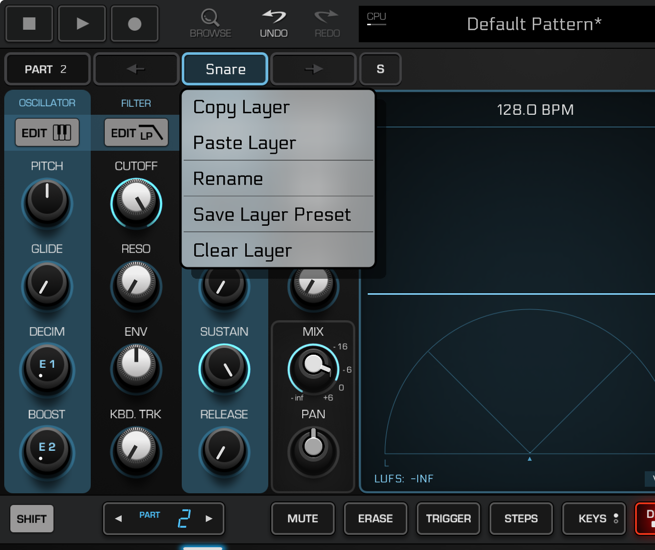
  • Thanks wim.

  • Just saw this on Facebook. Looks like auv3 insert effects might be on the way!

  • Yessss! B)

  • Sweet! I keep hoping he implements a song mode using clips similar to Drambo and LK.

    GR II clicks with me like no other app ever has - love it!

  • @FordTimeLord said:
    Just saw this on Facebook. Looks like auv3 insert effects might be on the way!

    That'd definitely draw me back in for at least a couple projects. :)

  • edited January 29

    That would be great. I hope there is/will be a tip box or IAP cause this kind of initiative should be rewarded

  • Oh yes, this makes me very happy! 😀

  • The user and all related content has been deleted.
  • @offbrands said:

    @jwmmakerofmusic said:

    @FordTimeLord said:
    Just saw this on Facebook. Looks like auv3 insert effects might be on the way!

    That'd definitely draw me back in for at least a couple projects. :)

    Honestly same

    Then again, I'm comfortable working within what I already got. ;)

  • @cuscolima said:
    That would be great. I hope there is/will be a tip box or IAP cause this kind of initiative should be rewarded

    Same!

  • For me 44€ is Too Much per This App!

  • Finally! Auv3 effects. Now I can use this again.

  • @jwmmakerofmusic said:

    @offbrands said:

    @jwmmakerofmusic said:

    @FordTimeLord said:
    Just saw this on Facebook. Looks like auv3 insert effects might be on the way!

    That'd definitely draw me back in for at least a couple projects. :)

    Honestly same

    Then again, I'm comfortable working within what I already got. ;)

    Honestly same 😉

  • @M3G4_7R0N said:
    For me 44€ is Too Much per This App!

    I would say it’s worth it. It’s a fantastic groove box.

  • Strange as it may sound GR2 is my main workstation on iOS. I just love the workflow. Lately hosting Drambo in GR2 as a midi effect has opened it up even more.

  • @M3G4_7R0N said:
    For me 44€ is Too Much per This App!

    For me it’s a fantastic app and 44€ is not to much. Really high potential in all aspects of sequencing and the upcoming hosting feature. Get it and enjoy 😊

  • @ecamburn said:
    Strange as it may sound GR2 is my main workstation on iOS. I just love the workflow. Lately hosting Drambo in GR2 as a midi effect has opened it up even more.

    Same here! I’m slowly transitioning from Korg Gadget (my main app for many years) to GR2.

  • @M3G4_7R0N said:
    For me 44€ is Too Much per This App!

    Then wait for a discount. You'll probably be able to get it for 20 or 25 on black friday
    Out of curiosity: where is it 44? I'm seeing 39 over here.

  • @cyberheater said:

    @M3G4_7R0N said:
    For me 44€ is Too Much per This App!

    I would say it’s worth it. It’s a fantastic groove box.

    I would say is cheap as hell considering how well is it made ..

  • @M3G4_7R0N said:
    For me 44€ is Too Much per This App!

    For me the price is worth it. Jim Pavlov is giving us free update after free update, including the upcoming AUv3 track effects. I'll install GR-II on my iPad Air 13" and try to build a piece of Ambient with it just using stock effects and soundfonts sometime either later today or tomorrow. (I'm about to build Ambient in AUM.)

  • @jwmmakerofmusic said:

    @M3G4_7R0N said:
    For me 44€ is Too Much per This App!

    For me the price is worth it. Jim Pavlov is giving us free update after free update, including the upcoming AUv3 track effects. I'll install GR-II on my iPad Air 13" and try to build a piece of Ambient with it just using stock effects and soundfonts sometime either later today or tomorrow. (I'm about to build Ambient in AUM.)

    I tried to build Ambient in GR-II, and it didn't quite work out as intended. 🫣 I'll try again tomorrow. 😅

  • edited February 8

    @jwmmakerofmusic said:

    @jwmmakerofmusic said:

    @M3G4_7R0N said:
    For me 44€ is Too Much per This App!

    For me the price is worth it. Jim Pavlov is giving us free update after free update, including the upcoming AUv3 track effects. I'll install GR-II on my iPad Air 13" and try to build a piece of Ambient with it just using stock effects and soundfonts sometime either later today or tomorrow. (I'm about to build Ambient in AUM.)

    I tried to build Ambient in GR-II, and it didn't quite work out as intended. 🫣 I'll try again tomorrow. 😅

    Can you explain why it didn't worked out to build ambient in GR-II? Is it the GR-II workflow?

  • The user and all related content has been deleted.
  • @offbrands said:

    @Pierre118 said:

    @jwmmakerofmusic said:

    @jwmmakerofmusic said:

    @M3G4_7R0N said:
    For me 44€ is Too Much per This App!

    For me the price is worth it. Jim Pavlov is giving us free update after free update, including the upcoming AUv3 track effects. I'll install GR-II on my iPad Air 13" and try to build a piece of Ambient with it just using stock effects and soundfonts sometime either later today or tomorrow. (I'm about to build Ambient in AUM.)

    I tried to build Ambient in GR-II, and it didn't quite work out as intended. 🫣 I'll try again tomorrow. 😅

    Can you explain why it didn't worked out to build ambient in GR-II? Is it the GR-II workkflow?

    Great video by Soundtest Room for one element

    Aha! This @Pierre118 was a missing link! Thanks @offbrands . ❤️ Will try again today.

  • The user and all related content has been deleted.
  • One thing I’d love within song mode is if it used the mutes mode when song building so when you hit a pad mute (or if it’s already muted) the part doesn’t record in song mode except for when the pad is unmuted.

    So basically you can record a song via pad mutes

    And/or if you could automate the mutes so it remembers them after the fact while playing back a song and muting pads.

    Maybe it can already do this and I’m doing it wrong, but whether or not a pad is muted or not, if its part is playing, it records in song mode as unmuted.

    (I would request this directly from Jim or read the manual, but I’m getting a certificate expired warning when trying to load his website, so I’m wary)

Sign In or Register to comment.