Loopy Pro: Create music, your way.

What is Loopy Pro?Loopy Pro is a powerful, flexible, and intuitive live looper, sampler, clip launcher and DAW for iPhone and iPad. At its core, it allows you to record and layer sounds in real-time to create complex musical arrangements. But it doesn’t stop there—Loopy Pro offers advanced tools to customize your workflow, build dynamic performance setups, and create a seamless connection between instruments, effects, and external gear.

Use it for live looping, sequencing, arranging, mixing, and much more. Whether you're a live performer, a producer, or just experimenting with sound, Loopy Pro helps you take control of your creative process.

Download on the App Store

Loopy Pro is your all-in-one musical toolkit. Try it for free today.

Jim Audio New App, GROOVERIDER 2 In Store.

12728303233

Comments

  • wimwim
    edited November 2025

    @FizzyLizzy27 said:

    @wim said:

    @FizzyLizzy27 said:

    @wim said:

    @FizzyLizzy27 said:
    Does anyone else find this app particularly buggy? Last night I couldn’t get MIDI learn to properly assign functions to the pots on my Launchkey MK3 - every time I assigned a parameter it just kept applying it to two of the eight assigned knobs. Just now I got stuck trying to toggle a part from solo to normal and it just kept flipping between solo and mute instead. I get a lot of crashes running plugins with MIDI. It crashed when I tried to select soundfonts to import, and it has never properly imported folders for soundfonts.

    I want to love this app but I’m fighting against it every time I open it to use it. It doesn’t take long for MIDI assignments to get mixed up or crashes to happen before I close it out and wish it actually worked.

    Running on an M2 iPad Pro 12.9”. I know these are hard to replicate with such vague info, but it’s a death by a million cuts scenario. So many little things are buggy and I’d rather make music with something stable than bug test an app. If anyone has recommendations for general setups for stability I’m open. I need to stop thinking I can get something out of this app though - this stuff has been a frustration since the apps release. Every couple updates I hope I can sit down and make something fun but it’s never happened.

    Interesting. I've never had a single crash or problem. Not one.
    I don't work with midi mapping and a controller though.

    Do you often use plugins?

    Yep. But thinking about it some more, I should add that my heavy use of GR2 was more than a few months ago. If instability has creeped in since then and I probably wouldn’t know of it.

    I’ll say that the MIDI mapping was a bit of a goof on my part. I did end up getting it figured out - I was missing the save option when doing MIDI learn.

    I do want to ask anyone who knows before I dive through the manual, can you change which MIDI channels are exposed for the control knobs on a plugin layer? For example I’d like one of those layer knobs to control lid position and another sustain in B Pianoteq but neither of those are assigned by default.

    I don’t think I understand the question. I don’t understand what midi channel has to do with which controls are exposed.

    You can change which parameters are tied to the control knobs without involving channel selection.

    Wrong phrasing on my part, I meant the parameters not channels. How do you change which parameters are exposed if you don’t mind?

    Long press on the Layer button and select Redefine AU Knobs. 👍🏼

    Tap a control knob. It will flash, and you'll see "Touch AU control for knob (#)" at the top. Open the AU interface and move a control. It'll now be linked to the flashing knob. The next control knob will be auto-selected and you can keep going, or close the AU window to finish.

  • edited November 2025

    @wim said:

    @FizzyLizzy27 said:

    @wim said:

    @FizzyLizzy27 said:

    @wim said:

    @FizzyLizzy27 said:
    Does anyone else find this app particularly buggy? Last night I couldn’t get MIDI learn to properly assign functions to the pots on my Launchkey MK3 - every time I assigned a parameter it just kept applying it to two of the eight assigned knobs. Just now I got stuck trying to toggle a part from solo to normal and it just kept flipping between solo and mute instead. I get a lot of crashes running plugins with MIDI. It crashed when I tried to select soundfonts to import, and it has never properly imported folders for soundfonts.

    I want to love this app but I’m fighting against it every time I open it to use it. It doesn’t take long for MIDI assignments to get mixed up or crashes to happen before I close it out and wish it actually worked.

    Running on an M2 iPad Pro 12.9”. I know these are hard to replicate with such vague info, but it’s a death by a million cuts scenario. So many little things are buggy and I’d rather make music with something stable than bug test an app. If anyone has recommendations for general setups for stability I’m open. I need to stop thinking I can get something out of this app though - this stuff has been a frustration since the apps release. Every couple updates I hope I can sit down and make something fun but it’s never happened.

    Interesting. I've never had a single crash or problem. Not one.
    I don't work with midi mapping and a controller though.

    Do you often use plugins?

    Yep. But thinking about it some more, I should add that my heavy use of GR2 was more than a few months ago. If instability has creeped in since then and I probably wouldn’t know of it.

    I’ll say that the MIDI mapping was a bit of a goof on my part. I did end up getting it figured out - I was missing the save option when doing MIDI learn.

    I do want to ask anyone who knows before I dive through the manual, can you change which MIDI channels are exposed for the control knobs on a plugin layer? For example I’d like one of those layer knobs to control lid position and another sustain in B Pianoteq but neither of those are assigned by default.

    I don’t think I understand the question. I don’t understand what midi channel has to do with which controls are exposed.

    You can change which parameters are tied to the control knobs without involving channel selection.

    Wrong phrasing on my part, I meant the parameters not channels. How do you change which parameters are exposed if you don’t mind?

    Long press on the Layer button and select Redefine AU Knobs. 👍🏼

    Tap a control knob. It will flash, and you'll see "Touch AU control for knob (#)" at the top. Open the AU interface and move a control. It'll now be linked to the flashing knob. The next control knob will be auto-selected and you can keep going, or close the AU window to finish.

    Does it work for you with drambo loaded as auv3 in GR2? Been trying to map the knobs of its new mutable instruments oscillator for easier access but it just doesn't seem to work with drambo.

  • @Szklak said:

    @wim said:
    Long press on the Layer button and select Redefine AU Knobs. 👍🏼

    Tap a control knob. It will flash, and you'll see "Touch AU control for knob (#)" at the top. Open the AU interface and move a control. It'll now be linked to the flashing knob. The next control knob will be auto-selected and you can keep going, or close the AU window to finish.

    Does it work for you with drambo loaded as auv3 in GR2? Been trying to map the knobs of its new mutable instruments oscillator for easier access but it just doesn't seem to work with drambo.

    That's different. Drambo doesn't expose AUv3 Parameters, which is what the control knobs are meant for.

    If I remember correctly, you can't pass CC's into AUv3 instrument layers. I don't think you can do what you would like to with Drambo in GR2.

  • edited January 22

    Is there a way to copy samples from one pad to another in a drum rack? Related, where are samples recorded in a drum rack stored? Can they be accessed?

    I’m resampling an app then triggering the recorded loops in a drum rack. I want to make variations of pads with different pitches, start times, etc

    edit. I found the share button so you can export and reimport. But if there’s a more elegant method I’d love to hear about it. And in case anyone’s wondering it looks like you can delete an exported file from the files app that has been imported and the sample remains in the GR2 project.

  • wimwim
    edited January 22

    @ecamburn said:

    Is there a way to copy samples from one pad to another in a drum rack? Related, where are samples recorded in a drum rack stored? Can they be accessed?

    I’m resampling an app then triggering the recorded loops in a drum rack. I want to make variations of pads with different pitches, start times, etc

    edit. I found the share button so you can export and reimport. But if there’s a more elegant method I’d love to hear about it.

    Long press on the first layer name at the top and select copy. Select the pad you want to copy to, long-press that layer name at the top, and select paste.
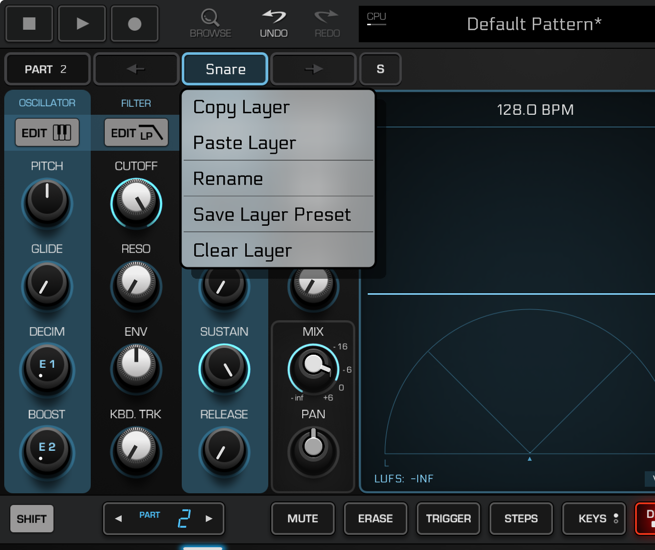
  • Thanks wim.

  • Just saw this on Facebook. Looks like auv3 insert effects might be on the way!

  • Yessss! B)

  • Sweet! I keep hoping he implements a song mode using clips similar to Drambo and LK.

    GR II clicks with me like no other app ever has - love it!

  • @FordTimeLord said:
    Just saw this on Facebook. Looks like auv3 insert effects might be on the way!

    That'd definitely draw me back in for at least a couple projects. :)

  • edited January 29

    That would be great. I hope there is/will be a tip box or IAP cause this kind of initiative should be rewarded

  • Oh yes, this makes me very happy! 😀

  • The user and all related content has been deleted.
  • @offbrands said:

    @jwmmakerofmusic said:

    @FordTimeLord said:
    Just saw this on Facebook. Looks like auv3 insert effects might be on the way!

    That'd definitely draw me back in for at least a couple projects. :)

    Honestly same

    Then again, I'm comfortable working within what I already got. ;)

  • @cuscolima said:
    That would be great. I hope there is/will be a tip box or IAP cause this kind of initiative should be rewarded

    Same!

  • For me 44€ is Too Much per This App!

  • Finally! Auv3 effects. Now I can use this again.

  • @jwmmakerofmusic said:

    @offbrands said:

    @jwmmakerofmusic said:

    @FordTimeLord said:
    Just saw this on Facebook. Looks like auv3 insert effects might be on the way!

    That'd definitely draw me back in for at least a couple projects. :)

    Honestly same

    Then again, I'm comfortable working within what I already got. ;)

    Honestly same 😉

  • @M3G4_7R0N said:
    For me 44€ is Too Much per This App!

    I would say it’s worth it. It’s a fantastic groove box.

  • Strange as it may sound GR2 is my main workstation on iOS. I just love the workflow. Lately hosting Drambo in GR2 as a midi effect has opened it up even more.

  • @M3G4_7R0N said:
    For me 44€ is Too Much per This App!

    For me it’s a fantastic app and 44€ is not to much. Really high potential in all aspects of sequencing and the upcoming hosting feature. Get it and enjoy 😊

  • @ecamburn said:
    Strange as it may sound GR2 is my main workstation on iOS. I just love the workflow. Lately hosting Drambo in GR2 as a midi effect has opened it up even more.

    Same here! I’m slowly transitioning from Korg Gadget (my main app for many years) to GR2.

  • @M3G4_7R0N said:
    For me 44€ is Too Much per This App!

    Then wait for a discount. You'll probably be able to get it for 20 or 25 on black friday
    Out of curiosity: where is it 44? I'm seeing 39 over here.

  • @cyberheater said:

    @M3G4_7R0N said:
    For me 44€ is Too Much per This App!

    I would say it’s worth it. It’s a fantastic groove box.

    I would say is cheap as hell considering how well is it made ..

  • @M3G4_7R0N said:
    For me 44€ is Too Much per This App!

    For me the price is worth it. Jim Pavlov is giving us free update after free update, including the upcoming AUv3 track effects. I'll install GR-II on my iPad Air 13" and try to build a piece of Ambient with it just using stock effects and soundfonts sometime either later today or tomorrow. (I'm about to build Ambient in AUM.)

  • @jwmmakerofmusic said:

    @M3G4_7R0N said:
    For me 44€ is Too Much per This App!

    For me the price is worth it. Jim Pavlov is giving us free update after free update, including the upcoming AUv3 track effects. I'll install GR-II on my iPad Air 13" and try to build a piece of Ambient with it just using stock effects and soundfonts sometime either later today or tomorrow. (I'm about to build Ambient in AUM.)

    I tried to build Ambient in GR-II, and it didn't quite work out as intended. 🫣 I'll try again tomorrow. 😅

  • edited February 8

    @jwmmakerofmusic said:

    @jwmmakerofmusic said:

    @M3G4_7R0N said:
    For me 44€ is Too Much per This App!

    For me the price is worth it. Jim Pavlov is giving us free update after free update, including the upcoming AUv3 track effects. I'll install GR-II on my iPad Air 13" and try to build a piece of Ambient with it just using stock effects and soundfonts sometime either later today or tomorrow. (I'm about to build Ambient in AUM.)

    I tried to build Ambient in GR-II, and it didn't quite work out as intended. 🫣 I'll try again tomorrow. 😅

    Can you explain why it didn't worked out to build ambient in GR-II? Is it the GR-II workflow?

  • The user and all related content has been deleted.
  • @offbrands said:

    @Pierre118 said:

    @jwmmakerofmusic said:

    @jwmmakerofmusic said:

    @M3G4_7R0N said:
    For me 44€ is Too Much per This App!

    For me the price is worth it. Jim Pavlov is giving us free update after free update, including the upcoming AUv3 track effects. I'll install GR-II on my iPad Air 13" and try to build a piece of Ambient with it just using stock effects and soundfonts sometime either later today or tomorrow. (I'm about to build Ambient in AUM.)

    I tried to build Ambient in GR-II, and it didn't quite work out as intended. 🫣 I'll try again tomorrow. 😅

    Can you explain why it didn't worked out to build ambient in GR-II? Is it the GR-II workkflow?

    Great video by Soundtest Room for one element

    Aha! This @Pierre118 was a missing link! Thanks @offbrands . ❤️ Will try again today.

Sign In or Register to comment.