Loopy Pro: Create music, your way.
What is Loopy Pro? — Loopy Pro is a powerful, flexible, and intuitive live looper, sampler, clip launcher and DAW for iPhone and iPad. At its core, it allows you to record and layer sounds in real-time to create complex musical arrangements. But it doesn’t stop there—Loopy Pro offers advanced tools to customize your workflow, build dynamic performance setups, and create a seamless connection between instruments, effects, and external gear.
Use it for live looping, sequencing, arranging, mixing, and much more. Whether you're a live performer, a producer, or just experimenting with sound, Loopy Pro helps you take control of your creative process.
Download on the App StoreLoopy Pro is your all-in-one musical toolkit. Try it for free today.
Comments
No one heard anything?
You'd best ask the devs. If it is currently not available for iPhone, I doubt it will be, and the UI looks a bit busy for a phone, but who knows. I don't think it would be a good user experience so it would probably be an unwise move from their side
finished my foot pedal for this app. so much fun. also pretty fun on loopy pro.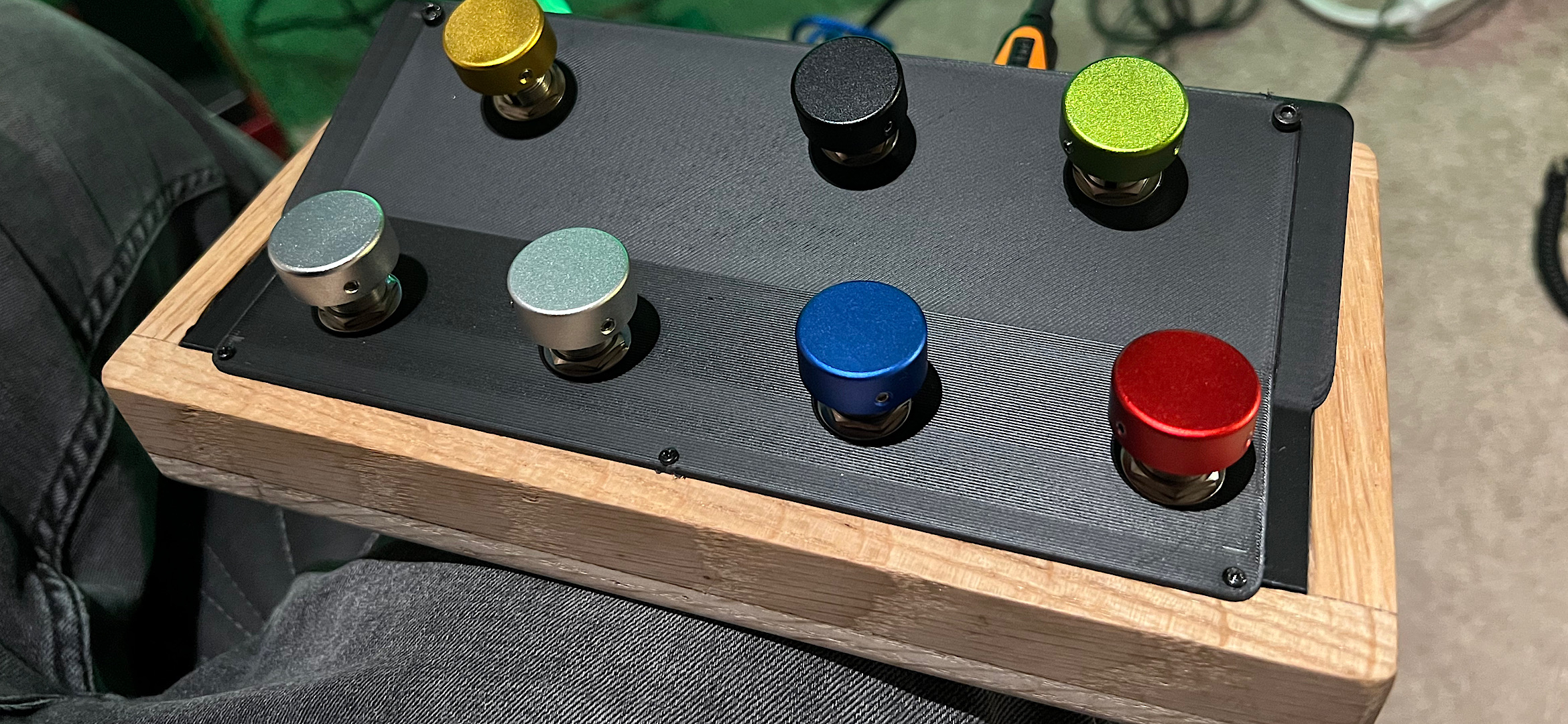
@eross that's so cool. How do you get started on building something like that?
That is a very cool build! May we see some real action using it as well?
I was playing around a bit with Circa today and it's very cool BUT I personally need to learn these looping apps better. I never owned a hardware looper and I blame that for being so bad at using the software ones. I came here just to bump the thread pretty much, so many superb releases drown in all the other superb releases.
yeah, if i can find a little free time in my schedule i can make a video of how it works
As an update to the earlier discussion in this thread regarding setting up slices in Loopy Pro, I’ve just realised that Loopy has a specific Slices widget - i told you i was a novice when it came to Loopy!
So, yes, Loopy can do that very easily, with a lot of control over how it happens and can be set up even quicker than the method i described.
That looks awesome! 🤩 I want one. 🙂
New update dropped:
Gesture Recorders added to the Modulations page. These are a group of six loopers that, instead of audio, will loop the Ul itself. Almost every control in Circa can be recorded and played back, either as a loop or a 1-shot. The transport works just like the audio transports (double click stop to RTZ, hold stop to clear).
The loop toggle button allows you to switch between 1-shot playback and looping playback, and the scissors button trims any dead air at the front of the recording (useful when mousing or recording controls not on the top panel.) To prevent feedback loops, the gesture recorders can not record MIDI input; they only record actual Ul manipulation. You can, however, play the gesture recorders with MIDI input, via two new controls in the momentary assign lists.
Play position is now a continuous modulation target. This is, as you may imagine, somewhat experimental. GLHF
Playback volume is is now ducked while scrubbing position. It was felt by several users that the scrubbing was too loud; we have addressed this.
Slices were not displaying in the Ul when editor was re-opened. This has been fixed.
Several bugs related to waveform start and end point manipulation have been sent to live on a farm in the country.
Various other bug fixes and optimizations.
Can you import files instead of recording?
Nope! 🙃
😭
Can’t you just load them into a file player with the plugin as an insert, then it’ll all automatically line up anyway? You could even have several file player channels sending to a bus that went into the looper on another channel…
I guess. I’m not a live looper, I was thinking of using it for the audio mangling side like a multi track Gauss. Loading the audio files would have been the quick way to do it.
Going on from the comments in this thread by @Gavinski about difficulty manipulating the loop start and end points on the Layers view (which was fixed I believe?), I’m finding that on the Position tab, it is very difficult to reliably do anything other than manipulate the loop start and end points.
I can’t reliably scrub the audio or play slices without it assuming that a touch is intended to reposition the loop start/end points.
Can anyone else confirm this behaviour before I send a bug report? If, on the other hand there’s a technique I’m missing, please let me know. Cheers.
Edit: Ignore this post, there is a technique: use the top half of the position lane to scrub or play slices and the bottom half to adjust the start/end markers. And good luck to you trying to do that reliably if you’re not using a stylus - not much of an area to aim at!
I have wanted to love Circa, but this central playhead issue simply makes it too frustrating for me to use.
I am hoping they are working on a major Circa update, as many of the recent AudioDamage updates have been great.