Loopy Pro: Create music, your way.
What is Loopy Pro? — Loopy Pro is a powerful, flexible, and intuitive live looper, sampler, clip launcher and DAW for iPhone and iPad. At its core, it allows you to record and layer sounds in real-time to create complex musical arrangements. But it doesn’t stop there—Loopy Pro offers advanced tools to customize your workflow, build dynamic performance setups, and create a seamless connection between instruments, effects, and external gear.
Use it for live looping, sequencing, arranging, mixing, and much more. Whether you're a live performer, a producer, or just experimenting with sound, Loopy Pro helps you take control of your creative process.
Download on the App StoreLoopy Pro is your all-in-one musical toolkit. Try it for free today.
Comments
Yeah, my experience is that text entry is a garbage fire across the iOS ecosystem in version 26. Some apps are worse than others. Facebook app, for example, is an absolute disaster. Aside from typos, text entry boxes just sort of disappear in mid entry, text entry just freezes up, all kinds of problems that point to a rather serious bug at the OS level. Hope they get it fixed soon. I suspect it affects other precision touch operations too but I don't have good evidence of that.
I have just discovered that since the iPadOS28 update, it is no longer possible to save user presets in the Mariana synth app, I have it on both iPad Air 4 and 13” Air 6, all I now get is a white strip on the bottom left of the screen (see screenshot), has anyone else found this problem?
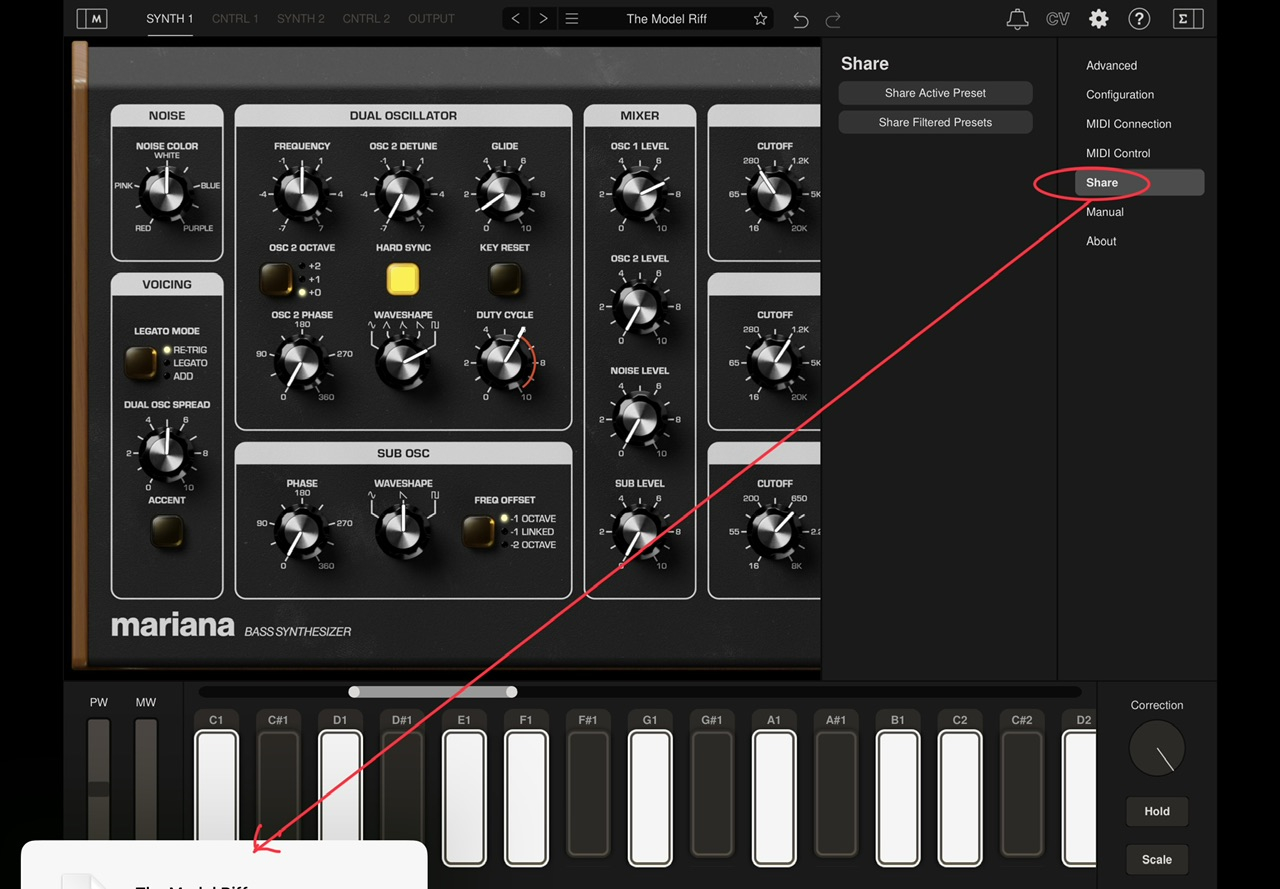
I have tried using the Export State in the preset bar > ham burger, and also in the Mariana Settings > Share > Share Active Preset, but I still get the white stripe on the bottom left of the screen.
I can save user presets in the preset bar > hamburger but anything to do with Export and Share does give me the hidden menu on the lower left (only white stripe and a bit of the tops of letters) as you show. I contacted Moog.
Interesting. Thanks for sharing this. That appears to be an additional problem. What I reported has to do with the redesigned onscreen keyboard for the iPad Pro under iPadOS 26, especially the smaller space bar, but also other changes like narrower letter keys, etc. I documented it with screenshots (see earlier in this thread).
This additional issue may be happening too, but I almost never type on a phone, and I don't have iOS 26 on my phone, so it's hard to know if the stuff shown in the video is happening to me.
Definitely a glitch that needs fixing and I just realized why I haven’t been using Mariana in a while…
The on-screen keyboard is borderline useless and causes hanging notes when playing legato or rapidly playing two notes close to each other, using external controller theses issues don’t happen that often but it’s a pretty buggy synth all in all…
This keyboard sticking behaviour only happens with my Air 4, the DSP in Cubasis also maxes out quite frequently whereas on my Air 6 the Mariana keyboard does not stick at all and the DSP is more stable, that’s probably down to the M2 chip compared to the A14 Bionic chip. I wrote to to the developer back in April/May concerning the bad preset management and Midi Mappings that completely disappear without warning and the inability to save Midi Mappings at all.
The Mariana is very complex with its unlimited modulation routes between all of its controls, and even direct connections to all the Moogerfooger plugins, and yet the simple things we are complaining about are minuscule in comparison.
I wrote to them two days ago, they replied saying they are investigating the compatibility with the OS26 update, they are also looking into the system file picker because it isn’t displaying as expected, but if my previous bug reports are anything to go by…. I wouldn’t hold your breath for a quick fix!
Mike.
The trouble is, the developers inMusic CX Team are not quick in putting things right so we might have a lengthy wait on our hands!
Regarding Mariana, I got a response from Moog looking for more detailed feedback on the hiding menu. They are looking into it.
Anyone messed with their notification text sizes? I was, and now my notification sizes are gigantic, and can’t seem to change it back now.
IOS26.1 anyone tried yet?
iOS refers to the phone. It’s fine. Don’t have a newer model iPad so maybe the experience is different on iPadOS.
Fwiw, a lot of people — including developers — use iOS to generically talk about iOS and iPadOS
Just installed 26.1 across my devices but haven't tried much of anything yet. Install was smooth. Almost immediately switched Liquid Glass into "calm down Apple" (tinted) mode, and there it will stay. Unlock buttons on the phone still look cheesy (IMO) even in tinted mode.
Loopy Pro, AUM, Logic Pro and Ableton Note all launch and play projects for me with no complaints. iPad Pro Gen5 (M1) 12.9.
I haven't broken myself of the habit quite yet, but the two platforms are getting more divergent
All I know is it’s a pain in the butt to write “iOS /iPadOS” in every post not specific to one or the other just because some know it all is likely to feel the need to call me out on it. 🙄
Yes, and it's unfortunate because they're not at all the same thing.
It bugs me too, but I feel it's important to make the distinctions clear especially since the specifics of iPhone, iPad and Mac are so different and questions applicable to one may not apply to the others.
Yep it’s very annoying to write it all out. I tend to only write iPad instead of iPadOS. Only one letter longer than iOS :P
Same. It’s amazing how quickly the novelty of “visually delightful“ (repeated ad nauseam as though saying it enough will make it true) wore off. I think it just looks stupid every time. Not that it’s ugly. Just that it’s so cliched.
As if we needed a reminder that Apple is losing their way on design. The thing that gets me is that it didn't add anything at all to UX except distracting eye candy. Jobs famously said that design is "how it works" and Liquid Glass has nothing to do with that. It's almost all downside from a usability perspective, at least for me.
Oh well. I think with the introduction of Ads to the Maps app, we've officially entered the "strip mining" era at Apple anyway.
I only just had a chance to test out an external monitor with the new OS and joy oh joy we have full screen! Loaded up Logic and it filled the screen of my external monitor and it finally felt that I could have a semi-desktop experience when I wanted or needed. The good times rolled off somewhat when I foolishly thought I could then drag Logic windows across to the iPad, such as the mixer. Maybe this will come with an update. Then my hopes dropped a little more after opening Cubasis. Still in 4:3 on the external monitor.
What’s everyone’s experience with external monitors and the new OS? Digging the update quite a lot regardless.
Im on the verge of taking my iPhone up to 26-26.1? Any last words, lol? But seriously is everything generally working well, especially music app wise.
Despite all of the flowery and obfuscatory language about the environment and bringing great products to users and so on, I constantly remind myself of this very simple reality: They are indeed a business and they need to show a profit. Things which get in the way of this fact won’t last in the long term.
The phone is generally a better experience with iOS 26.
Aside from the liquid glass UI which initially I didn't hate but now grates on me more every day, the phone is nicer to work with on 26. I haven't done much app testing on it though as I rarely feel like making music on it.
Yeah, those headphone jacks were literally destroying Apple.
So far everything is rock solid including battery life in my old 12 max pro. I think I'm staying out for a while on my iPad though. 26.1 is pretty much solid except for Auria Pro but at least it still works great in my old 5th Gen iPad. That's gonna be the Auria Pro hardware unit now as it only reached IOS 16.xxx but it's solid.
I might do the same for the 12.9 M1. I think updates will only make it slower and possibly break things. I don't do banking or other stuff like that on it so it'll be better not to fix if it ain't broke right?
Thanks All, just wanted to check in since I'm about to update.
Cant wait to get a new iPad, fingers crossed its before the new year!
I had such a great deal on my pre-owned M1 12.9" Pro 512 gigs. The guy had just posted for sale and I jumped on it right away. It's getting old already lol but at least it's better than my old 5th Gen iPad.
I'm still > @Tones4Christ said:
I'm still using an iPad Pro with the 1/8" headphone jack.