Loopy Pro: Create music, your way.

What is Loopy Pro?Loopy Pro is a powerful, flexible, and intuitive live looper, sampler, clip launcher and DAW for iPhone and iPad. At its core, it allows you to record and layer sounds in real-time to create complex musical arrangements. But it doesn’t stop there—Loopy Pro offers advanced tools to customize your workflow, build dynamic performance setups, and create a seamless connection between instruments, effects, and external gear.

Use it for live looping, sequencing, arranging, mixing, and much more. Whether you're a live performer, a producer, or just experimenting with sound, Loopy Pro helps you take control of your creative process.

Download on the App Store

Loopy Pro is your all-in-one musical toolkit. Try it for free today.

NEW APP: Super J8 - Inspired by Jupiter-8

145791014

Comments

  • How much did we pay for the super - Super J8 Synth app…..£7.99, now take a look at this eBay listing for the original Jupiter 8 Synth:
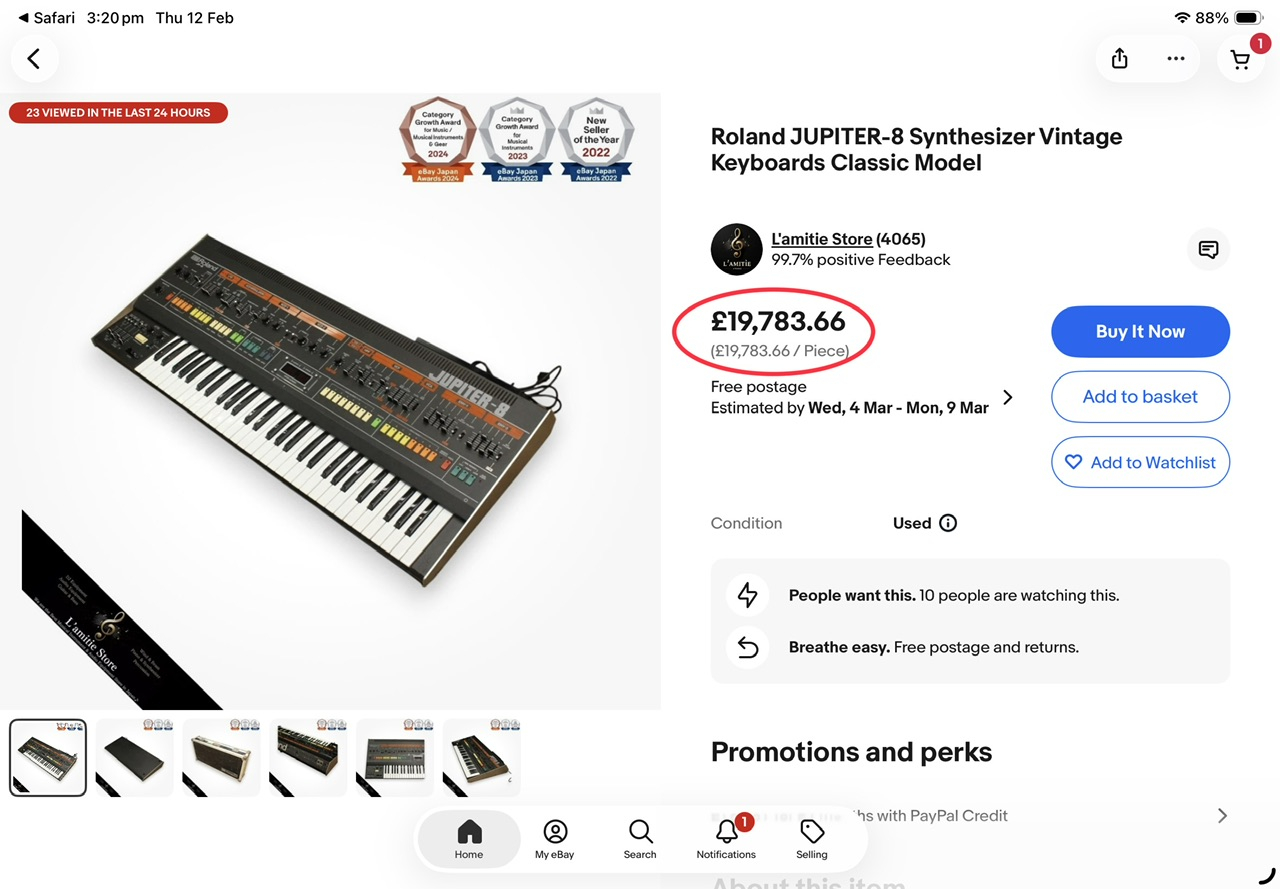
    I reckon we all got a great deal. Thank you @AnalogMatthew for this awesome synth app, I love your work and I’m ready for the P5 and CS80…..sod the new kitchen appliances 😂
    Mike

  • schsch
    edited February 12

    Just curious...

    Is there a way to transfer 'Favorites' status from one device to another? Say I mark all my favs on my iPad and then want to have them available on my iPhone?

    Remarkable feat BTW, the quality and sonic perfection you've created is monumental!

    Finally, is there any chance this could be available on Mac???

  • Is this called Super J8 (front panel) or J8 Synth (as listed in AUv3 list), or do the cyber hipsters just call it J8? Or maybe Jaate? I’m just running through some presets so far and I love the sound of this. Lots of useable sounds right out of the box. I like that it isn’t just a collection of retro 80’s presets but updated sounding versions and completely fresh presets as well. FANTASTIC SYNTH!!!

    I hate to sound like a Dick with nothing better to do than complain about first world minor niggles, but could the small buttons be spaced out so they do not crash into each other (iPhone inside NS2 - no problem in iPad). With careful tapping I can get both to work, but I have pretty big fingers. 🫣

  • @Samu said:

    @rapidfire said:

    @uncledave said:

    @rapidfire said:

    @AnalogMatthew said:

    @DAVIDWB said:
    I too have struggled to get the Mod wheel to control LFO depth for vibrato (on other Audiokit synths) I can only seem to assign LFO (vibrato) rate to the mod wheel

    “LFO > DCO” is the one you want. That’s classic vintage synth speak for vibrato depth, basically how much the LFO bends the oscillator pitch. It’s also how the original Junos and Jupiters did it, with the mod wheel controlling "vibrato" depth by assigning under the "DCO" label on Juno and "VCO MOD" on Jupiter.

    (I'll fix that typo to say LFO > VCO instead of DCO 😁)

    Good morning @AnalogMatthew,
    Please excuse my ignorance but where can I locate the LFO > DCO for oscillator modulation?
    Mike

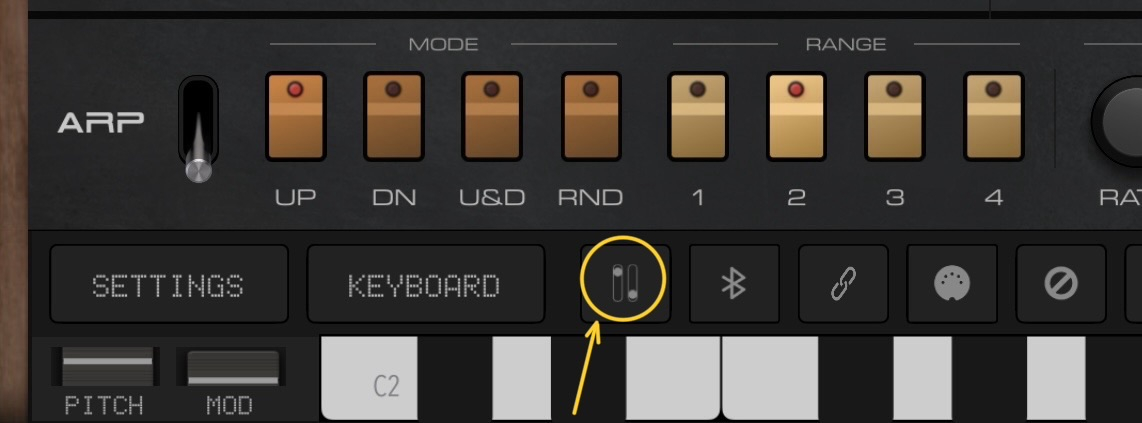
    Hi. Tap on the little "Wheels" icon, second from the right in the top row.

    Hmmm, 🤔
    Can you see the little Wheels icon on my screenshot?

    Yes, next left of the blue-tooth icon and right of the button that says keyboard.
    In the AUv3 it's at the top right.

    Thank you @Samu and @uncledave, very much appreciated for your help 🍻🍻

  • easy purchase, sounds meaty

    just one thing. i dont like that questionmark behind that sentence in the video that involves MPE ;)

    still hope the nerd also gets MPE one day. or can read scala files. that would be enough for me, already. altough, polyphonic pitchbend would make things easier

  • edited February 12

    If I set up an LFO to say 8th and sawtooth and route to VCF and hit a note it will eventually go out of sync. Is that expected behaviour.

    Stopped and started the app and it’s not doing it now.

  • edited February 12

    @sch said:
    Just curious...

    Is there a way to transfer 'Favorites' status from one device to another? Say I mark all my favs on my iPad and then want to have them available on my iPhone?

    Remarkable feat BTW, the quality and sonic perfection you've created is monumental!

    Finally, is there any chance this could be available on Mac???

    Yes there is a way to export from one device and import it into a different device.
    Tap the Favourite Star in the Preset list, tap the send-to icon - last on the right, you are navigated to the Files app, select iCloud Drive or On My iPad, select a new folder and name it, tap SAVE and SAVE again, preset is now stored and ready for importing elsewhere 👍
    As far as I can see there is no J8 folder where you can drop presets into a user folder instead of using Import, but I’m sure I will helpfully be corrected 🍻

    [Edit]
    Please ignore this post, it isn’t the answer you are after, you require the Favourites category to be imported into a different device instead of the actual presets which you already have, sorry.
    Mike

  • Is the sequencer locked into the same sync as the LFOs?

  • edited February 12

    Also another odd one. If you change a parameter, say the filter cut off. The next note will have a soft envelope.
    Edit: and now it’s not doing it.
    Edit2. It’s intermittent
    Edit3. I think it’s if you don’t play a note for a couple of seconds.

  • @rapidfire said:

    @Samu said:

    @rapidfire said:

    @uncledave said:

    @rapidfire said:

    @AnalogMatthew said:

    @DAVIDWB said:
    I too have struggled to get the Mod wheel to control LFO depth for vibrato (on other Audiokit synths) I can only seem to assign LFO (vibrato) rate to the mod wheel

    “LFO > DCO” is the one you want. That’s classic vintage synth speak for vibrato depth, basically how much the LFO bends the oscillator pitch. It’s also how the original Junos and Jupiters did it, with the mod wheel controlling "vibrato" depth by assigning under the "DCO" label on Juno and "VCO MOD" on Jupiter.

    (I'll fix that typo to say LFO > VCO instead of DCO 😁)

    Good morning @AnalogMatthew,
    Please excuse my ignorance but where can I locate the LFO > DCO for oscillator modulation?
    Mike

    Hi. Tap on the little "Wheels" icon, second from the right in the top row.

    Hmmm, 🤔
    Can you see the little Wheels icon on my screenshot?

    Yes, next left of the blue-tooth icon and right of the button that says keyboard.
    In the AUv3 it's at the top right.

    Thank you @Samu and @uncledave, very much appreciated for your help 🍻🍻

    Btw, I was looking for two small Wheels instead of two Faders, that’s the reason for my confusion lol
  • man this thing sounds fantastic. well done 👍🏻

  • So. Many. Presets!!

    And all very nice!

  • Notice how the comments have slowed down……….blame it on @AnalogMatthew 😂

  • @AnalogMatthew said:
    BTW, I hope it doesn't seem like I'm asking for too much... Would any of you that like the app, please give it a good rating/review in the App Store? Apple uses these initial reviews, so they're very important 🙏

    This is really nice. 5 stars rated. It does more than I can possibly grasp.

  • @rapidfire said:
    How much did we pay for the super - Super J8 Synth app…..£7.99, now take a look at this eBay listing for the original Jupiter 8 Synth:

    I reckon we all got a great deal. Thank you @AnalogMatthew for this awesome synth app, I love your work and I’m ready for the P5 and CS80…..sod the new kitchen appliances 😂
    Mike

    And compares very favourably I'd say:

  • @Edward_Alexander said:
    Wow @AnalogMatthew you’ve really created something special here!

    After spending a couple hours with it early this morning, I think this might be my new favorite auv3 synth! Things a BEAST!

    • 1 Thank you very much for all of your hard work that went into making this and providing us this BEASTY at such an unbelievably generous price point. J8 truly is SUPER and such a pleasure to use. Makes making new patches a breeze. I also really appreciate the extra sound packs and all of those upgraded extras that you included into the Super J8 design. WEll done Matthew please take a big bow! BRAVO!!! Congratulations and Cheers Matthew, Elektrik Diva AKA ED
  • @ElektrikDiva said:

    @Edward_Alexander said:
    Wow @AnalogMatthew you’ve really created something special here!

    After spending a couple hours with it early this morning, I think this might be my new favorite auv3 synth! Things a BEAST!

    • 1 Thank you very much for all of your hard work that went into making this and providing us this BEASTY at such an unbelievably generous price point. J8 truly is SUPER and such a pleasure to use. Makes making new patches a breeze. I also really appreciate the extra sound packs and all of those upgraded extras that you included into the Super J8 design. WEll done Matthew please take a big bow! BRAVO!!! Congratulations and Cheers Matthew, Elektrik Diva AKA ED

    You have just pointed something out that I think a lot of us has missed, I think you may be the first person to actually acknowledge the Preset Pack Creators, they do deserve a big thank you from all of us 👏🏻👏🏻👏🏻👏🏻👏🏻👏🏻👏🏻👏🏻👏🏻
    My excuse is I was carried away by the sheer brilliance of J8 🤥
    If anyone has already said thanks….my apologies for saying the contrary.
    Mike

  • edited February 13

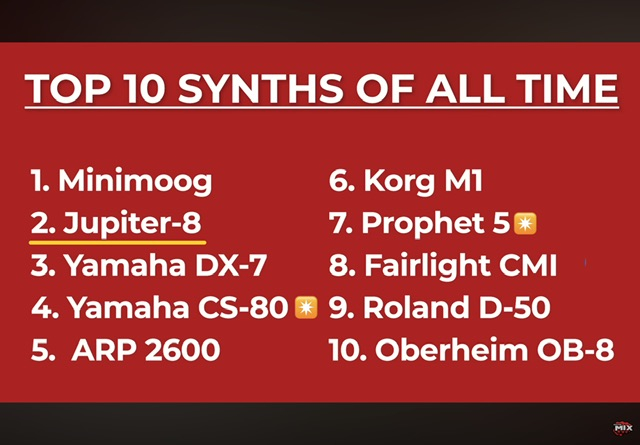
    Here is Dr Mix off YouTube top 10 Synths of all time, the two starred items are @AnalogMatthew next synths on his list for us, notice Jupiter 8 is #2
  • @rapidfire said:
    Here is Dr Mix off YouTube top 10 Synths of all time, the two starred items are @AnalogMatthew next synths on his list for us, notice Jupiter 8 is #2

    Gah that's got me hankering for a iM1-style 'emulation' port of a D-50...

  • Tonight I incorporated J8 into my multi-song performance loopy pro template. The presets I tried played perfectly with the other instruments. One of the lead presets (forgot which one, bank a, first one with “lead” in the name) was just epic.

    This is an inspiring and musical instrument.

  • heshes
    edited February 13

    @dendy said:

    @hes said:

    @dendy said:

    @AnalogMatthew said:
    Good eye, but that one’s on purpose. While you’re actively moving cutoff, I give your touch priority so we’re not sending two competing cutoff values to the DSP at the same time. When you release, the LFO mod resumes on the new baseline cutoff. If it still feels weird in practice, I’m open to a smoother handoff there.

    Well for live performance this is not ideal decision.. if you have LFO as part of sound and you tweak cutoff, this breaks sound.. i would reconsider this.

    Isn't this a design decision required for almost all synthesizers, i.e., any synthesizer that allows LFO modulation of the Filter Cutoff? Or even any synthesizer that has any knob setting that can have LFO modulation?

    Is there no standard way that it's handled?

    A quick question to ChatGPT gave me this answer:

    When a user turns the filter knob while an LFO is active, the resulting filter cutoff 
    frequency is the sum of both, where the knob sets the base frequency and the LFO 
    modulates it. The LFO acts as a dynamic offset, pushing the filter value above 
    and below the base setting defined by the knob. 
    
        Resulting Value: <Filter cutoff> = <Knob setting> + (<LFO waveform> * <LFO amount>)
    
        Interaction: If the knob is turned up, the entire range of LFO modulation moves upward. 
         If turned down, it moves downward.
    
        Performance: This allows for real-time manipulation of a sound's tone, where the LFO 
         creates cyclic movement while the manual knob shifts the overall 
         brightness, as shown in Ableton's live instrument reference and this article on LFOs.
        .
    

    I'm not sure that i understand question but yeah, GPT explained it to you precisely how it should work.

    My question was not exactly to you, perhaps more to Matthew. The way Matthew talked about it made it sound like he was unaware of a standard way of handling it. . . . He talks about "two competing cutoff values", bu the proper way to think about it is one cutoff value that is obtained by combining the knob setting and the LFO mod.

    @AnalogMatthew said:
    Good eye, but that one’s on purpose. While you’re actively moving cutoff, I give your touch priority so we’re not sending two competing cutoff values to the DSP at the same time. When you release, the LFO mod resumes on the new baseline cutoff. If it still feels weird in practice, I’m open to a smoother handoff there.

  • Someone else mentioned the randomizer, I agree, can we get a true randomizer, maybe in addition to the “pick a random preset” randomizer we have here?

    Also, the only other tiny niggle I have is, can we get a setting to increase the brightness of those little red LEDs on the buttons?
    My eyes have a hard time seeing if those are on or off.

    @AnalogMatthew

  • edited February 13

    .

  • @AnalogMatthew said:

    @DAVIDWB said:
    I too have struggled to get the Mod wheel to control LFO depth for vibrato (on other Audiokit synths) I can only seem to assign LFO (vibrato) rate to the mod wheel

    “LFO > DCO” is the one you want. That’s classic vintage synth speak for vibrato depth, basically how much the LFO bends the oscillator pitch. It’s also how the original Junos and Jupiters did it, with the mod wheel controlling "vibrato" depth by assigning under the "DCO" label on Juno and "VCO MOD" on Jupiter.

    (I'll fix that typo to say LFO > VCO instead of DCO 😁)

    @Samu said:

    @DAVIDWB said:

    @rapidfire said:
    Well, I’ve had over 2 hours of playing around with the J8 and I am very impressed with it, some of the presets have to be retuned because they are set in the wrong key compared to the majority, no big issue. Im trying to get my head around trying to assign the Mod Wheel to add vibrato to the oscillators but all I can achieve at the moment is LFO rate instead. Plenty more exploring to do, but that’s for another day.
    I reckon when J8 becomes available everywhere for everyone there will be a mass exodus and the forum will go quiet for a while lol
    Mike

    Bought it very excited but will have to wait until tomorrow to play it
    congrats & thanks @analog_matt !!
    I have several of your other synths too was wondering if you could please answer a question I’ve had for awhile…
    As @rapidfire commented I too have struggled to get the Mod wheel to control LFO depth for vibrato (on other Audiokit synths) I can only seem to assign LFO (vibrato) rate to the mod wheel. Sounds like this new one may present the same issue for me….is this user error on my part? Is it possible to assign the mod wheel to control the LFO vibrato depth rather than the rate? Thanks again!

    Tap on the mod-wheel settings and assign it to the desired function.
    This setting is stored per preset.

    Thanks for your replies and help!

  • Yooo @analog_matt this thing sounds great man! Everything in it just sounds so real! Shoutout to all the people that contributed presets , i was favoring way to many of them. Great work!

  • This sounds like a must-have. Lovely sounds!

  • This synth sounds really good to me
    Congrats to all involved ! Kudos and my hat’s off

  • I bought it last night. It sounds great, awesome work @analog_matt

  • @Loups said:

    @rapidfire said:
    Here is Dr Mix off YouTube top 10 Synths of all time, the two starred items are @AnalogMatthew next synths on his list for us, notice Jupiter 8 is #2

    Gah that's got me hankering for a iM1-style 'emulation' port of a D-50...

    The CS80 too? That’s awesome…but for some odd reason I thought he was doing the Casio CZ 101 next ! Oh wow !

Sign In or Register to comment.