Loopy Pro: Create music, your way.

What is Loopy Pro?Loopy Pro is a powerful, flexible, and intuitive live looper, sampler, clip launcher and DAW for iPhone and iPad. At its core, it allows you to record and layer sounds in real-time to create complex musical arrangements. But it doesn’t stop there—Loopy Pro offers advanced tools to customize your workflow, build dynamic performance setups, and create a seamless connection between instruments, effects, and external gear.

Use it for live looping, sequencing, arranging, mixing, and much more. Whether you're a live performer, a producer, or just experimenting with sound, Loopy Pro helps you take control of your creative process.

Download on the App Store

Loopy Pro is your all-in-one musical toolkit. Try it for free today.

NEW APP: Super J8 - Inspired by Jupiter-8

13468914

Comments

  • @AnalogMatthew said:
    There's a known issue with the LFO 1 > VCO & VCA waveshape. That will be fixed in quick update as soon as Apple approves

    Yes. Just noticed this.

  • edited February 12

    @dendy said:
    @AnalogMatthew

    out of curiosity - any reason you decided to allow LFO go just to 16hz where on Jupiter 8 it goes to 40hz ? It's a pity, cause higher freq LFO modulations are giving entirely new spectrum of sounds ..

    Also - never had Jupiter 8 in my hands - it's same on HW that by default Envelope 2 is hard-coded to modulate AMP instead of Envelope 1 ? It's a bit unusual, 99% of synth use (as default) for hard-wired AMP modulation ENV1 ... just curious if this is same on J8 HW

    Ok noticed one tiny bug (standalone):

    • set LFO -> Cutoff modulation
    • play tone with on-screen keyboard, hold the tone
    • now try tweak cutoff
    • during tweaking of cutoff, LFO>Cutoff modulation disappears, then reappears when you release Cutoff

    I also find the use of 2nd envelope for this absolutely bizarre!

  • About the tabbing system - I think this is designed for phone primarily and probably works pretty well there. My complaint is about what the experience is like on larger devices when you have it sized so there are two layers. Only on the top layer can you jump directly to the tab you want. For the bottom layer you have to cycle through to get to the one you want. Add to that that the preset browser can only be scrolled by tapping on a tab name, rather than the preset name. It's genuinely a confusing system for many users, it could definitely be done better by a) allowing the preset menu to be closed by tapping in the preset name, which is standard on iOS, b) adding a tab menu for the bottom layer.

  • edited February 12

    This is beautiful stuff!

    Just one question for @AnalogMatthew : I know this is how it works in all your synths, but have you considered adding a randomizer? Right now, it only picks a random preset, but a real randomizer randomizing the settings instead would be amazing!

    (Or am I just missing something?)

  • edited February 12

    Hey @dendy, good to hear from you. Great questions!

    @dendy said:
    it's same on HW that by default Envelope 2 is hard-coded to modulate AMP instead of Envelope 1 ?

    Yes, absolutely. Amp is hardcoded to ENV-2 on the original Jupiter-8.
    On init, ENV-2 is Amp and Filter (Juno style), and ENV-1 is Pitch and PWM. And of course you can toggle Filter over to ENV-1, where you can also flip polarity for all three of those destinations you want, and that’s where the polarity stuff becomes extra fun.

    Ok noticed one tiny bug (standalone):

    • during tweaking of cutoff, LFO>Cutoff modulation disappears, then reappears when you release Cutoff

    Good eye, but that one’s on purpose. While you’re actively moving cutoff, I give your touch priority so we’re not sending two competing cutoff values to the DSP at the same time. When you release, the LFO mod resumes on the new baseline cutoff. If it still feels weird in practice, I’m open to a smoother handoff there.

    As for increasing the LFO Hz upper limit, I might add a toggle in the hidden panel to unlock that higher range. Right now it’s set up to match the tempo sync’d ranges pretty closely, so the slider ends up in about the same spot whether you’re in free mode or sync mode.

    (Typing this is giving me flashbacks to all the late nights obsessing over these tiny details. It's to the point now that my social life has an LFO delay)

  • @Gavinski said:
    a) allowing the preset menu to be closed by tapping in the preset name, which is standard on iOS

    It actually does that in standalone. I’m pretty sure I had a very smart, very convincing reason to make AUv3 behave differently… but it is currently 3am here, so that reason has been replaced with finding places I can obtain tacos.

  • @AnalogMatthew said:
    Hey @dendy, good to hear from you. Great questions!

    @dendy said:
    it's same on HW that by default Envelope 2 is hard-coded to modulate AMP instead of Envelope 1 ?

    Yes, absolutely. Amp is hardcoded to ENV-2 on the original Jupiter-8.

    Oh, interesing .. can't remember if i ever saw this approach on other synth, looks like Roland engineers were very creative here
    :lol:

    On init, ENV-2 is Amp and Filter (Juno style), and ENV-1 is Pitch and PWM. And of course you can toggle Filter over to ENV-1, where you can also flip polarity for all three of those destinations you want, and that’s where the polarity stuff becomes extra fun.

    Yeah understand all this, it's pretty flexible.. just that initial default configuration made me like "WTF" and tooke me few seconds until i realised ENV2 is affecting actually also AMP :-)))

    Anyway then it's really good decision you followed how it is wired in original !

    Good eye, but that one’s on purpose. While you’re actively moving cutoff, I give your touch priority so we’re not sending two competing cutoff values to the DSP at the same time. When you release, the LFO mod resumes on the new baseline cutoff. If it still feels weird in practice, I’m open to a smoother handoff there.

    Well for live performance this is not ideal decision.. if you have LFO as part of sound and you tweak cutoff, this breaks sound.. i would reconsider this.

    As for increasing the LFO Hz upper limit, I might add a toggle in the hidden panel to unlock that higher range. Right now it’s set up to match the tempo sync’d ranges pretty closely, so the slider ends up in about the same spot whether you’re in free mode or sync mode.

    Yeah undestand.. if you do this you make me happy :-D It's definitely stuff for more deep sound design workflows ;)

    Anyway forgot to tell ya, good job here on this baby ! For me your best synth by large margin, respect !

  • Always liked Howard Jones

  • @dendy said:
    Anyway forgot to tell ya, good job here on this baby !

    Thank you, that's so nice.

    For me your best synth by large margin, respect !

    I am glad you finally like one of my apps. And hopefully they will keep being better for you!

  • @dendy said:

    @AnalogMatthew said:
    Good eye, but that one’s on purpose. While you’re actively moving cutoff, I give your touch priority so we’re not sending two competing cutoff values to the DSP at the same time. When you release, the LFO mod resumes on the new baseline cutoff. If it still feels weird in practice, I’m open to a smoother handoff there.

    Well for live performance this is not ideal decision.. if you have LFO as part of sound and you tweak cutoff, this breaks sound.. i would reconsider this.

    +1 on this, just noticed it earlier this morning, would prefer that didn't happen I think

  • It’s out

  • If someone could lend me a Jupiter 8 so I could compare that would be great 😊

    @AnalogMatthew
    Did you manage to get your hands on one?

  • edited February 12

    @AnalogMatthew said:
    BTW, I hope it doesn't seem like I'm asking for too much... Would any of you that like the app, please give it a good rating/review in the App Store? Apple uses these initial reviews, so they're very important 🙏

    Gratitude in advance,
    /\nalog Matthew

    Consider it done ✔️ anyway……you didn’t need to ask 😉

  • @AnalogMatthew
    Did you manage to get your hands on one?

    Video starts with nerdy Jup-8 footage 🤓 🎹

  • heshes
    edited February 12

    @dendy said:

    @AnalogMatthew said:
    Good eye, but that one’s on purpose. While you’re actively moving cutoff, I give your touch priority so we’re not sending two competing cutoff values to the DSP at the same time. When you release, the LFO mod resumes on the new baseline cutoff. If it still feels weird in practice, I’m open to a smoother handoff there.

    Well for live performance this is not ideal decision.. if you have LFO as part of sound and you tweak cutoff, this breaks sound.. i would reconsider this.

    Isn't this a design decision required for almost all synthesizers, i.e., any synthesizer that allows LFO modulation of the Filter Cutoff? Or even any synthesizer that has any knob setting that can have LFO modulation?

    Is there no standard way that it's handled?

    A quick question to ChatGPT gave me this answer:

    When a user turns the filter knob while an LFO is active, the resulting filter cutoff 
    frequency is the sum of both, where the knob sets the base frequency and the LFO 
    modulates it. The LFO acts as a dynamic offset, pushing the filter value above 
    and below the base setting defined by the knob. 
    
        Resulting Value: <Filter cutoff> = <Knob setting> + (<LFO waveform> * <LFO amount>)
    
        Interaction: If the knob is turned up, the entire range of LFO modulation moves upward. 
         If turned down, it moves downward.
    
        Performance: This allows for real-time manipulation of a sound's tone, where the LFO 
         creates cyclic movement while the manual knob shifts the overall 
         brightness, as shown in Ableton's live instrument reference and this article on LFOs.
        .
    
  • @AnalogMatthew said:

    @AnalogMatthew
    Did you manage to get your hands on one?

    Video starts with nerdy Jup-8 footage 🤓 🎹

    Nice. 😊

  • @AnalogMatthew said:

    @DAVIDWB said:
    I too have struggled to get the Mod wheel to control LFO depth for vibrato (on other Audiokit synths) I can only seem to assign LFO (vibrato) rate to the mod wheel

    “LFO > DCO” is the one you want. That’s classic vintage synth speak for vibrato depth, basically how much the LFO bends the oscillator pitch. It’s also how the original Junos and Jupiters did it, with the mod wheel controlling "vibrato" depth by assigning under the "DCO" label on Juno and "VCO MOD" on Jupiter.

    (I'll fix that typo to say LFO > VCO instead of DCO 😁)

    Good morning @AnalogMatthew,
    Please excuse my ignorance but where can I locate the LFO > DCO for oscillator modulation?
    Mike

  • Spent a few minutes scrolling presets this morning. Sounds amazing. Have to go to work… I know what lunch break looks like though.

  • Have tried 8 instances in Grooverider 2 on my M1 iPad and the cpu meter barely moved. What witchcraft is this?

  • edited February 12

    @hes said:

    @dendy said:

    @AnalogMatthew said:
    Good eye, but that one’s on purpose. While you’re actively moving cutoff, I give your touch priority so we’re not sending two competing cutoff values to the DSP at the same time. When you release, the LFO mod resumes on the new baseline cutoff. If it still feels weird in practice, I’m open to a smoother handoff there.

    Well for live performance this is not ideal decision.. if you have LFO as part of sound and you tweak cutoff, this breaks sound.. i would reconsider this.

    Isn't this a design decision required for almost all synthesizers, i.e., any synthesizer that allows LFO modulation of the Filter Cutoff? Or even any synthesizer that has any knob setting that can have LFO modulation?

    Is there no standard way that it's handled?

    A quick question to ChatGPT gave me this answer:

    When a user turns the filter knob while an LFO is active, the resulting filter cutoff 
    frequency is the sum of both, where the knob sets the base frequency and the LFO 
    modulates it. The LFO acts as a dynamic offset, pushing the filter value above 
    and below the base setting defined by the knob. 
    
        Resulting Value: <Filter cutoff> = <Knob setting> + (<LFO waveform> * <LFO amount>)
    
        Interaction: If the knob is turned up, the entire range of LFO modulation moves upward. 
         If turned down, it moves downward.
    
        Performance: This allows for real-time manipulation of a sound's tone, where the LFO 
         creates cyclic movement while the manual knob shifts the overall 
         brightness, as shown in Ableton's live instrument reference and this article on LFOs.
        .
    

    I'm not sure that i understand question but yeah, GPT explained it to you precisely how it should work.

  • Is it wrong that I’m more excited by this than rolands upcoming release?

  • Downloaded. Delighted. @AnalogMatthew you've done beautiful work. Thank you so much.

  • @hes said:

    @dendy said:

    @AnalogMatthew said:
    Good eye, but that one’s on purpose. While you’re actively moving cutoff, I give your touch priority so we’re not sending two competing cutoff values to the DSP at the same time. When you release, the LFO mod resumes on the new baseline cutoff. If it still feels weird in practice, I’m open to a smoother handoff there.

    Well for live performance this is not ideal decision.. if you have LFO as part of sound and you tweak cutoff, this breaks sound.. i would reconsider this.

    Isn't this a design decision required for almost all synthesizers, i.e., any synthesizer that allows LFO modulation of the Filter Cutoff? Or even any synthesizer that has any knob setting that can have LFO modulation?

    Is there no standard way that it's handled?

    A quick question to ChatGPT gave me this answer:

    When a user turns the filter knob while an LFO is active, the resulting filter cutoff 
    frequency is the sum of both, where the knob sets the base frequency and the LFO 
    modulates it. The LFO acts as a dynamic offset, pushing the filter value above 
    and below the base setting defined by the knob. 
    
        Resulting Value: <Filter cutoff> = <Knob setting> + (<LFO waveform> * <LFO amount>)
    
        Interaction: If the knob is turned up, the entire range of LFO modulation moves upward. 
         If turned down, it moves downward.
    
        Performance: This allows for real-time manipulation of a sound's tone, where the LFO 
         creates cyclic movement while the manual knob shifts the overall 
         brightness, as shown in Ableton's live instrument reference and this article on LFOs.
        .
    

    Yes. The entire principle of voltage control is that it's additive. That's what made "one volt per octave" was so powerful and musically useful.

  • sounds so amazing. been using j6/viral since this was announced and the difference is stunning.

    i've favorited so many presets that i had to stop. felt like i was favoriting each one.

    there are some presets that clip, no biggie just quirky.

    fantastic work @AnalogMatthew

  • @SirMcp said:
    Is it wrong that I’m more excited by this than rolands upcoming release?

    I feel the same way 👍

  • @rapidfire said:

    @AnalogMatthew said:

    @DAVIDWB said:
    I too have struggled to get the Mod wheel to control LFO depth for vibrato (on other Audiokit synths) I can only seem to assign LFO (vibrato) rate to the mod wheel

    “LFO > DCO” is the one you want. That’s classic vintage synth speak for vibrato depth, basically how much the LFO bends the oscillator pitch. It’s also how the original Junos and Jupiters did it, with the mod wheel controlling "vibrato" depth by assigning under the "DCO" label on Juno and "VCO MOD" on Jupiter.

    (I'll fix that typo to say LFO > VCO instead of DCO 😁)

    Good morning @AnalogMatthew,
    Please excuse my ignorance but where can I locate the LFO > DCO for oscillator modulation?
    Mike

    Hi. Tap on the little "Wheels" icon, second from the right in the top row.

  • @uncledave said:

    @rapidfire said:

    @AnalogMatthew said:

    @DAVIDWB said:
    I too have struggled to get the Mod wheel to control LFO depth for vibrato (on other Audiokit synths) I can only seem to assign LFO (vibrato) rate to the mod wheel

    “LFO > DCO” is the one you want. That’s classic vintage synth speak for vibrato depth, basically how much the LFO bends the oscillator pitch. It’s also how the original Junos and Jupiters did it, with the mod wheel controlling "vibrato" depth by assigning under the "DCO" label on Juno and "VCO MOD" on Jupiter.

    (I'll fix that typo to say LFO > VCO instead of DCO 😁)

    Good morning @AnalogMatthew,
    Please excuse my ignorance but where can I locate the LFO > DCO for oscillator modulation?
    Mike

    Hi. Tap on the little "Wheels" icon, second from the right in the top row.

    Hmmm, 🤔
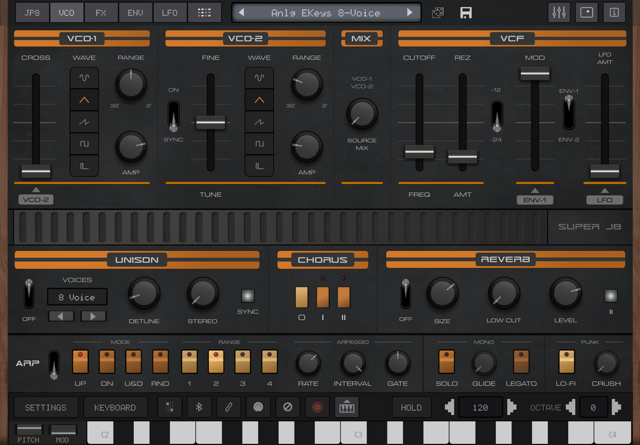
    Can you see the little Wheels icon on my screenshot?

  • @rapidfire said:

    @uncledave said:

    @rapidfire said:

    @AnalogMatthew said:

    @DAVIDWB said:
    I too have struggled to get the Mod wheel to control LFO depth for vibrato (on other Audiokit synths) I can only seem to assign LFO (vibrato) rate to the mod wheel

    “LFO > DCO” is the one you want. That’s classic vintage synth speak for vibrato depth, basically how much the LFO bends the oscillator pitch. It’s also how the original Junos and Jupiters did it, with the mod wheel controlling "vibrato" depth by assigning under the "DCO" label on Juno and "VCO MOD" on Jupiter.

    (I'll fix that typo to say LFO > VCO instead of DCO 😁)

    Good morning @AnalogMatthew,
    Please excuse my ignorance but where can I locate the LFO > DCO for oscillator modulation?
    Mike

    Hi. Tap on the little "Wheels" icon, second from the right in the top row.

    Hmmm, 🤔
    Can you see the little Wheels icon on my screenshot?

    Yes, next left of the blue-tooth icon and right of the button that says keyboard.
    In the AUv3 it's at the top right.

  • Wow @AnalogMatthew you’ve really created something special here!

    After spending a couple hours with it early this morning, I think this might be my new favorite auv3 synth! Things a BEAST!

Sign In or Register to comment.