Loopy Pro: Create music, your way.

What is Loopy Pro?Loopy Pro is a powerful, flexible, and intuitive live looper, sampler, clip launcher and DAW for iPhone and iPad. At its core, it allows you to record and layer sounds in real-time to create complex musical arrangements. But it doesn’t stop there—Loopy Pro offers advanced tools to customize your workflow, build dynamic performance setups, and create a seamless connection between instruments, effects, and external gear.

Use it for live looping, sequencing, arranging, mixing, and much more. Whether you're a live performer, a producer, or just experimenting with sound, Loopy Pro helps you take control of your creative process.

Download on the App Store

Loopy Pro is your all-in-one musical toolkit. Try it for free today.

KiraStudio by BleuBleu OU

13»

Comments

  • Alerted to Famistudio by this, kinda far more tempted by that mainly cause of the portrait mode on phone, but also chiptune >soundfont in my brain😅

  • @FizzyLizzy27 said:

    @Edward_Alexander said:
    Wow, this does look like a well designed app/DAW with some interesting features. It definitely looks like it was at least inspired by NS2 with the piano roll note handles and stuff, as does their previous app.

    I’m gonna pass though, as I don’t listen to, nor create “Chiptune”…

    I think im with @Samu though, as in I’m trying to be more responsible with my “instapurchases”, as I already have plenty to make all the music styles that I make. Plus not to mention that AUBE is reporting 925 AUV3s on the widget. I really don’t know if I should be proud or embarrassed.. damn I’ve spent a lot of money on these things. I’d hate to see the total all added up.

    You should see the number of Steam games my friends have. It would put 925 to shame.

    I do kind of look at it from a gamer perspective: these aren’t all serious tools, and some can bring a weekend’s worth of entertainment for a few bucks and that’s fine. I typically get more mileage out of my “sit on the shelf” apps than with games.

    Oh trust me, I’ve got a lengthy list of steam purchases as well. I don’t know about 925. Haven’t bought anything in the last couple years though, as my gaming PC has kinda fallen behind (my old GTX1070ti doesn’t quite cut it for the most modern games) and I can’t sit at the desktop too long any more. (Probably why I’ve started buying more apps) and buying games for the Xbox now, were I can sit comfortably on the couch.

  • @Krupa said:
    Alerted to Famistudio by this, kinda far more tempted by that mainly cause of the portrait mode on phone, but also chiptune >soundfont in my brain😅

    KiraStudio has chiptune synths in it, not Soundfont import only. ☺️

  • @jwmmakerofmusic said:

    @Krupa said:
    Alerted to Famistudio by this, kinda far more tempted by that mainly cause of the portrait mode on phone, but also chiptune >soundfont in my brain😅

    KiraStudio has chiptune synths in it, not Soundfont import only. ☺️

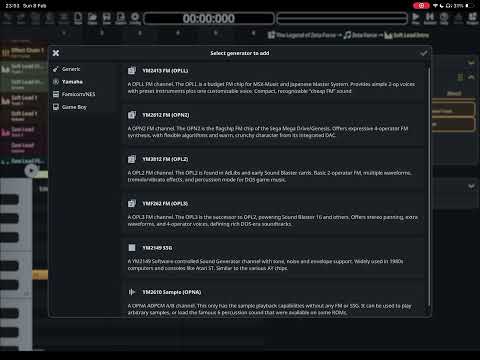
    Yes, tons of good generators in here, I'll share a screenshot in a minute @Krupa

  • @Krupa
    Pause or run at a lower speed if necessary to read the descriptions

  • @Gavinski said:
    @Krupa
    Pause or run at a lower speed if necessary to read the descriptions

    SID support could be nice too ;)

  • @Samu said:

    @Gavinski said:
    @Krupa
    Pause or run at a lower speed if necessary to read the descriptions

    SID support could be nice too ;)

    Whats your fave iOS synth/app for chiptune that's not a tracker Samu?

  • @Gavinski said:

    @Samu said:

    @Gavinski said:
    @Krupa
    Pause or run at a lower speed if necessary to read the descriptions

    SID support could be nice too ;)

    Whats your fave iOS synth/app for chiptune that's not a tracker Samu?

    Yeah that is a nice selection, I’m with Samu on the SID train though, love me some crunch, got several real ones in the studio here already though😅

    I think this one definitely doesn’t have portrait on phone though does it? None of the screenshots show it, but then the Fami one also shows landscape so maybe is an option?

  • @Krupa said:

    @Gavinski said:

    @Samu said:

    @Gavinski said:
    @Krupa
    Pause or run at a lower speed if necessary to read the descriptions

    SID support could be nice too ;)

    Whats your fave iOS synth/app for chiptune that's not a tracker Samu?

    Yeah that is a nice selection, I’m with Samu on the SID train though, love me some crunch, got several real ones in the studio here already though😅

    I think this one definitely doesn’t have portrait on phone though does it? None of the screenshots show it, but then the Fami one also shows landscape so maybe is an option?

    I don't use iPhone, I'm an Android man. Someone else will have to confirm that!

  • @Gavinski said:

    @Krupa said:

    @Gavinski said:

    @Samu said:

    @Gavinski said:
    @Krupa
    Pause or run at a lower speed if necessary to read the descriptions

    SID support could be nice too ;)

    Whats your fave iOS synth/app for chiptune that's not a tracker Samu?

    Yeah that is a nice selection, I’m with Samu on the SID train though, love me some crunch, got several real ones in the studio here already though😅

    I think this one definitely doesn’t have portrait on phone though does it? None of the screenshots show it, but then the Fami one also shows landscape so maybe is an option?

    I don't use iPhone, I'm an Android man. Someone else will have to confirm that!

    But no portrait mode on iPad anyway

  • @Gavinski said:

    @Gavinski said:

    @Krupa said:

    @Gavinski said:

    @Samu said:

    @Gavinski said:
    @Krupa
    Pause or run at a lower speed if necessary to read the descriptions

    SID support could be nice too ;)

    Whats your fave iOS synth/app for chiptune that's not a tracker Samu?

    Yeah that is a nice selection, I’m with Samu on the SID train though, love me some crunch, got several real ones in the studio here already though😅

    I think this one definitely doesn’t have portrait on phone though does it? None of the screenshots show it, but then the Fami one also shows landscape so maybe is an option?

    I don't use iPhone, I'm an Android man. Someone else will have to confirm that!

    But no portrait mode on iPad anyway

    👍🙏

  • edited February 8

    @Krupa said:

    @Gavinski said:

    @Samu said:

    @Gavinski said:
    @Krupa
    Pause or run at a lower speed if necessary to read the descriptions

    SID support could be nice too ;)

    Whats your fave iOS synth/app for chiptune that's not a tracker Samu?

    Yeah that is a nice selection, I’m with Samu on the SID train though, love me some crunch

    https://alexwiklund.bandcamp.com/album/c64-selection-2010-2020
    🔥🔥

  • @Gavinski said:

    Whats your fave iOS synth/app for chiptune that's not a tracker Samu?

    SquareSynth, OPL and miniBit do a pretty decent job and are relatively easy to use.

    Most synths can be programmed to do pretty convincing chip-sounds if/when the modulation sources (ie. step-sequencers, custom LFO waveforms, multi-point envelopes etc.) are up to the task and this is where many 'regular' synths fail...

    For LFOs in particular, being able to control the LFOs waveforms start-phase and switching the output between bi/uni-polar is a must.

    If the LFO provides a 'custom waveform' (this way the start-phase could be shifted by editing the waveform and scrolling the points left/right) it's a real bonus.

    Extra LFO bonuses would be cycle count (ie. how many times the LFO repeats) and a 'Fade In' time (think manually moving the mod-wheel up to increase the modulation depth over a set time period).

    For example an LFO with a 'Delay' that just waits for a fixed time and then bumps up the modulation to 100% is pretty 'un-musical'.

    With enough modulation source one one-shot LFO could be used to ramp up the output of another LFO etc.

    In reality chip-sounds are pretty basic, it's mostly about having absolute control over parameter changes over time.

    One synth on the desktop I've had a real blast with is the free u-he Zebralette 3 which can do almost anything :sunglasses:

  • @Gavinski said:

    @Krupa said:

    @Gavinski said:

    @Samu said:

    @Gavinski said:
    @Krupa
    Pause or run at a lower speed if necessary to read the descriptions

    SID support could be nice too ;)

    Whats your fave iOS synth/app for chiptune that's not a tracker Samu?

    Yeah that is a nice selection, I’m with Samu on the SID train though, love me some crunch, got several real ones in the studio here already though😅

    I think this one definitely doesn’t have portrait on phone though does it? None of the screenshots show it, but then the Fami one also shows landscape so maybe is an option?

    I don't use iPhone, I'm an Android man. Someone else will have to confirm that!

    Not to veer too far off-topic, I remember Summer of last year where I sported an S25 Ultra. It was a great phone, and I made lots of drawings on it with the S-Pen in HiPaint. But, then I redownloaded Auxy Studio on my iPad Mini 7, and I'm like, "Man, this app would be better on an iPhone." Thus, I got the iPhone 16 Pro Max with 1TB storage. 😂 It's easier for me to produce music on a phone than to draw on one.

    And back to topic - KiraStudio looks beautiful on my iPhone 16 Pro Max. Unfortunately, no portrait mode. No settings to switch it to portrait, and turning off rotation lock did nothing either.

  • @jwmmakerofmusic said:

    And back to topic - KiraStudio looks beautiful on my iPhone 16 Pro Max. Unfortunately, no portrait mode. No settings to switch it to portrait, and turning off rotation lock did nothing either.

    Portrait mode would be super on the iPhone even though I'm on the regular iPhone 16...
    ...thankfully there's sone nifty UI scale options in the settings so I can actually see what is going on :sunglasses:

  • @Samu said:

    @jwmmakerofmusic said:

    And back to topic - KiraStudio looks beautiful on my iPhone 16 Pro Max. Unfortunately, no portrait mode. No settings to switch it to portrait, and turning off rotation lock did nothing either.

    Portrait mode would be super on the iPhone even though I'm on the regular iPhone 16...
    ...thankfully there's sone nifty UI scale options in the settings so I can actually see what is going on :sunglasses:

    That's good to know. I didn't know there were UI scale options. I must've missed those. :)

  • @Samu said:

    @Gavinski said:

    Whats your fave iOS synth/app for chiptune that's not a tracker Samu?

    SquareSynth, OPL and miniBit do a pretty decent job and are relatively easy to use.

    Most synths can be programmed to do pretty convincing chip-sounds if/when the modulation sources (ie. step-sequencers, custom LFO waveforms, multi-point envelopes etc.) are up to the task and this is where many 'regular' synths fail...

    For LFOs in particular, being able to control the LFOs waveforms start-phase and switching the output between bi/uni-polar is a must.

    If the LFO provides a 'custom waveform' (this way the start-phase could be shifted by editing the waveform and scrolling the points left/right) it's a real bonus.

    Extra LFO bonuses would be cycle count (ie. how many times the LFO repeats) and a 'Fade In' time (think manually moving the mod-wheel up to increase the modulation depth over a set time period).

    For example an LFO with a 'Delay' that just waits for a fixed time and then bumps up the modulation to 100% is pretty 'un-musical'.

    With enough modulation source one one-shot LFO could be used to ramp up the output of another LFO etc.

    In reality chip-sounds are pretty basic, it's mostly about having absolute control over parameter changes over time.

    One synth on the desktop I've had a real blast with is the free u-he Zebralette 3 which can do almost anything :sunglasses:

    Thnx Samu, some great points there, yeah I really wish all synths had good, creative modulation options built in, this is indeed the problem with most of them.

  • edited February 18

    Okay, after monkeying around with Kirastudio, I've established the start of a useable workflow. Screenshot of the extremely short project I did as a test...

    ...and attached below is the result. Yes, the piece is rather short and sweet, because it's just a quick little experiment for me to get used to Kirastudio in the first place. Its default soundfont has "that Nintendo OST" sound to it that I was looking for. ❤️ Sounds like a Roland SC-55 to me. Shit, I haven't even dug deep into the chip synths in it yet. I also need to figure out how to expand the song length beyond 16 bars.

    I can start an idea on my iPhone and finish it up on my iPad. In the screenshot, you see I laid out my song idea with the default piano in the soundfont before copying the MIDI to their respective tracks and editing the notes further from there. Meaning I can start an idea on iPhone using the default piano and finish it up on iPad if I so wished, or I can finish it up on iPhone, period.

    So, back to the original purpose of this thread - Kirastudio is worth the $10. If you're like me and like to make videogame music like Concerned Ape, Toby Fox, and the composers who made Nintendo OSTs from the mid-to-late 90s and beyond, Kirastudio is worth every penny.

    EDIT: I forgot to mention that Kirastudio has the ability to turn on/off ghost notes and have multiple tracks per channel so I can lay out my MIDI in separate clips rather than all in one. Useful for quick copy/pasting to other channels.

  • >

    ...and attached below is the result. Yes, the piece is rather short and sweet, because it's just a quick little experiment for me to get used to Kirastudio in the first place. Its default soundfont has "that Nintendo OST" sound to it that I was looking for. ❤️ Sounds like a Roland SC-55 to me. Shit, I haven't even dug deep into the chip synths in it yet. I also need to figure out how to expand the song length beyond 16 bars.

    Tap project in the top right corner, then tap song and set the desired number of bars :sunglasses:

  • @Samu said:

    >

    ...and attached below is the result. Yes, the piece is rather short and sweet, because it's just a quick little experiment for me to get used to Kirastudio in the first place. Its default soundfont has "that Nintendo OST" sound to it that I was looking for. ❤️ Sounds like a Roland SC-55 to me. Shit, I haven't even dug deep into the chip synths in it yet. I also need to figure out how to expand the song length beyond 16 bars.

    Tap project in the top right corner, then tap song and set the desired number of bars :sunglasses:

    Right on it, mate! :) Thank you for the info. Cheers. 🍻

  • @jwmmakerofmusic said:

    @Samu said:

    >

    ...and attached below is the result. Yes, the piece is rather short and sweet, because it's just a quick little experiment for me to get used to Kirastudio in the first place. Its default soundfont has "that Nintendo OST" sound to it that I was looking for. ❤️ Sounds like a Roland SC-55 to me. Shit, I haven't even dug deep into the chip synths in it yet. I also need to figure out how to expand the song length beyond 16 bars.

    Tap project in the top right corner, then tap song and set the desired number of bars :sunglasses:

    Right on it, mate! :) Thank you for the info. Cheers. 🍻

    I'm missing an option to 'record' and 'loop' sections of the arrangement (the loop function is not working) especially on the Mac where I'm used to using the keyboard to enter/record notes into a trackers so having 'step recording' in KiraStudio would be totally bonkers!

    At some point I'll shoot him an e-mail but knowing it's a 'spare time project' I don't expect instant fixes or replies :sunglasses:

    Cheers!

  • @Samu said:

    @jwmmakerofmusic said:

    @Samu said:

    >

    ...and attached below is the result. Yes, the piece is rather short and sweet, because it's just a quick little experiment for me to get used to Kirastudio in the first place. Its default soundfont has "that Nintendo OST" sound to it that I was looking for. ❤️ Sounds like a Roland SC-55 to me. Shit, I haven't even dug deep into the chip synths in it yet. I also need to figure out how to expand the song length beyond 16 bars.

    Tap project in the top right corner, then tap song and set the desired number of bars :sunglasses:

    Right on it, mate! :) Thank you for the info. Cheers. 🍻

    I'm missing an option to 'record' and 'loop' sections of the arrangement (the loop function is not working) especially on the Mac where I'm used to using the keyboard to enter/record notes into a trackers so having 'step recording' in KiraStudio would be totally bonkers!

    At some point I'll shoot him an e-mail but knowing it's a 'spare time project' I don't expect instant fixes or replies :sunglasses:

    Cheers!

    Cheers mate. For what it is currently, it's really robust!

  • I’m super tempted to go with FamiStudio for the portrait mode functionality, but all the additional features in Kira sound so good… Torn!

  • @Squishy said:
    I’m super tempted to go with FamiStudio for the portrait mode functionality, but all the additional features in Kira sound so good… Torn!

    Depends if you want to use Kirastudio on iPhone or iPad. Landscape mode works a treat on iPad. On iPhone, it takes a little bit of an adjustment. Also depends on what kind of videogame music you wish to compose. :)

    Then again, both apps are about $15 combined, which isn't horrible by any stretch of the imagination.

  • edited February 18

    @jwmmakerofmusic said:

    @Squishy said:
    I’m super tempted to go with FamiStudio for the portrait mode functionality, but all the additional features in Kira sound so good… Torn!

    Depends if you want to use Kirastudio on iPhone or iPad. Landscape mode works a treat on iPad. On iPhone, it takes a little bit of an adjustment. Also depends on what kind of videogame music you wish to compose. :)

    Then again, both apps are about $15 combined, which isn't horrible by any stretch of the imagination.

    “Why not both? 🤷🏻‍♂️“
    Looking more for something to have ‘on the go’, so I guess that answers my question. Thanks for weighing in!

Sign In or Register to comment.