Loopy Pro: Create music, your way.

What is Loopy Pro?Loopy Pro is a powerful, flexible, and intuitive live looper, sampler, clip launcher and DAW for iPhone and iPad. At its core, it allows you to record and layer sounds in real-time to create complex musical arrangements. But it doesn’t stop there—Loopy Pro offers advanced tools to customize your workflow, build dynamic performance setups, and create a seamless connection between instruments, effects, and external gear.

Use it for live looping, sequencing, arranging, mixing, and much more. Whether you're a live performer, a producer, or just experimenting with sound, Loopy Pro helps you take control of your creative process.

Download on the App Store

Loopy Pro is your all-in-one musical toolkit. Try it for free today.

VS - Visual Synthesizer 2 by Imaginando (Released on iOS)

13

Comments

  • @vlaoladis said:
    I bought VS1 just before VS2 was announces, which made me a bit less motivated to learn it. Let's try to catch up with VS2 then!

    The best way to catch up is to watch our VS 2 tutorials playlist:

  • edited March 2

    @garden said:
    We could really use a full language reference, for the specific implementation of GLSL in this app.

    We haven't defined a new language just a set of rules. Parameters define uniforms that can be used to control visual parameters variables. And visualizers can have access to pre defined uniforms to access data passed by the application.

    You can easily learn by example by cloning existing shaders:

  • wimwim
    edited March 13

    @sinosoidal said:

    @garden said:
    We could really use a full language reference, for the specific implementation of GLSL in this app.

    We haven't defined a new language just a set of rules. Parameters define uniforms that can be used to control visual parameters variables. And visualizers can have access to pre defined uniforms to access data passed by the application.

    I found a bug in the editor that 'bout drove me crazy. I couldn't create or alter a shader manifest to save my life. I finally traced it down to the editor not overriding the Smart Punctuation device setting. Quotation marks were being replaced with "italicized" quotation marks. Turning the setting off in Device Settings > Keyboards fixed the issue, but one shouldn't have to do that.

    I thought I'd mention it here in hopes of saving someone else the couple hours of head scratching it cost me. 😎

  • @wim said:

    @sinosoidal said:

    @garden said:
    We could really use a full language reference, for the specific implementation of GLSL in this app.

    We haven't defined a new language just a set of rules. Parameters define uniforms that can be used to control visual parameters variables. And visualizers can have access to pre defined uniforms to access data passed by the application.

    I found a bug in the editor that 'bout drove me crazy. I couldn't create or alter a shader manifest to save my life. I finally traced it down to the editor not overriding the Smart Punctuation device setting. Quotation marks were being replaced with "italicized" quotation marks. Turning the setting off in Device Settings > Keyboards fixed the issue, but one shouldn't have to do that.

    I thought I'd mention it here in hopes of saving someone else the couple hours of head scratching it cost me. 😎

    Are you mostly editing existing shaders, transcribing them from some other source, or writing them entirely yourself? One thing I've had a problem with is (nothing to do with VS) copying code out of Shadertoy. Their interface just doesn't me to be able to select and copy the code.

  • edited March 13

    @garden said:

    @wim said:

    @sinosoidal said:

    @garden said:
    We could really use a full language reference, for the specific implementation of GLSL in this app.

    We haven't defined a new language just a set of rules. Parameters define uniforms that can be used to control visual parameters variables. And visualizers can have access to pre defined uniforms to access data passed by the application.

    I found a bug in the editor that 'bout drove me crazy. I couldn't create or alter a shader manifest to save my life. I finally traced it down to the editor not overriding the Smart Punctuation device setting. Quotation marks were being replaced with "italicized" quotation marks. Turning the setting off in Device Settings > Keyboards fixed the issue, but one shouldn't have to do that.

    I thought I'd mention it here in hopes of saving someone else the couple hours of head scratching it cost me. 😎

    Are you mostly editing existing shaders, transcribing them from some other source, or writing them entirely yourself? One thing I've had a problem with is (nothing to do with VS) copying code out of Shadertoy. Their interface just doesn't me to be able to select and copy the code.

    It’s near impossible on an iPad (to copy shadertoy code)

    Easier to accomplish on the desktop.

    And of course VS2 uses Metal (MSL) now, so all that GLSL code from shadertoy will have to be converted.

    Edit: or can we use both now? @sinosoidal

  • @Edward_Alexander said:

    @garden said:

    @wim said:

    @sinosoidal said:

    @garden said:
    We could really use a full language reference, for the specific implementation of GLSL in this app.

    We haven't defined a new language just a set of rules. Parameters define uniforms that can be used to control visual parameters variables. And visualizers can have access to pre defined uniforms to access data passed by the application.

    I found a bug in the editor that 'bout drove me crazy. I couldn't create or alter a shader manifest to save my life. I finally traced it down to the editor not overriding the Smart Punctuation device setting. Quotation marks were being replaced with "italicized" quotation marks. Turning the setting off in Device Settings > Keyboards fixed the issue, but one shouldn't have to do that.

    I thought I'd mention it here in hopes of saving someone else the couple hours of head scratching it cost me. 😎

    Are you mostly editing existing shaders, transcribing them from some other source, or writing them entirely yourself? One thing I've had a problem with is (nothing to do with VS) copying code out of Shadertoy. Their interface just doesn't me to be able to select and copy the code.

    It’s near impossible on an iPad (to copy shadertoy code)

    Easier to accomplish on the desktop.

    And of course VS2 uses Metal (MSL) now, so all that GLSL code from shadertoy will have to be converted.

    Edit: or can we use both now? @sinosoidal

    While internaly Metal is used, the code in the editor is GLSL, which is transformed to HLSL which by is turned is compiled to Metal.

  • @sinosoidal said:

    @Edward_Alexander said:

    @garden said:

    @wim said:

    @sinosoidal said:

    @garden said:
    We could really use a full language reference, for the specific implementation of GLSL in this app.

    We haven't defined a new language just a set of rules. Parameters define uniforms that can be used to control visual parameters variables. And visualizers can have access to pre defined uniforms to access data passed by the application.

    I found a bug in the editor that 'bout drove me crazy. I couldn't create or alter a shader manifest to save my life. I finally traced it down to the editor not overriding the Smart Punctuation device setting. Quotation marks were being replaced with "italicized" quotation marks. Turning the setting off in Device Settings > Keyboards fixed the issue, but one shouldn't have to do that.

    I thought I'd mention it here in hopes of saving someone else the couple hours of head scratching it cost me. 😎

    Are you mostly editing existing shaders, transcribing them from some other source, or writing them entirely yourself? One thing I've had a problem with is (nothing to do with VS) copying code out of Shadertoy. Their interface just doesn't me to be able to select and copy the code.

    It’s near impossible on an iPad (to copy shadertoy code)

    Easier to accomplish on the desktop.

    And of course VS2 uses Metal (MSL) now, so all that GLSL code from shadertoy will have to be converted.

    Edit: or can we use both now? @sinosoidal

    While internaly Metal is used, the code in the editor is GLSL, which is transformed to HLSL which by is turned is compiled to Metal.

    Interesting!

  • How can I select a layer via midi?

    Also when VS2 is an auv3 in loopy pro can it still receive keyboard shortcuts?

    Can’t wait to map and optimize.
    Thanks for a great app!

  • wimwim
    edited March 13

    @garden said:

    @wim said:
    I found a bug in the editor that 'bout drove me crazy. I couldn't create or alter a shader manifest to save my life. I finally traced it down to the editor not overriding the Smart Punctuation device setting. Quotation marks were being replaced with "italicized" quotation marks. Turning the setting off in Device Settings > Keyboards fixed the issue, but one shouldn't have to do that.

    I thought I'd mention it here in hopes of saving someone else the couple hours of head scratching it cost me. 😎

    Are you mostly editing existing shaders, transcribing them from some other source, or writing them entirely yourself? One thing I've had a problem with is (nothing to do with VS) copying code out of Shadertoy. Their interface just doesn't me to be able to select and copy the code.

    None of the above ... yet. I was just exploring the basics by attempting to modify a few factory shaders. Imaginando got right back to me about the quotation marks, suggesting to use long-press on the quotation mark key (in the numbers keyboard on ipad), to select the non "smart" quotation mark. I'm no fan of "smart" punctuation, so I'm just going to try leaving it off for now.

    I'm sure they can fix this. Mozaic, Streambyter, and Textastic don't need smart punctuation turned off to work properly.

    If I do try to get into using downloaded shaders, I'll probably end up just re-typing most of them. Since there's conversion that needs to happen, I find that thinking about what's needed in the code while I type helps me to process what's going on. So far the section on adapting shaders in the manual is a bit over my head.

  • wimwim
    edited March 15

    @tput73 said:
    How can I select a layer via midi?

    I would map midi notes to the layer selection buttons. There doesn't seem to be a select next / previous function or anything, so that you could, say twist a dial to scroll through the layers.

    Also when VS2 is an auv3 in loopy pro can it still receive keyboard shortcuts?

    It doesn't appear so.

  • wimwim
    edited March 15

    @wim said:

    @tput73 said:
    How can I select a layer via midi?

    I would map midi notes to the layer selection buttons. There doesn't seem to be a select next / previous function or anything, so that you could, say twist a dial to scroll through the layers.

    Also when VS2 is an auv3 in loopy pro can it still receive keyboard shortcuts?

    It doesn't appear so.

    There are AUv3 parameters for everything though, so MIDI learn, typing keyboard learn, widgets, etc are possible.

  • wimwim
    edited March 15

    @sinosoidal - pickup / takeover mode is badly needed, especially for linked layer parameters. Jumps are virtually guaranteed when using absolute controllers in linked mode.

  • @wim
    Right on, good tips. Thanks

  • If I’ve purchased the expansions for the Mac version do I have to purchase them for the iOS version?

  • @ccwilsoN said:
    If I’ve purchased the expansions for the Mac version do I have to purchase them for the iOS version?

    No. You just need to login with your imaginando account on your device to sync them up. :blush:

  • @sinosoidal I noticed the Text feature accepts emoji as expected, however Genmoji doesn’t work. (When you tap on one to add it to the text field, nothing happens)

    Are there any plans to get this working?

  • @Edward_Alexander said:
    @sinosoidal I noticed the Text feature accepts emoji as expected, however Genmoji doesn’t work. (When you tap on one to add it to the text field, nothing happens)

    Are there any plans to get this working?

    Sorry for my ignorance. What is genemoji and how do you use it? Can you share a video with a simple workflow so we can better understand?

  • @sinosoidal said:

    @Edward_Alexander said:
    @sinosoidal I noticed the Text feature accepts emoji as expected, however Genmoji doesn’t work. (When you tap on one to add it to the text field, nothing happens)

    Are there any plans to get this working?

    Sorry for my ignorance. What is genemoji and how do you use it? Can you share a video with a simple workflow so we can better understand?

    Genmoji is Apple’s new “Apple Intelligence” enable feature where users can create new emoji on the keyboard (for use mainly with iMessage between users with supported devices; I think iPhone 15 pro or M1 iPad Pro and up, with iOS 18.3 and up.)

    However, according to Apple, this feature can be implemented in other apps, such as graphical, or paint/art apps where users might use Text and/or emoji.

  • The reason I ask @sinosoidal, is because I see it available on the keyboard for text/emoji entry (see attached pic)

    But when I try to use one (a custom, user created Genmoji) nothing happens, while regular emoji work fine.

  • @Edward_Alexander said:
    The reason I ask @sinosoidal, is because I see it available on the keyboard for text/emoji entry (see attached pic)

    But when I try to use one (a custom, user created Genmoji) nothing happens, while regular emoji work fine.

    Here you are supposed to write text. As far as I could see from your question to gemini, the output will be an image. The text functions is supposed to have text only.

  • wimwim
    edited March 18

    No Apple Intelligence Genmogis support!?!? No Stickers? No Digital Touch?

    That's it, I'm requesting a refund.

  • @wim said:
    No Apple Intelligence Genmogis support!?!? No Stickers? No Digital Touch?

    That's it, I'm requesting a refund

    Haha, now I didn’t say all that.

    I’ve been beta testing another upcoming visual app for a couple years now.

    In it, I like doing a lot of text based visuals, along with all the typical shaders like the ones found in VS.

    Every so often, I’ll remind the developer that we should implement Genmoji, which will open up a whole new plethora of creative options. He hasn’t added it yet, but says he’s looking into it. I think he sees the potential.

    The Imaginando crew is obviously wanting to keep adding more and more packs of shaders and visual presets to give users more and more flexibility for creations. Genmoji could be yet another layer. It’s just another option or creative tool.

    @sinosoidal I think you guys should look into it as well. Heck, sell it as an IAP; “the Genmoji pack”

    There’s a lot you can do with it, not just smileys. You can create all kinds of shapes, designs, and fancy type face lettering like these I made for my initials:

  • wimwim
    edited March 19

    @Edward_Alexander said:

    @wim said:
    No Apple Intelligence Genmogis support!?!? No Stickers? No Digital Touch?

    That's it, I'm requesting a refund

    Haha, now I didn’t say all that.

    I know. I'm just messing with ya'.

    But now I'm hooked. I don't see how I can get along without icing with sprinkles on my text after seeing that. Do they come in chocolate?

  • Hello, How do you import your own custom image in Imaginando VS2? I can’t figure out where or how to do that. Any guidance would be appreciated!

  • @Jeezs said:
    Hello, How do you import your own custom image in Imaginando VS2? I can’t figure out where or how to do that. Any guidance would be appreciated!

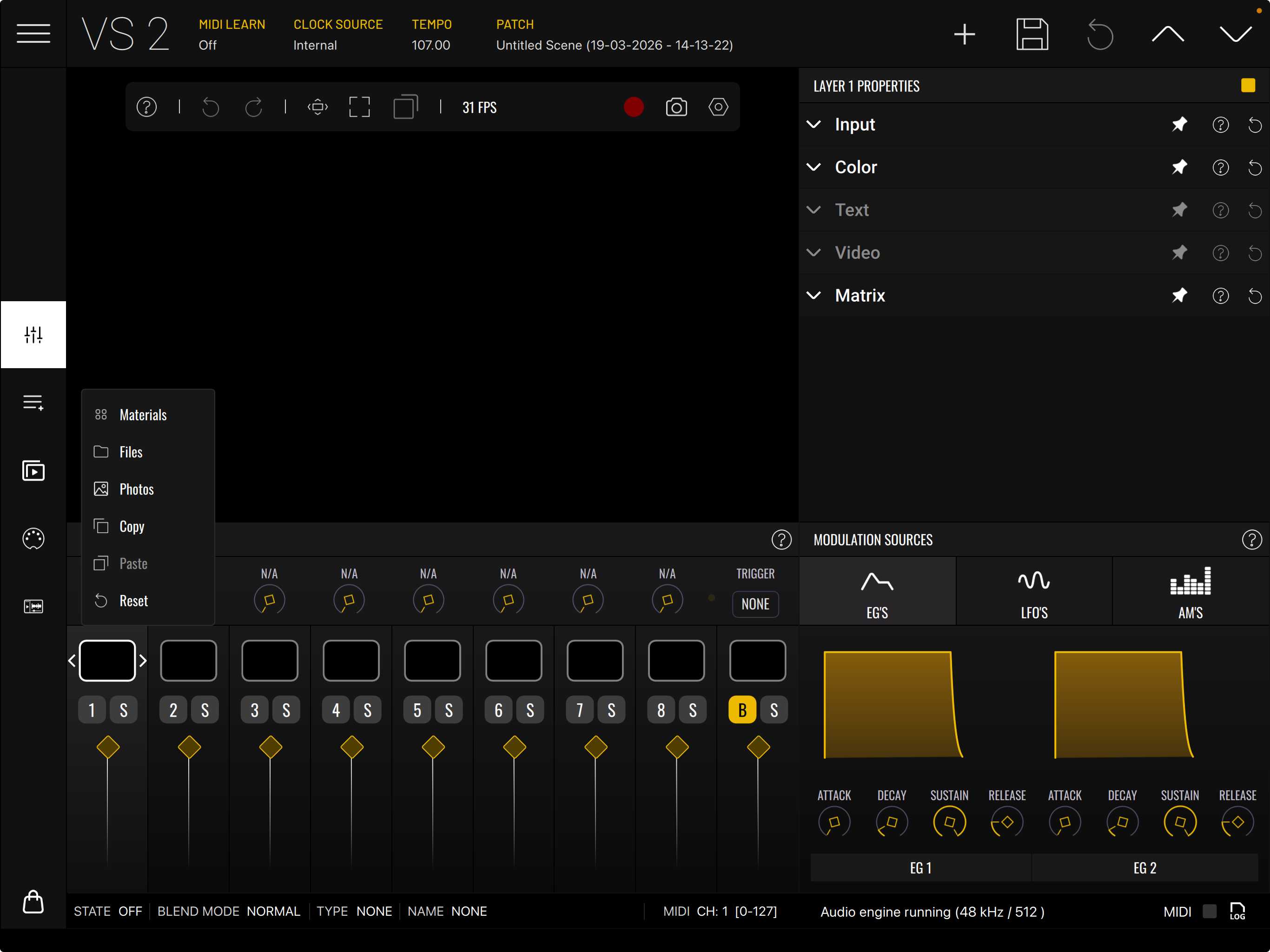
    Long press , on black square above the image mixer and you select photo or files to access images.
  • @hacked_to_pieces said:

    @Jeezs said:
    Hello, How do you import your own custom image in Imaginando VS2? I can’t figure out where or how to do that. Any guidance would be appreciated!

    Long press , on black square above the image mixer and you select photo or files to access images.

    Thanks a lot

  • edited March 31

    @sinosoidal
    Restore purchases doesn’t seem to work on vs1 packs inside vs2?
    Is there a fix…?

  • @id_23 said:
    @sinosoidal
    Restore purchases doesn’t seem to work on vs1 packs inside vs2?
    Is there a fix…?

    Please take a look here:

    https://help.imaginando.pt/en/article/how-do-i-sync-my-vs-1-expansion-pack-purchases-with-vs-2-ffe13i/

  • @sinosoidal said:

    @id_23 said:
    @sinosoidal
    Restore purchases doesn’t seem to work on vs1 packs inside vs2?
    Is there a fix…?

    Please take a look here:

    https://help.imaginando.pt/en/article/how-do-i-sync-my-vs-1-expansion-pack-purchases-with-vs-2-ffe13i/

    Perfect!
    Thanks very much!

Sign In or Register to comment.