Loopy Pro: Create music, your way.
What is Loopy Pro? — Loopy Pro is a powerful, flexible, and intuitive live looper, sampler, clip launcher and DAW for iPhone and iPad. At its core, it allows you to record and layer sounds in real-time to create complex musical arrangements. But it doesn’t stop there—Loopy Pro offers advanced tools to customize your workflow, build dynamic performance setups, and create a seamless connection between instruments, effects, and external gear.
Use it for live looping, sequencing, arranging, mixing, and much more. Whether you're a live performer, a producer, or just experimenting with sound, Loopy Pro helps you take control of your creative process.
Download on the App StoreLoopy Pro is your all-in-one musical toolkit. Try it for free today.
Comments
thanks, mug area by day and pint area by night
Those look nice!
@Bootsy I like your setup.
@steve99 Thanks man. It’s coming along. I’m finally able to create the way I’ve been wanting to. Honestly my next purchase is gonna be a really proper mixer. It gets quite pricey in that realm so it’ll be a minute. I may go with the Bluebox for now? Also I’m not totally feeling everything being super compact, cluttered the way it is. Looking for something flat. If that makes sense?
I’ve had almost no space in my apartment to get anything set up other than a few small things, but bought a house finally!! I move this weekend. I’ll finally get to set up a studio where I can just be free to make music and have everything already set up. I’ll get some pics after I get it setup.
I love this! Did you coffee table a touch screen all-in-one?
Yes. It is for when I’m too lazy even for moving from the couch and go on the desk 😂😂😂 (even if the keyboard there is really low quality). Jokes apart…it’s very useful also for controlling Studio One running on the desk with the touch screen and giving me some distance to better listen what I’ve done (since I really AM so lazy that I didn’t substitute the monitors I sold some month ago 😂)
How it started:

How it’s going:
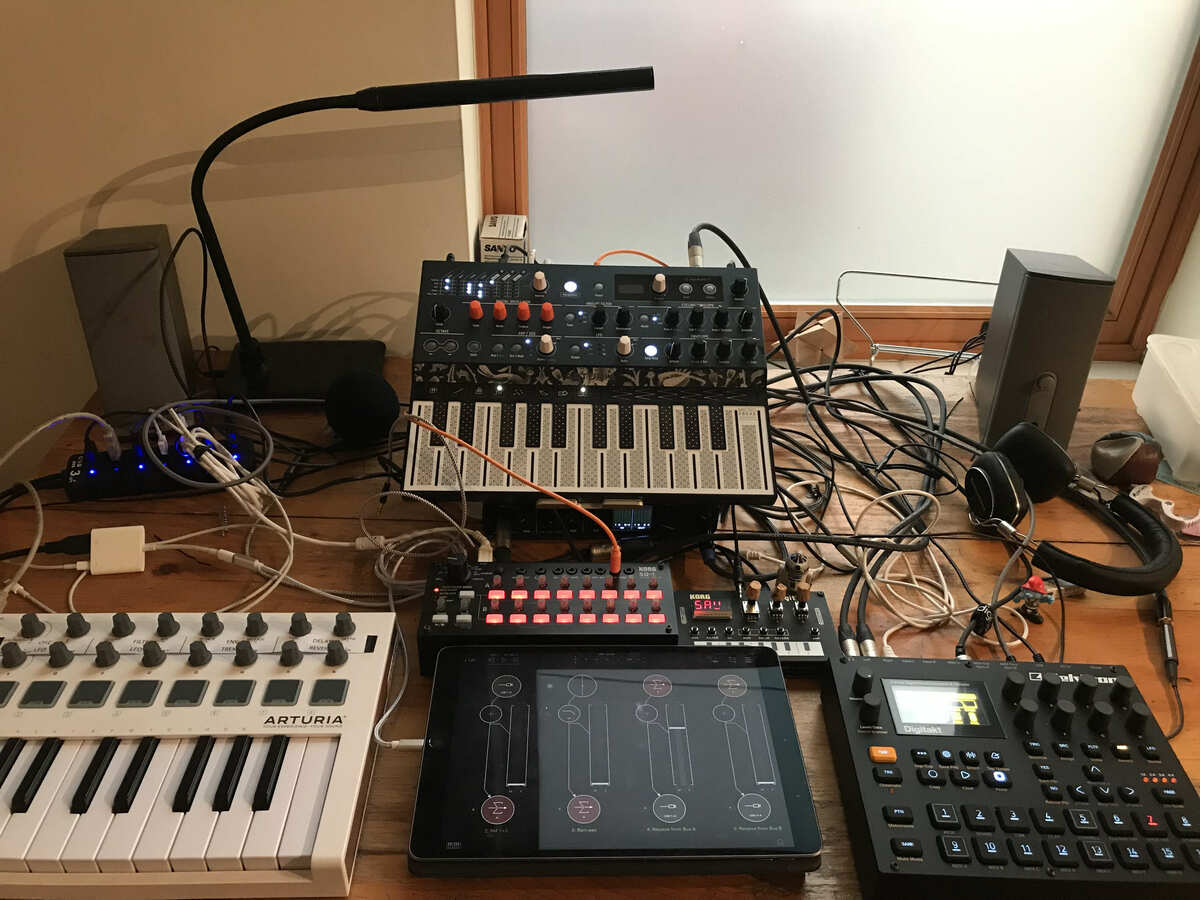
It’s been a crazy year! I discovered the forum and all the apps last year during lockdown and got sucked right in. Now I’ve added taken a major plunge and added the Digitakt, which I love. Drambo and Mirack are total gateway drugs. Keep your kids away from this stuff.
I have learned a lot from this forum and more to come. Starting with cable organization!
That setup looks very immediate and fun!
I noticed most of the hardware has built in sequencers. Are you using any IOS sequencing for the hardware too?
I’m just trying out things but a central motivation has been to use the iPad mostly as mixer + effects, having all the generators and sequencers as hardware/external. Before the digitakt I was mostly using Drambo as the sequencer when using the whole set up. This is also my work desk so the whole crew comes out only on the weekends. Weeknights are limited to one box or two.
Sturdy stand. Can still use Loopy with screen further away.
but the deck near launchpad maybe more important.
Long usb cable. For sit down drumming.
Girl looks so self-conscious but has great voice! No offence, but I think she’s better than you
@jebni Thanks. She's my daughter, so I hope she's better than me! 😉
So what would you even use the launchpad x for? Now the need for finding a cool stand has worn off. Think it would need to work well with loopy or find a decent function within setup and obviously for finger drums. Not many apps for fingerdrums. Theres drambo and gr-16 ( with sequencers if need be ) What about sound quality and midi input of Fred Corvest drum app? Or other drum apps.
Super solid. Ratling is from elsewhere. Seems like I just to be successful with a stand. Mission accomplished.
Which by the way, you're stealing her youth. She's getting older, but you're only getting younger! Kudos to whatever lifestyle you're living, mate
I love so much when parents and kids get to jam together. My older nephew didn't get this chance (but he used to jam with me and my other brother), but the new generation of twins already like to be around when my brother plays guitar and my sister in law sings
Scratching feels good. You can be stiff or flow like a wave.
Just thought of a setup. Hoping djplayer were good. Subscription. Hoping the idevice to line in ( without touching idevice and another ) dosent cause a ground issue.
So. It will be cue points from djplayer pro to line in. An auv3 apps on ipad mini. Maybe koala or drambo. To switch tracks. Route to maybe iphone. Where kb1 will be a delay on scratches and a delay on track. Still got launchpad for drums. Not really having to move everything about. Ipad mini would be better when big ipad is but not sure.
Think this should be my project for now rather than making tracks.
Not sure. Never used cue points. Not sure what arm is best.
Can cuepoints in djplayer be made bigger? Seems silly the cue points you get.
Better still.
Bigger cue points. More pad style effects on iphone. Latch effects on launchpad. Just need a mute on iphone for track. Will find an app that is cool for launching tracks. What app might be cool for launching tracks in aum or iaa?
Quite cool. Apart from beat juggling and deck sound quality. Who needs to buy an additional scratch setup plus a laptop.
Scratching with effects. Good to have a selection of delays. Screw you Pioneer.
Not even using launchpad for any. Ipad screen is better for the un-latched flick on style effects. Which is also ideal. Mapped to the audio track to mute. Better than a real mixer channel fader to mute opposite track. Only problem is I chose a turnado also. Stutter makes my crab seem a but slow.
My new live setup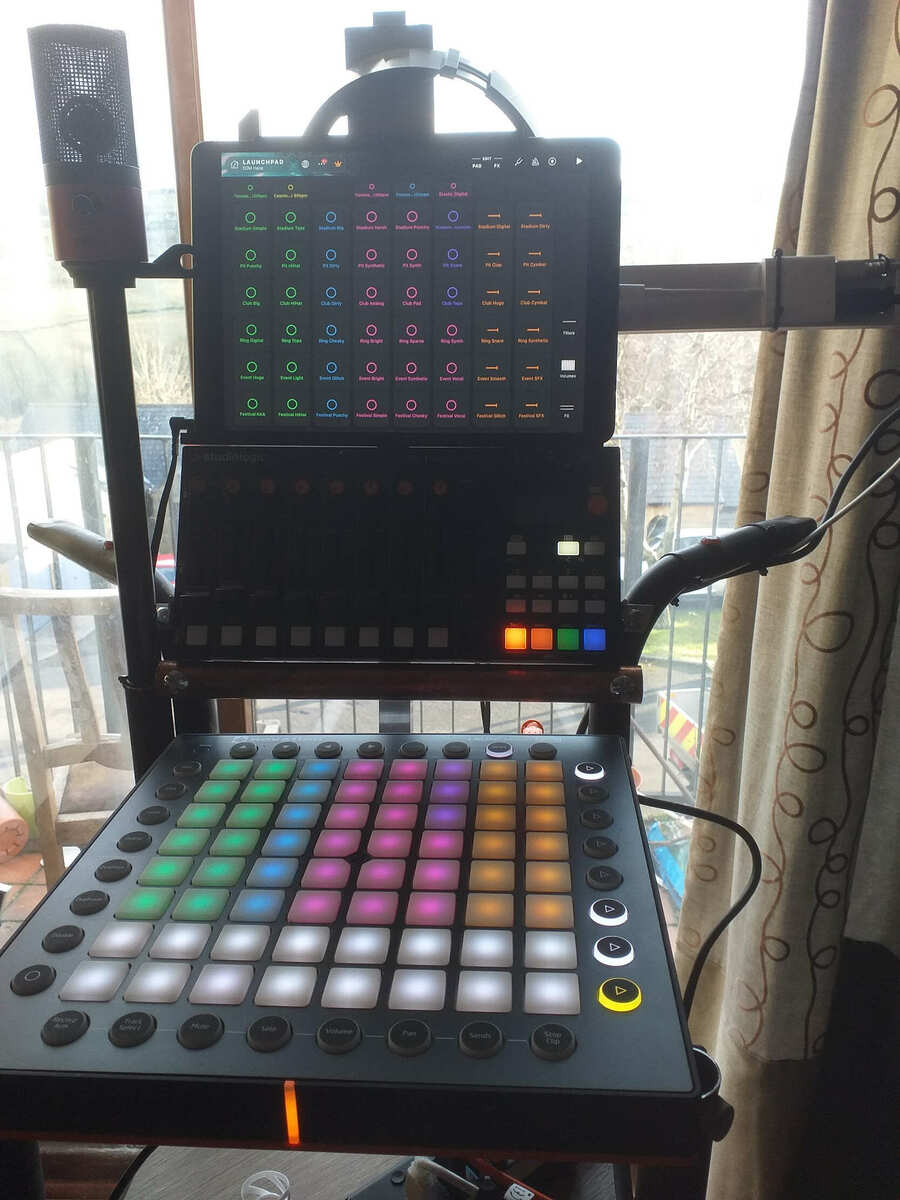
This now has a special arm to prevent damage tcables from gravity, bloody dongles. lol
Also includes a microphone which can either be static or pull out.
My dongle protector… see below
Just moved into a new house last week, that means new studio room! I still need to order some new bass traps since this room is taller than my last one, but it's getting there!
The window doesn't bother me since it's behind the speakers and no sound is directly reflected off it. Maybe not ideal in theory, but in use I want to see out the window while working so I'll put up with it
I would definitely say that each space has it's own unique sound, everything from the shape of the room to the materials it's made out of affect that. I've had my desk, monitors, and most of the acoustic treatment in roughly the same place the last three rooms I've had though, and that helps keep things at least a little consistent. Unless maybe I'm not understanding your question?
I spent the bulk of last year getting into guitar pedals & buying a few guitars to replace ones I'd sold years before. I always just plugged straight into the amp and if I did use a pedal it was an overdrive & maybe a wah. Being home for months meant lots of guitar playing and experimenting with pedals kept me sane, as ludicrous as that sounds. My pedalboard as it is today:
I ran into some great deals on Reverb and bought a few Strat's and a Les Paul. I've been digging these rack stands as it allows easy access for experimenting with different guitar tones:
My main bass for years has been my Eko Barracuda Bass, a hollowbody ES style bass that was influenced by the Gibson EB2. It has tapewounds that have been on it for literally decades and it has that Hofner bass warm thud in spades. Unfortunately if you want a more present tone it just isn't the bass for projecting highs...or slapping, lol.
So after searching awhile I bought a Squier Classic Vibe Jazz Bass that I put roundwounds on; total James Jamerson, John Paul Jones territory. I got a Music Man Sterling StingRay Bass as well that I put RotoSound roundwounds on. Now that bass IS one you can slap on.
Now that I've got three basses each with a different string type (tapewound, flatwound & roundwound) it has made writing basslines a very cool experience. The different tones inspiring different directions to take. If you've got three basses I recommend trying it.
I remember posting in a studio thread before (there's a few) and my main set up hasn't changed too much. A Tascam US-2x2 interface, Behringer UMC404HD 4 input interface or a TC-Helicon Go Solo go into my Air 3 depending on what's being recorded. I usually just use a Novation two octave controller or onscreen keys for synths. An ART Tube MP for mics & direct bass go into an interface and depending on what the guitar setup is I'll either go simple into the Air 3 with the Go Solo or I'll mic up one of my amps (A Stage Right Tube combo that sounds surprisingly good, or my Fender Deluxe) with my pedalboard.
The reason I got into iOS music production is that I wanted to return to the tactile feel of working with PortaStudio's but with pro quality sound & plugins. Sitting at a desktop with a mouse was wearing thin. With the rumors of Logic possibly coming to iPadOS I wonder if this format has kind of snuck up it's own backside or will the iPad version of Logic be a game changing mixture of what we all love about iOS music production with the power and stability of a major league DAW?
We'll see...
@JRSIV lol that's waaayyyy too many guitars! Nice collection though 👍
My "studio" is really just my home office that I run my business from, and I have to try and keep it family-friendly:
I have 3 guitars, the one on the right is a 12 string I don't play much:
My two main guitars are a Les Paul and an Epiphone J200:
And behind the Les Paul is a little 5w tube amp, which is beautiful sounding:
And tucked in right behind the desk is a hard case:
With my relatively modest pedalboard inside, still WIP with mostly budget pedals:
But I like the fact it can be set up really quickly, and then tidied away when not in use.
Behind the door is a shelf with some more audio stuff:
And in the hard case on the top, my very small mic collection: