Loopy Pro: Create music, your way.

What is Loopy Pro?Loopy Pro is a powerful, flexible, and intuitive live looper, sampler, clip launcher and DAW for iPhone and iPad. At its core, it allows you to record and layer sounds in real-time to create complex musical arrangements. But it doesn’t stop there—Loopy Pro offers advanced tools to customize your workflow, build dynamic performance setups, and create a seamless connection between instruments, effects, and external gear.

Use it for live looping, sequencing, arranging, mixing, and much more. Whether you're a live performer, a producer, or just experimenting with sound, Loopy Pro helps you take control of your creative process.

Download on the App Store

Loopy Pro is your all-in-one musical toolkit. Try it for free today.

Loopy Pro is here!

1363739414250

Comments

  • @espiegel123 said:

    @dobbs said:
    Hm… ipad mini 5, ipadOS 14.8
    When the app asked me to do the echo calibration during first startup, nothing happened, it just skipped the process. When I trigger the calibration manually, I see a never ending rotating icon and again nothing happens. Is this a known bug?

    Not a known problem. Can you power your device down and restart or do a hard reset and see if it still happens after you restart?

    Bloody hell, that chirp almost gave me a heart attack!

    Yes, reboot did the trick!

  • @Michael
    I have a feature request/suggestion that might be useful for people and definitely myself.
    I have been trying to send the metronome in one of my airpods by syncing Bluetooth from the iPad to my iPhone between 2 loopys and its been very glitchy and inconsistent.

    It would be awesome to have the offset feature on hardware outputs for the metronome.
    You could then connect a 5.0 Bluetooth transmitter to an output and send it straight to an airpod and other Bluetooth earbuds.

    I was trying to change offset on the iPad to the iPhone and it constantly changes the amount you need for them to stay in sync and on the iPad after I would set the offset, reset the clock and start a new loop, the offset would jump back to zero.

    Thank you for all your hard work and this amazing thing you created :)

  • I feel like a moron for asking this, but how do you route audio from non-Audio Unit apps into Loopy Pro? I've tried using Audiobus, but Audiobus only sees Loopy HD as an output, not Loopy Pro?

    Am I missing something incredibly obvious?

  • @Karma said:
    I feel like a moron for asking this, but how do you route audio from non-Audio Unit apps into Loopy Pro? I've tried using Audiobus, but Audiobus only sees Loopy HD as an output, not Loopy Pro?

    Am I missing something incredibly obvious?

    I think Audiobus support is coming to Pro. For now, you can load Loopy Pro as an effect in AUM and pump IAA apps into it through there

  • @Halftone said:

    @Karma said:
    I feel like a moron for asking this, but how do you route audio from non-Audio Unit apps into Loopy Pro? I've tried using Audiobus, but Audiobus only sees Loopy HD as an output, not Loopy Pro?

    Am I missing something incredibly obvious?

    I think Audiobus support is coming to Pro. For now, you can load Loopy Pro as an effect in AUM and pump IAA apps into it through there

    Ah! Thanks! I was going nuts thinking I must be doing something wrong!

  • @Karma said:
    I feel like a moron for asking this, but how do you route audio from non-Audio Unit apps into Loopy Pro? I've tried using Audiobus, but Audiobus only sees Loopy HD as an output, not Loopy Pro?

    Am I missing something incredibly obvious?

    You can run the AUv3 version of Loopy Pro as an FX in Audiobus. You won't be able to host AUs in it but you can copy and paste loops from the AU into the standalone, or open the whole AU project in the standalone when done.

  • @espiegel123 said:

    @ervin said:

    @espiegel123 said:

    @dobbs said:
    Hm… ipad mini 5, ipadOS 14.8
    When the app asked me to do the echo calibration during first startup, nothing happened, it just skipped the process. When I trigger the calibration manually, I see a never ending rotating icon and again nothing happens. Is this a known bug?

    Not a known problem. Can you power your device down and restart or do a hard reset and see if it still happens after you restart?

    I never fails to impress me how ios troubleshooting in 2021 is still based on The Windows Method from the 1990's. 😊

    True of any hardware/software system, not just iOS. Nor is it a method that particularly relates to Windows or the 90s.

    Power-cycling and resetting give one a known (or semi-known state).

    👍 Thank you, I guess

  • @wim said:

    @Karma said:
    I feel like a moron for asking this, but how do you route audio from non-Audio Unit apps into Loopy Pro? I've tried using Audiobus, but Audiobus only sees Loopy HD as an output, not Loopy Pro?

    Am I missing something incredibly obvious?

    You can run the AUv3 version of Loopy Pro as an FX in Audiobus. You won't be able to host AUs in it but you can copy and paste loops from the AU into the standalone, or open the whole AU project in the standalone when done.

    Ah. That sounds like an interesting workaround! Thanks!

  • edited January 2022

    @Karma said:

    @Halftone said:

    @Karma said:
    I feel like a moron for asking this, but how do you route audio from non-Audio Unit apps into Loopy Pro? I've tried using Audiobus, but Audiobus only sees Loopy HD as an output, not Loopy Pro?

    Am I missing something incredibly obvious?

    I think Audiobus support is coming to Pro. For now, you can load Loopy Pro as an effect in AUM and pump IAA apps into it through there

    Ah! Thanks! I was going nuts thinking I must be doing something wrong!

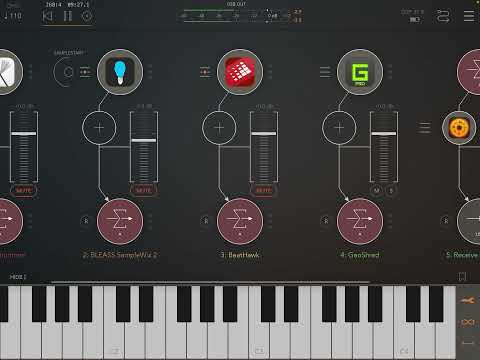
    @richardyot made a useful video about this use case
  • wimwim
    edited January 2022

    You're right though @ervin. If Apple fanboys could mock Windows all those years for having to be rebooted so often, smirking at having to reboot iOS devices often to fix issues is more than justified. Particularly after 30 years of "progress" in computing.

  • edited January 2022

    Anyone out there with a Singular Sound Midi Maestro successfully controlling Loopy Pro? I'm struggling to get it to do what I want it to. And no, I don't recommend buying the MM, in theory it looks like a great pedal for iOS but it's been an absolute nightmare so far and support is ridiculous. No USB port and BT connectivity is only meant for configuring it (and there's no other way)... Just curious if somebody managed to make it work at all.

  • @Michael had some strange behaviour just now in a session. I had an imported 2bar guitar loop at 83bpm playing at 80bpm in loopy. Also had a 2nd drum loop loaded in 2nd donut. Both loops playing nicely. While the loops where playing - I went into clip setting with guitar loop and adjusted slider to 1 bar from 2. Synced ok - but I didn’t like it so I slid it back to 2 bars. Then the loop started playing out of sync. Stopped loopy & started again but still out of sync. The clip properties looked fine - it was set back to 2 bars, with original tempo of 83 showing. I re-imported the same loop to another donut and it played in sync. The clip setting for each looked the exact same - but the 1st one where I adjusted the loop bars is out of sync...

    Also I’ve noticed Loopy sometimes gets the tempo wrong when I’m importing loops that I know the exact tempo ... for example I import a 8 bar loop at 83bpm and it might show 76.93 or something. Happens maybe 25% of the time.

    And like someone else mentioned above - I have once experienced a recording of an 8 bar loop and it showed 8.01 bars in the clip setting after recorded. (Only once so far)

    And please - could you add a volume control for imported media files? - they play considerably louder than the main mix out of loopy. And somewhere show the original file name of the imported file in the clip setting where it shows the waveform?

  • @Halftone said:
    Also I’ve noticed Loopy sometimes gets the tempo wrong when I’m importing loops that I know the exact tempo ... for example I import a 8 bar loop at 83bpm and it might show 76.93 or something. Happens maybe 25% of the time.

    Turning off time stretch can help with that.

  • edited January 2022

    @Jumpercollins said:
    Love seeing these custom templates appearing in u tube videos. Some really cool stuff being shown off. What a app!

    Should I get Turnado?. Many of the great templates like this 👆extremely cool one seem to be using it, there must be a good reason.
    Truth be told I though Turnado is “dated”. But it seems useful and probably a lot faster than having 10 separate plugins. How does it compare to other similar, newer apps like Koala FX?.
    Are Turnado effects implemented in parallel, like bus sends kind of?. Something like ToneStack Pro has all the fx I’d need in one interface but the effects are in serial so it’s not as flexible.

  • edited January 2022

    @tahiche said:

    @Jumpercollins said:
    Love seeing these custom templates appearing in u tube videos. Some really cool stuff being shown off. What a app!

    Should I get Turnado?. Many of the great templates like this 👆extremely cool one seem to be using it, there must be a good reason.
    Truth be told I though Turnado is “dated”. But it seems useful and probably a lot faster than having 10 separate plugins. How does it compare to other similar, newer apps like Koala FX?.

    I tried it briefly and didn’t liked its « dated » sounds very much, but surely it can helps to keep live setups more simple. I will perhaps give it a second chance, this was my thought when seeing this video yesterday. I find Koala FX sounding a bit « rudimentary » too. For live I love how BLEASS effects sound, I use them and others like Blamsoft, Perforator or AudioDamage, even if it’s more setup to do.

  • edited January 2022

    @tahiche Turnado is geared towards being a realtime performance fx - which in use means for the buffertype fx (Loopers, Slicers etc) you have to manually trigger the effect turning its knob to “catch” the audio to fill the buffer (& turn off to empty ) which can result in different results each time - it can be fun to play but not if you want repeatable results whilst playing other instruments .
    So if it’s more predictable programmable buffer fx you want I would suggest Effectrix &/or Looperator which self trigger for every loop - & can then either be programmed to exactly repeat or add randomised variations to each specified pass of audio .

    (edit) whilst the rest of Turnado fx are not quite “best in class” some offer novel features , but the real strength is how they integrate with the LFO/sequencing/EnvFollower & knob performance modulation integration .
    (edit2) maybe with LoopyPro’s widgets repeatable automated triggering of Turnado’s buffer fx would be possible ? but trial error & more work .

  • edited January 2022

    I'll use turnado all day live, but not for studio work. One of the nice things about turnado is that it does send bi directional midi.
    If you like its interface, you can use it and send the midi to other effects.

  • @tahiche said:

    @Jumpercollins said:
    Love seeing these custom templates appearing in u tube videos. Some really cool stuff being shown off. What a app!

    Has anyone else here downloaded this guy’s template from the YouTube page? When I open it, there is no audio input. It records silence into the slicer and donuts, and the mic is flatlined.

    All LP’s built-in templates work fine.

    I’m guessing it might be because he used an external mic, and it may have introduced a bug when the template was shared. Or I missing something stupid.

  • @aaronpc said:

    @tahiche said:

    @Jumpercollins said:
    Love seeing these custom templates appearing in u tube videos. Some really cool stuff being shown off. What a app!

    Has anyone else here downloaded this guy’s template from the YouTube page? When I open it, there is no audio input. It records silence into the slicer and donuts, and the mic is flatlined.

    All LP’s built-in templates work fine.

    I’m guessing it might be because he used an external mic, and it may have introduced a bug when the template was shared. Or I missing something stupid.

    Can you post a picture of the expanded mixer page?

    To figure out what is going on, tap on each audio input in the page and see what it says.

  • edited January 2022

    @aaronpc said:

    @tahiche said:

    @Jumpercollins said:
    Love seeing these custom templates appearing in u tube videos. Some really cool stuff being shown off. What a app!

    Has anyone else here downloaded this guy’s template from the YouTube page? When I open it, there is no audio input. It records silence into the slicer and donuts, and the mic is flatlined.

    All LP’s built-in templates work fine.

    I’m guessing it might be because he used an external mic, and it may have introduced a bug when the template was shared. Or I missing something stupid.

    I can’t figure out what’s going on, but I created a new mic input and that made everything work fine (you can even drag and drop the effects from the original mic input). I’ve tried to check if there are any differences in the two mic inputs, but they seem to be absolutely similar, except the original one is completely silent.

    Anyways, a new mic input makes it work. It’s a fun template. I wish there’ll be more of these to share and explore. This one is totally different from my normal work flow, but it’s very inspiring to try out different ways of using LP.

  • @AlmostAnonymous said:
    I'll use turnado all day live, but not for studio work. One of the nice things about turnado is that it does send bi directional midi.
    If you like its interface, you can use it and send the midi to other effects.

    I find this perspective interesting, especially with the lofi movement in hip-hop, for instance. If it creates the right vibe, who cares if the "audio quality" is sufficient or not for studio work? I think there are plenty of FX that sound better to me than Turnado, but there is nothing out there that allows for novel performances like Turnado. I'd rather hear a human do something interesting (whether live or in a studio) any day than hear something that "sounds professional" (whatever that means these days).

  • @galmandsværk said:

    @aaronpc said:

    @tahiche said:

    @Jumpercollins said:
    Love seeing these custom templates appearing in u tube videos. Some really cool stuff being shown off. What a app!

    Has anyone else here downloaded this guy’s template from the YouTube page? When I open it, there is no audio input. It records silence into the slicer and donuts, and the mic is flatlined.

    All LP’s built-in templates work fine.

    I’m guessing it might be because he used an external mic, and it may have introduced a bug when the template was shared. Or I missing something stupid.

    I can’t figure out what’s going on, but I created a new mic input and that made everything work fine (you can even drag and drop the effects from the original mic input). I’ve tried to check if there are any differences in the two mic inputs, but they seem to be absolutely similar, except the original one is completely silent.

    Anyways, a new mic input makes it work. It’s a fun template. I wish there’ll be more of these to share and explore. This one is totally different from my normal work flow, but it’s very inspiring to try out different ways of using LP.

    Can you post screen shots of:

    • the mixer
    • the input info that pops up when you tap on the mic icon for each input
  • edited January 2022

    @espiegel123 said:

    @galmandsværk said:

    @aaronpc said:

    @tahiche said:

    @Jumpercollins said:
    Love seeing these custom templates appearing in u tube videos. Some really cool stuff being shown off. What a app!

    Has anyone else here downloaded this guy’s template from the YouTube page? When I open it, there is no audio input. It records silence into the slicer and donuts, and the mic is flatlined.

    All LP’s built-in templates work fine.

    I’m guessing it might be because he used an external mic, and it may have introduced a bug when the template was shared. Or I missing something stupid.

    I can’t figure out what’s going on, but I created a new mic input and that made everything work fine (you can even drag and drop the effects from the original mic input). I’ve tried to check if there are any differences in the two mic inputs, but they seem to be absolutely similar, except the original one is completely silent.

    Anyways, a new mic input makes it work. It’s a fun template. I wish there’ll be more of these to share and explore. This one is totally different from my normal work flow, but it’s very inspiring to try out different ways of using LP.

    Can you post screen shots of:

    • the mixer
    • the input info that pops up when you tap on the mic icon for each input

    I’m not the original poster, but this is what it looks like (the left mic input is the original one, the right mic input is a new one I created)


  • @galmandsværk said:

    @aaronpc said:

    @tahiche said:

    @Jumpercollins said:
    Love seeing these custom templates appearing in u tube videos. Some really cool stuff being shown off. What a app!

    Has anyone else here downloaded this guy’s template from the YouTube page? When I open it, there is no audio input. It records silence into the slicer and donuts, and the mic is flatlined.

    All LP’s built-in templates work fine.

    I’m guessing it might be because he used an external mic, and it may have introduced a bug when the template was shared. Or I missing something stupid.

    I can’t figure out what’s going on, but I created a new mic input and that made everything work fine (you can even drag and drop the effects from the original mic input). I’ve tried to check if there are any differences in the two mic inputs, but they seem to be absolutely similar, except the original one is completely silent.

    Anyways, a new mic input makes it work. It’s a fun template. I wish there’ll be more of these to share and explore. This one is totally different from my normal work flow, but it’s very inspiring to try out different ways of using LP.

    I'm guessing that it wasn't the device mic input at all but input from an interface. It doesn't surprise me that a different input source wouldn't work if not present on the device. The confusion is they're all represented with a mic icon.

  • @wim said:

    @galmandsværk said:

    @aaronpc said:

    @tahiche said:

    @Jumpercollins said:
    Love seeing these custom templates appearing in u tube videos. Some really cool stuff being shown off. What a app!

    Has anyone else here downloaded this guy’s template from the YouTube page? When I open it, there is no audio input. It records silence into the slicer and donuts, and the mic is flatlined.

    All LP’s built-in templates work fine.

    I’m guessing it might be because he used an external mic, and it may have introduced a bug when the template was shared. Or I missing something stupid.

    I can’t figure out what’s going on, but I created a new mic input and that made everything work fine (you can even drag and drop the effects from the original mic input). I’ve tried to check if there are any differences in the two mic inputs, but they seem to be absolutely similar, except the original one is completely silent.

    Anyways, a new mic input makes it work. It’s a fun template. I wish there’ll be more of these to share and explore. This one is totally different from my normal work flow, but it’s very inspiring to try out different ways of using LP.

    I'm guessing that it wasn't the device mic input at all but input from an interface. It doesn't surprise me that a different input source wouldn't work if not present on the device. The confusion is they're all represented with a mic icon.

    Yeah, sounds like a good explanation.

  • @galmandsværk said:

    @wim said:

    @galmandsværk said:

    @aaronpc said:

    @tahiche said:

    @Jumpercollins said:
    Love seeing these custom templates appearing in u tube videos. Some really cool stuff being shown off. What a app!

    Has anyone else here downloaded this guy’s template from the YouTube page? When I open it, there is no audio input. It records silence into the slicer and donuts, and the mic is flatlined.

    All LP’s built-in templates work fine.

    I’m guessing it might be because he used an external mic, and it may have introduced a bug when the template was shared. Or I missing something stupid.

    I can’t figure out what’s going on, but I created a new mic input and that made everything work fine (you can even drag and drop the effects from the original mic input). I’ve tried to check if there are any differences in the two mic inputs, but they seem to be absolutely similar, except the original one is completely silent.

    Anyways, a new mic input makes it work. It’s a fun template. I wish there’ll be more of these to share and explore. This one is totally different from my normal work flow, but it’s very inspiring to try out different ways of using LP.

    I'm guessing that it wasn't the device mic input at all but input from an interface. It doesn't surprise me that a different input source wouldn't work if not present on the device. The confusion is they're all represented with a mic icon.

    Yeah, sounds like a good explanation.

    Yeah, the mic icon just means 'audio input'. In my opinion, it is actually a good thing that Loopy Pro doesn't automatically use mic inputs if you specified an audio interface -- that substitution is a major annoyance in AUM since it can lead to terrible feedback if you were using your hardware interface and later open the project when it isn't connected.

  • @espiegel123 said:

    @galmandsværk said:

    @wim said:

    @galmandsværk said:

    @aaronpc said:

    @tahiche said:

    @Jumpercollins said:
    Love seeing these custom templates appearing in u tube videos. Some really cool stuff being shown off. What a app!

    Has anyone else here downloaded this guy’s template from the YouTube page? When I open it, there is no audio input. It records silence into the slicer and donuts, and the mic is flatlined.

    All LP’s built-in templates work fine.

    I’m guessing it might be because he used an external mic, and it may have introduced a bug when the template was shared. Or I missing something stupid.

    I can’t figure out what’s going on, but I created a new mic input and that made everything work fine (you can even drag and drop the effects from the original mic input). I’ve tried to check if there are any differences in the two mic inputs, but they seem to be absolutely similar, except the original one is completely silent.

    Anyways, a new mic input makes it work. It’s a fun template. I wish there’ll be more of these to share and explore. This one is totally different from my normal work flow, but it’s very inspiring to try out different ways of using LP.

    I'm guessing that it wasn't the device mic input at all but input from an interface. It doesn't surprise me that a different input source wouldn't work if not present on the device. The confusion is they're all represented with a mic icon.

    Yeah, sounds like a good explanation.

    Yeah, the mic icon just means 'audio input'. In my opinion, it is actually a good thing that Loopy Pro doesn't automatically use mic inputs if you specified an audio interface -- that substitution is a major annoyance in AUM since it can lead to terrible feedback if you were using your hardware interface and later open the project when it isn't connected.

    Thanks, guys. Looks like you all sussed it in my absence. Didn't know it was so easy to just create a new input from the plus menu. Bad brain.

    I agree it's a good thing that it doesn't automatically switch to onboard mics when the expected input is lost, but a popup to explain what's happening would be nice, I guess. That's what I would expect on a desktop.

    Onward!

  • @wim said:
    You're right though @ervin. If Apple fanboys could mock Windows all those years for having to be rebooted so often, smirking at having to reboot iOS devices often to fix issues is more than justified. Particularly after 30 years of "progress" in computing.

    Cheers mate 🍺

  • @wim said:
    @Jojo, how did you get to that point? I don't see any action such as "Press" and I don't see any CC type such as "On CC 16" or "Hold CC 16". I haven't figured out any way to get to a button setting that looks like what you show.

    A little late, but my demo ran out ….and I had almost two feet of snow to deal with - haha! Here’s a video. Hopefully it makes sense…I couldn’t upload it here, so I put it up on YouTube.

    https://youtube.com/shorts/d9ALPq198Co?feature=share

  • @AlmostAnonymous said:
    I'll use turnado all day live, but not for studio work. One of the nice things about turnado is that it does send bi directional midi.
    If you like its interface, you can use it and send the midi to other effects.

    Please excuse my potential misunderstanding. Are you saying you can use Tunados Dictator with an effects chain outside of what Turnado provides? For example using Turnado to turn knobs on an external bitcrusher and or delay.

Sign In or Register to comment.