Loopy Pro: Create music, your way.
What is Loopy Pro? — Loopy Pro is a powerful, flexible, and intuitive live looper, sampler, clip launcher and DAW for iPhone and iPad. At its core, it allows you to record and layer sounds in real-time to create complex musical arrangements. But it doesn’t stop there—Loopy Pro offers advanced tools to customize your workflow, build dynamic performance setups, and create a seamless connection between instruments, effects, and external gear.
Use it for live looping, sequencing, arranging, mixing, and much more. Whether you're a live performer, a producer, or just experimenting with sound, Loopy Pro helps you take control of your creative process.
Download on the App StoreLoopy Pro is your all-in-one musical toolkit. Try it for free today.
Comments
Yea, its absolutely awesome. It has the potential to become my Nr.1 goto DAW/composer/controller thing. Even outpacing my desktop DAWs for the creative process. Not neccessarily production and mastering but everything creation related. Very liberating experience and so unbelievable flexible and versatile. When it has IAA support and maybe MIDi Loops it will be perfect.
Had some fun today with @SpiderIceMidas AddStation Patches in LoopyPro and decided to share the LoopyPro Project with everyone.
Here’s the project file:
https://www.icloud.com/iclouddrive/0femqPRPy6u6Ykq1IE3W_pQaw#Damp_Growth_Recharged
And a sample of the sounds:
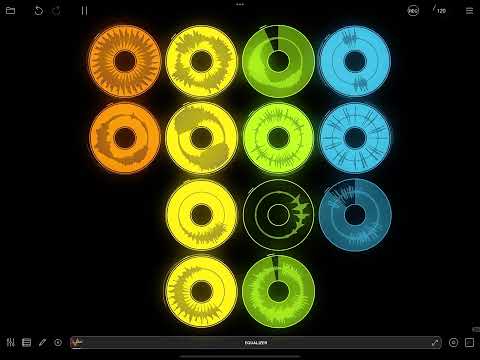
As always thanks for listening and feel free to use these samples how you see fit, and let me know if this is something you’d like to see more of from me and LoopyPro.
I think I finally figured it out. The Bluetooth setting was on Global > Default and I switched it to Session. Now everything seems to work as expected. Not sure why that is 🤷🏻♂️ But it’s working consistently at the moment. I shut everything down after testing it, restarted it and it seems to still be working.
Thanks a bunch and yes, absolutely.
How's Loopy Pro doing when it comes to manually sequencing one-shots on the time-line, does it beat Koala yet?
I admit I'm too lazy to get into it, other apps keep me busy...
So why do you wanna know if you are too lazy anyway?
Just out of curiosity...
I'm in the process of cutting down the total number of apps to make it easier to focus...
When Loopy Pro does what Koala does but does it better it's one step closer to thinning out the 'app soup'.
Probably just as fast but you draw the sequences in rather then playing them manually.
You can also record them into the sequence, though.
Cool, can each of the recorded events be individually modified? (Like different level, pitch, reverse etc?).
I'm in no rush as I spend most of my time with Renoise, SunVox and Logic on the desktop and use the iPad as a sound-module.
Thanks. I've not worked out how to do that yet. I'll have a look.
Not yet, as there's not currently automation in Loopy Pro. As a workaround for now, you would have to duplicate the clips you wanted to change, then change them to the level/pitch you wanted, and place the duplicates on the newly created tracks in the sequencer.
Hit the 'REC' button at the top of the screen and select 'Record Sequence' from the options that appear, then 'Start Recording'. The app will record your live performance to the sequencer. After you stop recording, you can play your sequence back. Maybe you want to leave it as it is so you just have a 'song' that goes when you press play, or you can improvise over the top of this pre-arranged sequence as it plays back - for example, by fiddling with clips live on the main screen (turning them on/off, for example) or recording new clips as your sequence plays. Or you can go into the sequencer screen itself and edit your sequence, add/delete clips from it, change clip length, all kinds of stuff.
You can switch in and out of sequencer mode as you see fit, so if you don't want to play your sequence at all, turn it off by means of the 'SEQ' button. I don't have the app in front of me, but one state of this button means the sequence will play when the play button's on, the other means that you control everything from the main screen as usual when play is activated and the sequence is therefore off.
Press the record sequence button and and all loop/one-shot/slicer playing generates events on the sequencer timeline.
Currently, the sequencer has a few kinks which I expect will be worked out.
@samu: at this time, the events don’t have independent volume, pitch etc. IMO, Koala is not the app that I would think of comparing it to.
I know, I'm just after a iOS/iPadOS DAW with a somewhat usable built-in sampler that is still being actively developed...
...and I'm kinda fed up with the iOS/iPadOS 'AppSoup', thus my iPad mainly serves as a sound module & sampler fodder.
This year I'll mainly focus on Drambo and SunVox...
That worked great. Thanks.
And thank you espiegel123 as well.
So to answer Samu's question. Koala still has the edge when it comes to recording sequences (I can't imagine anything to be easier than Koala to be honest). There's not a lot in it though. Worth investing in Loopy Pro. It's awesome.
I’m getting lots of freezes using Spacecraft Granular as an au instrument (only instrument in the project). Also no luck still with koala - lots of crashes and have sent logs.
I’m running ios15 on a 2017 iPad - is anyone else on one of these and not having issues with au crashes and feeezes?
You are not alone having trouble with Koala. There have a number of people commenting on it. I’ve had trouble, too. I haven’t used Spacecraft in LP enough to comment.
Yah, I think I am probably in the same boat. Once that timeline has editing options and automation, the ability to do some next level tweaky stuff then I am in. Right now I have tons of sketching / flow state options.
Trial period over and bought, absolute no brainier and worth every penny. I am a very happy chappy
I love how much cpu loopy pro saves. I can record a auv3 midi with the cpu meter up a 12%, imprint it to audio and turn the auv3 off and the cpu meter is back down to 3% or so.
I can't see the need to ever have to upgrade my iPad.
I think that the Audiobus Forum Account of @Samu is in such a good state of credit that he is able to ask whatever queries that may occur to him whilst maintaining a very low expectation of being questioned about his motives. Particularly when the answer is patently obvious anyway.
The question has already been somewhat answered as each object gets a track in the sequencer so it's possible to 'paint in' the one-shots but currently in order to pitch the sounds a copy of an object is needed.
I listened/watched Jade Stars interview with Michael last night and playable samples was on the to-do list together with midi-clips which should bring us closer to the goal but there was no ETA on when. I suspect it'll part of the first paid-update as it would a 'major' feature addition
Current focus for me is on Drambo, Koala, DRC, Tonality, Mela 2 and SunVox 2.
So far it's been ZERO new apps for me this year...
I will take a look at Loopy Pro when the midi-clips arrive.
Cheers!
I wasn’t meaning the question you asked about Loopy Pro was obvious @Samu - I was meaning the question that @Doc_T asked you about ‘why do you want to know?’
So... No MIDI Out in the AU version of Loopy Pro?
I was looking to set up a simple XY pad in AUM, but Loopy Pro AU only shows up as a destination.
This can't be right, can it? I searched for an answer, but searching this forum is dreadful.
Figured it out: You have to use the AUM Destination, send Loopy Pro to it from within Loopy Pro, and the effect to receive it.
When this finally gets MIDI Looping, it is going to be a beast.
Yes, that's my vote for MIDI Looping to be next on the To Do List.
This is a tricky one… Should we expect an app to do everything or is a more modular approach desirable?. As consumers/users I believe a modular approach to apps is more rewarding and gets us to places faster.
I’ve been complaining forever about the lack of a solid audio clip/loop solution for an AUM or Inter-app (modular) workflow. For midi looping/clips we had LK, Atom2, Helium… extremely capable and solid apps that provide a great workflow. Yet there wasn’t a good audio solution. There were workarounds involving 4p MultiTrack or multiple Ensos, or Drambo, but very convulted and prone to errors and blocks.
So we get Loopy that covers everything you’d want for audio looping and triggering. Massive. From 0 to 100. And now we’re asking Loopy to do midi?. In my opinion Loopy should focus on audio, where there’s still a ton of really cool features and ideas to evolve, and let LK, Atom, etc take care of midi, where they’re already ahead.
If Loopy sequencer could send midi messages to control these Midi sequencers you’d already be covered. These midi sequencers would keep evolving and getting better, Loopy would not overlap and concentrate on what already makes it amazing… So these Devs win and collaborate, we win because the whole ecosystem evolves at a faster rate and we get more goodies and options.
There was a lot of talk about LK getting audio clips. It was the same situation from the other position. And it makes sense that they stuck to midi. Loopy is above all an audio looper with a very nice sequencer and a million possibilities, if it tries to be a timeline daw with midi, etc, it’ll be like other daws, run onto the same problem of other daws… we’ll have 20 apps that are great but each one missing something… Modular means you take the best out of every app, combine them as you wish. Collaborate and advance.
Sorry for the rant 🤓
Spot on, IMHO.
Not sure I entirely follow the rant but it looks like the app / roadmap has already committed to things you want to be avoided. To back out now would probably not be good.