Loopy Pro: Create music, your way.
What is Loopy Pro? — Loopy Pro is a powerful, flexible, and intuitive live looper, sampler, clip launcher and DAW for iPhone and iPad. At its core, it allows you to record and layer sounds in real-time to create complex musical arrangements. But it doesn’t stop there—Loopy Pro offers advanced tools to customize your workflow, build dynamic performance setups, and create a seamless connection between instruments, effects, and external gear.
Use it for live looping, sequencing, arranging, mixing, and much more. Whether you're a live performer, a producer, or just experimenting with sound, Loopy Pro helps you take control of your creative process.
Download on the App StoreLoopy Pro is your all-in-one musical toolkit. Try it for free today.
Comments
Question that might have been answered in other drambo threads:
Does drambo work on M1 Macs as an AU?
@giku_beepstreet is there a patchstorage API that would let you pull patches in automatically, I wonder?
There is.
https://patchstorage.com/docs/
We've discussed it right after the initial Drambo release after I've had Drambo added to Patchstorage but it hasn't been given high enough priority yet - there are so many core features waiting to be implemented 😉
OK that all sounds good!
It does. It’s a good idea to run standalone first, as it is with all iOS apps running on MacOS.
Yes it works great.
Can someone help explain why I can’t open any of the projects I’ve downloaded from Patchstorage in Drambo please? I’ve created a folder called “Patchstorage “ but when I click on the projects nothing happens….
Are you sure that you've downloaded a project, not a module preset maybe?
When you open your downloaded file in Drambo, does a white dialog box pop up? If so, what's written on top of it?
Downloading and opening shared racks in Drambo can be a little confusing. Drambo itself has project files, and then various different kinds of presets, which are mostly what is shared on Patchstorage. There are instrument, processor, and midi racks, as well as track presets. When you download a rack in your browser and select it from the downloads, Drambo will open, and then ask you where you want to save the rack. Generally, it will try and save it in the Instrument Rack, Processor Rack, or Midi Rack folders of the module browser. Confirm the location, then hit save.
Now you need to open it! Tap the module add button on a track, then go to Generators, Processors, or MIDI. You’ll see a _____ Rack option with a presets button next to it. That opens the preset browser and you will see your downloaded preset.
This is a super quick, no voice + no mouse cursor walkthrough.
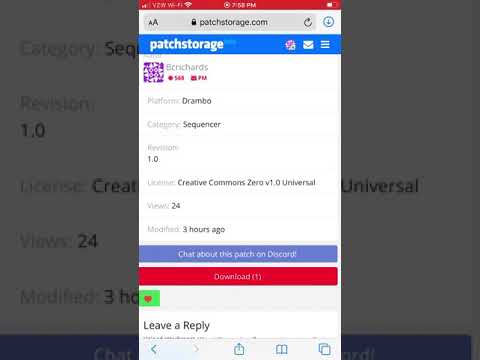
Projects will actually open. This is great, but the downside is the user needs to know to save the rack now
I think the reason why Drambo won’t just “open” a preset is that it would need to know exactly what project, what track, and where in the routing you’d want that rack to go. You’re essentially downloading a module for use anywhere in Drambo.
Sorry @rs2000 , my teeny weeny brain is struggling with this. Yes they probably are module presets, but I’m still none the wiser. Let’s use Shards as an example; question 1 - what is it? Question 2 - how do I open it? I downloaded it because I like @cotcd’s presets for other synths. Think I might just dig my SU-10 out of the loft and play with that. Drambo is just too complicated for me.
I did have a positive covid test this morning, so that can be my excuse today
No idea, because I can’t open the file… that’s the issue
When you download the file, you need to go to the downloads folder and tap on the file. It will open in Drambo, and you can decide where to save it in Drambo's storage. If you've tried to push the file into Drambo by some other method, it is likely wrong. And if it doesn't open in Drambo automatically, you need to Share it with Drambo. Drambo will open with the proper place to store files of that type.
Damn straight!
Thanks @bcrichards , this is helpful.
And thanks for your help @rs2000
You're welcome @Kashi!
Shards is a .drmodule file. Save in Safari, tap on this icon:

then tap on the topmost file and Drambo will open. It will show you this dialog:

First, you can see that this is made for Drambo's Processor Rack.
It's important to remember that so you know where you have to search for it.
You can now choose a destination to save it. Remember the location.
Now add a new processor rack by tapping on this symbol:

Which means add a rack by directly choosing a ready-made preset,
then find your new file and tap on it to add the rack.
Voilà!
(I find this procedure rather annoying so I've always posted complete projects on patchstorage - they just open directly in Drambo and you're ready to go 😉)
Ace! Got it.
Thanks again @rs2000 , and thanks @uncledave - can always rely on you in times of confusion
Drambo has not been updated since April 2021. Does anyone know why that is so and if there still an active roadmap and features coming?
@pac_71 its very much still under active development. Initially the developer has hoped for a Christmas-ish release for the new update but it’s been delayed due to some serious work on his part and a lot of feedback on the beta team’s part. Better to release something polished than half-baked.
Thanks. Is there a beta forum or feature roadmap? Can I get involved with Testflight?
I use the Testflight 1.50 version, and I can say it's improved a lot.
Sounds great. What is coming that you like so much? Is there a Discord channel for Drambo?
@pac_71 https://forum.audiob.us/discussion/47657/drambo-this-was-just-posted-on-facebook check this thread to see some screenshots
And there’s a forum - https://forum.beepstreet.com/ - you can introduce yourself there and possibly ask the dev (@giku) for TestFlight access.
so you think it's a question of weeks or more like months? i can wait for it for another year, but those screenshots hyped me quite a bit!
I’m new to Drambo and seeing the screenshots for piano roll and automation have me insanely hyped. I’m assuming that means we’ll be able to use Drambo’s mod possibilities to automate other AUs? 🤤
anyhow it sounds very promising. i’ve been using drambo as my main instrument for a while now and even without this update it is the most powerful tool i’ve ever tried. at least for me. drambo just gets this process of making electronic music right
Dear beta testers. Shut up. You’re spoiling the surprise and we don’t care that you are better than us 🤣
Thank you
I’d give up a kid to be a beta tester for this. Luckily for society I have no kids.
@Fingolfinzz said:
A beta tester is just unpaid labour ;-)
I have three kids. I have no time for myself let alone being a beta tester! If I’m posting here chances are iIm having a break in the smallest room in the house 🤣
I promise to wash my hands.
NOTE: This is only slightly snarky... Drambo's feature set is nothing less than amazing as a music production environment. I should probably get started... someday.
With the impending update Has Drambo finished making all other apps irrelevant yet? That would be the "IOS Singularity Event". Then it will move to M1 MacBooks and finish making all plug-ins irrelevant. And @rs2000 will be able to say "I told you so." with a great deal of authority.
It’s a fair trade off, I worship Drambo