Loopy Pro: Create music, your way.
What is Loopy Pro? — Loopy Pro is a powerful, flexible, and intuitive live looper, sampler, clip launcher and DAW for iPhone and iPad. At its core, it allows you to record and layer sounds in real-time to create complex musical arrangements. But it doesn’t stop there—Loopy Pro offers advanced tools to customize your workflow, build dynamic performance setups, and create a seamless connection between instruments, effects, and external gear.
Use it for live looping, sequencing, arranging, mixing, and much more. Whether you're a live performer, a producer, or just experimenting with sound, Loopy Pro helps you take control of your creative process.
Download on the App StoreLoopy Pro is your all-in-one musical toolkit. Try it for free today.
Comments
Totally not interested in AUM on Mac, AUM on IOS is my sole modular, touch screen environment capable of hosting all the many (many) apps I have that will never make it across, and in that space, it is almost all I need. I already have Ableton if I actually want/need full on DAW action. Which, frankly, is rarely.
The only thing I’d get excited about in the IOS to Mac space would be an IDAM plus, as already discussed, but Studiomux still seems too unstable/nerdy for a simple soul like me to get excited about. Not even that interested in a conventional timeline add in/on for AUM, tbh, since Atom has that covered as far as I am concerned, on the MIDI side at least. An audio track timeline would be a nice to have, but I can live without it.
What would totally float my boat though, and stop me if you’ve heard this before, @j_liljedahl , would be a proper recordable, editable automation track for AUM’s button and faders, a la the Cubasis/Ableton style clickable/draggable point ‘graph’ automation. More than happy if this exists as a complementary or add-in app to AUM so as not to compromise the purity of the main app, and would willingly pay again for this, either as an ‘AUM Pro’, or IAP, or as a totally new app.
Given that you can already hand off button switching and fader control to the likes of MIDI LFOs via MIDI CC messages, presumably this would be one route to do it? A transport control linked ‘clickable graph’ for each AUM channel? I’d love to be able to do ‘performance’ editing of my auto running mixes in an iterative way, and then dive back in, on multiple passes if necessary, to fix it in the mix, to add shape and movement to my sometimes overly static pieces through the ‘mixing desk as instrument’ metaphor much used by the sainted Hainbach
That would get my attention!
Update on my last comment.... the issue that frustrated me last night had to do with MIDI channels settings that were inside my Falcon plugin. Solved now. So not the DAWs per see.
Still affirms my opinion on AUM for Mac. Less for me to get flustered about with my current hybrid setup. And AUM has earned my trust for reliability.
Yes, stuff that I'd like to add as future IAP add-ons inside AUM:
Yes, internally everything is in place for such automation -> parameter direction, but the other way around is not there yet (move a parameter knob -> record automation), which is also something needed for future MIDI Controller feedback, so it's on the roadmap.
@j_liljedahl : oh, this is very, very good news! I feel I am finally starting to get it together with my iPad ‘n’ modular setup now, but live mixing when so much is going on simultaneously in hardware and on screen is still tricky for me, not being an octopus, so automation of the onscreen elements is becoming increasingly desirable to me. So, okay, Jonatan, you got me. I’ll stop banging on about automation now and sit and wait like a good girl for the goodies to arrive…
Any news on porting AUM to Mac or making the current version universal iOS+Mac?
Universal = iPhone and iPad (with optional Watch link)
InterGalactic (IG) = Mac (M1/2) + Universal (with optional Intel Mac)
TRUE STORY: I bought an M2 MacBook Air and used the Mac App Store to buy the 4Pockets app for $7.99 with my credit and it ran on the MacBook and was available for download on iPhone and iPad immediately. I broke my IGA cherry just by using a link on the forum in Safari on the Mac. Apple gets somethings so right.
I also picked up a Windows 11 HP Laptop just to drive my brain nuts and hopefully add more dendrites in my 70’s. The HP keyboard seems better and the screen is nice and it cost about 1/3 the price of the MacBook but there’s almost no software I enjoy using. Even the Chrome browser I added just doesn’t zoom like I want. Probably due to the war over font technology that Apple and MS waged in the 90’s: PostScript vs TrueType.
Windows 11 was reputed to be more “Mac-like” by the Staples sales dude because the app icons are in a row at the bottom of the screen. They still “steal” from Apple to fix their terrible user interfaces. Steve Jobs was a user on a mission… and it made a difference for his tribe and hell for developers that had to iterate with a user that just didn’t have the right vocabulary to explain himself or his vision. “I’ll know it when you get it right.” Most of us have the same approach to newness. Some apps just unfold in layers of elegance and delight. For me that’s
AUM. Many pads in AUM.
No news yet, sorry.
Sorry to bother about this again @j_liljedahl but is there any news now?
Whenever I want to work on my AUM live guitar session I have to climb behind my desk and plug out and in quite a few cables. Which is a bit annoying.
It would be extremely convenient to just set everything up on Mac and then transfer the session to iPad. Or even have it synced over iCloud 😍
I’d be happy to pay a “desktop class” price for it.
No news yet, sorry! But it will come sooner or later
Ok well I'll stay patient but optimistic then
Any news on the Audio region editor? Would love to have that! ☺️
Forget AUM for Mac.
How about AUM at the movies...?
I like it already. Much less unused space between each audio channel :-)
Or AUM for desktop? 😅 (either AUM for desktop or MainStage for iPad)
About to get my first MacMini, would love to have fully cross compatible AUM to work seamlessly on my iPads and the Mini. Did you know you can use an iPad not just the iPadPro with a $79 Luna Display dongle to touch screen control a MacMini?
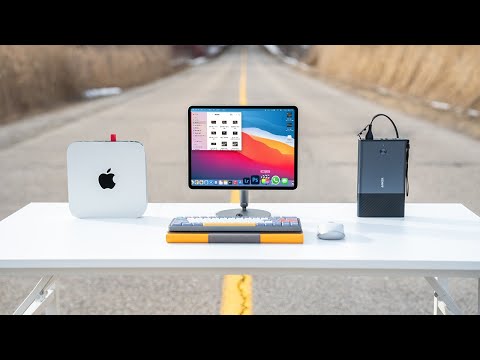
“Super Exciting video about making the Mac Mini completely portable and on the go, while using the iPad Pro as the Monitor. This allows you to use Mac OS with touch screen, and even edit Final Cut Pro on the iPad.. Yup. This is the Ultimate Portable Mac Mini and iPad Pro Monitor Setup!”
What would be really great is if Apple made a portable Mac with a built-in screen, battery, keyboard and trackpad.
Since Logic for iPad projects seem to be somewhat compatible with Logic for Mac and vice versa I wonder if there is now a solution for the cross-platform AUv3 plugin compatibility issue @j_liljedahl
Brilliant! We can only dream.
At first when this thread started years ago, I was like no
Now I think I would love a cross platform or desktop version of Aum
With a touch screen ? 🤣
Exactly! 😂 I mean I already have several iPads and I can get a screamer M2 MacMiniPro for less than the price of an entree level MacBookPro with lesser specs and no touchscreen. In reality I probably won’t use an iPad as monitor but pretty cool and yes I really would like a MacOS version of AUM to use with cross compatible iPadOS MacOS apps. I’m not wanting an AUM version for MacOS with extra bells and whistles, just the same functionality as AUM iPadOS.
I haven't had time to give this much more thought, but as long as the AUv3s has the same "audio component description" ID codes on both platforms, and uses the same state saving format, I don't see a reason it wouldn't be cross-platform compatible.
@j_liljedahl Let me start with thanking you for creating AUM. It’s a stable and indispensable app!
This is only my opinion.
Please don’t change AUM on iOS because it’s a perfect Audio Unit Mixer, I’m guessing as you probably intended it to be.
I’d hate to see feature creep in such a great app.
But I’d love to see a completely new app, based on your AUM codebase. It will also create a new revenue stream for you.
An example in point, Imaginandos new groovebox app BAM. They didn’t make LK a groovebox. But the sequencer in BAM is pretty much LK so people familiar with LK can pick it up quickly.
@Svetlovska I hear you about automating AUM. I use LK for that in AUM as it can record and replay CC, and PC in addition to notes. I send the recorded CC, PC to AUMs MIDI control channel. It works perfectly.
In case you haven’t seen it, there is also 4pockets’ MidiMixer app specifically designed for this purpose for AUM.
😄 thanks for pointing it out. Obviously both AUM and Xequence were game changers in their own areas so the honor is deserved for both developers 😉
Whoops. Fixed. Thanks!
AUM was the first app that made me feel like I could make music - and well, make music on a phone/ipad
Never got along with GarageBand
Unintended but agreed! I was looking at both threads and got my lines crossed. 😅
I haven’t followed the entire thread but are you still planning on making a Mac version of AUM? Maybe it already works on Silicon Macs-? (I don’t have one so I don’t know.)
If it doesn’t work on Macs, I would say that you should definitely make it - AUM is so unique that once people on Mac learn about it, they will love it. Heck, you’d probably sell a ton of copies!
Just a few months ago on a forum thread here I read a few people commenting on iOS DAWs and they all said the same thing: Most Mac people would not be impressed with iOS DAWs….but they’d love AUM and be envious of us iOS users for having it.
Only a few posts above the one you quoted...
https://forum.audiob.us/discussion/comment/1139411/#Comment_1139411