Loopy Pro: Create music, your way.

What is Loopy Pro?Loopy Pro is a powerful, flexible, and intuitive live looper, sampler, clip launcher and DAW for iPhone and iPad. At its core, it allows you to record and layer sounds in real-time to create complex musical arrangements. But it doesn’t stop there—Loopy Pro offers advanced tools to customize your workflow, build dynamic performance setups, and create a seamless connection between instruments, effects, and external gear.

Use it for live looping, sequencing, arranging, mixing, and much more. Whether you're a live performer, a producer, or just experimenting with sound, Loopy Pro helps you take control of your creative process.

Download on the App Store

Loopy Pro is your all-in-one musical toolkit. Try it for free today.

Fugue Machine Rubato by Alexandernaut (Released)

1111214161723

Comments

  • @timfromtheborder said:
    In my App store (Canada) it's 19 on iPad and 47 on iPhone.

    Other recent releases on iPad: Humanoid at 33, Wave Box at 12, Circa Looper at 8, GRFX at 6. Oh! Actually I missed that the FM bundle is at 4.

    Surprising: Loopy HD at 38. To be honest, I don't entirely trust the rankings...

    Yeah, I was checking on my Mac, now when doing the same on my iPad: on all apps I can't even find it on top 100. On 'Music' the bundle is on 11th. This is somewhat a relief. I agree with your sentiment on trust for these though.

  • @wim said:
    I refuse to buy this unless it goes subscription.

    He he, good one!

  • wimwim
    edited May 2025

    @timfromtheborder said:
    Surprising: Loopy HD at 38. To be honest, I don't entirely trust the rankings...

    You're not confusing Loopy Pro with Loopy HD, are you?

    [edit] weird. I don't see either of them in the app store's ranking. Fugue Machine Bundle is at #4 in the US.

  • @wim

    It dropped a few spots. Volatile.

  • edited May 2025

    A big part of me loving ios music making is how cheap things are in comparison to buying apps on pc. That being said this is cross platform and it definitely sits among the most interesting and well made music apps I own across all platforms. It's $100 where I live but as steep as that is I believe its worth it. For it to spit out an insane number of midi notes with rock solid timing is really impressive on the development side of things. I'm sure it took a lot of work to get right.

    I support developers actually being able to survive while focusing on making apps for music on ios. Majority of the time it's a side project to their main hustle. Which means a lot of devs don't take it seriously as a platform. In turn we miss out on a lot of potentially groundbreaking work.

    As an artist its so hard to be confident about the worth of your work. I've played so many gigs for basically nothing because I wasn't straight up with myself and promoters about the value of my practice. Eventually just leading to burn out because the thing I love is directly contributing to financial stress.

    We have a really hard time valuing art as consumers. I think we should try be a little bit more supportive. This aint some big corporation, it's a passionate person doing work on the fringes and that should be encouraged.

  • @timfromtheborder said:
    @wim

    It dropped a few spots. Volatile.

    I'm surprised it registers at all. I don't think @Michael really intends anyone to purchase HD since it's maintenance only and Loopy Pro is the current product.

  • @Pxlhg said:

    @wim said:

    I refuse to buy this unless it goes subscription.

    Would you settle for a dongle?

  • @suboptimal said:
    This price conversation isn't surprising, but it's also a bit baffling. $60 isn't nothing, but it's still pretty trivial for a tool that looks like it can become a centerpiece app.

    Agreed. I think this is probably going to be my new default sequencer. In the past that’s been Drambo because I find that to be very easy to set down notes with. But this is just as easy and can go a lot deeper.

    My impression is the era of $5 killer apps is sunsetting as the convergence between iOS and MacOS perfects itself. In a sense, the iOS music playground has felt like the old internet, where brilliant people gave away their efforts for almost nothing just to improve the world. Alas, devs need to eat and find shelter.

    Yeah, there have been so many great developers wh

  • wimwim
    edited May 2025

    @Wrlds2ndBstGeoshredr said:

    @Pxlhg said:

    @wim said:

    I refuse to buy this unless it goes subscription.

    Would you settle for a dongle?

    Only if it's from iLok. And only if there's a limit on the number of devices it can be used with.

  • I posted this quick sketch I did with FM Rubato this evening. I love what you can do with five notes and some modulation.

    https://bsky.app/profile/very-interesting.bsky.social/post/3lpxl6u4th224

  • @Muireb said:
    A big part of me loving ios music making is how cheap things are in comparison to buying apps on pc. That being said this is cross platform and it definitely sits among the most interesting and well made music apps I own across all platforms. It's $100 where I live but as steep as that is I believe its worth it. For it to spit out an insane number of midi notes with rock solid timing is really impressive on the development side of things. I'm sure it took a lot of work to get right.

    I support developers actually being able to survive while focusing on making apps for music on ios. Majority of the time it's a side project to their main hustle. Which means a lot of devs don't take it seriously as a platform. In turn we miss out on a lot of potentially groundbreaking work.

    As an artist its so hard to be confident about the worth of your work. I've played so many gigs for basically nothing because I wasn't straight up with myself and promoters about the value of my practice. Eventually just leading to burn out because the thing I love is directly contributing to financial stress.

    We have a really hard time valuing art as consumers. I think we should try be a little bit more supportive. This aint some big corporation, it's a passionate person doing work on the fringes and that should be encouraged.

    I concur 🙏

  • edited May 2025

    @negativeone said:

    @suboptimal said:
    This price conversation isn't surprising, but it's also a bit baffling. $60 isn't nothing, but it's still pretty trivial for a tool that looks like it can become a centerpiece app.

    Agreed. I think this is probably going to be my new default sequencer. In the past that’s been Drambo because I find that to be very easy to set down notes with. But this is just as easy and can go a lot deeper.

    My impression is the era of $5 killer apps is sunsetting as the convergence between iOS and MacOS perfects itself. In a sense, the iOS music playground has felt like the old internet, where brilliant people gave away their efforts for almost nothing just to improve the world. Alas, devs need to eat and find shelter.

    Yeah, there have been so many great developers wh

    Yup 👍 change is hard, but necessary

  • I cannot figure out how to animate the individual notes where they pitch up and down. Can anyone point me in the right direction? Any help, would be really appreciated.

  • @RJB said:
    I cannot figure out how to animate the individual notes where they pitch up and down. Can anyone point me in the right direction? Any help, would be really appreciated.

    It’s on the right side-pane. Select a note and hit the Y label to select it for automation.

  • edited May 2025

    @RJB said:
    I cannot figure out how to animate the individual notes where they pitch up and down. Can anyone point me in the right direction? Any help, would be really appreciated.

    Yessir!
    It’s at the bottom, there are automation lanes for each sequencer parameter, tap Pitch on the right.

  • @Stuntman_mike said:

    @RJB said:
    I cannot figure out how to animate the individual notes where they pitch up and down. Can anyone point me in the right direction? Any help, would be really appreciated.

    Yessir!
    It’s at the bottom, there are automation lanes for each sequencer parameter, tap Pitch on the right.

    That changes the pitch of the play head. I think they’re asking how to change the pitch of one note with automation, though I could be mistaken.

  • @negativeone said:

    I posted this quick sketch I did with FM Rubato this evening. I love what you can do with five notes and some modulation.

    https://bsky.app/profile/very-interesting.bsky.social/post/3lpxl6u4th224

    Really nice. I like that a lot!

    @Stuntman_mike said:

    @Muireb said:
    A big part of me loving ios music making is how cheap things are in comparison to buying apps on pc. That being said this is cross platform and it definitely sits among the most interesting and well made music apps I own across all platforms. It's $100 where I live but as steep as that is I believe its worth it. For it to spit out an insane number of midi notes with rock solid timing is really impressive on the development side of things. I'm sure it took a lot of work to get right.

    I support developers actually being able to survive while focusing on making apps for music on ios. Majority of the time it's a side project to their main hustle. Which means a lot of devs don't take it seriously as a platform. In turn we miss out on a lot of potentially groundbreaking work.

    As an artist its so hard to be confident about the worth of your work. I've played so many gigs for basically nothing because I wasn't straight up with myself and promoters about the value of my practice. Eventually just leading to burn out because the thing I love is directly contributing to financial stress.

    We have a really hard time valuing art as consumers. I think we should try be a little bit more supportive. This aint some big corporation, it's a passionate person doing work on the fringes and that should be encouraged.

    I concur 🙏

    Amen 🙏

  • @Stuntman_mike said:

    @RJB said:
    I cannot figure out how to animate the individual notes where they pitch up and down. Can anyone point me in the right direction? Any help, would be really appreciated.

    Yessir!
    It’s at the bottom, there are automation lanes for each sequencer parameter, tap Pitch on the right.

    Make sure to select the sequencer you are applying it to and press the play button above the automation lane to enable the automation.

  • edited May 2025

    @negativeone said:

    @Stuntman_mike said:

    @RJB said:
    I cannot figure out how to animate the individual notes where they pitch up and down. Can anyone point me in the right direction? Any help, would be really appreciated.

    Yessir!
    It’s at the bottom, there are automation lanes for each sequencer parameter, tap Pitch on the right.

    That changes the pitch of the play head. I think they’re asking how to change the pitch of one note with automation, though I could be mistaken.

    I feel you!
    The parameter I am referring to changes the pitch of each note in the sequence via the automation, step by step 🙏

  • @RJB

    I know I said earlier that I appreciated the demo. But now I’m regretting it, because it’s kinda addictive. This thing is actually really good at sequencing drums… like really good. And combining it with Drambo’s parameter automation is uhhhh… dangerous. Hmm…

  • @negativeone said:

    @Stuntman_mike said:

    @RJB said:
    I cannot figure out how to animate the individual notes where they pitch up and down. Can anyone point me in the right direction? Any help, would be really appreciated.

    Yessir!
    It’s at the bottom, there are automation lanes for each sequencer parameter, tap Pitch on the right.

    That changes the pitch of the play head. I think they’re asking how to change the pitch of one note with automation, though I could be mistaken.

    Yup, you’re right…
    That is, if you want to automate pitch for one note in stages, which is super cool!

  • @wim said:
    I refuse to buy this unless it goes subscription.

    Now that is a flaming hot take!

  • @timfromtheborder said:
    @RJB

    I know I said earlier that I appreciated the demo. But now I’m regretting it, because it’s kinda addictive. This thing is actually really good at sequencing drums… like really good. And combining it with Drambo’s parameter automation is uhhhh… dangerous. Hmm…

    Thank-you! That’s got it sorted!

  • I’ve been a bit out of the loop, what are some crazy highlights of the last month they have to do with p?

    @Gavinski said:
    Can't think of a month as crazy as the past month or so has been for iOS releases

  • There might have been a bunch of releases but almost nothing that has even remotely sparked my interest...
    So far this year I'm up to a whopping 3 purchases, FF Pro-Q 4, Waldorf Blofeld and Elastic OSC :sunglasses:

  • edited May 2025

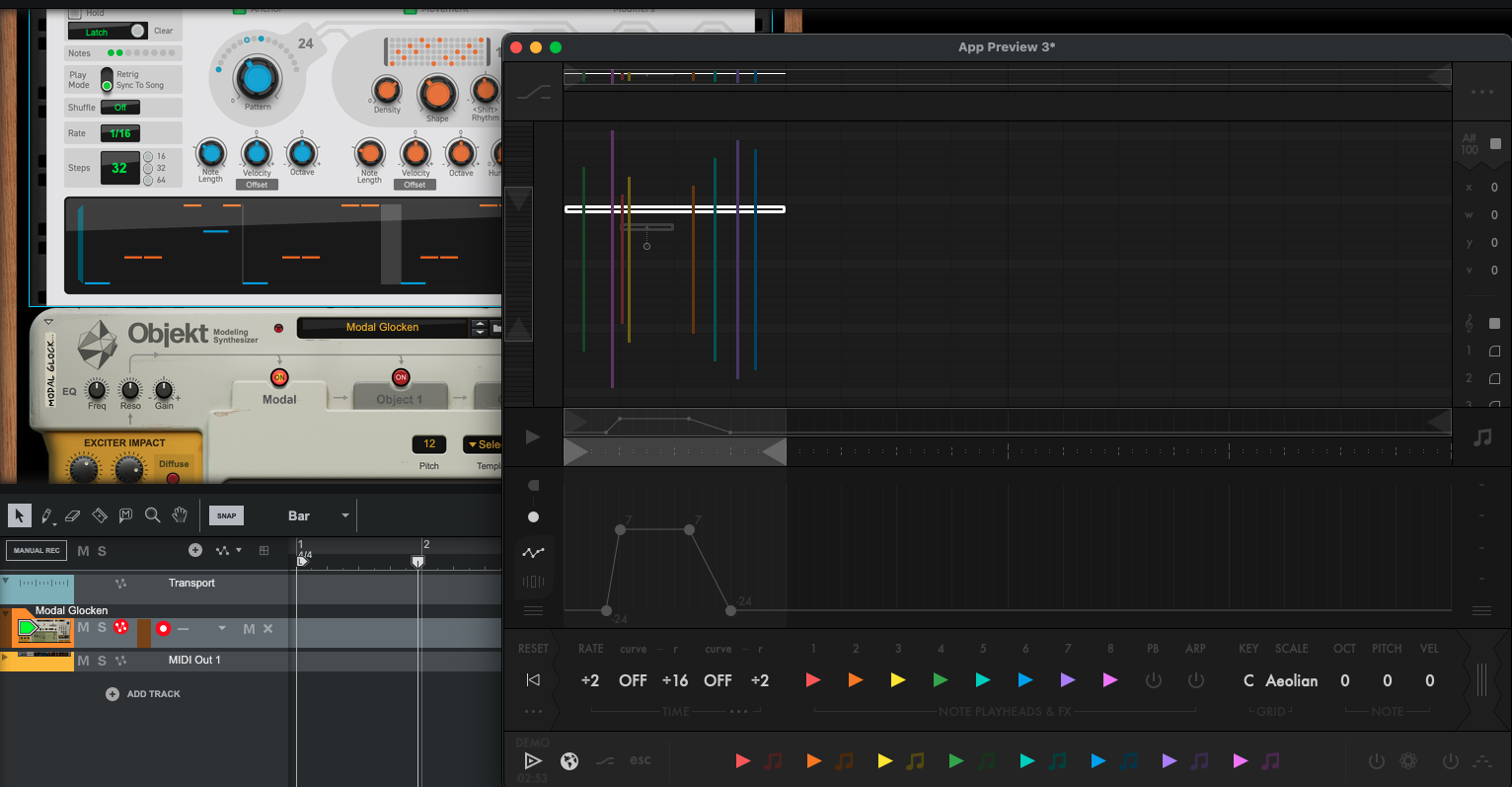
    I wish I hadn't tried this but now I'm a convert - I'm having it (when I can). Reason isn't exactly famous for it's midi capabilities but no problem doing a test run. Together with the new Lab Arpeggiator. Awesomeness awaits
  • edited May 2025

    @Cỗirácâyỗirpthui said:
    I’ve been a bit out of the loop, what are some crazy highlights of the last month they have to do with p?

    @Gavinski said:
    Can't think of a month as crazy as the past month or so has been for iOS releases

    ‘have to do with P’? I don’t understand this part! Main highlights for me, among the ones I actually had a chance to properly learn to use, would be Strips, GRFX, GSDSP Granulator (though I prefer GRFX), Elastic Osc, Waymaker, Dialekt. Probably Fugue Machine Rubato too but I haven’t had time to learn it properly so can’t be sure.

  • @Gavinski said:

    @Cỗirácâyỗirpthui said:
    I’ve been a bit out of the loop, what are some crazy highlights of the last month they have to do with p?

    @Gavinski said:
    Can't think of a month as crazy as the past month or so has been for iOS releases

    ‘have to do with P’? I don’t understand this part! Main highlights for me, among the ones I actually had a chance to properly learn to use, would be sqsl Strips, GRFX, GSDSP Granulator (though I slightly prefer GRFX), Elastic Osc, Waymaker, Dialekt. Probably Fugue Machine Rubato too but I haven’t had time to learn it properly so can’t be sure.

    So yeah - a lot of highlights unfortunately as there’s been a lot of good stuff. The one I think I personally will use most: sqsl Strips, even though not AUv3

  • @Kashi said:
    Weird stuff happening here.
    Sometimes, when I change presets, the new preset is loaded (the notes and the lines and the whizzy whizzy stuff is all new), but the current sound remains exactly the same…hmmm

    This not happening for anyone else?

  • pushing the envelope for app quality on iPad

Sign In or Register to comment.