Loopy Pro: Create music, your way.
What is Loopy Pro? — Loopy Pro is a powerful, flexible, and intuitive live looper, sampler, clip launcher and DAW for iPhone and iPad. At its core, it allows you to record and layer sounds in real-time to create complex musical arrangements. But it doesn’t stop there—Loopy Pro offers advanced tools to customize your workflow, build dynamic performance setups, and create a seamless connection between instruments, effects, and external gear.
Use it for live looping, sequencing, arranging, mixing, and much more. Whether you're a live performer, a producer, or just experimenting with sound, Loopy Pro helps you take control of your creative process.
Download on the App StoreLoopy Pro is your all-in-one musical toolkit. Try it for free today.
Comments
Me too. Is it possible or will it become soon ?
Select a Part / Section and press + . The new Part will copy all the parameters as the selected one
Must say one of the best Auv3 UI designs, so far.. Congrats… pretty nice…
Would have thought that sales data would make that choice pretty obvious to Luis?
Thank you!
@LuisMartinez Is it a bug? When I try to edit a user pattern, the UI reverts back to a factory preset. It's like the app will only allow one pattern. For example, a basic 4 on the floor, I can't create as it will just flick the UI to a pattern matching that pattern, making it impossible to create my own user version.
update out now
.
Huge compliment. Would love to hear pop drummer-Ibassist together if you are willing to share.
on song mode. what does the little bass drum and cymbal icon do?
At the end? If on, it hits a cymbal and kick on the 1 and ends
Thanks..
Just a quick try..
Thx man. I dig it! Ibassist sounds really nice!
Hi @LuisMartinez, is this a good place to post bug reports/feature requests? Or is discord your preferred method?
If here is good: I’m finding that when I freeze pop drummer in Cubasis 3 (with I midi command or clips being sent to pop drummer) that the audio produced is just a low buzz sound that doesn’t sound like drums at all and the waveform looks very unusual. I can post an audio clip or video demo of what’s happening.
Thanks!
I suspect there is another "bug", although it may be a quirk of AUv3....the play button in the drum app itself, is disabled when hosted by AUM. Only the AUM play button at top right (which, on another bugbear of mine, should be re-sizable it is too small to accurately tap) starts and stops the plugin.
As I wrote not sure if this is a quirk of the AUv3 system, or a bug in the app.
Tap the Lock icon next to the play button. When locked the play button doesn't operate, when unlocked the play button can toggle play on and off as long as AUM's transport is running.
I don't think this is a bug, and it isn't an AUv3 quirk. It's a design decision. It's up to apps how they handle host synchronization. Some can run completely free, some (like this app) are dependent on the host for clock timing but give you a choice to start or stop independent of the host.
thanks wim, it doesn't exhibit this in the IAA versions....either will turn it on and off...only happens in the AUv3...Sometimes I do not want the transport in AUM running and I control the Lumbeat drummer via footpedal....I suppose I can re-map my setups to stop start AUM transport and leave the rest of the pedal commands unchanged...bit of a pain though haha!
Or talk @LuisMartinez into adding it as a feature. I'm not sure that'll be successful because it could be a lot of work to add in a built-in clock. But maybe not, because as you say, the other apps have that plumbing already.
A lot (most?) AUv3 plugins, for instance the Rozeta Suite, depend on the host transport running.
I think the dedicated support server on Discord might be the better place for bug reports/feature requests. Here’s the link https://discord.gg/4YJjYmwht4
same here, set mixdown to realtime works!
Good looking out! I have not tried that option before.
Hi All
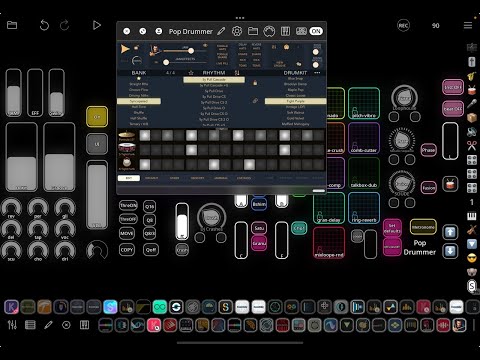
This is not a tutorial. Just a first touch of the Pop Drummer auv3 possibilities in Loopy Pro. And dunno, if there is no sense in what I'm doing, but bare with me..
Wish it had that random button exposed - I suppose it is accessible via midi though.. So need to add that button, then can have really crazy and surprising stuff..
So, how do you get out of the mixer/kit screen? Seems there is no way to return to editor screen, etc.
Is anyone using the auv3 in ableton live 12.3? The latest pop drummer update 1.0.2 opens on the purchase page and won’t restore my purchase. I’ve signed in and out, deleted, reinstalled, restarted, etc. The previous versions have worked in ableton. The standalone 1.0.2 works on my Mac. So frustrating….
I wasn’t able to restore my IAP in Funk Drummer on Mac. It was admittedly the iPad version running on Mac.
Oh yeah plus one on that.
Saw an intervju with him where he explained he gets his crazy drumming by using wildly fast midi sequences and then he trains with that till he can keep up. I don't remember if he said he programmed the midi himself. Anyway, what a drummer.
edit: typo
they used programed drums on a few tracks/albums.
was their own sampled "drumkit from hell"
i think its available for desktop, without the midi files of course.
https://www.toontrack.com/product/dfh-ezx/
i just bought mideast drummer as accompaniment for my guitar playing and i have to say iam amazed how good that sounds.
its not even 200mb