Loopy Pro: Create music, your way.

What is Loopy Pro?Loopy Pro is a powerful, flexible, and intuitive live looper, sampler, clip launcher and DAW for iPhone and iPad. At its core, it allows you to record and layer sounds in real-time to create complex musical arrangements. But it doesn’t stop there—Loopy Pro offers advanced tools to customize your workflow, build dynamic performance setups, and create a seamless connection between instruments, effects, and external gear.

Use it for live looping, sequencing, arranging, mixing, and much more. Whether you're a live performer, a producer, or just experimenting with sound, Loopy Pro helps you take control of your creative process.

Download on the App Store

Loopy Pro is your all-in-one musical toolkit. Try it for free today.

VariFlute by Audio Modeling (Released)

135

Comments

  • At first glance, I can’t create a Frankenstein flute. 😔 No matter what I do, everything sounds correct with just moderate changes. For classic flute lovers, this is fantastic, for experimentalists trying to make new, never-before-heard sounds, it’s not. There is also a chance I haven’t yet comprehended all the controls. 🤭

  • @Luxthor said:

    @Grandbear said:
    How does this relate to SWAM Flutes and Woodwinds? Does it implement a subset of their functionality or is it something else altogether?

    From their official site: “VariFlute is built using the same modeling excellence as our professional SWAM Flutes — just with a fresh, experimental twist.”

    Have you figured out what the fresh, experimental twist is yet?

  • @Luxthor said:
    At first glance, I can’t create a Frankenstein flute. 😔 No matter what I do, everything sounds correct with just moderate changes. For classic flute lovers, this is fantastic, for experimentalists trying to make new, never-before-heard sounds, it’s not. There is also a chance I haven’t yet comprehended all the controls. 🤭

    Agreed, it's very good for a variety of traditional flute sounds and maybe slight tweaks on that palette, but it's definitely not mega experimental.

  • @Squishy said:

    @Luxthor said:

    @Grandbear said:
    How does this relate to SWAM Flutes and Woodwinds? Does it implement a subset of their functionality or is it something else altogether?

    From their official site: “VariFlute is built using the same modeling excellence as our professional SWAM Flutes — just with a fresh, experimental twist.”

    Have you figured out what the fresh, experimental twist is yet?

    For someone who doesn’t own the entire SWAM Flute suite, this is great value and an instabuy, you won’t regret it. For those who already have all the flutes, it’s like just having a flute with more than the usual features for material resonance and timbre changes. It’s still good value, but I have a strong feeling that every instrument in the SWAM arsenal should be 'vari' from day one or at least have an unlock.

  • @Luxthor said:

    @Squishy said:

    @Luxthor said:

    @Grandbear said:
    How does this relate to SWAM Flutes and Woodwinds? Does it implement a subset of their functionality or is it something else altogether?

    From their official site: “VariFlute is built using the same modeling excellence as our professional SWAM Flutes — just with a fresh, experimental twist.”

    Have you figured out what the fresh, experimental twist is yet?

    For someone who doesn’t own the entire SWAM Flute suite, this is great value and an instabuy, you won’t regret it. For those who already have all the flutes, it’s like just having a flute with more than the usual features for material resonance and timbre changes. It’s still good value, but I have a strong feeling that every instrument in the SWAM arsenal should be 'vari' from day one or at least have an unlock.

    I didn't have any SWAM instruments yet and I'd tend to agree, I'll spend some time with the manual to see if it helps figuring out how experimental it can truly get. Here it is in case anyone is looking for it:

    https://static.audiomodeling.com/manuals/discovery/SWAM VariFlute v1.0.0 - User Manual.pdf

  • @Gavinski said:

    @Luxthor said:
    At first glance, I can’t create a Frankenstein flute. 😔 No matter what I do, everything sounds correct with just moderate changes. For classic flute lovers, this is fantastic, for experimentalists trying to make new, never-before-heard sounds, it’s not. There is also a chance I haven’t yet comprehended all the controls. 🤭

    Agreed, it's very good for a variety of traditional flute sounds and maybe slight tweaks on that palette, but it's definitely not mega experimental.

    It would be fantastic to see your Vari deep dive. Maybe you could unlock sounds that I couldn’t. 😉

  • @Grandbear said:

    @Luxthor said:

    @Squishy said:

    @Luxthor said:

    @Grandbear said:
    How does this relate to SWAM Flutes and Woodwinds? Does it implement a subset of their functionality or is it something else altogether?

    From their official site: “VariFlute is built using the same modeling excellence as our professional SWAM Flutes — just with a fresh, experimental twist.”

    Have you figured out what the fresh, experimental twist is yet?

    For someone who doesn’t own the entire SWAM Flute suite, this is great value and an instabuy, you won’t regret it. For those who already have all the flutes, it’s like just having a flute with more than the usual features for material resonance and timbre changes. It’s still good value, but I have a strong feeling that every instrument in the SWAM arsenal should be 'vari' from day one or at least have an unlock.

    I didn't have any SWAM instruments yet and I'd tend to agree, I'll spend some time with the manual to see if it helps figuring out how experimental it can truly get. Here it is in case anyone is looking for it:

    https://static.audiomodeling.com/manuals/discovery/SWAM VariFlute v1.0.0 - User Manual.pdf

    Yeah, it’s still early to make any final conclusion. I’ll continue with experimentation tomorrow, excitement is still strong with me, haha. Thanks for the manual link. 👍

  • @Gavinski said:

    With these audio modeling apps, I sometimes use a few instances with multiple touchscreen keyboards if I want polyphony. I think there's a Mozaic script for that too maybe? Also Polythemus probably.

    TIL: I tested a half dozen VariFlute instances in AUM and configured the internal keyboard into PolyThemus. PolyThemus
    Spilts incoming MIDI notes across audio outputs each using MIDI Channel 1. I have no idea how many DAW’s support audio multi-outs. But I would be interested to know.

    @Polyphonix said:
    The Mozaic script is called Multi-Divisi v1.2, works perfectly.
    https://patchstorage.com/multi-divisi/

    Now, I know from experience that the @_Ki Mozaic script divides incoming chords across MIDI channels in sequence.

    Yesterday, I learned that GarageBand doesn’t support MIDI FX apps and I love to chain MDI FX apps and that maybe why I
    Just keep using AUM. Does Loopy Pro support flexible MIDI and Audio Out routing similar to AUM?

  • The user and all related content has been deleted.
  • Using WoodTroller on my old Air3 over BT to iPad Pro. Once I turned MPE on in VF the horror show was on, it screams with just the smallest amount of side moves. Agree with the choir on: "it's just a flute, where's the odd settings" There's a lot of controls for fine tuning things and it sounds pretty good, well not with WT but just preset browsing. Lots of new to learn as usual.

  • @Pxlhg said:
    Using WoodTroller on my old Air3 over BT to iPad Pro. Once I turned MPE on in VF the horror show was on, it screams with just the smallest amount of side moves. Agree with the choir on: "it's just a flute, where's the odd settings" There's a lot of controls for fine tuning things and it sounds pretty good, well not with WT but just preset browsing. Lots of new to learn as usual.

    You'd need to have it set up right for the controller you're using. It's definitely a bit complicated in that way

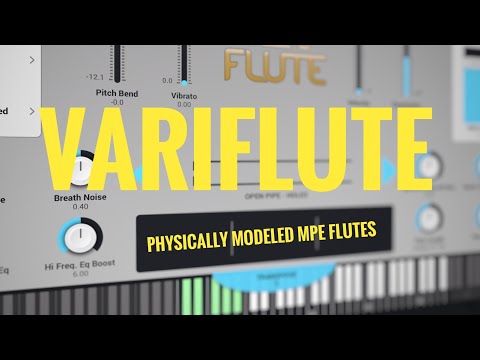
  • My pretty detailed walkthrough, come say hi in the premiere live chat, starts in 20 mins:
  • I like it! As others said, it’s not to sculpt a completely different instrument, but love the flute sounds it can produce! Especially with the overblow and ethnic vibe that gives

  • @Jer4 said:
    I like it! As others said, it’s not to sculpt a completely different instrument, but love the flute sounds it can produce! Especially with the overblow and ethnic vibe that gives

    I think it's fab value at the price, yes, not experimental but really good at what it does

  • @Gavinski said:

    @Jer4 said:
    I like it! As others said, it’s not to sculpt a completely different instrument, but love the flute sounds it can produce! Especially with the overblow and ethnic vibe that gives

    I think it's fab value at the price, yes, not experimental but really good at what it does

    Exactly! To be fair, I think it’s a much better deal than the separate flute apps. Looking forward to the other Vari’s!

  • @Jer4 said:

    @Gavinski said:

    @Jer4 said:
    I like it! As others said, it’s not to sculpt a completely different instrument, but love the flute sounds it can produce! Especially with the overblow and ethnic vibe that gives

    I think it's fab value at the price, yes, not experimental but really good at what it does

    Exactly! To be fair, I think it’s a much better deal than the separate flute apps. Looking forward to the other Vari’s!

    This kind of app is better suited to the average iOS musician than those other swam solo apps for sure

  • @Gavinski said:

    @Pxlhg said:
    Using WoodTroller on my old Air3 over BT to iPad Pro. Once I turned MPE on in VF the horror show was on, it screams with just the smallest amount of side moves. Agree with the choir on: "it's just a flute, where's the odd settings" There's a lot of controls for fine tuning things and it sounds pretty good, well not with WT but just preset browsing. Lots of new to learn as usual.

    You'd need to have it set up right for the controller you're using. It's definitely a bit complicated in that way

    This is perplexing me since there is no option for Artiphon Instrument 1. I have tried other similar MPE instruments that are included on the list and just get wild and woolly results. Any suggestions for which preset instrument would best match Instrument 1?

  • I wasn’t expecting much experimental capabilities. Audio Modeling’s entire goal is realism. I do wonder though if the parameters, such as pipe diameter, aperture etc…are exposed for automation. I could see pipe diameter changing with an LFO producing an interesting twist to the sound.

  • @lukesleepwalker said:

    @Gavinski said:

    @Pxlhg said:
    Using WoodTroller on my old Air3 over BT to iPad Pro. Once I turned MPE on in VF the horror show was on, it screams with just the smallest amount of side moves. Agree with the choir on: "it's just a flute, where's the odd settings" There's a lot of controls for fine tuning things and it sounds pretty good, well not with WT but just preset browsing. Lots of new to learn as usual.

    You'd need to have it set up right for the controller you're using. It's definitely a bit complicated in that way

    This is perplexing me since there is no option for Artiphon Instrument 1. I have tried other similar MPE instruments that are included on the list and just get wild and woolly results. Any suggestions for which preset instrument would best match Instrument 1?

    No clue, I'm not familiar with Instrument 1. Maybe ask Audio Modeling how best to set up for that? It's also always gonna be a personal thing depending on your playing style, what you're playing, and how much you care about forcing yourself into the limits there would be to playing a real flute in terms of pitch bend and so on...

  • @Gavinski said:

    @lukesleepwalker said:

    @Gavinski said:

    @Pxlhg said:
    Using WoodTroller on my old Air3 over BT to iPad Pro. Once I turned MPE on in VF the horror show was on, it screams with just the smallest amount of side moves. Agree with the choir on: "it's just a flute, where's the odd settings" There's a lot of controls for fine tuning things and it sounds pretty good, well not with WT but just preset browsing. Lots of new to learn as usual.

    You'd need to have it set up right for the controller you're using. It's definitely a bit complicated in that way

    This is perplexing me since there is no option for Artiphon Instrument 1. I have tried other similar MPE instruments that are included on the list and just get wild and woolly results. Any suggestions for which preset instrument would best match Instrument 1?

    No clue, I'm not familiar with Instrument 1. Maybe ask Audio Modeling how best to set up for that? It's also always gonna be a personal thing depending on your playing style, what you're playing, and how much you care about forcing yourself into the limits there would be to playing a real flute in terms of pitch bend and so on...

    The main thing to figure out is what Instrument 1's mpe pitch bend range is and make sure it's set to match in the app. Then see what other mpe messages your hardware sends. Probably mpe pressure and cc74? Then you have to decide which parameters in Variflute you want to control with each and figure out what the appropriate curve will be for each

  • @Gavinski said:

    @Gavinski said:

    @lukesleepwalker said:

    @Gavinski said:

    @Pxlhg said:
    Using WoodTroller on my old Air3 over BT to iPad Pro. Once I turned MPE on in VF the horror show was on, it screams with just the smallest amount of side moves. Agree with the choir on: "it's just a flute, where's the odd settings" There's a lot of controls for fine tuning things and it sounds pretty good, well not with WT but just preset browsing. Lots of new to learn as usual.

    You'd need to have it set up right for the controller you're using. It's definitely a bit complicated in that way

    This is perplexing me since there is no option for Artiphon Instrument 1. I have tried other similar MPE instruments that are included on the list and just get wild and woolly results. Any suggestions for which preset instrument would best match Instrument 1?

    No clue, I'm not familiar with Instrument 1. Maybe ask Audio Modeling how best to set up for that? It's also always gonna be a personal thing depending on your playing style, what you're playing, and how much you care about forcing yourself into the limits there would be to playing a real flute in terms of pitch bend and so on...

    The main thing to figure out is what Instrument 1's mpe pitch bend range is and make sure it's set to match in the app. Then see what other mpe messages your hardware sends. Probably mpe pressure and cc74? Then you have to decide which parameters in Variflute you want to control with each and figure out what the appropriate curve will be for each

    Yes, MPE pressure and cc74. My assumption is that it mirrors other instruments in that respect but perhaps the range of motion varies enough that it’s not useful to start with other presets. Into the settings I dive!

  • Can you create a new instrument with an expanded range going from, say, bass to piccolo all in one?

  • edited September 2025

    @MrStochastic said:
    Can you create a new instrument with an expanded range going from, say, bass to piccolo all in one?

    I don’t think so no, because the transpose slider seems to be the main way that pitch is changed, but you’d still be stuck within a certain range

  • @Gavinski said:

    @MrStochastic said:
    Can you create a new instrument with an expanded range going from, say, bass to piccolo all in one?

    I don’t think so no, because the transpose slider seems to be the main way that pitch is changed, but you’d still need stuck within a certain range

    😢 well that’s sad. It was the first thing I thought could be fun.

  • edited September 2025

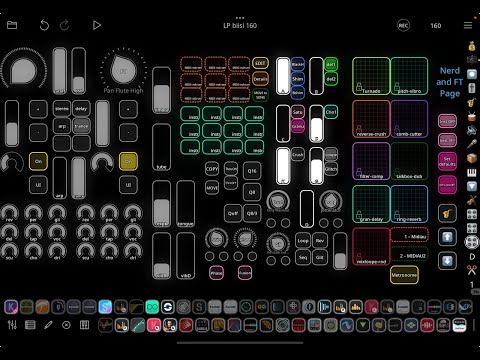
    Any comments on my preview of Variflute inside Loopy Pro template and in companion of Pop Drummer?
  • edited September 2025

    @MrStochastic said:

    @Gavinski said:

    @MrStochastic said:
    Can you create a new instrument with an expanded range going from, say, bass to piccolo all in one?

    I don’t think so no, because the transpose slider seems to be the main way that pitch is changed, but you’d still need stuck within a certain range

    😢 well that’s sad. It was the first thing I thought could be fun.

    However, via loopy pro, you COULD have two or three instances of VariFlute with the ranges spread across all three and set up different sections of the keyboard/touch app to trigger different instances at their varying ranges

    I haven't messed with this yet (VariFlute) so I'm unsure if the transposition is also baked-in to include tube size, so this whole thing could be a moot point 😅

  • @PapaBPoppin said:

    @MrStochastic said:

    @Gavinski said:

    @MrStochastic said:
    Can you create a new instrument with an expanded range going from, say, bass to piccolo all in one?

    I don’t think so no, because the transpose slider seems to be the main way that pitch is changed, but you’d still need stuck within a certain range

    😢 well that’s sad. It was the first thing I thought could be fun.

    However, via loopy pro, you COULD have two or three instances of VariFlute with the ranges spread across all three and set up different sections of the keyboard/touch app to trigger different instances at their varying ranges

    I haven't messed with this yet (VariFlute) so I'm unsure if the transposition is also baked-in to include tube size, so this whole thing could be a moot point 😅

    Thanks, yes also MidiLayers in AUM would work but I just wished for an easier solution. I wonder if they'll ever consider making this possible.

  • Thought I’d knock up a quick example track using VariFlute…
    4 instances, two providing the drones with their Master Tuning values being modified by Sample & Hold LFOs.
    On the Timbre tab page I increased the pipe length (I think) to drop the range down to C2 to G5.
    On the Pitch page transposed down by -12.

  • edited September 2025

    @GeoTony said:
    Thought I’d knock up a quick example track using VariFlute…
    4 instances, two providing the drones with their Master Tuning values being modified by Sample & Hold LFOs.
    On the Timbre tab page I increased the pipe length (I think) to drop the range down to C2 to G5.
    On the Pitch page transposed down by -12.

    Amazing use of the low drones. Texture out the wazoo!

    Quick note: while plenty of prepositions can be used following the work 'Knock' to denote 'Quickly Throwing Together' [knock out, knock together]...

    'Up' means something else entirely

    ...but I must admit, if your past examples hold true for the future, youre gonna birth something that sounds absolutely beautiful no matter the method 🤣🤣

    Edit: Not just the drones, great piece and utilization all around! The drone aspect just stood out as an solid example closer to the 'experimental' side a few people have brought up

  • Cheers @PapaBPoppin , knock is indeed a tricky word, knock out and knock one out have very different meanings 😊
    I think with some parameter manipulation VariFlute could perhaps be more experimental than expected.
    The ability to vary the tuning (coarse and fine) with parameters to create beats (frequency rather than rhythm) is an interesting direction to take.
    BTW I have replaced the track with one that I think is a slightly better one.

Sign In or Register to comment.