Loopy Pro: Create music, your way.
What is Loopy Pro? — Loopy Pro is a powerful, flexible, and intuitive live looper, sampler, clip launcher and DAW for iPhone and iPad. At its core, it allows you to record and layer sounds in real-time to create complex musical arrangements. But it doesn’t stop there—Loopy Pro offers advanced tools to customize your workflow, build dynamic performance setups, and create a seamless connection between instruments, effects, and external gear.
Use it for live looping, sequencing, arranging, mixing, and much more. Whether you're a live performer, a producer, or just experimenting with sound, Loopy Pro helps you take control of your creative process.
Download on the App StoreLoopy Pro is your all-in-one musical toolkit. Try it for free today.
Song Looper template-in-progress
Here is a song looper template that I am working on. It’ll be prettier when I finish implementing its features.
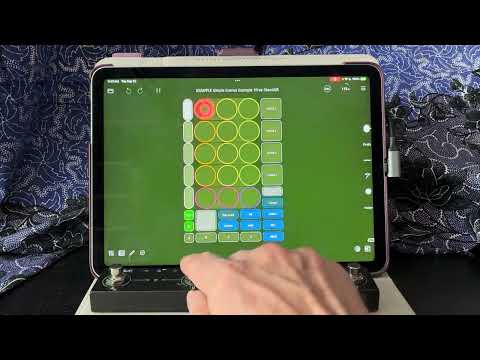
See post: https://forum.loopypro.com/discussion/comment/1427187/#Comment_1427187
for a download link
Comments
This type of template is extremely valuable for those of us using Loopy Pro to write and perform songs with a handful of distinct song parts, really appreciate this type of template! Thanks for your effort, looking forward to trying this out!
Thanks for posting this. Very helpful.
What is the foot switch controller you’re using in the video?
M-Vave Chocolate
Demo of a rubato mode:
Great! Thanks for sharing
+1.
@espiegel123 looks great man.
This looks great!
This is a draft of the song looper. Watch the video to get oriented. Hopefully the tutorial widgets will explain enough to get you started.
There are bindings in the project for the Blueboard or a wired M-Vave Chocolate set to Manufacturer Control mode.
It is designed to be controlled by four momentary action pedals. To learn a different pedal, go to the pedalboard page. Enter midi learn mode. Make sure the pedalboard profile is selected. Tap on the A button onscreen then tap and release your pedal. Repeat for all 4 pedals. Learn a single tap only. Each binding should be on/off and set to trigger the button’s press release.
You should see something what is shown in the picture.
Thanks @espiegel123 I’ll take this draft version for a spin tomorrow.
Thanks @espiegel123, really appreciate it!
I'm trying it out and have a question for you: When pressing the "Play Form" button to play specific forms, I notice that most of the time, the first play group to play will be the last one that was played/stopped prior to pressing the "Play Form" button (even though it's not the first scene in the Form) and after that plays through once, it then plays through the selected Form as expected.
Any ideas why this might be happening and/or if there is a way to reset things prior to pressing the "Play Form" button that might address this issue? Or any other ideas?
Thanks
I’ve not seen that. Can you make a screen recording and post a link to it?
Sure, here’s a link to a vid:
https://www.dropbox.com/scl/fi/jd8wvt76n3rr5u23tzs01/ScreenRecording_09-28-2025-22-06-06_1.mov?rlkey=mtisx95w667q6791ucbu2elb7&st=4gieaqjn&dl=0
In that video, what preceded the start of the video?
Was the clock already running prior to the screen recording?
How are you initiating the actions?
The beginning of the video shows the project in a surprising state…the scenes were set up to be mutually exclusive but there is a clip in scene 3 that is play enabled when the first tow is playing.
Did you change any settings?
I am not able to reproduce the behavior you show.
Here's a link to a new video showing same thing, but also all the interactions:
https://www.dropbox.com/scl/fi/ai6zt4x2jrkyp4bii46jv/ScreenRecording_09-28-2025-23-05-07_1.mov?rlkey=dczqx6b48tj5ff78y9nxi1yto&dl=0
In above video, the clock is stopped, then I hit the Scene 3 button and when the loops have played through just beyond halfway, I stop the clock. The timing seems to matter here, as sometimes if I stop the clock sooner, the issue doesn't happen.
Then I tap the "Play Form" button with my finger
Pressing with finger on the Loopy Pro UI, not using any external controllers
Does the new video help to clarify?
I set the bpm to be 120 before starting to experiment.
At one point, I selected the radio button on the left side next to "Record Intro" in the Orange clip in Scene 3. bc I was thinking about recording an intro. I did not enable the slider on the right side of that "Record Intro" setting...so there is a checkbox in the white circle to the left of the "Record Intro", but the slider to the right is in the off position
I think this is all I did in terms of changes
Hope this helps
Can you open another project then reopen the project and press the play form bu
Ok. Opened another project then reopened this project. Pressed the play form button. All works as expected.
Then I re-tried the scenario outlined above where I hit the Scene 3 button and when the loops have played through just beyond halfway I stop the clock...then hit the play form button and still having the same issue
Please send a zipped copy of the project to support.
If you create a new copy of the project , clear the page (with the clear page button) are you able to reproduce it in a new set of loops? I’ve been (EDIT: there was a typo it should be) UNable to reproduce the issue.
Done
I did "Duplicate Project", cleared the page with the clear page button and then recorded audio into loops in Scenes 1 through 3 and was able to reproduce the issue, yes
Thanks
@danm : I am not able to reproduce this with the file you sent. Can you check to see which version of Loopy Pro you are using in zloopy zero’s System settings panel?
Vers 2.0.4 (707)
You were able to independently reproduce the issue, yes?
But you're not able to reproduce it with the file I sent, correct?
I am unable to reproduce the issue with the file you sent or independently.
Can you long press on the transport button and post a screenshot of your setting?
@danm : I am guessing that you turned off reset playhead. So during the count-in playback is continuing from where the playhead was when you stopped the transport (which is expected behavior).
If that is the case, either stop the clips by tapping on them when the clock is stopped or set the transport to reset the play head on stop.
Ah, ok...I was confused due to this earlier typo:

Ah, I did turn on "Perform Count-In", would that cause this issue?
Can you explain how one would turn off reset playhead? I haven't done that explicitly or intentionally, that's why I'm wondering if setting "Perform Count-In" would have done that and/or how else I might have done it accidentally (and how I can revert it to having reset playhead turned on, so I can use the template as expected)
Thanks
Long-press the transport. You may have missed my request for you to do that and post a screenshot.
That is mysterious. With perform count-in for me, those clips don’t audibly play. Below is a screen recording
https://www.dropbox.com/scl/fi/0bokmrzww2iahawbrtvee/RPReplay_fordan.mp4?rlkey=b721esxwczbugvbncwdo0djyl&st=l6dki0sx&dl=0
Turn down your volume before watching this screen capture.
If you tap to turn off the clips, they won’t play in any case. It is mysterious that they are playing for you but not me.