Loopy Pro: Create music, your way.

What is Loopy Pro?Loopy Pro is a powerful, flexible, and intuitive live looper, sampler, clip launcher and DAW for iPhone and iPad. At its core, it allows you to record and layer sounds in real-time to create complex musical arrangements. But it doesn’t stop there—Loopy Pro offers advanced tools to customize your workflow, build dynamic performance setups, and create a seamless connection between instruments, effects, and external gear.

Use it for live looping, sequencing, arranging, mixing, and much more. Whether you're a live performer, a producer, or just experimenting with sound, Loopy Pro helps you take control of your creative process.

Download on the App Store

Loopy Pro is your all-in-one musical toolkit. Try it for free today.

VariFlute by Audio Modeling (Released)

124

Comments

  • Is there a way to increase the MPE pitch range? Love the sound of this, but a bit disappointed with the short range of pitch slide, using the built-in keyboard. Using Geoshred and other MPE keyboards doesn’t seem to improve things.

  • @oldsynthguy said:
    Is there a way to increase the MPE pitch range? Love the sound of this, but a bit disappointed with the short range of pitch slide, using the built-in keyboard. Using Geoshred and other MPE keyboards doesn’t seem to improve things.

    You probably need to set your pitch bend range in the settings to +48, -48. And if you want 'normal' mpe pitch bend behavior you need to make sure it's set to 'Glide' in the Pitch settings rather than whatever the other option is called (from memory, 'natural overtones' or something similar). The natural overtones option is the best if you want pitch bend that sounds like actual flute pitch bend, but if you want it to behave in the more standard way you might be used to, go with Glide

  • edited October 2025

    @Gavinski said:

    @oldsynthguy said:
    Is there a way to increase the MPE pitch range? Love the sound of this, but a bit disappointed with the short range of pitch slide, using the built-in keyboard. Using Geoshred and other MPE keyboards doesn’t seem to improve things.

    You probably need to set your pitch bend range in the settings to +48, -48. And if you want 'normal' mpe pitch bend behavior you need to make sure it's set to 'Glide' in the Pitch settings rather than whatever the other option is called (from memory, 'natural overtones' or something similar). The natural overtones option is the best if you want pitch bend that sounds like actual flute pitch bend, but if you want it to behave in the more standard way you might be used to, go with Glide

    Ah, thanks Gav! Still finding my way around the app - seems like ‘glide’ is the option I’m looking for, the other pitch bend settings just seem to jump one note, then an octave.

    I think I still prefer the flute sound and playability of Thumbjam, but having the AUv3 in this one will be handy.

  • @oldsynthguy , along with Gav’s observation about the ‘Glide’ setting, if your using GeoShred use the MIDI Out iOS SWAM preset in GS and the GeoShred Default template in VariFlute and you should have no need to change any other settings… does full octave glides up and down.

  • @oldsynthguy give the tutorial I put up on YouTube a watch if you haven't, there'll probably be a few useful things in it. These apps can be a bit confusing and the manuals are very long

  • edited October 2025

    @GeoTony said:
    @oldsynthguy , along with Gav’s observation about the ‘Glide’ setting, if your using GeoShred use the MIDI Out iOS SWAM preset in GS and the GeoShred Default template in VariFlute and you should have no need to change any other settings… does full octave glides up and down.

    Thanks, just tried that and just get clicks, I’m obviously doing something wrong.

    Loved your track by the way, that pushed me into action to buy!

    @Gavinski said:
    @oldsynthguy give the tutorial I put up on YouTube a watch if you haven't, there'll probably be a few useful things in it. These apps can be a bit confusing and the manuals are very long

    I did watch, but I’ll need to go through it again, as I don’t find the menu system particularly intuitive. When trying to set the Geoshred template above, for example, the iPad keyboard pops up. It’s my first Swam app, so it’s all a bit unfamiliar.

    Reinstalling, and will take notes from your helpful video!

  • @oldsynthguy said:

    @GeoTony said:
    @oldsynthguy , along with Gav’s observation about the ‘Glide’ setting, if your using GeoShred use the MIDI Out iOS SWAM preset in GS and the GeoShred Default template in VariFlute and you should have no need to change any other settings… does full octave glides up and down.

    Thanks, just tried that and just get clicks, I’m obviously doing something wrong.

    Loved your track by the way, that pushed me into action to buy!

    @Gavinski said:
    @oldsynthguy give the tutorial I put up on YouTube a watch if you haven't, there'll probably be a few useful things in it. These apps can be a bit confusing and the manuals are very long

    I did watch, but I’ll need to go through it again, as I don’t find the menu system particularly intuitive. When trying to set the Geoshred template above, for example, the iPad keyboard pops up. It’s my first Swam app, so it’s all a bit unfamiliar.

    Reinstalling, and will take notes from your helpful video!

    That keyboard popping up thing is very annoying behavior. Please mention it to the devs, maybe they'll change it. I did also already mention to them that the user doesn't get proper feedback in the UI when they select a new template. It does actually change, but you wouldn't know that from the UI. Overall, I wouldn't say UI / UX is their forte, as good as the instruments sound.

  • @Gavinski said:

    @oldsynthguy said:

    @GeoTony said:
    @oldsynthguy , along with Gav’s observation about the ‘Glide’ setting, if your using GeoShred use the MIDI Out iOS SWAM preset in GS and the GeoShred Default template in VariFlute and you should have no need to change any other settings… does full octave glides up and down.

    Thanks, just tried that and just get clicks, I’m obviously doing something wrong.

    Loved your track by the way, that pushed me into action to buy!

    @Gavinski said:
    @oldsynthguy give the tutorial I put up on YouTube a watch if you haven't, there'll probably be a few useful things in it. These apps can be a bit confusing and the manuals are very long

    I did watch, but I’ll need to go through it again, as I don’t find the menu system particularly intuitive. When trying to set the Geoshred template above, for example, the iPad keyboard pops up. It’s my first Swam app, so it’s all a bit unfamiliar.

    Reinstalling, and will take notes from your helpful video!

    That keyboard popping up thing is very annoying behavior. Please mention it to the devs, maybe they'll change it. I did also already mention to them that the user doesn't get proper feedback in the UI when they select a new template. It does actually change, but you wouldn't know that from the UI. Overall, I wouldn't say UI / UX is their forte, as good as the instruments sound.

    Ah right, with that happening I thought I was clicking the wrong thing, didn’t realise it was an actual bug. The UI/UX is probably the worst I’ve encountered in a long while, very confusing. Fortunately the sounds are worth the effort.

  • How do I make velocity sensitivity work on a midi keyboard, the volume adjusts via mod wheel but pressing the actual keys seems to produce the same volume no matter how soft or hard I hit them. :-/

  • @oldsynthguy , let us know if you still have issues. I think there is some sort of ‘feature’ where if you set GS up as detailed earlier then on the SWAM playing surface all you get is very brief staccato sounds, possibly the clicks you referred to ? These persist even if you change SWAM back to using its own on-screen keyboard. I’ll try and bug it with the SWAM people.
    @Gavinski , completely agree about keyboard and feedback. I find myself selecting the same template multiple times because there is no visual feedback. Also you can define a template as the default but that seems to be lost across sessions… not ideal.
    @deadpoetlive , is it a case of finding the right template. Don’t have a keyboard to try it on I’m afraid.

  • @GeoTony said:
    @oldsynthguy , let us know if you still have issues. I think there is some sort of ‘feature’ where if you set GS up as detailed earlier then on the SWAM playing surface all you get is very brief staccato sounds, possibly the clicks you referred to ? These persist even if you change SWAM back to using its own on-screen keyboard. I’ll try and bug it with the SWAM people.

    Yes, it’s exactly that, and affects the on-screen keyboard as well.

    Also seem to be having an issue with MIDI mapping, where it gets stuck on the Geoshred setting. Changing to another map seems to have no effect.

    Feel like I’m bug testing now.

  • @deadpoetlive said:
    How do I make velocity sensitivity work on a midi keyboard, the volume adjusts via mod wheel but pressing the actual keys seems to produce the same volume no matter how soft or hard I hit them. :-/

    I only ever played this MPE, so don’t know. Maybe it’s not possible and you’re expected to play notes with one hand and control ‘expression’ with the other, not sure. Check the manual I guess and see if velocity can be assigned to control expression, maybe? Or maybe there’s another way. Although they like to emphasize that it’s not really an MPE instrument (being mono for starters), I do think it’s well suited to being played by mpe controllers like Velocity Keyboard, Geoshred etc if you have them, rather than using a regular midi keyboard. The app does have its own keyboard, I don’t enjoy playing that, and (strangely, I think) they don’t let you map expression to their own MPE keyboard. But I like using Geoshred, Salome etc to play it, though it takes some experimenting to set things up right for your style and for the piece you want to play at a given time.

  • I’ve bugged it @oldsynthguy . It happens with other templates as well as GeoShred. I’ll let you know what they say 😊

  • @Gavinski said:

    @deadpoetlive said:
    How do I make velocity sensitivity work on a midi keyboard, the volume adjusts via mod wheel but pressing the actual keys seems to produce the same volume no matter how soft or hard I hit them. :-/

    I only ever played this MPE, so don’t know. Maybe it’s not possible and you’re expected to play notes with one hand and control ‘expression’ with the other, not sure. Check the manual I guess and see if velocity can be assigned to control expression, maybe? Or maybe there’s another way. Although they like to emphasize that it’s not really an MPE instrument (being mono for starters), I do think it’s well suited to being played by mpe controllers like Velocity Keyboard, Geoshred etc if you have them, rather than using a regular midi keyboard. The app does have its own keyboard, I don’t enjoy playing that, and (strangely, I think) they don’t let you map expression to their own MPE keyboard. But I like using Geoshred, Salome etc to play it, though it takes some experimenting to set things up right for your style and for the piece you want to play at a given time.

    Thank you, that helps. :-)

  • @Luxthor said:
    At first glance, I can’t create a Frankenstein flute. 😔 No matter what I do, everything sounds correct with just moderate changes. For classic flute lovers, this is fantastic, for experimentalists trying to make new, never-before-heard sounds, it’s not. There is also a chance I haven’t yet comprehended all the controls. 🤭

    Yes, that was my thought also. Audio Modeling needs to allow for parameter choices that can be "unmusical" also or it's not doing it's job as a sound creation tool.

  • @GeoTony said:
    I’ve bugged it @oldsynthguy . It happens with other templates as well as GeoShred. I’ll let you know what they say 😊

    Thanks Tony!

    @Gavinski said:

    I like using Geoshred, Salome etc to play it, though it takes some experimenting to set things up right

    Salome does the pitch bend/glide thing nicely, but seems pitched really low.

  • Yes - you need to put it through something to put it up a few octaves, Rozeta Scaler for example

  • @oldsynthguy , Audio Modeling have replied.
    Basically if you select the GS template (and some of the others) in SWAM it expects input from GS (or other app / controller) and therefore sets the SWAM expression to zero.
    If you then select the SWAM Onscreen Keyboard template the expression is still zero which causes the staccato/ clicks. You just need to increase the expression value and the normal sounds come back.

  • edited October 2025

    @Gavinski said:
    Yes - you need to put it through something to put it up a few octaves, Rozeta Scaler for example

    @GeoTony said:
    @oldsynthguy , Audio Modeling have replied.
    Basically if you select the GS template (and some of the others) in SWAM it expects input from GS (or other app / controller) and therefore sets the SWAM expression to zero.
    If you then select the SWAM Onscreen Keyboard template the expression is still zero which causes the staccato/ clicks. You just need to increase the expression value and the normal sounds come back.

    Thanks both, I got it working with Salome/Scaler, and after a few attempts, Geoshred.

    Unfortunately when I reopened my AUM session Geoshred threw up an error, so I had to reload the MPE patch. Working again, jammed a bit, closed, and then when I reopened the session again, SWAM had completely lost the recorder/Geoshred map.

    Unfortunately this is waaaaay too buggy and hassly for me. Might be my first refund in about a decade. This is not fun.

  • Strange @oldsynthguy , just tried a similar thing and it worked ok for me. Do you know what the GS error was?
    If you wanted to send me the AUM project I could have a look for you.

  • @oldsynthguy said:

    @Gavinski said:
    Yes - you need to put it through something to put it up a few octaves, Rozeta Scaler for example

    @GeoTony said:
    @oldsynthguy , Audio Modeling have replied.
    Basically if you select the GS template (and some of the others) in SWAM it expects input from GS (or other app / controller) and therefore sets the SWAM expression to zero.
    If you then select the SWAM Onscreen Keyboard template the expression is still zero which causes the staccato/ clicks. You just need to increase the expression value and the normal sounds come back.

    Thanks both, I got it working with Salome/Scaler, and after a few attempts, Geoshred.

    Unfortunately when I reopened my AUM session Geoshred threw up an error, so I had to reload the MPE patch. Working again, jammed a bit, closed, and then when I reopened the session again, SWAM had completely lost the recorder/Geoshred map.

    Unfortunately this is waaaaay too buggy and hassly for me. Might be my first refund in about a decade. This is not fun.

    That might be Geoshred's fault. Geoshred doesn't save state like a normal AUv3, something that never fails to annoy the shit out of me!

  • edited October 2025

    @GeoTony said:
    Strange @oldsynthguy , just tried a similar thing and it worked ok for me. Do you know what the GS error was?
    If you wanted to send me the AUM project I could have a look for you.

    It didn’t state save the MPE SWAM setting I was using, so when I reopened the session, it asked for an IAP I didn’t have instead. Closed that, and then had to reload the MPE SWAM option.

    @Gavinski said:
    That might be Geoshred's fault. Geoshred doesn't save state like a normal AUv3, something that never fails to annoy the shit out of me!

    Ah right, yes I’ve had this previously.

    I’m still having issues with SWAM itself. Just tried it on a newer iPad, using KB1. Worked ok with the default SWAM MIDI map, but when I tried a few others, I couldn’t reload the default - it seemed stuck again on the staccato setting. Not the most reliable app.

    This is hard work - it’d be quicker taking flute lessons!

  • @oldsynthguy said:

    @GeoTony said:
    Strange @oldsynthguy , just tried a similar thing and it worked ok for me. Do you know what the GS error was?
    If you wanted to send me the AUM project I could have a look for you.

    It didn’t state save the MPE SWAM setting I was using, so when I reopened the session, it asked for an IAP I didn’t have instead. Closed that, and then had to reload the MPE SWAM option.

    @Gavinski said:
    That might be Geoshred's fault. Geoshred doesn't save state like a normal AUv3, something that never fails to annoy the shit out of me!

    Ah right, yes I’ve had this previously.

    I’m still having issues with SWAM itself. Just tried it on a newer iPad, using KB1. Worked ok with the default SWAM MIDI map, but when I tried a few others, I couldn’t reload the default - it seemed stuck again on the staccato setting. Not the most reliable app.

    This is hard work - it’d be quicker taking flute lessons!

    Haha. I found my presets saved and loaded fine in the app. You could always try saving them as aum presets instead just to get over this annoying bump, maybe come back to the in-app presets later? It could well be human error exacerbated by some poor design and lack of UI feedback

  • On the first reload of a new session I find that GS loses the preset you've chosen I.e. points to the wrong preset.
    After reselecting the preset and saving it seems to retain it correctly on subsequent reloads. Not right of course but I guess I’m used to it.
    If you’ve modified a GS preset you have to save it with a new name and use that going forward else your changes will be lost.
    Re the SWAM default midi map, I found that manually increasing the expressivity value in SWAM fixed the staccato issue.

  • @NeuM said:

    @Luxthor said:
    At first glance, I can’t create a Frankenstein flute. 😔 No matter what I do, everything sounds correct with just moderate changes. For classic flute lovers, this is fantastic, for experimentalists trying to make new, never-before-heard sounds, it’s not. There is also a chance I haven’t yet comprehended all the controls. 🤭

    Yes, that was my thought also. Audio Modeling needs to allow for parameter choices that can be "unmusical" also or it's not doing it's job as a sound creation tool.

    I didn’t refer to the ‘unmusical’ kind of experimentation.

    It was more about basic stuff, like how to make a ceramic triple ocarina sound authentic and even more extreme. How to make a shakuhachi from almost rotten bamboo or from stone. We got a range for different material resonance from 69% to 79%. That’s only a freaking 10% difference. 🤦‍♂️ I don’t know what’s behind this weird number. I’m pretty sure the differences between wood, stone, metal, and plastic are more prominent.

    And in Timbre settings, the ‘Timbre’ feature is a joke, or I completely misunderstood this option. 🤭

  • @Gavinski said:
    You could always try saving them as aum presets instead just to get over this annoying bump, maybe come back to the in-app presets later?

    @GeoTony said:
    On the first reload of a new session I find that GS loses the preset you've chosen I.e. points to the wrong preset.
    After reselecting the preset and saving it seems to retain it correctly on subsequent reloads. Not right of course but I guess I’m used to it.
    If you’ve modified a GS preset you have to save it with a new name and use that going forward else your changes will be lost.

    Thanks both.

    Yeah, I’ve got into the habit of relying on AUM’s state-saving. Usually works, but in this instance looks, like I’ll need give creating custom presets a go.

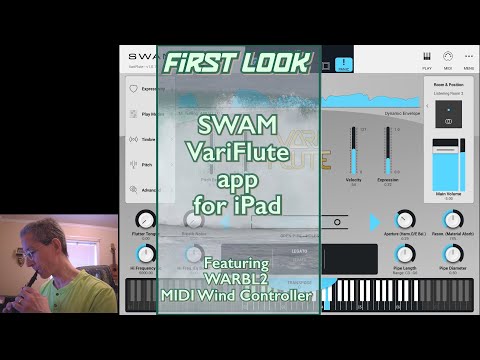
  • First look with WARBL2 wind controller
  • @jimhanks said:
    First look with WARBL2 wind controller

    Jim, I waited for your demonstration. Thank you so much! But I got more interested in having WARBL2 than anything else, haha. 🤦‍♂️😅

  • i would like to have a wind controller and a varifart app.

  • Variflute pairs very well with the Exquis controller. As most of others SWAM apps there is also already a preset included.

    Some random jamming on a new track I'm working on.. sorry for the sloppy playing :smile:

Sign In or Register to comment.