Loopy Pro: Create music, your way.
What is Loopy Pro? — Loopy Pro is a powerful, flexible, and intuitive live looper, sampler, clip launcher and DAW for iPhone and iPad. At its core, it allows you to record and layer sounds in real-time to create complex musical arrangements. But it doesn’t stop there—Loopy Pro offers advanced tools to customize your workflow, build dynamic performance setups, and create a seamless connection between instruments, effects, and external gear.
Use it for live looping, sequencing, arranging, mixing, and much more. Whether you're a live performer, a producer, or just experimenting with sound, Loopy Pro helps you take control of your creative process.
Download on the App StoreLoopy Pro is your all-in-one musical toolkit. Try it for free today.
Comments
I had Kymatica on my list for a few things, but it doesn't look like they make a PC version of their products - I want to be able to apply reverb and delay to recorded audio while I'm creating, but not bake it in, and instead re-add them when arranging, producing, and mixing the tracks when pulled over to the PC with the same settings as a starting point to refine room spacing with a focused mindset.
But there is a workaround that I sometimes use. You can assign a MIDI message to control "Tap Tempo", which essentially puts AUM's tempo under the control of an external MIDI device.
It's a seriously fair point. I am grabbing Nembrini's Black Distortion and Big Stuff plugins for ProCo Rat 2 and EHX Big Muff Pi replicas, which I think will be fine.
I get there are some arguments for that thing that physical gear adds, and can actually here a difference in some cases - it's one reason I'd love to specifically have a Nord Lead 2 with 18-bit DAC at some point, but not the 2X or others with the 24-bit DAC. But I'm not worried about it for several effects.
That said, I also moved to dawless to get away from the computer and mouse, at least for all creative work. Touch with the iPad generally feels better, but still not as good as hands-on, so I like that option where possible and not prohibitively expensive. I can probably find something similar to what the Red Panda Particle V2 does, though I'll need to see if there is something I can map independently with a small controller for hands on. I try to avoid the process of touch interaction for loading plugins as well, but it's not too bad.
That said, while there are lots of amazing things, I haven't seen a plugin that sounds quite like the Gamechanger Audio Plasma, or that would have as simple of an interface to get there. Would be cool to learn of something with those two characteristics though
I wonder if Fuge Machine Tempo Rubato will have a Friday discount...
Apps Gone Free - Miscellaneous
xPDF is free usually $17.99
https://apps.apple.com/us/app/xpdf/id6738056009
Color Pro X Accurate Picker is free usually $.99
https://apps.apple.com/us/app/color-pro-x-accurate-picker/id6746386069
TimePDCA is free usually $3.99
https://apps.apple.com/us/app/timepdca/id6752494060
uCamera is free usually $3.99
https://apps.apple.com/us/app/ucamera/id6740316131
SnapResizer is free usually $.99
https://apps.apple.com/us/app/snapresizer/id6753068831
fmQT - FM Synth is FREE usually $12.99! Grab it while you can, it is an AUv3

https://apps.apple.com/us/app/fmqt-fm-synth/id6475642825
phase monkey and blip box on sale in germany
https://apps.apple.com/de/app/phase-monkey-poly-synth/id6452880369?l=en-GB
Utility
Memos voice is free usually $2.99
https://apps.apple.com/us/app/memos-voice/id1396913168
T2L - Piano is 30% off at $24.99

https://apps.apple.com/us/app/t2l-piano/id6747394589
Almost like he knew Jimmy Cliff gonna pass, chills!
Doesn't seem to attract much discussion this one, but it's properly good - strikes a good balance between the physical modelling responsiveness of Pianoteq and the character of the GSI sampled pianos. Great value for what you get, especially at this price.
I was concerned the iOS version seemed cut down compared with desktop, but it isn't noticeable:
I use this a lot when I don’t need all the Pianoteq bells and whistles. It’s a great piano app.
Cheers for the tip but I can’t unfortunately seem to get the double tap popup. Tried iPad and iPhone. Bugger
New Release - Johanna Quiceno - developer of Noise Face
Wave Face is $4.99
https://apps.apple.com/us/app/waveface/id6754204480
New Release
Mic Drop - Pro Vocals is a free app with multiple IAPs options, subscription, lifetime, base Pack, and individual voice fx’s, AU, iPad only, WORKS ONLY INSIDE LOGIC PRO.
https://apps.apple.com/us/app/micdrop-pro-vocals/id6754768013
Listening
Dream S Pro - Internet Radio is $3 off st $1.99
https://apps.apple.com/us/app/dream-s-pro-internet-radio/id1636215558
It works in any DAW but you need an M5 iPad to actually run the thing because it is so hungry.
Newly Added Music App Sales
All Axart Labs Apps on Sale!
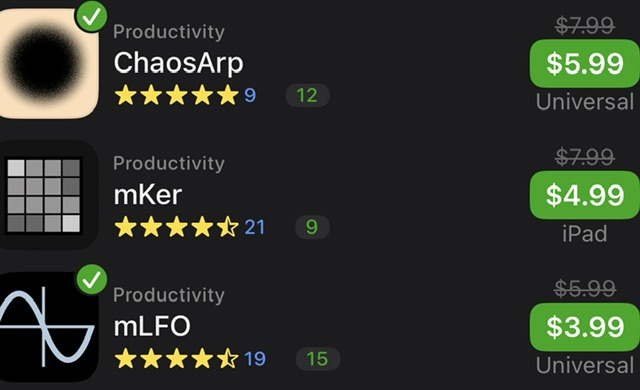
https://apps.apple.com/us/developer/axart-labs-ou/id1814434331
Alexander Zolotov App Store Link
https://apps.apple.com/us/developer/alexander-zolotov/id324462547
In the description it says something like designed to work in logic pro, or something like that… maybe just optimized for Logic Pro
EDIT: After playing a bit more, WAY more functionality than just playing images: create, manipulate, and perform spectrograms.
Virtual ANS let's you "play" images as spectral tones. It's pretty unique, Zolotov af, the only thing of its kind afaict existing as an iOS AUv3. Very 2000's experimental vibes. As always, best to play with the desktop version first if you can to determine usefulness.
Virtual ANS if quite a unique and fun app especially for soundscapes and ambience worth considering buying
Virtual ANS is extraordinary if you’re into more experimental sound design. Allows you to draw sound events across a frequency/timeline using different brushes. Also allows import of audio and images onto the timeline which can then be played back or parts of them selected to create brushes from and paint with.
Playback and export the timeline as a composition in its own right or have it triggered by MIDI notes and use it as a synth.
Definitely try the desktop version if possible. Plus, look up the history of the actual device it’s based on - really interesting.
This is fairly bonkers! Looks like a toy but it's essentially an dirty lofi fm synth with always on looper that records both notes played and any knob moments. You can choose whether notes, knobs or both are recorded. Rapidly gets quite nuts! Not sure if it's ever going to be actually useful but it's quite a lot of fun on first twiddle...