Loopy Pro: Create music, your way.
What is Loopy Pro? — Loopy Pro is a powerful, flexible, and intuitive live looper, sampler, clip launcher and DAW for iPhone and iPad. At its core, it allows you to record and layer sounds in real-time to create complex musical arrangements. But it doesn’t stop there—Loopy Pro offers advanced tools to customize your workflow, build dynamic performance setups, and create a seamless connection between instruments, effects, and external gear.
Use it for live looping, sequencing, arranging, mixing, and much more. Whether you're a live performer, a producer, or just experimenting with sound, Loopy Pro helps you take control of your creative process.
Download on the App StoreLoopy Pro is your all-in-one musical toolkit. Try it for free today.
Comments
Hi @timfromtheborder, thanks for sharing that cool track 😎🔥! Very happy to hear you are getting variety and quality from the app! It’s always a real treat to hear the creative ways people are using the app. Your example really shows what’s possible!
I have added a couple of new motif files to the sample motif files in:
https://sites.google.com/site/azul3dapps/home/sample-motif-files
One is the Multi Octave Arpeggio motif, inspired by a fall theme 🍁🍂. The other one is named Classical and was inspired by a recent @GeoTony composition 🎼 .
If you're interested, download them and take a look.
Wow, that's grounds for a hit!
Lots of great ambient tracks in the forum. I thought I’d share some ambient tracks generated by Piano Motifs:
The motif files for each one of the tracks can be found in the video descriptions.
A new version of Piano Motifs (v4.104) is now available. What's new in this version:
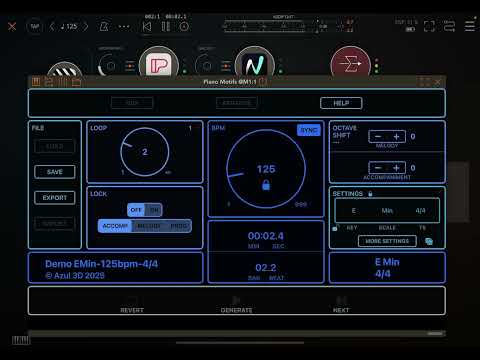
• The Melody Sequence Setting has a new Frz (Freeze) option for each one of the 2 sequences. You can select between 2 different Freeze modes: Note and Interval. When Note is selected, the exact same notes are played on each sequence beat. When Interval is selected, the intervals of the first notes played are preserved and remapped to the chord played in each bar. The default setting is Def, where the sequence may be randomly frozen or not.
• Fixed crash that could sometimes happen when loading motifs into an arrangement.
With this new option and the loop setting for each sequence you can generate some really nice melody sequences.
An example of a motif using this new option can be found here:
If you are enjoying the music generated by Piano Motifs please consider leaving a review in the App Store. Every review helps others discover the app, ensures the app is fairly represented, and supports future development.
Enjoy!
Done 😉
Thanks Fernando
@zAk , Thank you for taking the time to leave a review, it's greatly appreciated 🙏✌️
Hope you can use this new feature in your musical creations 🎶
@azul3D_Apps
I am making some wicked 80's synth tracks using 3 instances of iwavestation w/piano motifs. This app is incredible man. We appreciate you.
Cool @egobeats 😎. Would love to listen to those tracks!
A new version of Piano Motifs (v4.105) is now available. What's new in this version:
• Added new option to the Drone Accompaniment Style. You can now specify for the Drone Accompaniment to be a Dyad (2 notes of a chord). The Dyad can be the 1-5 (root and 5th), 1-3 (root and 3rd) or 3-5 (3rd and 5th). The Dyad drone adds a subtle harmonic color and texture without the fullness of a chord. This is great for Ambient tracks.
• Fixed crash that can happen when calculating the number of chord notes for Rolled Chords (AUv3 Plug-In Only).
• Fixed crash that can occur when changing from Bluetooth to Speakers and vice versa.
• Fixed issue where setting a lock for the Drone Accomp Style isn't working correctly.
Here is a video of a motif that uses this new option:
You can find the motif file for this track here:
https://drive.google.com/file/d/1xYE0cs7dZMdjb1fXvJ8bzV5Ls-VExHMR/view?usp=sharing
There are many ways to configure the Drone Accompaniment Style which can be used very effectively in Ambient Style tracks. Try it out!
If you are enjoying the music generated by Piano Motifs please consider leaving a review in the App Store. Every review helps others discover the app, ensures the app is fairly represented, and supports future development.
Enjoy!
Thanks again Fernando. I use a bit less Piano Motifs these days to learn different workflows in Drambo, but I look forward to getting back to it. It will be a nice addition to making textures in Koala.
He's added so many neat updates. Always awesome additions. Been using it more than ever before now that Iwavestation is auv3. Wavestation, IM1, and module pro's rapture expansion is a great piano motif template.
The " korg Module Pro IAP: Rapture " is really good with Piano Motifs and SpaceWalk.
Still killing it, @azul3D_Apps ! Really nice update
@oscillotus, It’s always great to have different workflows in your creative arsenal. Hopefully the new features in Piano Motifs will be a helpful addition to your workflow.
@egobeats, glad to hear you find great value in the new additions. Haven't used any of the Korg apps, might need to try them with Piano Motifs.
@lukesleepwalker, thanks! 🙏✌️
Preview of a new feature coming soon to Piano Motifs:
Edit: If you’re interested, the motif file is on the description of the video.
So COOL! I can make descending bass lines soon. I love descending scale bass lines. I’d imagine I can also make the bass lines ascend… so generally, You get more control over your bass lines by using these /slash chord like C - G/B - Am - Am/G- F - F/E -…
Hi @McD, I had a feeling you would like this new feature 😊
You get me. It did take you a few years to add this essential feature but I will remember you in the Tip Jar when you release this new version.
I wouldn’t mind seeing an updated tutorial video that explains all or most of the new features. I do understand that it may be rather difficult to do, as @azul3D_Apps keeps adding things; new features and stuff.
Whenever I do remember to use this app, I only use it in its most basic form, and only use two tracks; the main on MIDI channel 1, and the accompaniment on channel 2.
What I’d like to see specifically, is tutorials for the “Arrangement” section, as well as the Chord progression settings and such.
@Edward_Alexander oh man, go into midi and activate the 3rd midi channel. I use it a lot. I concur additional tutorials would be awesome. The tutorials were really fun replicating and hearing the end result was pretty sick.
@azul3D_Apps hallelujah, slash bass fills a nagging need I’ve had for a while! I’ve worked around it using other sequencers for the bass line. This new feature will seriously simplify things. Thank you! Can’t wait to play with it
A new version of Piano Motifs (v4.106) is now available. What’s new in this version:
• New Slash Bass setting for Programmed Chord Progressions. You can either Add a Bass note to a Chord or Swap the Root Bass note of a chord for another note. Perfect for line cliché bass lines and other bass movement ideas.
If you are enjoying Piano Motifs please consider leaving a review in the App Store. Every review helps others discover the app, ensures the app is fairly represented, and supports future development.
Enjoy!
It was always there in the list of new features to add, and I finally got to it 😀. As always thanks for your support and generosity.
@azul3D_Apps piano motifs should be in the top 10 apps purchased by any musician for its tools, efficacy, inspiration, and updates
I will echo the same on a store review
Hi @Edward_Alexander, I’ll see when I get the time to create more tutorials. There does exist a tutorial for Arrangements, albeit it’s somewhat old and for MIDI Out, but it still applies. You can find it here:
In that YouTube channel there are more tutorials in this playlist:
Hope this helps.