Loopy Pro: Create music, your way.

What is Loopy Pro?Loopy Pro is a powerful, flexible, and intuitive live looper, sampler, clip launcher and DAW for iPhone and iPad. At its core, it allows you to record and layer sounds in real-time to create complex musical arrangements. But it doesn’t stop there—Loopy Pro offers advanced tools to customize your workflow, build dynamic performance setups, and create a seamless connection between instruments, effects, and external gear.

Use it for live looping, sequencing, arranging, mixing, and much more. Whether you're a live performer, a producer, or just experimenting with sound, Loopy Pro helps you take control of your creative process.

Download on the App Store

Loopy Pro is your all-in-one musical toolkit. Try it for free today.

Jim Audio New App, GROOVERIDER 2 In Store.

12728293032

Comments

  • wimwim
    edited March 23

    @Qwesto said:

    @wim said:
    For instruments you can record and edit automation for up to 9 assignable parameters per plugin instance.

    Incorrect information.

    I already corrected that earlier.

  • Hard to believe we got this update for free! I may give GR-II a go soon.

  • @wim said:

    @Qwesto said:

    @wim said:
    For instruments you can record and edit automation for up to 9 assignable parameters per plugin instance.

    Incorrect information.

    I already corrected that earlier.

    Read it. Remained swampy, imho. Case closed.

  • edited March 24

    Getting a couple spikes when interacting with OS controls while transport is running, control panel, notification shade, etc. Pretty well expected and nothing game breaking at all though.

    Pure Acid Drums, Moog Mariana, J8 Super Synth, Microwave 1 and Blofeld all running with automations on a 2018 ipad pro....barely hovering 50 percent!! incredible. Thank You Jim!!!!

  • Great update, i'll play with it this evening.
    A question: clip automations are only possible with song mode off? When i record some knob movement it goes always in the song page and not in edit page.

  • Sweet! The insert fx update takes an already great tool to a new level.

  • Superb work! Many thanks for Aufx implementation and Multi-thread processing support. I’m glad to work with this new features asap.

  • @mistercharlie said:
    Can you automate auv3 parameters? Or p-lock them?

    In addition to my earlier mention about parameter automation, p-lock style automation is possible as well:

    Parameter Lock-style editing of automation: hold down any Pad in the STEPS mode and then move a knob (on the Sound page) to instantly create parameter automation in the current clip and place dialed parameter value at the desired step. You can also hold several Pads while turning a knob to place parameter value to a number of steps at one time.

  • wimwim
    edited March 24

    @Luc_A said:
    Great update, i'll play with it this evening.
    A question: clip automations are only possible with song mode off? When i record some knob movement it goes always in the song page and not in edit page.

    Yes, I believe that's correct, which makes sense to me.

  • While I don’t really use GR2 regularly (I prefer Drambo), this latest update has my M1 feeling “old” now. Might have to do some upgrading!

  • @Edward_Alexander said:
    While I don’t really use GR2 regularly (I prefer Drambo), this latest update has my M1 feeling “old” now. Might have to do some upgrading!

    I saw the reference to my M1 too.

  • edited March 25

    Is it actually feeling old for y’all or are you just reading the patch notes? @Edward_Alexander @cyberheater

    My iPad that’s three years older than the m1 is very peachy with this update. A12x is barely hitting 40 percent right now. Been playing for 4-5 hours since the update hit.

    Tekno, Oneshot, Dagger, Elastic OSC, Microwave 1, Audiolayer, tons of internal synths, automation running on everything and still have room for lots of AU FX.

    I’m begging the other hosts to catch up with multi-threading. Half of these synths alone will crash my Loopy Pro or Drambo projects, here there’s no sweat at all! It's quite incredible and should be the standard at this point. Apple isn't going to help us any time soon and this is the best way to make older ipads stay alive. <3

  • Excellent! Been waiting for this since day one! Finally here!

  • @wim said:

    @Luc_A said:
    Great update, i'll play with it this evening.
    A question: clip automations are only possible with song mode off? When i record some knob movement it goes always in the song page and not in edit page.

    Yes, I believe that's correct, which makes sense to me.

    Thank you @wim

  • can you automate fx in master fx slot, or only fx slot on each parts fx slot ?

  • I wish this had better support for my Launchkey. This app seems like it has good hardware integration for the Launchpad.

  • @FizzyLizzy27 said:
    I wish this had better support for my Launchkey. This app seems like it has good hardware integration for the Launchpad.

    +1 Launchkey 37

  • wimwim
    edited March 26

    @eross said:
    can you automate fx in master fx slot, or only fx slot on each parts fx slot ?

    You can automate fx in the master and busses, but only from Song mode.
    That makes sense when you think about it since clip automations could collide with each other otherwise.

    Manual page 32:

    7.2 Bus Effect Types
    Here is a list of bus effect types, which can be assigned on the FX and Master buses: Delay, Delay Free, Tape Delay, Chorus, Flanger +, Flanger -, Equalizer, Equalizer X-Band, Exciter, LP / HP / Peak / DJ / Talk Filters, Phaser (7 variations), Analog Drive, Overdrive, Distortion, Pure Drive, Slicer, Slicer 2, Filter Slicer, Ducking, Off Beater, Decimator, Bit Crusher, Ring Mod, Pitch Shifter, Pitch Delay (4 variations), Stereo Width, Compressor (2:1, 4:1 and 8:1 ratio), Sidechain Compressor, Sidechain Gate, Limiter, Maximizer and AUv3 audio unit effect.

    All these effects can be automated in the Song Mode. To record automation, tap Record button and then Play button, then move any desired control during the recording. Automation is stored in the FX A, FX B and MASTER track of the Song Page, and can be edited once it has been recorded.

  • When developers don't have the hardware to test with they usually don't want to attempt integration. If anyone feels like a quick visit to Ukraine, maybe you can lend him one.

    (Someone located in Ukraine did just that for one of the controllers he built support for. 😉)

  • @wim said:

    @eross said:
    can you automate fx in master fx slot, or only fx slot on each parts fx slot ?

    You can automate fx in the master and busses, but only from Song mode.
    That makes sense when you think about it since clip automations could collide with each other otherwise.

    Manual page 32:

    7.2 Bus Effect Types
    Here is a list of bus effect types, which can be assigned on the FX and Master buses: Delay, Delay Free, Tape Delay, Chorus, Flanger +, Flanger -, Equalizer, Equalizer X-Band, Exciter, LP / HP / Peak / DJ / Talk Filters, Phaser (7 variations), Analog Drive, Overdrive, Distortion, Pure Drive, Slicer, Slicer 2, Filter Slicer, Ducking, Off Beater, Decimator, Bit Crusher, Ring Mod, Pitch Shifter, Pitch Delay (4 variations), Stereo Width, Compressor (2:1, 4:1 and 8:1 ratio), Sidechain Compressor, Sidechain Gate, Limiter, Maximizer and AUv3 audio unit effect.

    All these effects can be automated in the Song Mode. To record automation, tap Record button and then Play button, then move any desired control during the recording. Automation is stored in the FX A, FX B and MASTER track of the Song Page, and can be edited once it has been recorded.

    oh cool thanks

  • edited March 27

    @wim said:
    When developers don't have the hardware to test with they usually don't want to attempt integration. If anyone feels like a quick visit to Ukraine, maybe you can lend him one.

    (Someone located in Ukraine did just that for one of the controllers he built support for. 😉)

    exactly, that was me – LP X, LP Mini, and also Zoom LiveTrak.
    but i don't have Launchkey.

  • A question for you GR2 heads, my favorite MIDI APP is Chordpads, the thing is, it doesn’t work with the print midi function, it’s more of a live thing, how do you record live from a midi source into a GR2 pattern? I appreciate the knowledge

  • wimwim
    edited March 27

    @Drrabbitfoot said:
    A question for you GR2 heads, my favorite MIDI APP is Chordpads, the thing is, it doesn’t work with the print midi function, it’s more of a live thing, how do you record live from a midi source into a GR2 pattern? I appreciate the knowledge

    I would like nothing better than to be wrong about this, but I think the only way found earlier was to use such apps standalone or in another host and route the midi to GR-2 and then record live.

  • Appreciate you @wim, yeah that pretty cumbersome.

  • One of the workarounds we found was to record the midi into something else like Midi Tape Recorder or Loopy Pro, then print the midi from there.

    I just did a quick test using Chord Pads (Cem Olcay - not sure if it's the same app you mention @Drrabbitfoot) and MIDI Tape recorder. It was a bit of a pain to set up, but worked.

    • Layer 1: Chord Pads
    • Layer 2: Midi Tape Recorder

      • Turn on input monitoring for the track (I)
      • Arm a track to record (R)
      • Set the loop length and turn on looping
      • Arm recording
    • Layer 3: The instrument I want to play

    • Set the loop length in GR2 pattern settings
    • Start GR2 transport and watch the bar counter to know where you are. MTR should be following this if you set the loop length to match.
    • Record, then stop recording in MTR. The pattern should loop.
    • Create a clip in the clip grid, then long-press and select Print MIDI. MIDI should play back and record to the clip. Then you'll be prompted to switch to the clip for playback, which will turn off midi output from Chord Pads and MTR. Remember to turn those back on to use them again.

    The workflow is probably the same if using another recorder such as Loopy Pro.

  • Thank you for that! I’ll give it a go

  • Thoroughly enjoying the update! it has been some time since I last used GR2, i have some questions:

    Is it possible to assign midi to Send FX AUv3 controls? (Seems to be no, as they don‘t expose parameters as macros to be Shift+double-tapped for midi assignment)

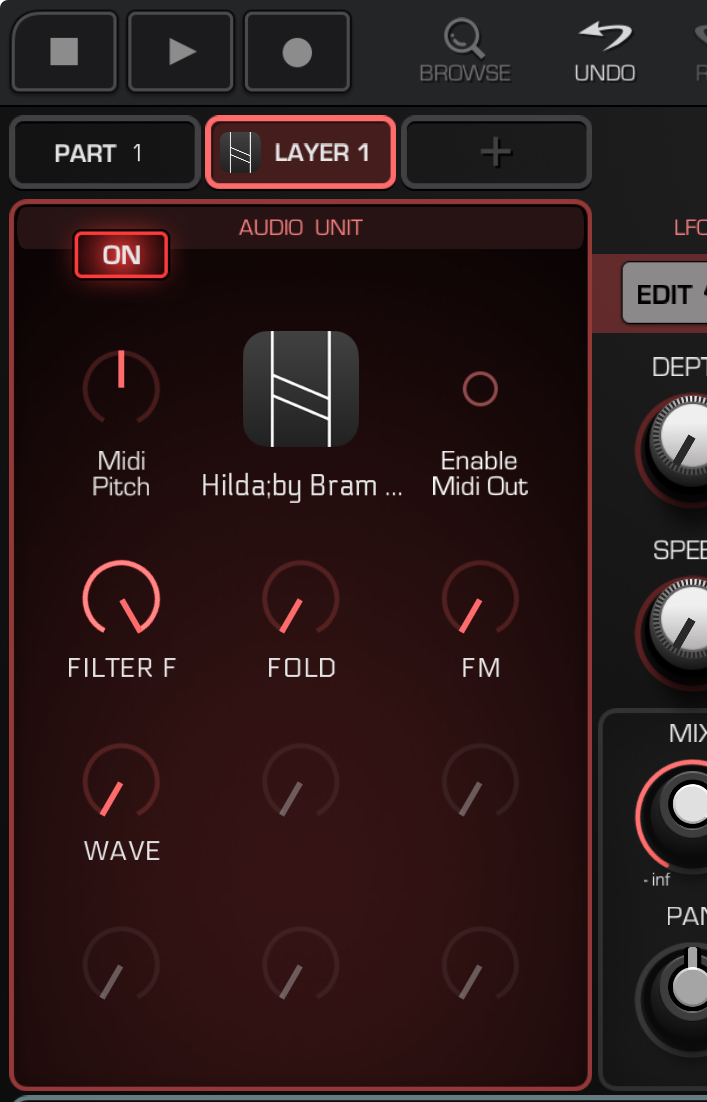
    On a similar note, how can we assign macros for auv3 instruments. For example Hilda here has spots free, alternatively other AUv3 macros are fully auto-populated with seemingly arbitrary controls:
  • wimwim
    edited March 31

    @drewinnit said:
    On a similar note, how can we assign macros for auv3 instruments. For example Hilda here has spots free, alternatively other AUv3 macros are fully auto-populated with seemingly arbitrary controls:

    Long-press the Layer name, then select Redefine AU Knobs. Tap the knob you want to assign, then wiggle a control in the plugin. A few apps don't report their knob movements properly to the host, but most will work.

  • @wim the apps name I was trying to think of is Tonality, that’s my favorite chord pad that I was trying to figure out how to work into GR2’s setup

  • wimwim
    edited March 31

    @Drrabbitfoot said:
    @wim the apps name I was trying to think of is Tonality, that’s my favorite chord pad that I was trying to figure out how to work into GR2’s setup

    That's the one I used for testing the setup above. 👍🏼

Sign In or Register to comment.