Loopy Pro: Create music, your way.
What is Loopy Pro? — Loopy Pro is a powerful, flexible, and intuitive live looper, sampler, clip launcher and DAW for iPhone and iPad. At its core, it allows you to record and layer sounds in real-time to create complex musical arrangements. But it doesn’t stop there—Loopy Pro offers advanced tools to customize your workflow, build dynamic performance setups, and create a seamless connection between instruments, effects, and external gear.
Use it for live looping, sequencing, arranging, mixing, and much more. Whether you're a live performer, a producer, or just experimenting with sound, Loopy Pro helps you take control of your creative process.
Download on the App StoreLoopy Pro is your all-in-one musical toolkit. Try it for free today.
Comments
I’ve not yet downloaded this, but does the same Roland account work that is also used for Zenbeats?
I think Aki might have a point, it does sound like we'll be put to a choice later (sub or buy). Could you please clarify @MatthewAtZenbeats?
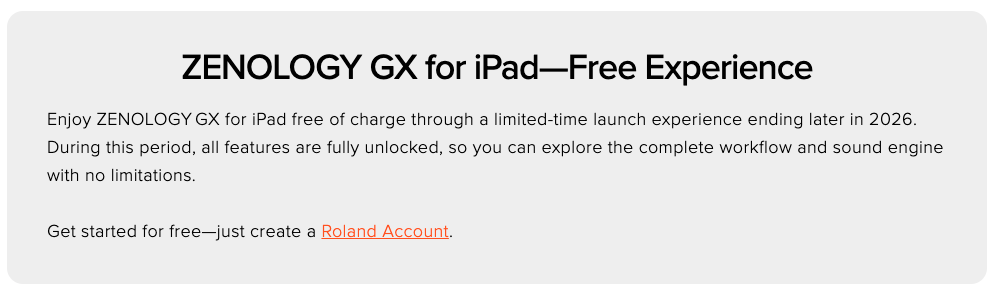
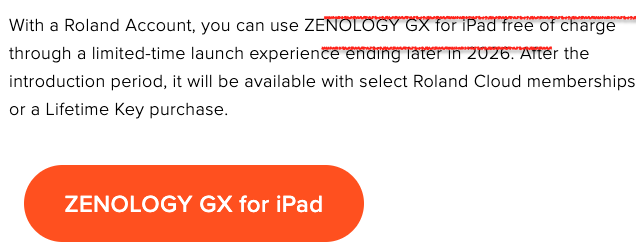
Sorry about the red lines, something is wrong with the editor.
Same here. Compared to all of my other apps, this is pretty quiet overall, even with my iPad volume at max. 😎✌🏼
The most important question: will there be any scratching sounds?
Yes 😁
Same here. Extremely low volume. Apart from that, it seems tremendous.
Edit: In fact, there seems to be some inconsistency in volume. Some of the brass patches, for example, are loud, while some electric pianos are very low.
Yes.
/DMfan🇸🇪
As another MC707 owner I totally agree.
With genuine respect @MatthewAtZenbeats, ultimately it will all come down to the pricing so I’d suggest you guys be upfront about that as soon as possible.
Even if it’s the best synth ever, if the lifetime purchase is out of reach then that will be the end of that for some of us - a free trial period isn’t going to change people’s financial realities so it feels a bit unfair to not let us know straight away whether we’re going to able to afford it after the trial period.
(Edit: I do, of course, realize that the decision whether to let us know the pricing or not will probably not be up to you personally.).
very glad to be able to play with this. lots of familiar sounds in this, I like it so far
I thought this was multitimbral, how does that work? i see you get 4 "Partials", but they seem to respond to same MIDI channel
just one MFX plus reverb seems a bit limited (i know some of them are combinations, but still)
I wonder if this will be integrated into Zenbeats and we can expect a ZB update soon.
On the hardware units you can have different partials responding to different key ranges. Can’t seem to find the option in the iPad version.
thanks @cyberheater
it's early days, maybe that feature will come
@MatthewAtZenbeats Not available in the China Appstore? It would surely have propagated there by now, nearly 10 hours. I’m guessing you’re not making it available on the China Store?
@Samu : I think so
It unlocked for me using my Roland Cloud
Login rather than my Roland Account login.
Well, it sounds stunningly great.
Auv3 support (supposed to be on the way) and pricing will determine if it stays.
Is it finally out?
Edit: never mind! I see it!
Don't have a Roland Cloud account but the regular Roland Account that I use for Zenbeats worked...
...don't know if there's any practical differences though? (I've get 12 packs and 4217 presets in total).
Under Settings/General it just says Roland Cloud Membership NONE which is correct since I don't have a cloud membership
I wonder how you do that?
I can’t see it in the UK App Store
https://apps.apple.com/gb/app/zenology-gx-synthesizer/id6756631713
ZENOLOGY GX - Synthesizer
Erm… the mighty Roland released a brand new synth for iPadOS with no connectivity? No AUv3? Why exactly?
Or am I completely missing something? Is this the build it while it’s in the air model of development and it’s on its way? I’m guessing so but have not read back through thread.
No AUv3 or IAA?
Yeah was really quiet for me too. Had my iPad volume all the way up and it sounded like it was about halfway.
+1 on the weak/inconsistent volume on the built-in speakers.
Anyone still having those issues with monitors?
@gusgranite @MMXXIV They said AUv3 will soon be added during the free trial period. Hopefully @MatthewAtZenbeats can address the low volume issues.
They’ve said from the beginning that AUv3 would arrive after release.
I must admit I’m a bit shocked considering how long they’ve sat on this that they didn’t release with AUv3. It’s been 5 months since they first showed this. Kinda makes you wonder what they’ve been working on.
Not the volume that’s for sure 🤣
I’m happy to see iPadOS included in the ecosystem of these types of apps. Compatibility lists for iPad/iPadOS and the Roland products on their support site is extensive, so it seems like they really want to take it seriously. Having the ability to move seamlessly between devices and platforms is always a plus for me, and anytime I can take an entire project from iPad to desktop or have them interact directly is great. There’s a lot of things that lend themselves well to the touch interface and just being able to take a project and work on it from a tablet is helpful.
On the other hand, I don’t want to invest a lot of money and be trapped in a single vendor’s workflow, where things only work seamlessly within those tools. Give me flexibility to make it easy to use with my own workflow and with different levels of power (Free/base, Light, Power, Ultimate), and I’ve done ok with those from other vendors. Just my 2 cents.