Loopy Pro: Create music, your way.
What is Loopy Pro? — Loopy Pro is a powerful, flexible, and intuitive live looper, sampler, clip launcher and DAW for iPhone and iPad. At its core, it allows you to record and layer sounds in real-time to create complex musical arrangements. But it doesn’t stop there—Loopy Pro offers advanced tools to customize your workflow, build dynamic performance setups, and create a seamless connection between instruments, effects, and external gear.
Use it for live looping, sequencing, arranging, mixing, and much more. Whether you're a live performer, a producer, or just experimenting with sound, Loopy Pro helps you take control of your creative process.
Download on the App StoreLoopy Pro is your all-in-one musical toolkit. Try it for free today.
Comments
@AnalogMatthew
Absolutely awesome, man! 👍
(Killer hat)
👏🏼👏🏼👏🏼🎹 great to see this
@AnalogMatthew Is the VCF key follow working? I've had to patch in an external control to step-modulate the VCF.
Nice one @AnalogMatthew
Good ear. It goes to 25% total. The unit I had seemed to have keyfollow at that percentage with the slider all the way up.
Honestly, that Jupiter may have been broken. Surprised nobody has mentioned yet.
This week, I'll try to figure out a way to allow it to go to 100% without breaking people's presets 🤔
Yeah please try to do it
Only thing about this amazing app that has led to some headscratching moments..
I never owned an actual Jupiter 8, so I don't have an aural memory to go on. So I've just read the original manual, and it's entirely ambiguous. It only says that with the control raised, the sound gets brighter. It also says something about its midpoint being middle C, which isn't very clear. My guess would be that when the control is up (or perhaps at its own midpoint?), notes above middle C increase VCF cutoff, while notes below middle C reduce it. Which would be very weird.
The manual for the Arturia emulation adds no information, and while the Cherry Audio documentation mentions tone consistency throughout octaves, I think that's just generic gabble. To my ear, even at full, we don't hear "one octave per volt" change. More like... one quarter?
So I don't know. It seems quite possible that your emulation is in fact perfectly faithful. I hope someone else with a working Jupiter might be able to confirm. To learn any more myself, I'd have to dig up and decipher the service manual.
Edit: The service manual describes the calibration procedure, but does not indicate the reference values.
Edit: I thought I might replicate the essential step of the calibration, which involves cranking the VCF into resonance - so that you can actually track its pitch on a scope - and then playing C2 and C4 with key follow. Lo, this app's VCF does not appear to self-oscillate at 100% resonance.
Give it a “tickle” with a little noise to get it going?
Having a lowered pitch (negative CV) on the lower half of the keys is likely helpful to get the cutoff low enough - something that can be problematic on my JX3P. Hopefully Matt still has access to a JP8 to check this.
I forgot the mention that on the example JP8 the key follow only went to circa 25%. The manual reads to me that the maximum is somewhere above 100%, centred on middle C. This isn’t weird to my experience, I’d think it would be quite practical. Time to grab my iPad and experiment!
And… with both oscillators turned down, noise fully up, VCF key follow fully up, I hear not a lot of change in resonant peak frequency across 3 octaves.
@AnalogMatthew I do hope the presets have some kind of versioning?
Am I being dumb?…
I want to use the lfo to automate the amp envelope attack, but only envelope 1 attack is a target. Is there a way to switch the amp envelope to envelope 1?
By popular demand in this forum:
In the next update, keytracking can go the full monty. It will update the presets while keeping the sound the same.
So if a preset was effectively at 100% before, it will migrate to 25% to account for the extra range.
Is that accurate? I was only able to model one real-life unit. You know how people say all vintage gear sounds a little different?
Maybe that is part of what gave this app some of its mojo. Ha!
That is correct. The only Juno/Jupiter that self-oscillates is the 106.
For the filter nerds, the upcoming PRO-A5 self-oscillates like a champ. It even has a magic "rez" tune button that snaps the cutoff to the nearest note, so you can get that resonance singing in key. Not saying it's "game changing", but it's pretty cool.
Not dumb at all, that's a valid question. In the hardware/app, Amp Envelope is hardwired to Env 2.
I believe they did that because Env 1 can be inverted.
Gotcha. Can I add a feature request to make env2 attack (and other env2 params) a target for the lfos?
The destinations are labeled "Attack VCA", "Decay VCA", "Sustain VCA", "Release VCA" in the LFOs.
Now you've got me second guessing whether they should be labeled "ENV-2 Attack" etc 🤔
Ah yes, I can see them now! I think the problem was that they didn’t sit together in the list of targets. If it was VCA Attack, VCA Release etc. I think I would have found them.
Woot.
But according to the service manual, which I referenced earlier, you crank it to self-oscillation to calibrate the key-follow. I'm attaching a screenshot. Perhaps the internal adjustment pot has a greater range than the panel slider.
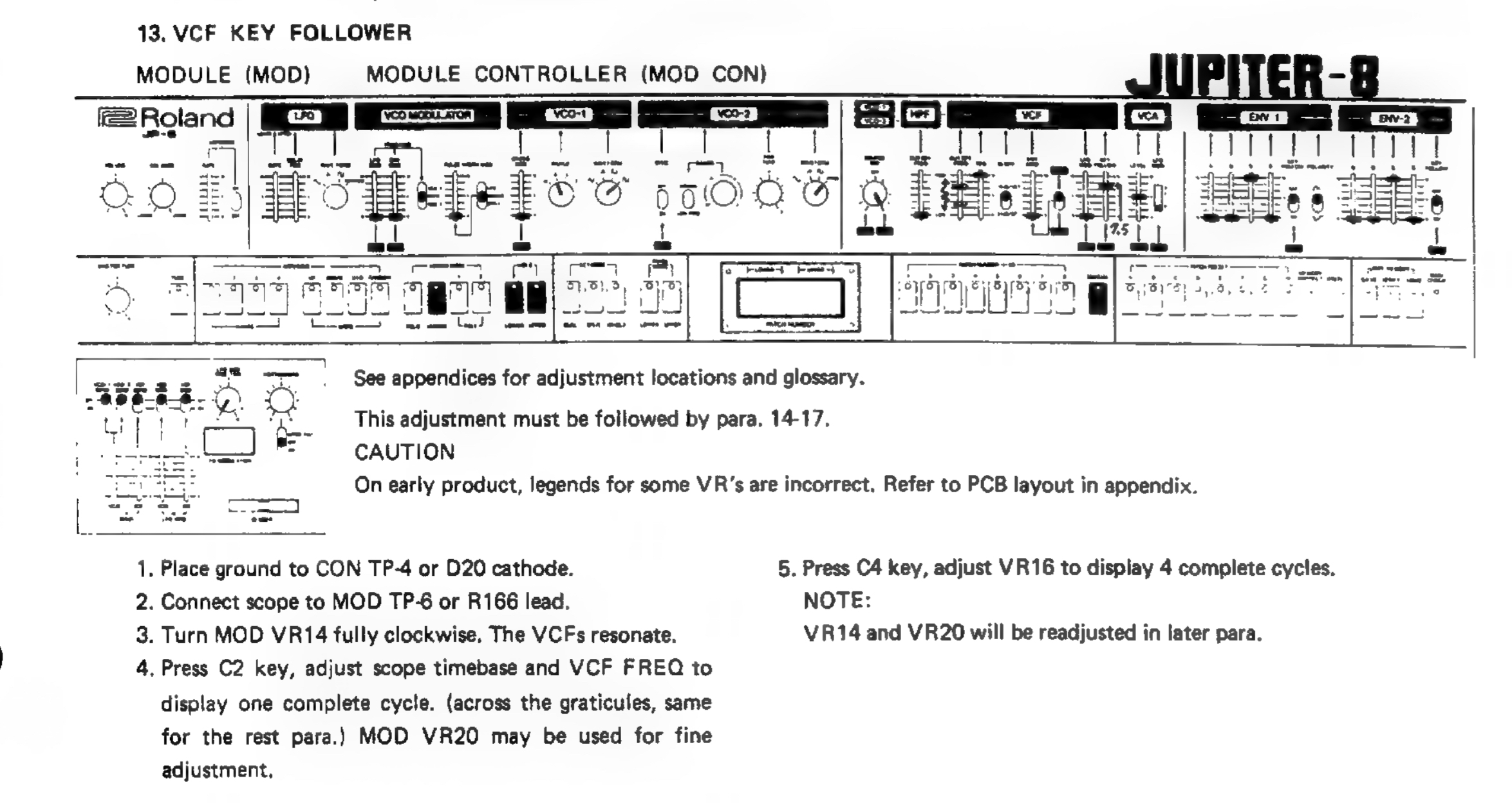
That's super interesting information @garden, thank you for sharing!
Back to the chestnut of VCF key follow… this seems to be implemented as a cross fade between the other modulation and pitch CV. Strangely I still don’t hear the filter move when only noise is turned up, so maybe noise is implemented as a pseudo-voice?
Having just had a look at JP8 schematics key CV is clearly summed with other modulation CV, which would be conventional. I also see that noise is a waveform option for VCO2, so it’s going through a filter affected by key CV.
JP8 Owners and Service Manuals here for anyone interested: https://synthfool.com/docs/Roland/Roland_Jupiter8/
And I think there is but a single, global noise generator.