Loopy Pro: Create music, your way.
What is Loopy Pro? — Loopy Pro is a powerful, flexible, and intuitive live looper, sampler, clip launcher and DAW for iPhone and iPad. At its core, it allows you to record and layer sounds in real-time to create complex musical arrangements. But it doesn’t stop there—Loopy Pro offers advanced tools to customize your workflow, build dynamic performance setups, and create a seamless connection between instruments, effects, and external gear.
Use it for live looping, sequencing, arranging, mixing, and much more. Whether you're a live performer, a producer, or just experimenting with sound, Loopy Pro helps you take control of your creative process.
Download on the App StoreLoopy Pro is your all-in-one musical toolkit. Try it for free today.
Comments
@LFS, having watched the videos, it seems there’s no way to create user layers? Is that correct and, if so, is this planned for an update?
Hi @Robin2
Here's the manual that includes all infos...
https://www.steinberg.help/r/halion-sonic-play-for-iphone/ipad/1.0/en/halion/topics/ios/halion_sonic_play_for_ios/halion_sonic_play_for_ios_c.html
Hope that helps!
Best,
Lars
Thanks Lars. The manual seems to confirm that the user can’t make their own layers (without explicitly saying so) but it doesn’t mention whether that functionality is planned for a future update? Do I assume that it’s not then? Seems a shame if so.
Hi @Robin2
We normally announce new features alongside the release of new apps and updates, ensuring we only communicate confirmed functionality.
Best,
Lars
Fair enough, please consider it a feature request then! Cheers.
I'll +1 this feature request.
I am pleased to see Alexander Gross (author of Music Studio) named in the HALion Play manual; he knows a lot about romplers.
@jwmmakerofmusic I believe you have both of these apps, but do the strings and orchestral instrument in Halion Play kinda match the ones in Iconica Sketch? I'm trying to decide which one to buy and if the orchestral sounds in Halion Play are good enough I'd rather get that since I'll get other sounds as well.
I'd say "get both eventually", but make HALion Sonic Play the priority. It has great orchestral sounds in its library already, and it's what I used for client work (they wanted a "magical" type of orchestral score). HALion Sonic Play also comes with General MIDI sounds. Iconica Sketch is great for orchestral works too (and can use automation to program string swells and such), but honestly for a "swiss army knife" of sounds, you can't go wrong with HALion Sonic Play.
Thank you sir.
Of course, friend. Let me know what you decide to get.
Is it safe to remove sonic selection after buying play?
At the moment it is not possible to do that, but yesterday I asked that same question on the Cubasis forum and it is now passed to the engineers 👍
Mike
I agree 100% 👍
Mike
Cheers. 🍻
I am very taken with this addition. Hugely happy I can play it in Logic as well as in Cubasis (of course).
I am REALLY enjoying playing the chord thingie (see pic!), but am as ever obviously missing something obvious because when recording notes they sound delicious but do not record in the track. Any clues as to what button I am (or am not) pushing etc?
Hi @BiancaNeve,
Hope you are well,
The first thing I'd recommend is making sure that all of your projects using HSS have been properly updated and are assigned to HSP.
As a first step, you could test this with a duplicate of one of your projects. Verify that everything works as expected by closing and reopening Cubasis, restarting your iPad, and loading the project again.
Once you've confirmed that all of your projects load correctly, you may go ahead deleting the HSS content in the Cubasis In-App Shop.
Hope that helps.
Best,
Lars
Wow! I think I can now give up (well, really, putting up with) with IK Multimedia Sampletank for iOS! It's still stuck forever in the dark ages of IAA and will be forever according to IK!
I just bought the HALion Sonic Play app. Outstanding! AUv3, disappointing there are no splits or layers that I have found so far, but there might be some add-on MIDI functionality in the future perhaps? The instruments are VERY usable. Have not got to the add-on packs yet. This is just the factory set.
Will now incorporate it into all my live gig setups with Camelot and other stage apps!
Good job Steinberg...._MIGHT _even have another look at Cubase for iOS too!
Hi hi 👋 bought HaliSonic… would be nice to be able to tie steps on the Arp… nice..
Hi @JohnnyGoodyear
Thanks for your message.
WOW, HSP is a very nice fit here... 🙂
I'll share your issue with our engineering team to see if there's anything we can do on our end.
Please note that it may take some time for the issue to be evaluated.
Best,
Lars
But you can delete the 1.8g of downloaded content
Sadly, I don't think it's possible in Logic for iPad, Halion doesn't expose MIDI out to Logic, so there is no way to record the pads that I can figure out. I'm happy to be corrected if someone finds a way.
This video shows the process to record from Geoshred, but it doesn't work with Halion due to the MIDI out from the instrument not being exposed to Logic:
@richardyot Hello Mister Yot! How are yer?
Thanks for the confirmation....I have ended up making a fist of this by using the Logic Chord Strips etc, which work well, but differently of course. I am still very happy that this vast tranche of HAL is now available in Logic (and elsewhere). A good addition for the dollars....
I'm well, thank you for asking
The Logic Chord Strips are nice, but very limited sadly. They are fixed to the key of the project, and you can't edit them to create more interesting or spicy chords such as suspensions or sevenths, which is a shame.
There are probably some AUv3 play surfaces that do something similar to the Halion chord blocks.
Actually I'm wrong! You can edit Logic's Chord Strips, hurrah:
https://support.apple.com/en-gb/guide/logicpro-ipad/lpip55a1529d/ipados
I read in posts above that user layers are not possible, BUT there are factory layers in the top sounds section. SO obviously layering is possible. Why has Steinberg opted to leave out this BASIC (they are touting it as a COMPLETE WORKSTATION) function in the app?
No splits either, another basic workstation function! This is really just a sound rompler and nothing else in its present form.
Another one is 'note ties' in the arpeggiator, some presets very obviously use them but when opening the arpeggiator you're greeted with this...
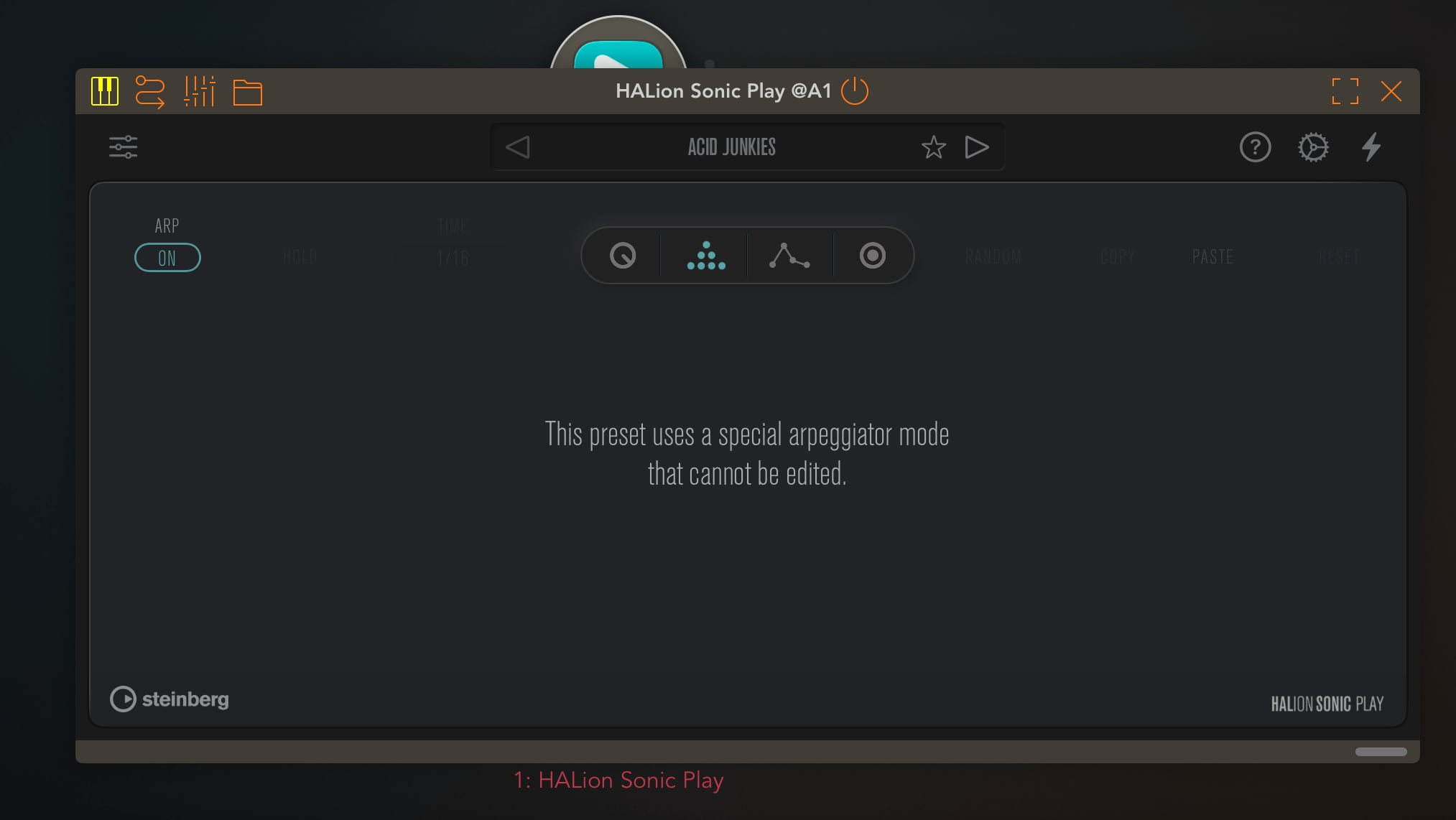
Also when a preset contains multiple layers there are no Plug-In UI elements to turn on/off the arpeggiator for each layer but that can be automated. (there's automation for up to 4 layers as well as some other options that are not accessible from the plug-in UI).
It does sound very good and if it sells well maybe we'll get an additional IAP enabling more advanced editing
Yeah agree! It was very disappointing as I thought I could ditch Sampletank IAA but alas, not yet!
Yeah that would be great, hopefully they will implement it in an update, 4 layers brilliant.
Korg module wants to charge the cost of Halion as a IAP FOR 2 layers.