Loopy Pro: Create music, your way.
What is Loopy Pro? — Loopy Pro is a powerful, flexible, and intuitive live looper, sampler, clip launcher and DAW for iPhone and iPad. At its core, it allows you to record and layer sounds in real-time to create complex musical arrangements. But it doesn’t stop there—Loopy Pro offers advanced tools to customize your workflow, build dynamic performance setups, and create a seamless connection between instruments, effects, and external gear.
Use it for live looping, sequencing, arranging, mixing, and much more. Whether you're a live performer, a producer, or just experimenting with sound, Loopy Pro helps you take control of your creative process.
Download on the App StoreLoopy Pro is your all-in-one musical toolkit. Try it for free today.
ATOM Piano Roll update is coming soon
This discussion has been closed.
Comments
To get the MIDI out from ATOM, you record it into something that can export the MIDI. I've done it by recording into Photon or Xequence. I think BeatHawk would work, too. With Beathawk, you wouldn't even need to export the MIDI, you could save the BH project from the instance in AUM an reopen it in Cubasis.
@espiegel123 cheers will give that a go.
Yes but come on, gotta’ leave some surprises for the release
Speaking of, I’m happy to say the beta started and we’re in the home stretch. Will keep you folks updated.
Atom 2 has support for importing and exporting MIDI. Let me know if there’s some particular workflow you have in mind.
Can’t wait.
Yay!
@blueveek said:
Atom 2 has support for importing and exporting MIDI. Let me know if there’s some particular workflow you have in mind.
I am finding the easiest and most flexible way to work across IPad and my Ableton set up for audio is simply to record a per-channel File Player wav of a piece created in AUM (so, 4 channels - 4 File Player wavs) and then use the AudioShare WebDAV option to copy the wav files over to Ableton on my MBP from there. All I need for the midi then (And this would be everything, mind! ) is to be able to simultaneously record each Atom clip inside AUM at the same time as the File Player recorder happening, one Atom clip per channel, then use AudioShare to export the resulting set of standard .mid files in the same way across. And vice versa, via the same method.
As I create my pieces entirely in AUM, but find arranging and mixing them in the available IOS Daws time consuming and not fun, this workflow would give me the very best of both possible worlds.
Here’s hoping from what you have said so far that this will be possible.
More power to you!
Oh c'mon I don't mind if its buggy just take my money and shut up.
Just joking. Take the time you need of course.
That sounds like it's a supported workflow.
IIUC, the only thing that might make it more powerful I think is adding support for batch export: export all MIDI clips from within a single instance. I'll look into adding that, at least for an update.
@blueveek what about support for translate midi superior drummer layout into a general midi.
I will try to explain myself a bit better. Let's say for example that you import a midi file from superior drummer (or any other drum soft that has different midi layout) and everything sounds wrong on a drum app because it is not general midi... is it possible to make your personal translation changes and save it within the atom preferences so everytime you import a similar file just get it right?
Thanks
That seems like a killer feature! I'll consider it for a 2.1 update to avoid postponing the release even more.
Yesssss! I can hardly wait!
Guess we'll find out sooner or later but...
...Is there any 'clip launcher view' to control all the instances without an external controller?
Not yet, but since Atom is modular to an extreme degree, you can use other AUs to drive it if you don't have a controller. For example, here's a video of LK pads launching/stopping an Atom instance: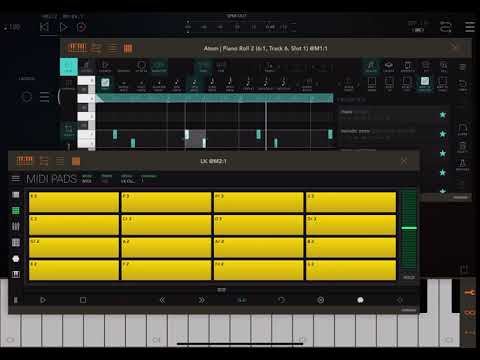
What's happening there is that I'm tapping the E3 pad in LK, and on the other side Atom is launched/stopped accordingly. There's probably many other AUs that can be hacked into doing this as well. If they emit MIDI, they can drive Atom.
That being said, if you do have a controller, it's the better experience for now. Pads light up, you can arm recording, you can launch entire scenes/rows and so on. I'm trying to match Ableton on every detail I can, automatically and without having to set up anything.
I'm still planning to build dedicated "Atom | Sessions" and "Atom | Tracks" audio units, sometime after 2.0 hits.
@blueveek said:
Hi,
Yes, batch export at some point would be very cool, would definitely save some faffing. Atom mark #1 already features on pretty much everything I do (usually recording seeds from the various auto generator apps I use like Autony, so I can then muck about with them, then if necessary recapturing and playing the edited Atom file via Photon or Musk - being able to do all that in-house within Atom Mark #2 will be a significant improvement.
@blueveek : something that would be useful for import/export is the ability to have it split multi-channel single tracks into multiple tracks.
I started a thread about two weeks ago about the potential usefulness of an App with a "History Recorder" as a composing function.
A MIDI "History Recorder", would simply be a MIDI recorder function, where the user selects a length of time (in measures) for the recorder to store played MIDI into a buffer. The recorder continuously erases the oldest data in the buffer (the data that is older than the selected buffer time length). The buffer can never be longer than the set length, but will always contain the newest Midi data played.
I think users of ATOM 2.x, or one of planned subsequent Apps, might find a MIDI History Recorder useful.
Tentative work flow in ATOM 2.x:
1) A top menu button is labeled "HIST REC". Tapping it opens a dialogue box where the user can enter the recording time length in measures. User taps REC in the dialogue box to start the recorder. Dialogue box remains open as long as Hist Rec is on. App's normal tempo and time signature settings are used.
2) User noodles on keyboards, drum pads, chord pads, ect.
3) User returns to ATOM after noodling. Taps STOP in the Hist Rec Dialogue box. Hist Rec retains buffer data. If empty track in ATOM is active, user taps button in dialogue labeled "SAVE TO TRACK". Dialogue box closes and user now has track filled with entire length of buffer data ready to be edited. Track auto adjusts length to contain the midi from the buffer.
4) User edits buffer midi data on the track, to use the part(s) they want for their song.
I think a Hist Rec function would be most useful when set to 16 or 32 Bars. Users could quickly compose without having to wait for a track to reset to Bar 1. Users can keep noodling from the start of ANY measure. Once they "get it" they could hit Stop in the AUM transport control.
Then it's just a matter of returning to ATOM and transferring the buffer to an empty track and editing it.
Shall I just setup a direct debit now??
FLStudio’s midi import option..
The standalone app for Pianoteq (piano vst) on a pc does something like this. By default it's continuously recording whatever you play, but whenever there's a break of more than a few seconds it writes the midi out to a file, with filename that includes the timestamp. This is a surprisingly useful function, you can always go back and find file containing something you played previously, even if it wasn't something you were planning to record. I think there are options for how long you want the files around before they get deleted, and/or whether you want this auto-record running at all. No reason to change it, though, it's simple and lightweight, never gets in the way.
What would be cool is to have the capability in iOS as an AU.
The aspect that intrigues me the most about the idea of such a feature in an AU midi recorder like ATOM. Would be having the potential to transfer the history buffer to a track with no intermediary steps such as saving and opening any midi files.
I think the coolest part, would be experimenting with compositions to a metronome while not having to remain aware of the beginning of any Track. The beginning of each next measure has the potential of becoming the beginning of your new track. If you make any mistakes, just wait for the next measure to try again.
You also won't have to work within a predetermined track length, just make the length of the history recorder longer than you think you'll need, and leave enough space to have time to tap the stop button once you capture something good. Then tap a button, and there it is on a track ready to be edited.
You could also have a second instance of Atom running playing a loop. Then use a first instance in History Record mode to work out another part of the song that's much longer than the looping part.
Yeeeeesssssss!
History buffer could also be realized with an Atom instance using a long loop setting if there was an ‚overwrite‘ recording mode in contrast to the current overdub/add mode. I admit it‘s a bit fiddly to copy out the notes if you happen to like something that wraps over the loop‘s end back to the start. But if the loop length is choosen long enought, this situation will happen happen only rarely
The main drawback of this approach is that restarting the hosts clock (maybe after copying over intersting parts to another Atom instance) would start overwriting the buffer from its start perhaps trashing another cool part, while a real ‚history mode‘ always would append at the end of all its recordings.
.
I am very much looking forward to the planned update - all these considerations and ideas regarding ‚history mode‘ are rather something for future expansions. The new Atom will already offer many new features boosting my current workflow
I'm really enjoying all these conversations about improving workflows!
Wanted to share a quick teaser of what @j_liljedahl and me are cooking: support for custom node colors in AUM, so you can identify each instance.
@blueveek nice palette 🎨
Looking good @blueveek 👍🏾
You are working width @j_liljedahl , we may have big surprises so!!
Nice
Yeah I hope @j_liljedahl might consider colour coding a set could become part of main AUM toolset which the user can apply in the gui (apps could override the custom colours).
This would be really useful for arranging any AUM set, especially with multiple instances and multi-out ports.
So, will it be possible to arrange a complete song with lots of midi parts? Or just a loop? I mean will we have control to play the midi in atom at any specific point in the timeline of a song?