Loopy Pro: Create music, your way.
What is Loopy Pro? — Loopy Pro is a powerful, flexible, and intuitive live looper, sampler, clip launcher and DAW for iPhone and iPad. At its core, it allows you to record and layer sounds in real-time to create complex musical arrangements. But it doesn’t stop there—Loopy Pro offers advanced tools to customize your workflow, build dynamic performance setups, and create a seamless connection between instruments, effects, and external gear.
Use it for live looping, sequencing, arranging, mixing, and much more. Whether you're a live performer, a producer, or just experimenting with sound, Loopy Pro helps you take control of your creative process.
Download on the App StoreLoopy Pro is your all-in-one musical toolkit. Try it for free today.
Drambo by BeepStreet released
This discussion has been closed.
Comments
Looking forward to it!
@giku_beepstreet - these wavey modules are amazing! You are amazing. Thanks man.
FYI everybody, there are plenty of free wavetables here, compiled by a friendly guy called Taro who posts them over at Elektronauts:
https://freewavetables.glideapp.io/
Drambo likes the 2048 version of wavetables.
You may load any sample, it will be chopped to wavetables (each 2048 long).. results may be interesting
Any sample??? I didn't know that...
Oh good gosh....
A question.
Can I set the Flexi sampler to record precisely 2048???
Thanks.
That's actually all I needed to know.
Awesome.
That's funny, every time I look at it I think of this ancient UI.

I love Drambo's UI.
The new wave table iap is the best $5 I’ve ever spent.
Keep in mind that when you chop up random audio into 2048 single-cycle waveforms, the results will generally be glitchy (which is great when that is what you want.) Keep in mind that if using tunings base on A=440Hz there are no notes in standard tunings whose waveforms are 2048 samples long. (At either 44.1Khz or 48kHz).
Btw, Auditor has a mode that lets you set selections to be fixed at a particular sample length (say 2048). This can be handy for opening existing wavetables and creating new ones by rearranging copying/pasting single cycles into a new layer to create your own wavetables.
@espiegel123
I kinda figured that it could glitchy sounding but
I've got an Alesis Hr-16 to circuit bend very soon
so I don't mind glitchy. 😏
standard tunings whose waveforms are 2048 samples long. (At either 44.1Khz or 48kHz).
Yup, I gone through a few of my samples since I now know
that they could be used in the wavetable oscillator module
some of them sound like pants but the ones that sound good???
Sound good???
I've been eyeing up Auditor for awhile now so this is definitely good to know.
A question...
There is an old school sampling technique used for samplers with limited memory.
Something along the lines of speeding up the
sample and then playing it back pitched down???
I can't remember precisely, I was reminded of the technique when
I was looking up Korg Volca Sample earlier this year and I can't find the link anymore.
Is this doable using Auditor???
The Auditor app can re-pitch and time-stretch audio.
Okay, I found the link that describes the technique I mentioned.
One has to transpose it up, resample it,
then pitch it back down to save memory.
Here's the link that shows the process properly.
This wavetable osc is a lot of fun! i recorded a quick sketch of some stock wavetables being modulated by S&H ramp LFOs. Was a good excuse to get to know Drumcomputer too, sequenced via Drambo:
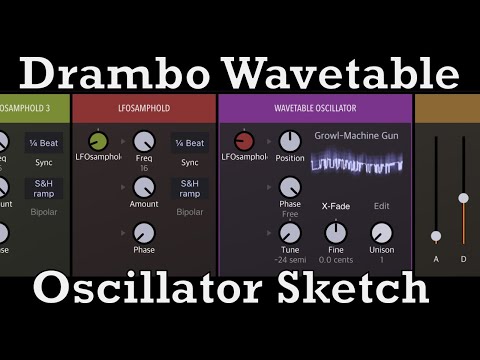
Looking forward to more IAPs to put a bit of extra cash into the developer’s pocket
Just curious if anyone has built a delay bank in Drambo where the volume of the input signal influences the delay time and/or feedback.
I did one a while back that used an envelope follower to add and then fade distortion to the feedback, was nice, though risky - I need to learn more about how to control that sort of modulation automatically so that things don’t get out of hand 😬
Here's one for you:
https://patchstorage.com/delay-follows-input-signal-level/
If you want more delays, just add them and maybe also add a Graphic Shaper for each delay control so you can fine tune more easily and go really wild 😊
Cool. I am pretty noobie-ish in Drambo, is it easy to set up the envelope follower so that you get a sort of gated response.
I'd rather do that with the Feedback Graphic Shaper.

The Envelope Follower decay time only has to be long enough to cover the longest gate time.
@rs2000 : thx
I totally forgot that older iPhones are DC coupled so I was using Drambo last night to modulate my model d, using the wavetable got some really interesting results. $5 was a total steal
Great idea! 👍🏼👍🏼
Is this the thread for questions about this app?
Excellent!
So, I have a question. It is not a question I want to ask but it is a question I need to know the answer to. Are we ready?
When Drambo is open, standard Drambo, Stambo, It says 1 and then MIDI to CV and under that heading it says 1 and under that it says Voices. My question is, in what universe are there 1 voices? No, that's not it.
What are Voices? Like, if I open a drum machine and there's a Kick and a Snare, is that 2 Voices?
Cheers! In order to understand the question you must imagine you're trying to teach a pebble from the beach how to make electronic music.
I knew Polyphony would come up. Or at least I thought it might. So, a Voice is a note? Like C? And Polyphony is a chord? Like CMaj?
Also, I have just connected my Beatsep Pro to Drambo and if I play a sequence via the BsP then Drambo lowers the note by 1 each time the sequence repeats, until the kick warbles off into sub bass territory and then I have to stop it, even though it sounds pretty good tbf.
Oh and despite the jokey tone, I'm dead serious about these questions. No, really. I need to nail something down before I can move on and seeing Voices in Drambo, every time I open it up and not really understanding what it is, makes me feel demotivated and so I turn it off and go back to my MS20iC. If i'm going to be bamboozled by something musical then I want to hear a loud farty noise at least once every half hour or so.
@ashh
Voices is a module which converts midi to cv. It will take a polyphonic midi input signal, and output monophonic or polyphonic gate, velocity and pitch CV signals.
Try this: place a FM Operator module (found in generators tab) after the “voices” (aka midi to cv) module. With 1 voice you are playing strictly monophonically. Increase the voice number and you’ll be able to play pads. No need to worry about multiples, or cable messes, or patching X the number of modules. I’d make an example for you, but I’m at work now.
Great, thanks.
So the Voice module converts binary to electrical by using Gate, Velocity and Pitch? I can still play pads with one note but I think you mean that I will be able to play chords on the pads, do you?
Multiples? Multiple instances of your software client?
Yes, the voice module is a midi to cv converter. Broadly speaking, there are 2 categories of modules in Drambo -1) midi generators and processors, and 2) CV generators and processors. CV and midi modules are for the most part incompatible with each other. You can't route a midi signal to a pitch or gate input. Much like you couldn't plug a 5 pin din cable into a 1/8 inch socket.
Drambo's sequencer and keyboard generate polyphonic midi data. This data is accessible at the track head. It is typical midi data - note on/off, note number, and velocity, etc. There are several things you can do with the midi data:
1) send the data out of drambo to other music apps. Use a midi out module to do this.
-When sending midi out directly, there are various ways you can modify it. Transpose, arpeggiate, strum, humanize, etc.
2)convert the sequencer and keyboard's midi data to internal CV to play internal instruments, to trigger internal events, processors etc.
-use as many midi modules desired, place a midi to CV module at the end. Then add CV modules.
3) convert midi to cv, use cv processors, then convert the CV back to midi to use on external midi apps.
-There are midi to cv modules, and there are cv to midi note and CC generators. This is a bit more advanced, but its another common way to use the app.
It seems like you're complicating things a bit. Start simple. Patch a midi to cv > VCO > Filter > AMP env ADSR > Reverb. If you add the modules in this order you won't need to do any manual patching, everything is automatically connected. Start with 1 voice, play it monophonically. then make it an 8 voice and play chords, whatever. Play it with the internal keyboard because you're having issues with your Beatstep.
After you've made that patch, add an arpeggiator module before the midi to cv module (the arpeggiator will be your first module). Now you you can observe how midi processors behave an then get converted to internal cv.
Now you’ve made a simple subtractive Mono/poly synth with an arp. Of course, there are no envelopes of lfos for the filter. Those can be added under the ‘modulator’ tab. In order to route them to the correct destination, place them before the module you want to modulate.
Add an LFO and an ENV ADSR. Place them after your VCO (or before, doesn’t matter) but make sure to place them before the filter.
Any parameter that has a small grey arrow beside it is a modulation destination. You can route any CV signal to those parameters. Tap on the filter frequency dial. It will turn orange. Now tap on the ENV ADSR squiggly symbol (cv/audio symbol). A new ADSR knob will appear next to the cutoff frequency.
Now do the same thing with the Reverb mix dial, connect it with the lfo.
Now you have an arpeggiated synth with 2 envelopes - 1 controlling amp, the other routed to filter frequency. You also have an lfo controlling the dry/wet level of your reverb. Make sure to watch the master volume at the far right of your track, it can easily clip. Just turn it down to avoid that.
I know this patch isn’t the most amazing synth, but it should get you used to the patching logic and a few different categories of modules.
Also @ashh please check out @bcrichards 'getting started' tutorial. He explains things in depth, with easy to follow along examples. Patching starts at about 4:20 into the tutorial.