Loopy Pro: Create music, your way.
What is Loopy Pro? — Loopy Pro is a powerful, flexible, and intuitive live looper, sampler, clip launcher and DAW for iPhone and iPad. At its core, it allows you to record and layer sounds in real-time to create complex musical arrangements. But it doesn’t stop there—Loopy Pro offers advanced tools to customize your workflow, build dynamic performance setups, and create a seamless connection between instruments, effects, and external gear.
Use it for live looping, sequencing, arranging, mixing, and much more. Whether you're a live performer, a producer, or just experimenting with sound, Loopy Pro helps you take control of your creative process.
Download on the App StoreLoopy Pro is your all-in-one musical toolkit. Try it for free today.
Comments
🤯
Double YES!!
Thanks! Now that you remind me, that does seem familiar. So much goodness in that list!
I think the edit button would be good maybe if it could be on. You add probabilty via midi knob. Double tap edit and you add probabilty of p-locks via midi. Both per step.
Or just add a couple knobs inbetween mute and A button.
Forgive. Dont use drambo much apart from sequencing auv3 and flexi.
Maybe add a 3rd knob. For the track length thing.
Maybe rolls to sequencer via midi also.
Or 4 knobs. Which can be customised from the step component settings.
Think it would be better to have 4 knobs. Custizable. Hold step. Raise value. Value appears under finger as you swipe up.
At the mo you have to press step. Choose step. Press +. Choose random condition. Then the amount.
whew!! the audio export to ableton thing was causing me a headache!! i thought i was going crazy.. thanks for the fix @giku_beepstreet
Yeh, sorry, I know that was a little vague. I'll describe two setups, the first is simpler, but only lets you play on the keyboard when you have LK open:
The disadvantage to this is the only MIDI input to the AU that you want to play is coming from LK. If you play the Drambo keyboard when not in the Main channel, the MIDI won't be captured. So, to do that we need to get midi from two sources, the track input and LK. To do that I used a MIDI Mixer. Since the input from the keyboard on a channel is channel 1, that would be a problem for channels that you only want to get another channel from LK, so an additional MIDI Channel Filter was needed. This example is for Channel 2:
So, input from the Drambo keyboard hits the first filter module and gets converted from channel 1 to channel 2. It then goes to the mixer, along with the LK input. The second filter acts as before, filtering out all but channel 2 from LK.
I hope that makes sense.
Awesome instructions, thank you!!!
and sometimes place probabilty in the right order. Thats 6 actions to add probabilty ( unless Im mistaken ) I know theres a chance midi. Volca drum, which isnt drambo. You just hold step and turn knob.
Consider adding 3-4 knobs between mute and A.
Thanks.
I think its worth a poll. If Im wrong about how Drambo works, fine or if idea is good. Bet poll is 100 percent.
Nice lil chaos maker. I like it.
The sequencer buttons are there ( 0 percent poll ) lol.
Can you record/capture MIDI from a MIDI au into the drambo main sequencer?
And/or
Can you set up an instance of something like atom and have a pattern in sequence 1 and different pattern when you change to pattern 2
Not without workarounds. At least not if the MIDI AU is hosted in Drambo.
I think you could do this with a p-lock if the app has exposed control over pattern change (like poly 2).
I was thinking about giving your poly2 pattern app a try! But haven’t made it that far yet
I was hoping to host everything in the BO hehe
Quick phone thing with two instances...Fader’s fiddly AF on phone 🤪
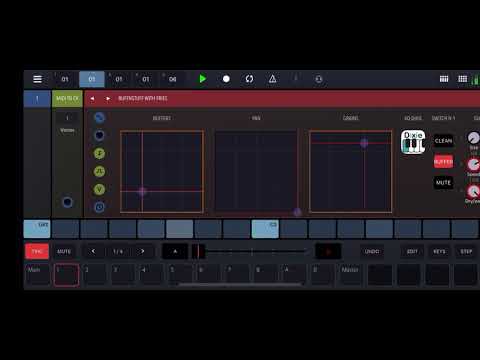
https://patchstorage.com/buffnstuff-with-fries/
Sorry If i have missed this. I know you can do the web dev workaround to copy samples to folders in Drambo.... Will Drambo ever just open up and have direct access to files app? That way I can just copy into there as opposed to doing the whole web dev deal?
Thanks
Thank you!!
Really like this. Feels like an underwater scene in a Wes Anderson flick
Is there an easy way to sequence the output of the Radio Unit AU in drambo? Like basically if I press a key, have it output, and if I release a key, have it play? Or anything, really, doesn’t have to be a key. Just _someway to hear it and not hear it when I sequence it 😂. Sorry, I don’t drambo well yet.
If I understood correctly, this should do the trick:

You’ll find that module in the Processor section, subsection Amp.
Edit: I re-read your question and this confused me
What’s the difference between output and play?
That’s what I needed!
Haha, the difference between output and play is that I couldn’t explain it 😆
Now using the Amp Env, if I crank up the attack and leave the decay at zero and I just sequence any note on the sequencer then it “outputs sound”, which is what I was looking for. I’m just leaving it playing through a radio station and running it through a bunch of effects and the New buffer stuff.
Than you so much, I was losing my mind.
Has anyone figured out if it’s possible to change drambo patterns from within NS2 with drambo as an AU?
Do you not just go to, mappings via drambo. When map each pattern ( maybe set to recieve a note rather than cc ) then press either a key in nano studio or midi keyboard?
Than you so much @sigma79! I know that’s a noob question, but I’m primarily an in the box type of musician. This will open up a new world for me. Gracias!
Nice, glad I was able to help
Manually? You can map notes from the NS2 keyboard to the patterns at the top by entering MIDI map mode first, tapping the pattern button and then pressing the MIDI key:
Modulating amp knob with cv sequencer might give you interesting results with varying volumes changing obruptly. Of course followed by all the buffers