Loopy Pro: Create music, your way.
What is Loopy Pro? — Loopy Pro is a powerful, flexible, and intuitive live looper, sampler, clip launcher and DAW for iPhone and iPad. At its core, it allows you to record and layer sounds in real-time to create complex musical arrangements. But it doesn’t stop there—Loopy Pro offers advanced tools to customize your workflow, build dynamic performance setups, and create a seamless connection between instruments, effects, and external gear.
Use it for live looping, sequencing, arranging, mixing, and much more. Whether you're a live performer, a producer, or just experimenting with sound, Loopy Pro helps you take control of your creative process.
Download on the App StoreLoopy Pro is your all-in-one musical toolkit. Try it for free today.
Comments
Take THAT, desktop!!!
Bing, bing, bing.
Ah, I get it. Don’t squeeze it down for the SE. I’m like the last person with one. But is it difficult to have the interface scale?
Add an option for linear control of the dials please, rotary is terrible.
Transpose by midi notes like the Rozeta plugins do would be awesome. I find it can produce much more interesting sequences by keep changing the transpose.
Incredible update! Thank you @Alexandernaut !
Duly impressed with this one. What a treat!
Thanks @Alexandernaut !!!
Ha! It's my responsibility tho! I'll do it.
Prior to this update, it was very difficult to change scale/aspect-ratio (due to the way I implemented the UI). In fact, most of the work I did for this update was just refactoring that old UI code. Supporting iPhone and AUv3 was relatively trivial in comparison.
Anyway, thanks to the rewrite, it's super easy to change, but now it's more a usability concern. I wanted to support going smaller (cuz they look so cute!), but ran into a bottleneck with the piano roll. Had a solution in mind actually... and now I have another reason to work on it :]
/ here's a screenshot from an earlier version on a 9.7" screen:

36 playheads... why not... yes, we can
Love this one. It happens something everytime I open Fugue.
Absolutely wonderful!
OMG! Feeling giddy at this. I have felt for a while now that I would benefit more from Fugue Machine if it was universal, I have sat on it for some time as it was no longer convenient for my work flow. Having it as AUv3 as well is some gourmet icing on the cake.
Congratulations @Alexandernaut, this is a fantastic development.
Roflol...
New scales = awesome
@Alexandernaut - when is your new app creation approximately due?
Brilliant app.
Thanks for make it universal.
@Alexandernaut you da man!

This is an AWESOME update!
I’ll be grinning like a Cheshire Cat for some time into the foreseeable future, that is for sure!
Thank you!
Such a wonderful surprise. Perfect for bus ride noodling.
Yes, really excellent to see this as an AU, just feels so playable. Was always an iOS classic. Now even more so.
Yes! Hopefully this shouldn't be too difficult to implement and would make the whole experience 10x more fun!
@Alexandernaut any hope to have this feature in a future release?
Always hoped for this on my phone! Thanks so much for the surprise update.
This is just awesome and makes me wonder if Arpeggionome Pro is next?
Hey all, just a quick note that 1.5.1 is live, fixing the issue where the AU was limited to iOS 12.1+. It's now iOS 11+ as intended. Ok back to sleep 🙌.
+1, please
its saying its £9.99 on my phone but already have it,if i click on buy will it recognise that i already have it and wont have to pay,if anyone can help,cheers
Confirmed here multiple times that you don't have to pay again.
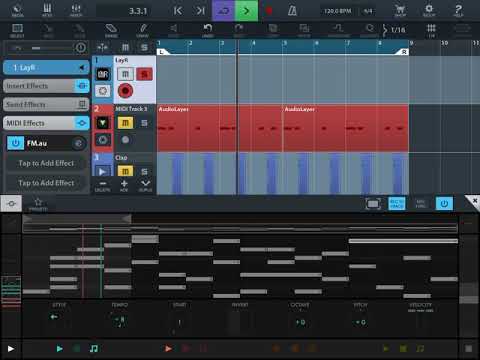
Interesting which apps FM au shows up in as a AU and how you can implement it.
Can’t see it in Cubasis 2, NanoStudio 2 or StageLight.
Being linear DAWs there is not a lot of use in these ones anyhow.
FM AU showing up in ApeMatrix but from what I see you can’t split up the midi channels for playheads within ApeMatrix maybe I’m missing something.
But now it’s a AU having multiple heads or just 1 head playing doesn’t really matter as you can put in multiple instances within CPU limits.
Got it working in BM3 no problem.
Haven’t currently got GarageBand or Auria Pro loaded but again they are linear DAWs so not a lot of use with FM.
Obviously works best and best suited for AUM. The amount of midi AU apps that have come out this last 8 months that just let you build on AUM basic structure is just mind boggling.
Definitely pushes AUM to the top of the tree for quickly building compositions on the go.
Check under Midi Effects in Cubasis
@Alexandernaut
Yes man.you just made my Day.
Easy melody made in less than a minute with your presets 😂😂
Great for drums too, now that we have chromatic scale.