Loopy Pro: Create music, your way.
What is Loopy Pro? — Loopy Pro is a powerful, flexible, and intuitive live looper, sampler, clip launcher and DAW for iPhone and iPad. At its core, it allows you to record and layer sounds in real-time to create complex musical arrangements. But it doesn’t stop there—Loopy Pro offers advanced tools to customize your workflow, build dynamic performance setups, and create a seamless connection between instruments, effects, and external gear.
Use it for live looping, sequencing, arranging, mixing, and much more. Whether you're a live performer, a producer, or just experimenting with sound, Loopy Pro helps you take control of your creative process.
Download on the App StoreLoopy Pro is your all-in-one musical toolkit. Try it for free today.
Comments
Oh that's good to know. Thanks for the info.
pretty sure the same problem will occur when loading a Loopy Pro project & GigFast instances will not restore correctly. fwiw, i reported a similiar issue in MacOS/Reaper by email a few months back.
Do you have a set of steps that you could describe?
my trial period has expired so i can't verify, but iirc: w new Reaper project, new instance of GigFast; set an extreme tone setting, save Reaper project, quit & reopen. GigFast would visually show the extreme tone setting but actually had default values in effect until the tone knobs were manually tweaked. this was w GigFast Lite 2.2, Reaper 7.30 with MacOS 14.4 on an M2 Macbook Air.
I misunderstood. I thought you were having a problem with Gigfast Lite not loading correctly in Loopy Pro.
sorry. that was @filo01. i thought my similar experience on MacOS might be relevant. & i do think @filo01's problem will also occur when loading Loopy Pro projects. using GigFast presets is not an alternative in that case.
Thank you, fingers crossed.
I've tested loading of project with GigFast (GF) app inside in Loopy Pro on several scenarios and I cannot confirm any issues there.
Init: Open LP, new project, add GigFast app, set extreme settings, save LP project.
1. Close and reopen LP - sound corresponds to extreme GF settings.
2. Switch to different project and back - sound corresponds to extreme GF settings.
3. Switch to different project, close and reopen LP, switch to GF project - sound corresponds to extreme GF settings.
So it looks like the problem is only with saving/recalling Loopy Pro GF preset, not when loading the whole Loopy Pro project.
thanks for checking that out @filo01. MacOS/IOS maybe different, & things may have changed since my trial back in January.
FYI this should be sorted in the latest 2.0 beta
Thank you Michael for dealing with this. I'm on beta b.661 and the problem still persists.
@filo01 can you post a project, demonstration and instructions on the Slack?
Wouldn't a YT video with a description be enough? I don't know anything about Slack, I'd have to learn how to use it first.
If you don’t want to join the slack, that would be fine. (FWIW, using slack doesn’t have much learning curve)
@ArteraDSP -- Wow, what a great deal on a superb application for guitarists! Thank you for offering this.
Not unless it's absolutely necessary. FB groups, several Forums, Discord groups, WhatsApp, Teams ... I'm too socialized.
Here is a video example: https://youtube.com/watch?v=1iyfVyAeZYs
Thanks for your kind words, we hope you enjoy GigFast
@ArteraDSP : I don't know if this is a Loopy issue or an GigfastLite issue -- you might be able to tell easily from your side. It looks like what is happening is that when Loopy Pro restores the the state and the model changes that EQ params don't restore unless one re-selects the channel.
Hi everyone. Autumn is ahead of us so “end of summer sale” has started. You can have GIGFAST LITE for $19.99 till the end of September. You can download it from the AppStore.
@ArteraDSP Any plans to make Gigfast Lite and NAM XT less CPU hungry?
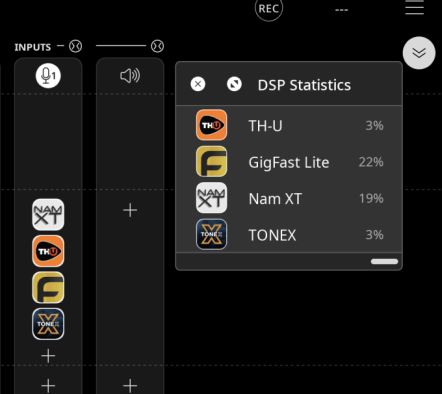
We might have maybe one or two options that we have not tried to further improve the CPU usage but for the most part our processing is as good as it gets. That is why we don't see many native NAM supporting hardwares at tonex price point.
@ArteraDSP Has anything come of the Cubase crash issue I am having with Gigfast?
Yes, along with some iOS 18 fixes and new models.
Im so sorry to veer off topic, but what's the DSP Statistics plugin?
Im getting zero returns on the shotgunning of scattershot searches I've been attempting
It’s not a plugin. It’s a feature of Loopy Pro that shows the % of its DSP usage broken down by plugin. It’s reached by tapping the little bitty percentage indicator at the right of the mixer or bottom right of the loops view.
AUM has something similar, with even more useful info.
No plugin can ever supply that kind of info, so if you see one in the App Store don’t buy it. 😉
Haha oh man, I started by searching in the Loopy manual (since it's obvs loopy Pro from the pic, but it doesn't have the standard buttons on the top frame), but zero results for DSP or Stats or Statistics
And then was finding nothing from either google or the internal LPF search
Thank you for the info!
I've only known about obsessively watching that percentage (why I turned off fps counter on Steam years back. 'Why did it just drop from 90fps to 87?! Gotta tweak it!')...
Never crossed my mind to tap it xD
Hooray for learning something new today!
I’ve out it on my to-do list for manual tweaks. Thanks for bringing this to my attention.
GIGFAST LITE Neural Amp Suite is $19.99 till the end of September.Turn your iOS & macOS device into a pro-level guitar rig with GigFast Lite – Neural Amp Suite.
Parametric Neural Amp Models
Built-in FX: overdrive, delay, reverb, chorus & more
Third Party nam support + IR Loader + MIDI support
Don’t miss your chance to upgrade your tone and take your playing anywhere. 🤘🤘🤘
Loving the app, great work!
Feature request:
I would love to be able to dial in my presets on my iMac and then load them up on my iPad for the gig.
I cant seem to find anyway to save and transfer the presets - Is this possible?
It would be killer to have this or even an iCloud sync option that keeps the app identical across devices.
@ArteraDSP
“Did anyone notice such a big difference between ToneX and GigFast Lite/NAM XT? Both are based on neural modeling technology, while others rely more classic circuit/algorithmic modeling.