Loopy Pro: Create music, your way.
What is Loopy Pro? — Loopy Pro is a powerful, flexible, and intuitive live looper, sampler, clip launcher and DAW for iPhone and iPad. At its core, it allows you to record and layer sounds in real-time to create complex musical arrangements. But it doesn’t stop there—Loopy Pro offers advanced tools to customize your workflow, build dynamic performance setups, and create a seamless connection between instruments, effects, and external gear.
Use it for live looping, sequencing, arranging, mixing, and much more. Whether you're a live performer, a producer, or just experimenting with sound, Loopy Pro helps you take control of your creative process.
Download on the App StoreLoopy Pro is your all-in-one musical toolkit. Try it for free today.
Comments
The ‘collapsible by company’ idea is great, please do move forward with this 😎
AUM is great, but I'd willingly pay for IAPs for multi thread support and MIDI clock sync.
The clock multiply/divide feature creates fascinating chaos when 2 clocks are not even multiples:
Ahh. I always use the hamburger menu. It’s the same menu, why it isnt it there too?
I guess I am just an idiot.
Thanks!
What exactly does this do?
@Antos3345 if AUM is running at say 128 BPM you can use the clock divider / multiplier to drive individual channels at slower speeds e.g. 64, 32, 16, 8 or faster speeds e.g. 256, 512, 1024 etc depending on whether the receiving app can go that low or high.
Reload works also for non-crashed plugins. It replaces the node with a new instance but keeps the state. The same as if you quit aum and reload the session, but for a single plugin only.
Correct! I kinda thought that would have been priority. This update is growing on me, I mean: tail recording ... so awesome. I haven't used the tip option very often (Piano Motif has gotten a few) but this and the timing of it, it's a given (ha!). Well deserved.
Could this be used to split the midi timing from a step sequencer that only runs at 16 th notes? Bram Bos Bassline sequencer is swift, but doesn't have any slower timing speeds.
Thanks
Yes. It can speed it up to 4x its speed - so 64th notes.
[edit] Oops, misread. Yes, it can slow down to 4 beats per step.
Yes, that was exactly my first test: I've always wanted to use it for slower speeds and it works!
Hiding channels would be a separate feature, which I already have in mind (I call them channel tabs/tags), but indeed it would make sense for that feature to integrate in the Navigator.
Frankly I will probably try to find a better location for this settings menu. Currently it's in the title bar of the MIDI Controls view for a plugin, but it's not related to MIDI control in any way. Perhaps it will move to the node long-press menu instead.
Well, I must say that I am REAL happy to hear that this is on your radar!
I don’t know about anyone else, but to me, that would be one of the game changiest features.
First thought was to look for clock divider settings somewhere in the MIDI Inputs (Destination) menu, since it relates to incoming MIDI.
And a small request, is it possible to make a setting for hidden/visible Apple AUv3 effects in Options, the list is really big.
Happy holidays and thanks for the great AUM update, tip sent)
Loving the maximise window option, and the way it flips from landscape to portrait and back again. Not tested every app yet but ahhhh… so nice.
Thank you- tipped ✅
I agree, i always loved aesthetic in AUM, one of the things why i still use it today beside functionality and ease of use. Just pretty to look at
I think it’s fine where it is but please add it to the hamburger MIDI Controls as well. That’s the first place most users go to do MIDI setup and it seems logical to put a MIDI clock divide option there.
Hamburger MIDI Controls is exactly the same menu as the one in the AU header yet it doesn’t have the same settings option which is not consistent. It flummoxed me at least…
Thanks for the great update and for adding the clock divider which I’ve wanted numerous times!
Wow! What a Christmas present! How did you get it to work to slow the sequence down?
Actually no, it has nothing to do with MIDI, and it works also for plugins that don’t have any MIDI inputs.
My idea is that collapsible Company sections would fix this for you, and if you sort by Last Used they will be at the bottom of the list if you never use them.
Thanks!
Good point, will keep that in mind!
It would be nice if you could expose the clock control setting to MIDI control though.
I don't really understand why it needs to be so separated conceptually from the rest of the plugin controls such as Bypass and Show & Hide. Is it for technical reasons?
It's such a great feature though. Thanks so much for this, and the whole amazing update. ❤️
Very nice update, is it possible to map the clock division and factor to a CC in the future? It’d be great to update this param using my faderfox.
@j_liljedahl It’s a very nice update and I do hope more AUv3 host developers will jump on the train and implement a similar true full-screen AUv3 view into their apps
The AUv3 clock divider/multiplier was designed to be a setting and not a performance tool. Most plugins will need you to reset the transport to beat zero for it to align and sync correctly after changing this setting. So no plans to make it MIDI controllable for the moment, but not impossible in the future.
+1. This was an elegant approach. Especially good for apps like Scaler 2, where I need the full screen view if I want to see the keyboard with the blue notes playing.
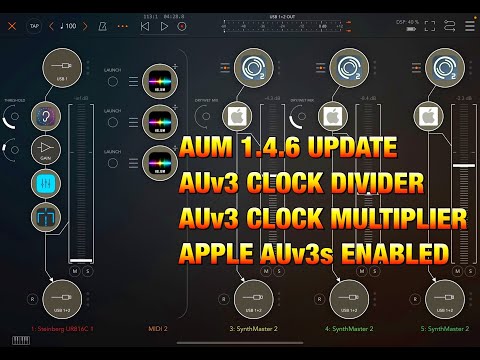
AUM Update - More NEW Features - AUv3 Clock Divider & Multiplier Tutorial & Apple AUv3s
Deleted original embittered comment ,
let me be more optimistic …
Great so many users are happy with update ,
I wonder if midiclock dividers will solve my longstanding issue of needing /8 & /16 timesigs to work in Aum.
(particularly odds 5,7, etc which can be so troublesome for bar counts)
Thanks as always for making the context clear. That helps a lot.
Had my first crash with koala, tapped the app, the old reload prompt popped up, tapped on that and loosed everything 🙁
I’ll try it next time