Loopy Pro: Create music, your way.

What is Loopy Pro?Loopy Pro is a powerful, flexible, and intuitive live looper, sampler, clip launcher and DAW for iPhone and iPad. At its core, it allows you to record and layer sounds in real-time to create complex musical arrangements. But it doesn’t stop there—Loopy Pro offers advanced tools to customize your workflow, build dynamic performance setups, and create a seamless connection between instruments, effects, and external gear.

Use it for live looping, sequencing, arranging, mixing, and much more. Whether you're a live performer, a producer, or just experimenting with sound, Loopy Pro helps you take control of your creative process.

Download on the App Store

Loopy Pro is your all-in-one musical toolkit. Try it for free today.

AudioPipeline AUv3 (Link AUDIO Send+Receive AUv3 plugins) [AppStore AVAILABLE]

2456710

Comments

  • Also an observation that if I reopen the AUM session after closing, with apematrix still running in the background, the instance of AudioPipeline makes no sound. I had to go in and manually disconnect, then choose the channel name again, even though the channel name was correct

  • wimwim
    edited May 7

    @dendy said:

    @wim said:
    Latency between apps on the same device is similar to the LoopBack plugin. Tested sending from GarageBand to Loopy Pro. The audio is distorted in Loopy Pro.

    hm.. on same device ? tryuing AUM -> LOOPY , sound is clear ..

    Maybe it's a GarageBand thing. That's the first, most challenging, host anyone should be trying if you wanna break things.

  • @oldsynthguy said:

    @Gavinski said:
    Getting some dropouts here, very simple on-device setup, massive buffer size too, 1024. Is anything set up wrong?:

    Btw, note that it is very hard to read the AudioPipeline channel name in apeMatrix, but not in AUM

    Are the sample rates the same? I had crackles in Live from AUM until I changed the rates.

    yeah sample rate is knowb bug, new build which shuld solve this will be soon in testfligh

  • @oldsynthguy said:

    @Gavinski said:
    Getting some dropouts here, very simple on-device setup, massive buffer size too, 1024. Is anything set up wrong?:

    Btw, note that it is very hard to read the AudioPipeline channel name in apeMatrix, but not in AUM

    Are the sample rates the same? I had crackles in Live from AUM until I changed the rates.

    Good question, yes they’re the same sample rate and buffer size

  • @Gavinski said:
    Getting some dropouts here, very simple on-device setup, massive buffer size too, 1024. Is anything set up wrong?:

    Btw, note that it is very hard to read the AudioPipeline channel name in apeMatrix, but not in AUM

    those dropouts continue when you keep it running for some time ?

  • @dendy said:

    @Gavinski said:
    Getting some dropouts here, very simple on-device setup, massive buffer size too, 1024. Is anything set up wrong?:

    Btw, note that it is very hard to read the AudioPipeline channel name in apeMatrix, but not in AUM

    those dropouts continue when you keep it running for some time ?

    Ocassionally, yes. Like it is running in the background as I type this, and still some dropouts, but not as bad as initially

  • @wim said:

    @dendy said:

    @wim said:
    Latency between apps on the same device is similar to the LoopBack plugin. Tested sending from GarageBand to Loopy Pro. The audio is distorted in Loopy Pro.

    hm.. on same device ? tryuing AUM -> LOOPY , sound is clear ..

    Maybe it's a GarageBand thing. That's the first, most challenging, host anyone should be trying if you wanna break things.

    will try later with garageband :-) Making note to my list of stress test apps "if it works with this, it works with everything" :smiley:

  • @Gavinski said:

    @dendy said:

    @Gavinski said:
    Getting some dropouts here, very simple on-device setup, massive buffer size too, 1024. Is anything set up wrong?:

    Btw, note that it is very hard to read the AudioPipeline channel name in apeMatrix, but not in AUM

    those dropouts continue when you keep it running for some time ?

    Ocassionally, yes. Like it is running in the background as I type this, and still some dropouts, but not as bad as initially

    that's weir i have all totally clean on iPhone 16 even with with smallest possible buffer in AUM .. will investigate, thanks

  • sooon build 3 with fixes:

    • fixed problem when sender/receiver used in hosts which runs on different internal sample rate
    • added potential clicks/dropouts protection for some rare cases when CPU load is not high
    • fixed wrong color of channel name field / channel selector in some hosts (ApeMatrix)
  • @wim let me know if build 3 fixes your garagemand -> loopy wrong audio

  • Does this work for sending audio between iPhone and iPad wirelessly or just different apps on the same device?

  • @Jumpercollins said:
    Does this work for sending audio between iPhone and iPad wirelessly or just different apps on the same device?

    As mentioned above, it works over local network too. With latency tho

  • wimwim
    edited May 7

    @dendy said:
    @wim let me know if build 3 fixes your garagemand -> loopy wrong audio

    A little better, but still distorted. In AUM too. iPad reboot didn't fix it. It's not clipping, but that's sort of what it sounds like. I also tried at 44.1kHz and 48kHz audio rate setting with no effect.

    Every once in awhile for just about 100ms, the sound is clear.

    Time for bed. I won't be able to do any more testing for awhile.

  • @wim said:

    @dendy said:
    @wim let me know if build 3 fixes your garagemand -> loopy wrong audio

    A little better, but still distorted. In AUM too. iPad reboot didn't fix it. It's not clipping, but that's sort of what it sounds like. I also tried at 44.1kHz and 48kHz audio rate setting with no effect.

    Every once in awhile for just about 100ms, the sound is clear.

    Time for bed. I won't be able to do any more testing for awhile.

    Just to be sure - you are runniong both ends on SAME device or on DIFFERENT devices ?

  • GREAT NEWS - GOT LICENSE AGREEEMENT FROM ABLETON !

    Means - this app can go live.

    I will wait in test phase for some time, tweak some things, then release.

  • @dendy said:
    GREAT NEWS - GOT LICENSE AGREEEMENT FROM ABLETON !

    Means - this app can go live.

    I will wait in test phase for some time, tweak some things, then release.

    Fantastic news! Thanks 🙏

  • @dendy said:
    GREAT NEWS - GOT LICENSE AGREEEMENT FROM ABLETON !

    Means - this app can go live.

    I will wait in test phase for some time, tweak some things, then release.

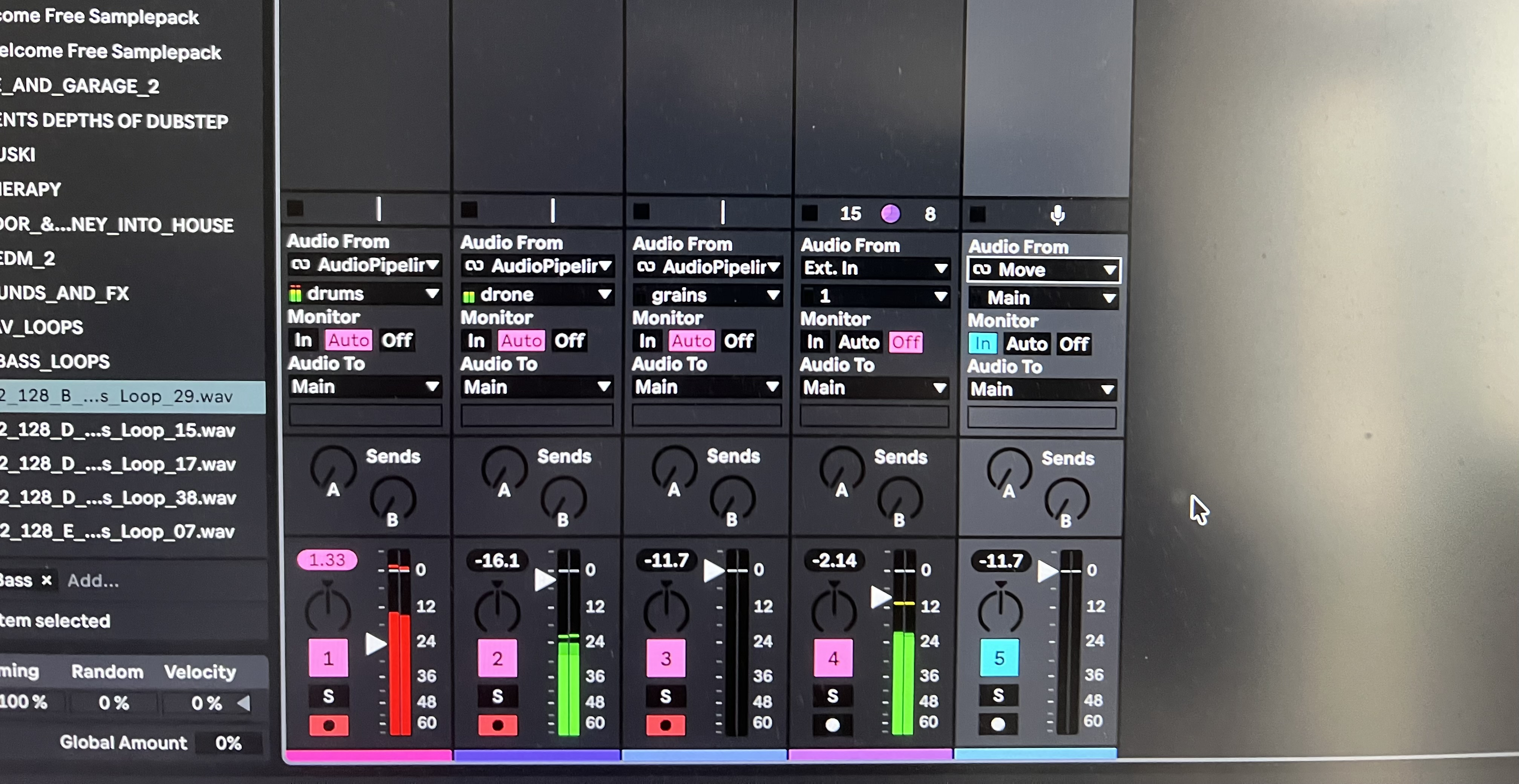
    Brilliant, thanks for this. Live picked up audio nicely from my iPad. It’ll be really good for recording AUM multi track sessions, directly onto separate tracks in Live.

  • Great! I hope this new Ableton Link Audio feature brings more people to iOS music, or brings them back to it.

  • edited May 7

    Seemed to work better for me this morning than the other player in the game. Link Effekt. No dropout at 100ms. With quite a few audio tracks going. Maybe the time of day or now I’ve plugged in Ethernet!
  • @Jumpercollins glad to hear that !

  • @wim said:
    Latency between apps on the same device is similar to the LoopBack plugin. Tested sending from GarageBand to Loopy Pro. The audio is distorted in Loopy Pro.

    Could it be Garageband’s sample rate weirdness? Some of its built in instruments use low sample rates.

  • edited May 7

    build 4 in TestFlight

    • solved problem od dropouts/distorted sounds when Sender is hosted in Garageband
    • complete rework of adaptive resampling for hosts with different sample rate

    @wim thanks for reporting !

  • @dendy said:
    build 4 in TestFlight

    • solved problem od dropouts/distorted sounds when Sender is hosted in Garageband
    • complete rework of adaptive resampling for hosts with different sample rate

    @wim thanks for reporting !

    Hi, I noticed the receiver plug-in only loads into a Mid slot in Ableton. Is it possible to update this so that it also works in an audio track, to save using two tracks to record audio? thanks

  • @oldsynthguy said:

    @dendy said:
    build 4 in TestFlight

    • solved problem od dropouts/distorted sounds when Sender is hosted in Garageband
    • complete rework of adaptive resampling for hosts with different sample rate

    @wim thanks for reporting !

    Hi, I noticed the receiver plug-in only loads into a Mid slot in Ableton. Is it possible to update this so that it also works in an audio track, to save using two tracks to record audio? thanks

    I haven't tried it, yet, but I guess you don't really need the receiver in Ableton, but can just pick the input from an audio track, as Ableton has (Ableton) link included.

    Oh wait, are you working with an older Ableton version. That's cool, that you can use link audio in older versions with this plug, if you're working on Mac.

  • edited May 7

    @oldsynthguy said:

    @dendy said:
    build 4 in TestFlight

    • solved problem od dropouts/distorted sounds when Sender is hosted in Garageband
    • complete rework of adaptive resampling for hosts with different sample rate

    @wim thanks for reporting !

    Hi, I noticed the receiver plug-in only loads into a Mid slot in Ableton. Is it possible to update this so that it also works in an audio track, to save using two tracks to record audio? thanks

    wait, you can even load those plugins in Ableton ?? I thought i released them only for iOS 🤣

    I have license for their SDK only for iOS, I probably overlooked something, my plugin should be not available on desktop

    Unfortunatelly I think i have to find why it works and turn it off, i doesn’t want to risk they forbid also iOS release because of this.

  • @tyslothrop1 said:

    @oldsynthguy said:

    @dendy said:
    build 4 in TestFlight

    • solved problem od dropouts/distorted sounds when Sender is hosted in Garageband
    • complete rework of adaptive resampling for hosts with different sample rate

    @wim thanks for reporting !

    Hi, I noticed the receiver plug-in only loads into a Mid slot in Ableton. Is it possible to update this so that it also works in an audio track, to save using two tracks to record audio? thanks

    I haven't tried it, yet, but I guess you don't really need the receiver in Ableton, but can just pick the input from an audio track, as Ableton has (Ableton) link included.

    Oh wait, are you working with an older Ableton version. That's cool, that you can use link audio in older versions with this plug, if you're working on Mac.

    Yeah, currently on the previous version, holding off until I check my plugins are still compatible.

    @dendy said:

    @oldsynthguy said:

    @dendy said:
    build 4 in TestFlight

    • solved problem od dropouts/distorted sounds when Sender is hosted in Garageband
    • complete rework of adaptive resampling for hosts with different sample rate

    @wim thanks for reporting !

    Hi, I noticed the receiver plug-in only loads into a Mid slot in Ableton. Is it possible to update this so that it also works in an audio track, to save using two tracks to record audio? thanks

    wait, you can even load those plugins in Ableton ?? I thought i released them only for iOS 🤣

    I have license only for iOS so i must overlooled something .. like you should be able to receive in desktop daw using other receivers (like that official desktop plugin) - but my plugin should not be available on desktop

    Unfortunatelly I think i have to find why it works and turn it off, i doesn’t want to risk they forbit also iOS relwase because of this.

    Ah sorry, yeah it popped up on Mac Testflight - I thought that was how we should use it - a copy on iOS, and another on the Mac.

    I’ll uninstall it, I need to get around to updating Live soon anyway.

  • @oldsynthguy said:
    Ah sorry, yeah it popped up on Mac Testflight - I thought that was how we should use it - a copy on iOS, and another on the Mac.

    I’ll uninstall it, I need to get around to updating Live soon anyway.

    there is existing desktop plugin, should be 100% compatible (that desktop plugin actually uses same SDK as mine), try it - both my sendse/receiver on iOS should easily communicate with that plugin sender/receiver on desktop.

    Actually that would be interesting test to try it:

    https://structurevoid.gumroad.com/l/voidlinkaudio-vst?layout=profile

  • This is great Dendy, and yeah clicking is not really an issue since the update.
    With Dendy’s permission, I made a short intro vid. This is a good tool that will hopefully bring more people to iOS, or back to iOS, so please spread the word!

  • does this work through usb and wifi?

Sign In or Register to comment.