Loopy Pro: Create music, your way.
What is Loopy Pro? — Loopy Pro is a powerful, flexible, and intuitive live looper, sampler, clip launcher and DAW for iPhone and iPad. At its core, it allows you to record and layer sounds in real-time to create complex musical arrangements. But it doesn’t stop there—Loopy Pro offers advanced tools to customize your workflow, build dynamic performance setups, and create a seamless connection between instruments, effects, and external gear.
Use it for live looping, sequencing, arranging, mixing, and much more. Whether you're a live performer, a producer, or just experimenting with sound, Loopy Pro helps you take control of your creative process.
Download on the App StoreLoopy Pro is your all-in-one musical toolkit. Try it for free today.
Comments
Great job @dendy
Do I remember you said this also sends midi @dendy?
Thanks - yes that worked perfectly - I used your app to send two channels from AUM, and received onto two tracks using the VoidLink plugin.
The VoidLink plugin also doesn't record audio onto a track directly (unless there's a setting I've missed), so I have to route it to a second audio track.
I notice your app takes over volume control in AUM - is there any way to bypass that? No worries if not, it'd just be nice to be able to use the AUM sliders.
@dendy from the creator of AUM on his Discord.
It doesn’t take over - just by default in AUM plugins are placed “PreFader” .. do long press on plugin in AUM and set it “Post FADER” .. then AUM will sent audio to plugin after the fader .. This is AUM feature, not my plugin’s, plugin just nicely sits where you put him and eats all what comes into it :-)))
Is there invitstion link to that channel somewhere ?
Could be a cool combo. To desktop etc!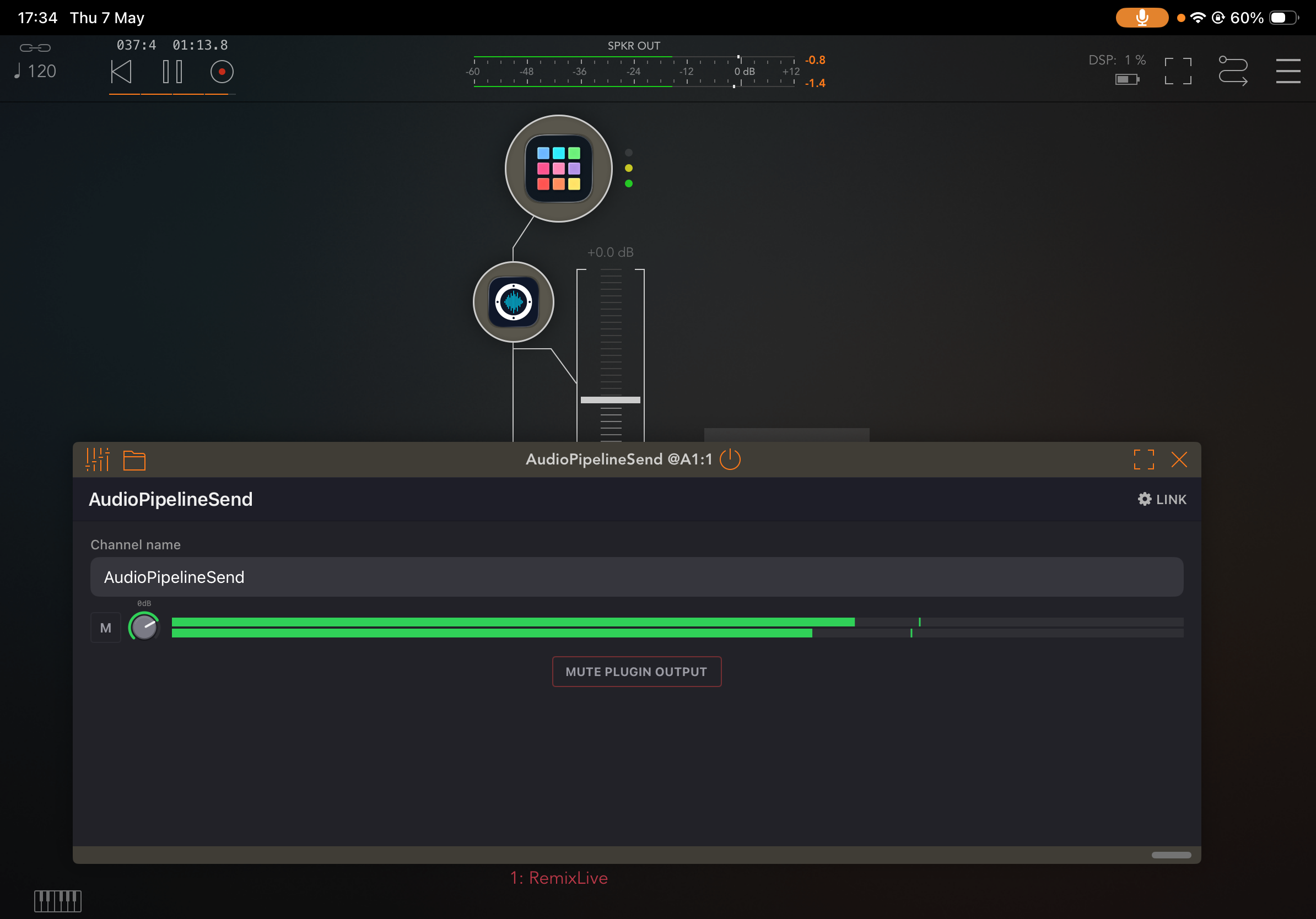
Ahhh....yes that works, thanks again!
I love jamming in AUM, then exporting the mix onto desktop for editing, but having all the separate tracks to play with, plus the AUM faders for some live mixing - is going to give my workflow a proper boost.
I think this will draw a few folks back to the iPad, as @Gavinski mentioned earlier.
no, this is audio only
OK thanks
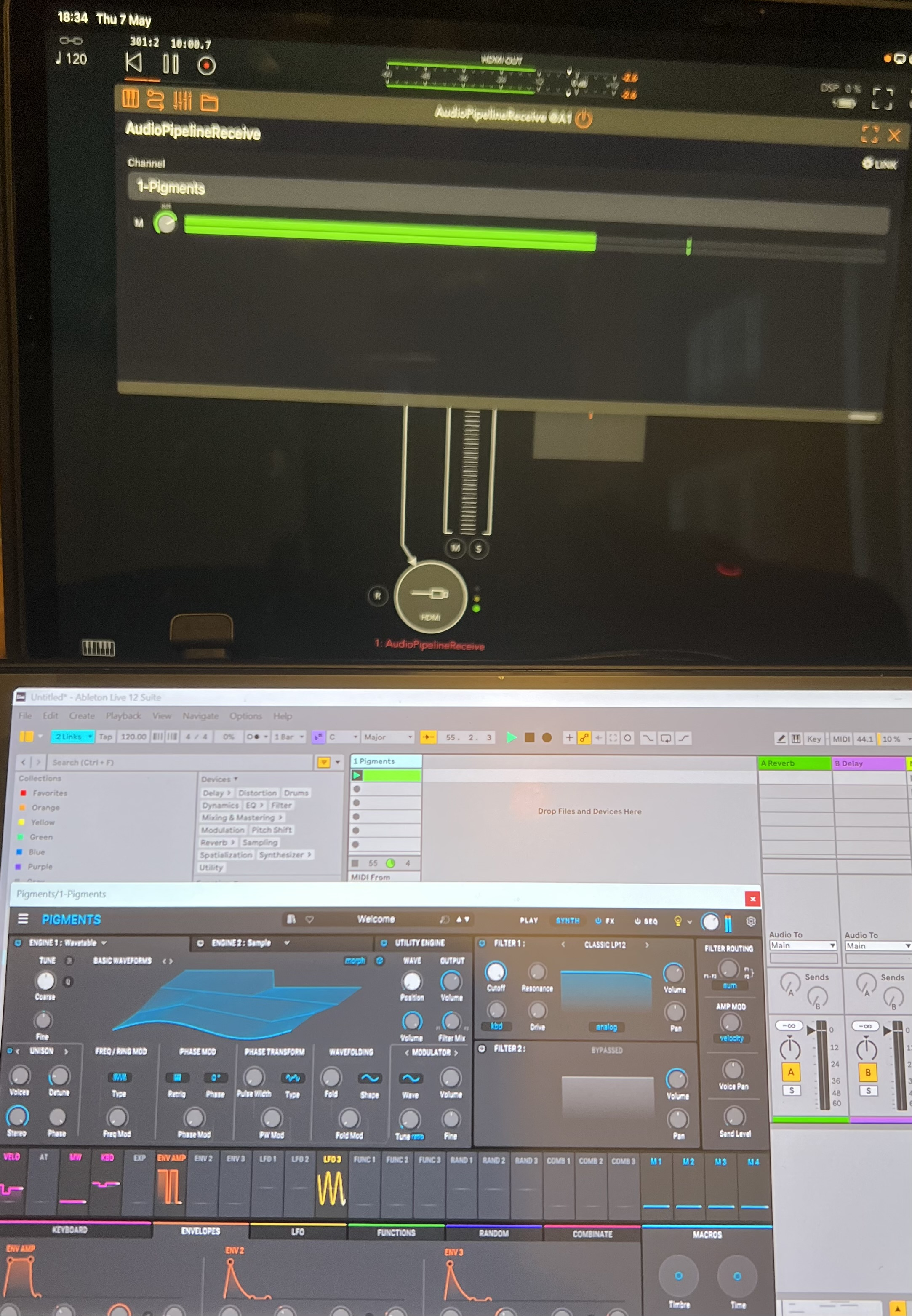
Arturia Pigments into AUM ! Sweet.
👍
https://discord.gg/syTDMp8umR
thanks, already there
Fixed. 👍🏼
Audio from GarageBand is clean now.
In answer to your earlier question - yes, it was audio between apps on the same device.
I notice in the Link Audio settings in Ableton that there's an adjustment for latency. Is that something that would make sense for the plugin?
I see that you report the latency of the plugin to the host. That's great for hosts that have plugin delay compensation. Is it accurate do you think? It's reporting +150ms in AUM for the receive plugin.
Congratulations @dendy sounds like a useful tool. I’ll check it out. Cheers.
The Live panel also shows the status, whether it's getting dropouts, buffering, etc. Those features are nice to have in Sonobus. I wonder if they'd make a good addition to the plugin.
Oh.. ok this is sort of bug ) .. forgotten code when i tested something at beginning, hard coded constatn which is approximate estimate based on some math but not real calulated number .. will look at it ..
Yeh, in Live it shows the current latency from buffering (95ms over USB cable currently), so I guess it's available. It would be helpful to have indicated in the plugin I think.
@dendy : I am seeing a fair amount of latency in AUM AND Loopy Pro. Unfortunately, I don’t have time at the moment to look into the details, but it makes me wonder if the latency is being accurately reported. I might be mistaken.
It seems to me there's significant latency even on device, when using this. I hadn't previously tried it with rhythmic stuff, when I did the results weren't usable. Error from my side? I dunno. DMed Dendy about it, let's see.
You can use Link Audio over USB to a Mac at the same time iDAM is enabled. 😎
I crashed Live when I enabled the iPad iDAM connection, but after restarting Live, I was able to get the two audio streams working at the same time.
@dendy : the latency I am seeing is on the order of 220-320 ms — I checked in AUM and Loopy Pro in recorded audio.
That isn't surprising to me. That has been the case with Sonobus and Loopback as well. My initial take hasn't changed - that this will be loads of fun and useful for making already set up stuff work together, but not much use (for me) for live play.
I feel like Live Audio is just a nicely polished and more broadly compatible equivalent to what Sonobus and StudioMux tried to provide. AudioPipeline is a very nicely executed and very easy to use plugin with potentially broader application than those two.
But already set up stuff is not working right either. Too much latency to get sequences playing in time for example.
Lots of fun testing AUM out to Live over USB/AudioPipeline, plus iDAM out to Live, and two channels from Live out to AUM via AudioPipeline ... all at the same time.
That could be due to latency reporting not working right yet, as mentioned a little earlier. Of course, that's no help if the host doesn't have latency compensation.
I think it'll get more usable as @dendy refines things, but I imagine its going to be fairly similar to Sonobus and Loopback as far as latency goes. Maybe Ableton has some secret sauce though, who knows.
This was from apematrix to aum, so maybe an apematrix thing? I don't normally use apematrix, no clue whether it has latency compensation or not. If it works well between hosts which do, that would be nice.