Loopy Pro: Create music, your way.

What is Loopy Pro?Loopy Pro is a powerful, flexible, and intuitive live looper, sampler, clip launcher and DAW for iPhone and iPad. At its core, it allows you to record and layer sounds in real-time to create complex musical arrangements. But it doesn’t stop there—Loopy Pro offers advanced tools to customize your workflow, build dynamic performance setups, and create a seamless connection between instruments, effects, and external gear.

Use it for live looping, sequencing, arranging, mixing, and much more. Whether you're a live performer, a producer, or just experimenting with sound, Loopy Pro helps you take control of your creative process.

Download on the App Store

Loopy Pro is your all-in-one musical toolkit. Try it for free today.

iPadOS 26 Thread

1356711

Comments

  • The swipe up to switch apps has been mostly a pain in the butt with music apps. I especially hate when key functions are near the bottom or the very top. I can never properly close full screen app in AUM the first time. It always ends up pulling control center down instead of closing. Maybe it’s a me thing (or a settings thing) but it’s to the point where I just avoid going full screen with plugins.

  • @Samu said:
    So far I'm happy with the update on my iPhone 16 and M1 iPadPro and all the apps seem to behave as expected.

    Thanks for that report, @Samu.

  • Interesting, I updated my iPhone to 18.7 but didn't get option to update to IOS26.

  • wimwim
    edited September 2025

    @Tones4Christ said:
    Interesting, I updated my iPhone to 18.7 but didn't get option to update to IOS26.

    Did you look at the bottom of the screen?

  • @Tones4Christ said:
    Interesting, I updated my iPhone to 18.7 but didn't get option to update to IOS26.

    See below. ;)

  • Updated my iPhone 16 Pro to iOS 26 and I love how fast the animations are. Makes everything feel a lot smoother overall. Definitely gonna have to get used to the icons

  • @wim said:

    @Tones4Christ said:
    Interesting, I updated my iPhone to 18.7 but didn't get option to update to IOS26.

    Did you look at the bottom of the screen?

    Will check it out again lol

  • @Samu said:

    @Edward_Alexander said:
    I’m gonna hold off as long as I can. On 18.6.2 I feel like everything works perfectly.

    And I’m still trying to figure out what’s new about all this “we now have “windows” on the iPad!” When I can enable Stage Manager and literally have multiple “windows” on my screen already.

    (no, I haven’t watched any videos or really read into any of this. This is just my view from my lazy position on the couch)

    There's a lot more than that, like finally being able to set the default apps for various file-types, maybe I'll even re-install BM3 at some point (the reason I un-installed it some time ago was because it hijacked all the *.wav files, meaning if I tapped on a *.wav file in the Files app it got instantly imported into BM3).

    And well, if multiple Audio devices are connected at the same time it will be possible to independently select the input and output devices per app.

    Also 18.7 will likely drop at the same time...

    Hmm you might persuade me with the multiple audio device selection, and file type associations.

    So Drambo is working normally?

  • @Edward_Alexander said:

    @Samu said:

    @Edward_Alexander said:
    I’m gonna hold off as long as I can. On 18.6.2 I feel like everything works perfectly.

    And I’m still trying to figure out what’s new about all this “we now have “windows” on the iPad!” When I can enable Stage Manager and literally have multiple “windows” on my screen already.

    (no, I haven’t watched any videos or really read into any of this. This is just my view from my lazy position on the couch)

    There's a lot more than that, like finally being able to set the default apps for various file-types, maybe I'll even re-install BM3 at some point (the reason I un-installed it some time ago was because it hijacked all the *.wav files, meaning if I tapped on a *.wav file in the Files app it got instantly imported into BM3).

    And well, if multiple Audio devices are connected at the same time it will be possible to independently select the input and output devices per app.

    Also 18.7 will likely drop at the same time...

    Hmm you might persuade me with the multiple audio device selection, and file type associations.

    So Drambo is working normally?

    Oh wow! Just re-read this and that is absolutely amazing!

  • @Edward_Alexander said:

    @Samu said:

    @Edward_Alexander said:
    I’m gonna hold off as long as I can. On 18.6.2 I feel like everything works perfectly.

    And I’m still trying to figure out what’s new about all this “we now have “windows” on the iPad!” When I can enable Stage Manager and literally have multiple “windows” on my screen already.

    (no, I haven’t watched any videos or really read into any of this. This is just my view from my lazy position on the couch)

    There's a lot more than that, like finally being able to set the default apps for various file-types, maybe I'll even re-install BM3 at some point (the reason I un-installed it some time ago was because it hijacked all the *.wav files, meaning if I tapped on a *.wav file in the Files app it got instantly imported into BM3).

    And well, if multiple Audio devices are connected at the same time it will be possible to independently select the input and output devices per app.

    Also 18.7 will likely drop at the same time...

    Hmm you might persuade me with the multiple audio device selection, and file type associations.

    So Drambo is working normally?

    So far no issues to report.
    (Like I’ve mentioned, should I bump into any severe issues I’ll post about it).

  • I don’t see much difference.

  • edited September 2025

    anyone knows why I can't resize some apps windows as I want? For example: I can resize AUM, Loopy Pro to a very thin windows, but I can't do it with KORG Monopoly, Playbeat 4 or others (ipad pro 12.9)

  • There's a lot more than that, like finally being able to set the default apps for various file-types, maybe I'll even re-install BM3 at some point (the reason I un-installed it some time ago was because it hijacked all the *.wav files, meaning if I tapped on a *.wav file in the Files app it got instantly imported into BM3).

    And well, if multiple Audio devices are connected at the same time it will be possible to independently select the input and output devices per app.

    Also 18.7 will likely drop at the same time...

    Hay @Samu how do you change the file-types for wav files? I’ve been looking, but I can’t find it. I would appreciate a little pointer..👉

  • @MAtrixplan said:
    anyone knows why I can't resize some apps windows as I want? For example: I can resize AUM, Loopy Pro to a very thin windows, but I can't do it with KORG Monopoly, Playbeat 4 or others (ipad pro 12.9)

    Yes, not a great experience imo so far, this windows thing. For those apps whose windows can't be resized significantly, I think it's up to the developer to improve this, but I'll let someone more knowledgeable on this stuff comment on that. Anyway, currently it's very hit and miss. Sqsl apps, Xynthesizr, are a few that I tried which don't really take much advantage of the new resizing, sadly

  • @Gavinski said:

    @MAtrixplan said:
    anyone knows why I can't resize some apps windows as I want? For example: I can resize AUM, Loopy Pro to a very thin windows, but I can't do it with KORG Monopoly, Playbeat 4 or others (ipad pro 12.9)

    Yes, not a great experience imo so far, this windows thing. For those apps whose windows can't be resized significantly, I think it's up to the developer to improve this, but I'll let someone more knowledgeable on this stuff comment on that. Anyway, currently it's very hit and miss. Sqsl apps, Xynthesizr, are a few that I tried which don't really take much advantage of the new resizing, sadly

    Yeah, me as well got stumped on this. Thought I'd setup a session with Aum and some IAA apps, Borderland did not shrink much at all. Hopefully they get pushed to fix it, the devs I mean as it got to be there the issue lays, right?

  • @Pxlhg said:

    @Gavinski said:

    @MAtrixplan said:
    anyone knows why I can't resize some apps windows as I want? For example: I can resize AUM, Loopy Pro to a very thin windows, but I can't do it with KORG Monopoly, Playbeat 4 or others (ipad pro 12.9)

    Yes, not a great experience imo so far, this windows thing. For those apps whose windows can't be resized significantly, I think it's up to the developer to improve this, but I'll let someone more knowledgeable on this stuff comment on that. Anyway, currently it's very hit and miss. Sqsl apps, Xynthesizr, are a few that I tried which don't really take much advantage of the new resizing, sadly

    Yeah, me as well got stumped on this. Thought I'd setup a session with Aum and some IAA apps, Borderland did not shrink much at all. Hopefully they get pushed to fix it, the devs I mean as it got to be there the issue lays, right?

    From what I understand, it should be up to the devs. Yep, not much advantage to this feature for me if most of the apps I want to use with it don't take advantage of it. Also, this liquid glass is ugly as sin lol

  • I updated last night, iPad pro m1 3rd gen, no issues so far, nice visual update, I like the windowed stuff, doesn't seem to be encountering and battery related issues short of the usual re indexing type drain..

  • edited September 2025

    18.7 has now become available for my Air 4.

    Current iPadOS storage used for 16 is 8.53 GB.

    On my 18.6.2 M2, it’s 17.61 GB (includes 6.24 Apple ‘Intelligence’, which is switched off - the update switched it on again). Basically double.

    That would be a fairly major chunk of my 64 GB storage gone. The Air 4 doesn’t support Apple ‘Intelligence’, so I presume that wouldn’t be used. Not sure if I can clear it from my M2, since storage on that one is tight too (edit: looks like that’s removed slowly, automatically).

  • @Mountain_Hamlet said:

    There's a lot more than that, like finally being able to set the default apps for various file-types, maybe I'll even re-install BM3 at some point (the reason I un-installed it some time ago was because it hijacked all the *.wav files, meaning if I tapped on a *.wav file in the Files app it got instantly imported into BM3).

    And well, if multiple Audio devices are connected at the same time it will be possible to independently select the input and output devices per app.

    Also 18.7 will likely drop at the same time...

    Hay @Samu how do you change the file-types for wav files? I’ve been looking, but I can’t find it. I would appreciate a little pointer..👉

    Long-tap on a file of the type you wish to change, select 'Get Info' and pick an app under 'Always open With'.

    If you on the other hand always wish to use Quick Look for a specific file-type (which is my preferred way) Long-Tap on the file, select Open With and scroll all the way down and check 'Preview With Quick Look'.
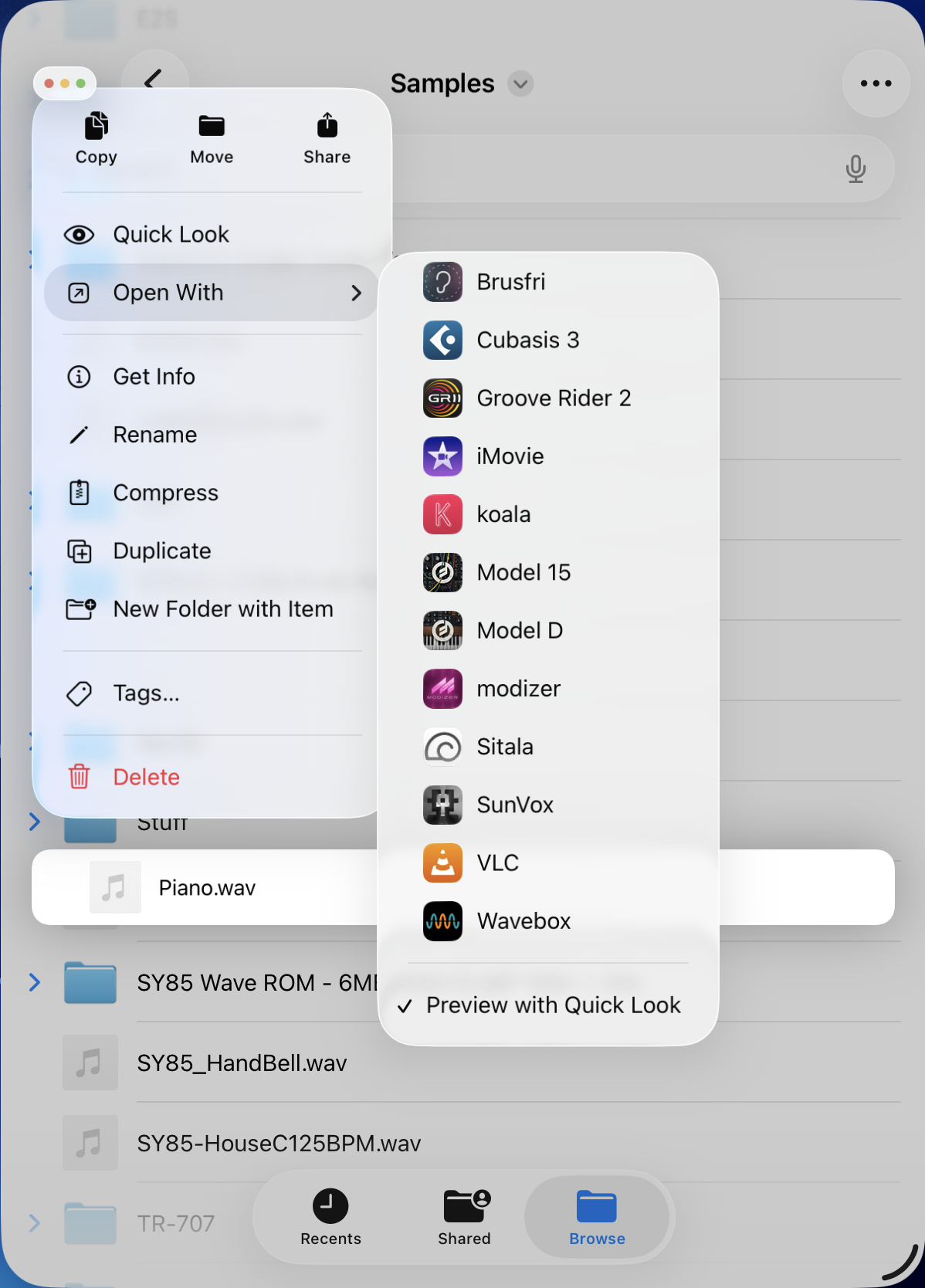
    It's the same on the iPhone as well as long as both are running iOS/iPadOS26

  • @Samu said:

    @Mountain_Hamlet said:

    There's a lot more than that, like finally being able to set the default apps for various file-types, maybe I'll even re-install BM3 at some point (the reason I un-installed it some time ago was because it hijacked all the *.wav files, meaning if I tapped on a *.wav file in the Files app it got instantly imported into BM3).

    And well, if multiple Audio devices are connected at the same time it will be possible to independently select the input and output devices per app.

    Also 18.7 will likely drop at the same time...

    Hay @Samu how do you change the file-types for wav files? I’ve been looking, but I can’t find it. I would appreciate a little pointer..👉

    Long-tap on a file of the type you wish to change, select 'Get Info' and pick an app under 'Always open With'.

    If you on the other hand always wish to use Quick Look for a specific file-type (which is my preferred way) Long-Tap on the file, select Open With and scroll all the way down and check 'Preview With Quick Look'.

    It's the same on the iPhone as well as long as both are running iOS/iPadOS26

    Thanks!!

  • @special_k said:
    nice visual update

    Agreed, it looks quite nice (and was overdue) 👍 -- seems a bit snappier too, though that could just be the animations.

  • What animations?

  • @telecharge said:

    @special_k said:
    nice visual update

    Agreed, it looks quite nice (and was overdue) 👍 -- seems a bit snappier too, though that could just be the animations.

    Agreed the overall smoothness of the UI seems nicely improved to me too..

  • @Meek3 said:
    What animations?

    The motion on your screen as you navigate and operate your phone/tablet.

  • @special_k said:
    I updated last night, iPad pro m1 3rd gen, no issues so far, nice visual update, I like the windowed stuff, doesn't seem to be encountering and battery related issues short of the usual re indexing type drain..

    Thank you for that report on the M1 iPad Pro, @special_k. That's two so far, both positive.

  • edited September 2025

    After updating to iPAdOS 26, the AUv3 of Velocity Keyboard will not open for me in AUM. Anyone else? I get the message “Cannot communicate with helper application”

    I emailed @Blue_Mangoo

  • @Gavinski said:
    After updating to iPAdOS 26, the AUv3 of Velocity Keyboard will not open for me in AUM. Anyone else? I get the message “Cannot communicate with helper application”

    I emailed Blue Mangoo.

    Same here on iOS 26, iPhone 13 Mini. iFretless Bass also not loading. Neither app is loading in Drambo or Cubasis either.

  • Would it be worth updating my iphone 14, or will it just become slower and more battery hungry with all the ai and animations I don’t really care about?
    Tempted just because reading this thread diagonally, I see there are some usability improvements
    Anyone with an iPhone 14 took the chance? I’m not even considering updating my ipad 9

  • @pedro said:
    Would it be worth updating my iphone 14, or will it just become slower and more battery hungry with all the ai and animations I don’t really care about?
    Tempted just because reading this thread diagonally, I see there are some usability improvements
    Anyone with an iPhone 14 took the chance? I’m not even considering updating my ipad 9

    Anecdotally I've heard that it improves battery life because it's more optimized. Iphone 14 doesn't support the AI stuff so it shouldn't have any effect. But YMMV.

  • @timfromtheborder said:

    @pedro said:
    Would it be worth updating my iphone 14, or will it just become slower and more battery hungry with all the ai and animations I don’t really care about?
    Tempted just because reading this thread diagonally, I see there are some usability improvements
    Anyone with an iPhone 14 took the chance? I’m not even considering updating my ipad 9

    Anecdotally I've heard that it improves battery life because it's more optimized. Iphone 14 doesn't support the AI stuff so it shouldn't have any effect. But YMMV.

    That’s good to know, thanks, I think I’ll test on iphone just cause I’m curious, and I think I have a window I can revert back, but reserve ipad on 18.7

Sign In or Register to comment.