Loopy Pro: Create music, your way.
What is Loopy Pro? — Loopy Pro is a powerful, flexible, and intuitive live looper, sampler, clip launcher and DAW for iPhone and iPad. At its core, it allows you to record and layer sounds in real-time to create complex musical arrangements. But it doesn’t stop there—Loopy Pro offers advanced tools to customize your workflow, build dynamic performance setups, and create a seamless connection between instruments, effects, and external gear.
Use it for live looping, sequencing, arranging, mixing, and much more. Whether you're a live performer, a producer, or just experimenting with sound, Loopy Pro helps you take control of your creative process.
Download on the App StoreLoopy Pro is your all-in-one musical toolkit. Try it for free today.
Comments
Anybody getting random “SIM not found” or “No Service” errors after upgrading to ios26?
Not sure if this is just coincidence and I need to clean the contacts or convert to a eSIM, but my iPhone 15 pro max is coughing up these errors from time to time after the upgrade to 26.
Never happened before.
FILES does not remember settings and restarts with the default settings. Not even under iPadOS 26.0.1.
At least on my iPad Pro M1 12.9".
FILES does not remember:
Is it just me?
Just installed Gboard on iPadOS. Nice! Glad there's an alternative.
Are You by any change using DropBox, Google Drive or AudioShare etc. as a preferred 'Location'?
For me Files.app remembers the last used location and folder and settings when I relaunch it granted I'm not littering Files.app with other storage-providers...
@Samu
Thank you very much for the information.
It's amazing that it works for others.
Everything was fine until iPadOS 18.6.2. The FILES app always remembered the last settings.
This has only been happening since the update to iPadOS 26.
I hadn't changed any storage locations beforehand.
Hey all, it's been a hot minute.
Figured I'd ask if anyone here is a tech guru. I'm no slouch, but I can't solve this one and I'm trying hard not to pay money to do so.
iPadOS 26 bricked my 3rd gen iPad Pro 12.9". It is stuck in a boot loop, which eventually resolves to Recovery Mode, which tells me it cannot recover. I've managed to get into the "Connect to a computer" screen, but no computer/cable/port combination I've tried can see the device.
Anyone here have any other suggestions before I shell out on a Genius Bar visit?
@McD had this or something like it I think.
To be honest that was the thing that surprised me most. It actually used less power than normal overnight while I slept. And it's been pretty normal on battery power as a rough estimate. The slow, glitchy interface had me thinking it would be a big battery hog but so far now. That new UI though. Ugh!
Yeah I really feel like they could have introduced some of the "liquid glass" effects and had a nice UI update. But, they decided to go for a Branded Experience and went too far. And some of it seems really rushed. The unlock keypad looks like trash in so many situations.
@Meek3 it's pretty normal for a new iOS release to burn battery for a few days after install while it re-indexes everything (and has to work harder in general before those indexes are built). If you've been running it for weeks and it's still draining the battery there might be something pathological happening.
Another annoying thing I am finding about ipadOS 26 and AUM is that, when the bottom edge of an AUv3 window is near the bottom of the iPad screen, when I try to grab that AUv3 window to make it smaller, I often unintentionally just make AUM's entire window smaller.
This is very aggravating. I might actually end up disabling the windowing. Apple have introduced so many things in recent years that get in the way of using the iPad for precise tasks. I feel like some recent 'improvements' - lack of home button for example - just get in the way. They create more problems than they solve, half the time
QQQq> @wim said:
I had a reboot issue with iPadOS 26 Beta that ended with a Genius Bar visit to go back to IOS 18.
I tried again when iPadOS 26 dropped and it would not boot. I was able to follow recovery steps using a MacBook. But any all
Attempts led to another bricked iPad using update or restore (wiped). If I tried the iCloud backup restore the iPad would not boot.
I tried update and restore (which wipes the iPad and I had 500GB of apps and data). Another visit to the Genius Bar at the Apple Store which thankfully is only 3 miles away.
At the Genius Bar I begged to go back to IOS 18 so I could restore from the iCloud Backup which I used for the first restore process. The 500GB local turned out to require about 700GB of iCloud transfers. So, the first restore took about a week.
But after iPadOS 26 was the official install… the Geniuses could not (Apple policy) restore the previous OS. I think that stance will push so many over to Android devices. Not Music creatives, I suspect.
I I have been downloading apps into iPadOS 26 from the store as I feel the need for an app.
So, I lost all my AUM projects and app data. The largest data bundled being Decent Sampler instruments over 200GB total.
But I just read about someone that updated and (maybe) at the same time had a iPad hardware fail so it won’t power on
And has no AppleCare support. That iPad is dead. That’s the only iPadOS 26 store that makes me feel fortunate.
I learned thatbwhen an iPad is being updated make sure you have 100% power and connected to a power bank just in case!
I always freak when the darn apple takes too long to show up!
Horrific, sorry to hear that
Drambo thinks it’s not started in standalone mode. Is there a fix?
I’m on a iPad M1.
Edit. Rebooted and it’s working now.
My first issue with 26: moving icons is extremely sluggish, like this can't be right sluggish. I'm on an M1 pro with 16gb ram. plenty of disk space so, something is faulty.
These tales make me really hesitant to update my ipad9. No problem with iphone 14 though, I kinda disliked it at first but now it seems to be an improved experience
So if iOS 26 doesn't reliably support IAA, what will happen with the Lumbeat apps (like Reggae Drummer, and Soft Drummer,) which aren't AUv3?
@McD thank you for your insight. I'm sorry, and disheartened, to hear of the loss of all that data. I am thinking I may be at the point of losing what I have (...had) on my iPad as well.
One tiny light at the end of the tunnel, I was able to see it with my laptop for the first time today. But the Mac requested I press "Trust" on the iPad, which did not have a button for it.
sigh I don't intend to buy a new device any time soon. Gonna hope that I can see the device again on another attempt.
I have heard mixed reports about IAA in iOS 26. Quite a few people seem to be having good luck others not so much. A developer posted earlier that iOS 26 iOS the last OS that will support them. Lumbeats have said that they are in the process of adding AUv3 support to their drummers.
Oh wow. That's huge. I remember about a year ago Lumbeat was saying they had no interest in upgrading their IAA apps to AUv3. I guess they will have to do something to make them work with iOS26.
They recently released their first AUv3 drummer.
That's great to see. I wonder how arduous it is to revamp their older IAA apps to AUv3. I hope the plan is not to release brand new AUv3 redux of their classics at new prices. Although, a dev has to get paid for their time somehow...
I feel like some recent 'improvements' - lack of home button for example - just get in the way.
You know about the "virtual Home button" that can be enabled by turning on Assistive Touch in the Accessibility settings, right? It creates a virtual Home button that floats over the screen at all times.
I've had this turned on ever since the elimination of the Home button. I never even learned the new gestures to do basic things that used to require the Home button, like unlocking the screen, or switching apps. I would be lost without it.
I got used to the new gestures (after the home button was removed) within a few days after I got the 11" M1 iPadPro...
...after that I also used the same gestures on my iPad Air 2 and don't miss the home button at all.
Short swipe all the way up from the bottom or do a 4 finger pinch gesture to hide all apps and get back to the home-screen.
To jump to any of the currently open apps swipe up from the bottom to bring up the windows of all currently open apps and tap the app to bring to the front.
Learning these few gestures will save a lot of future frustration and will more than likely become automatic.
Regarding iPadOS26 and 'battery drain'...
...if/when experiencing this check under the battery settings if there are any apps running in the background (even after they are properly closed) one might get a few surprises finding apps that were closed are still chugging along in the background...
I found that Relic Waves (the recently updated one) had been running in the background for 22h 49 minutes and eating roughly 30% of the battery-time with a grand total of 1 minute of on-screen time...
(ie. I launched it, played with and then closed it but apparently it didn't close properly?!).
This is unfortunately not the only app that behaves like this...
...it feels like 'The Return of the IAA Ghost Apps'
Lesson learned, 'clear the ram' before putting the iPad to sleep and keep the fingers crossed that 26.1 will fix this...
Maybe you’re not accidentally previewing them in the preview.app?
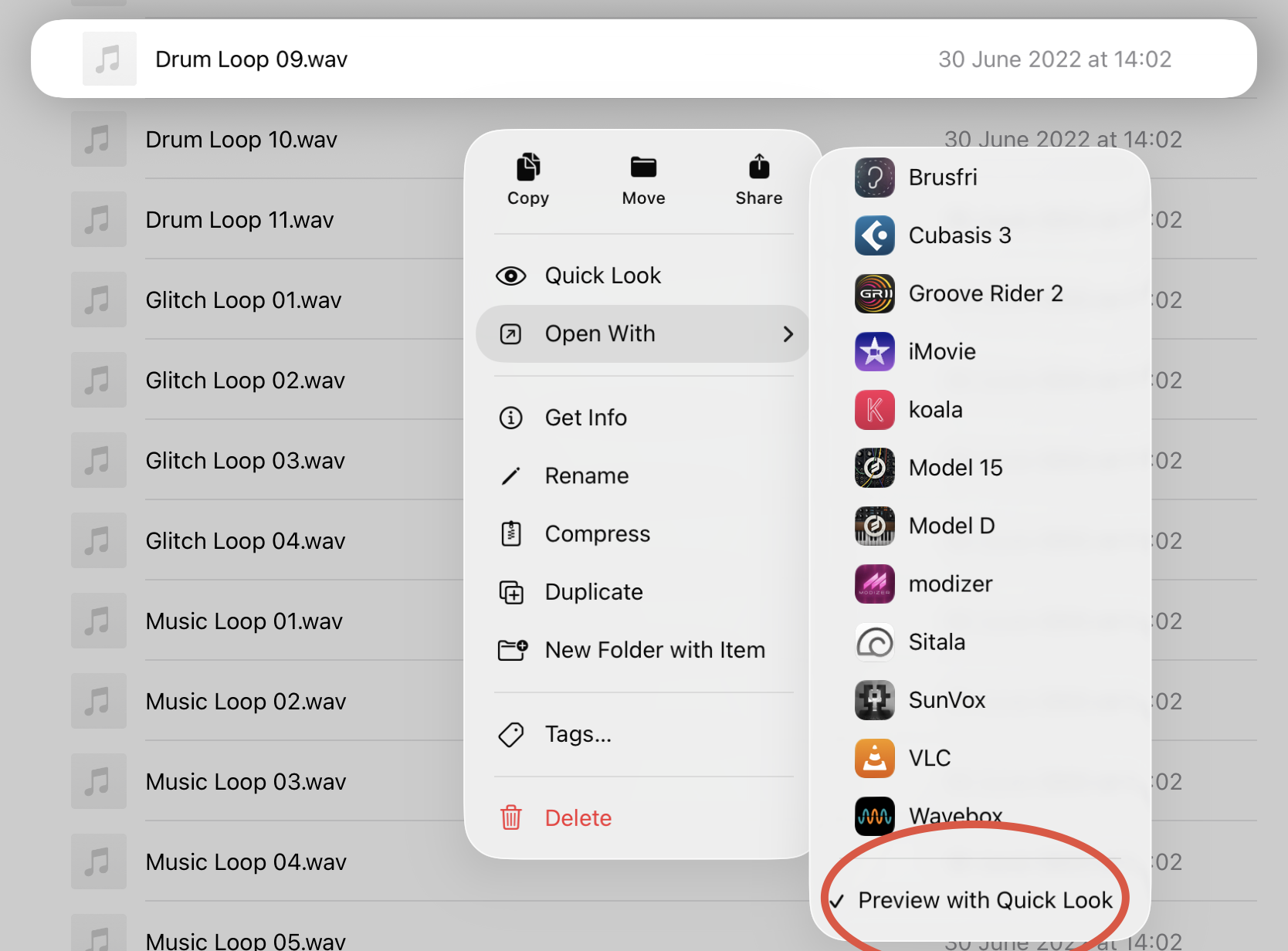
Make sure quick-look is enabled for the file-type.
One one file is in quick-look mode you can swipe to the next/previous file.
I've been playing whack a mole since updating and experiencing some weird battery draining issues, for now I think I've sorted it by uninstalling Google drive, it never shows in the battery metrics but since I deleted it my standby drain has dropped to a couple of percent per day instead of 10/15.. also I turned off all the usual suspects, location, app refresh, analytics,location, face recognition..
…..
No idea if your problem is related to this, but I just saw this in my YouTube feed. Seems like you're not alone in this: