Loopy Pro: Create music, your way.
What is Loopy Pro? — Loopy Pro is a powerful, flexible, and intuitive live looper, sampler, clip launcher and DAW for iPhone and iPad. At its core, it allows you to record and layer sounds in real-time to create complex musical arrangements. But it doesn’t stop there—Loopy Pro offers advanced tools to customize your workflow, build dynamic performance setups, and create a seamless connection between instruments, effects, and external gear.
Use it for live looping, sequencing, arranging, mixing, and much more. Whether you're a live performer, a producer, or just experimenting with sound, Loopy Pro helps you take control of your creative process.
Download on the App StoreLoopy Pro is your all-in-one musical toolkit. Try it for free today.
Comments
what you mean with feedback knob ?
.
I mean a knob that feeds the receiver's sound back on itself, just like doing feedback loops in AUM, but with no need for setup on the user's side . I don't expect you'll actually add this, and it was just a jokey comment, but actually I'd love it if you did.
aah no thatbwould be madness, i have enoug headache with proper phase syncing and delay compensation already , this would kill me 😆
Yes, the threshold for user error on this one would be waaaay too low as well 😂
Just tried inside Drambo, works flawlessly @dendy, you can add it to the hosts listed in your app.
Good job!
👍
Now i realised you can use it in Drambo for sending audio back on same track, which is (at least it wat not if i good remember) possible in Dramboby by simply inserting Receiver and Then Sender on same track :-)
In next update Receiver will be capable to mix multiple inputs and send them to up to 8 AUv3 outout busses
Routing madness :-)
Awesome update work, thank you for making this!! A few days ago it was unusable beyond basic sampling...
this morning I had a Koala to Koala jam wirelessly ipad to iphone with 0 issues!
Link Audio is the birth of Dongle Death!
Glad to hear that !
Great work! Tested using Drambo and with Bitwig using VoidLinkAudio VST and it's a great combo on my M2.
I see in TestFlight 3 or 4 crashes (not bad considering that almost 350 beta testers were signed )
)
Anyway, i can't see there any crashlogs, if anybody experiences crash, please share crashlog, it helps me improve app stability.
Btw. current 0.2.0 (6) build is considered as pre-final. No more new features, just bugfixes. I'll wait few days more and then i submit it to AppStore.
Yes, that was my quick local test to measure latency
BTW, sending audio backwards or across tracks is possible in D since a while, using the Feedback Send and Receive modules.
ach ok, what a pity I was hoping my baby brings some actual benefit for Drambo users lol
C'mon, if wireless audio is not a benefit then I don't know!
It's fantastic!
Hello @dendy
Thanks a lot. Super interesting! Works well with live. It even works (not always) between my ipad and my iphone with a USB connection through a usb HUB (require to start the connection in wifi first).
However, it doesn't work with my move. It recognize the move and its 4 tracks but it says " waiting for peer connection"
Maybe I'm doing something wrong?
Move is send only need a Ableton host to work ie Ableton Live or Push 3.
Thanks for follow up. I know that move is send only. But in this this situation, I want: send move TO receive ipad
@SamSamSam Pretty sure that’s a built in limitation of the SDK but I’m sure @dendy will confirm.
Just tried it myself on my Move yes it shows but no dice.
Unfortunatelly i don't have Move so can't debug this
And i would love to have Move, it's great groovebox ! Maybe one day..
Well if Move is send only then actually my Receiver SHOULD detect it .. so this will be some other problem.. Receiver sinply shows ALL Link AUDIO peers it see in local network ..
wouldn't be surprised that this is some bug on Move but as is said, without having it in my hands I can just speculate..
@SamSamSam
Does Ableton LIVE see MOVE ? Can you receive audio from MOVE in Live ?
If yes, and my Receiver doesn't see it, they it really may be some bug in Ableron SDK which my plugin uses ..
Hard to tell.. just speculations.
Move connects to Live no problem same as Note. But Move only shows the main in AudioPipeline but doesn’t pick up the sound and or show the 4 channels like Live does. the midi channels show aswell.
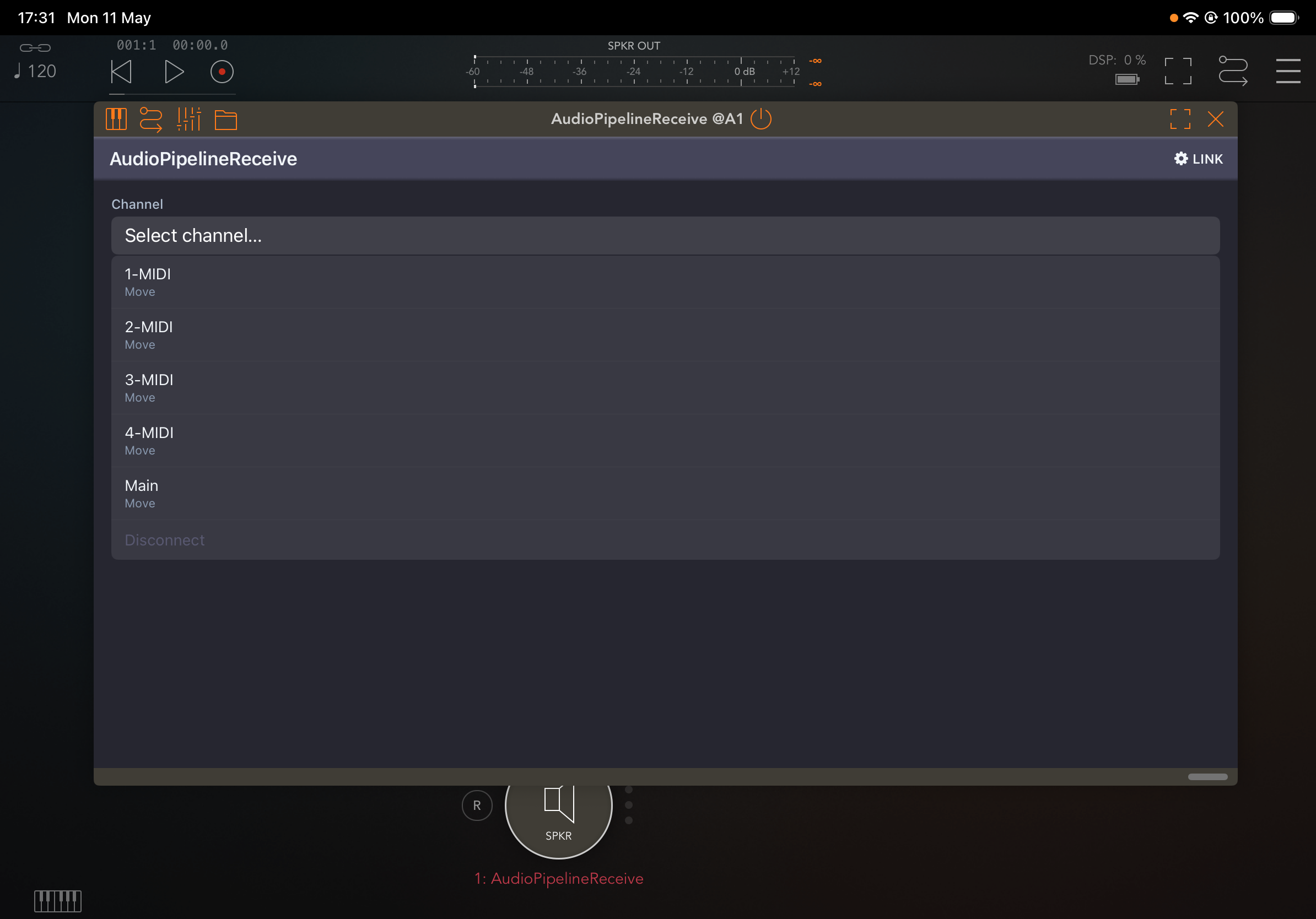
Understand.. well, as i said i am afraid without Move on my desk this bug will stay unresolved for now ..
Maybe after i release app, IF it shows in apple app scharts, Ableton will donate me Move to fix this LOL
No problem hopefully your get sent one great what you done is the bus addition in the next update?
Multiple busses in Receiver is already in TestFlight since yesterday .. update to build 0.2.0 (7)
Thanks a lot for the answer. If there is anything we can do to test the move, just let us know!
Sweet wasn’t aware, I’ve just DM you about the Move problem.
uploaded new build - 1.0 (4) - to TestFlight .. this is release candidate, i added Receiver also as FX plugin so you can load it into FX slot and record audio into audio track in Cubases or other DAW of your choice (except of Nanostudio 2, uhm, obviously ))
))
Also i am in REVIEW for offical relese - got one rejection cause retards did not understand how to use app so they asked me to record video how i use it LOL .. nice to see that our audio apps are depending on reviews by totaly incompetent people :-))))
You're not the first one, believe me!
They're so fkn useless yeah haha. And yet they let some right shite get through, the mind boggles!