Loopy Pro: Create music, your way.
What is Loopy Pro? — Loopy Pro is a powerful, flexible, and intuitive live looper, sampler, clip launcher and DAW for iPhone and iPad. At its core, it allows you to record and layer sounds in real-time to create complex musical arrangements. But it doesn’t stop there—Loopy Pro offers advanced tools to customize your workflow, build dynamic performance setups, and create a seamless connection between instruments, effects, and external gear.
Use it for live looping, sequencing, arranging, mixing, and much more. Whether you're a live performer, a producer, or just experimenting with sound, Loopy Pro helps you take control of your creative process.
Download on the App StoreLoopy Pro is your all-in-one musical toolkit. Try it for free today.
Comments
Correction: not standard (base) iPad from 2018, that's the one I had to ditch. Perhaps all Pro and Air models from 2018 can do the job?
min: iPhone 8, iPhone 8 Plus, and iPhone X (2017 gen), plus iPad Pro 11-inch (1st gen), iPad Pro 12.9-inch (3rd gen), iPad Air (3rd gen), iPad mini (5th gen), and iPad (8th gen)
btw. IAP will be blocked on unsupported devices, so there is no danger.
btw @giku_beepstreet posted some examples on yt lately, but is too modest to share here I was trying to re-find this one among the various forum threads, only to realize that I had just accidentally seen it on yt and not here.
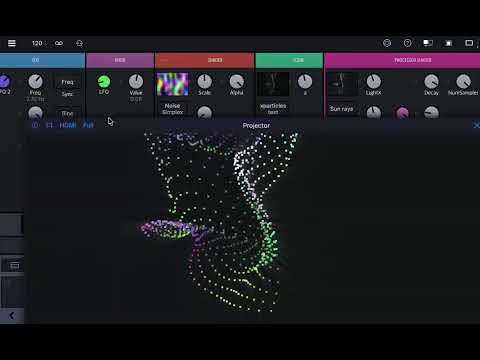
@bleep Yes trying to find more time for that.
Some examples from IG (no coding, only visual modules in there):
That’s great really great, please continue. Btw @giku_beepstreet could you reccomend webpage to download visuals, maybe some programmed animated ones? I hope I’m clear in my message. Also please advice me guys on app to cut longer videos and edit them. Thanks!
How’s the CPU demand for this stuff, relative to the DSP?
The DSP is on the CPU and the visuals are on the GPU,
because the visual side of things uses the GPU it's actually very light
however like any app or program once the visuals get complicated then it starts to get heavy on the system.
My examples in this thread were entirely in dRambo standalone from start to finish,
designed and composed in real time at 1:4 (1:1 is full quality) and then rendered at 1:1 4K/60FPS.
@giku_beepstreet can I load full song into sampler and still control visuals? What module(s) in between, would I need?
Would akai mpd 218 be (or ant similiar equipment with pads) be usefull to launch clips, or changes?
I didn’t read a manual, excuse me 🫣
To users, do you use it with any hardware?
Yes, they would.
When you get the time it would be well worth the read
Reading the manual will save a lot of trial and error.
Once you press the Midi Mapping button you will automatically
see the parameters that can have CC messages assigned to them.
Screenshot
Is that an image of a djembe head on your visual tap/projector? Or a concoction of shaders, ect? Looks very cool.
@Blipsford_Baubie it's actually a fractal.
I'm having loads of fun with them.
Have just gone through the tutorials. Which took ages due to having way too much fun messing about with the new techniques at each step.
Huge congrats to the dev/s it's really incredible. To have modular music and visual design all in one app with this level of depth is nuts.
@Muireb it’s a single dev (Giku @ beepstreet) which makes it even more impressive
I’ve been experimenting with how possible it is to predictably apply some rhythmic motion to hand drawn images using Drambo Visual. Here’s a quick experiment from yesterday.
Awesome @Robin2, Looking forward to you expanding on this concept.
Thanks @Edward_Alexander. Yeah, I think there’s genuine possibilities available taking this approach. Cheers.
I've just discovered that we can use Texture mapping to apply different textures to surfaces and the background.
Here's a rough draft of "Night and Day"
where I'm using Royalty free videos
to texture map the background and the fractal.
Automated using three Morph knobs.
Rendered at 4K/60FPS which took approx 83 minutes to render.
Ha, that's excellent. Really works well! Although, technically speaking the snare is on "2" not "1".
Absolutely beautiful. I was mesmerized!
Brilliant work, @giku_beepstreet
Very cool!
Thanks @lukesleepwalker. Yeah, I wanted the hit on the one but given I was only experimenting, couldn’t be bothered to draw a kick drum so snare drum it, incorrectly, was! Cheers.
All good! Please share your method if you would be so kind
This is extremely inspiring. I have no idea how you're doing this. It looks like things I've seen coming down from some very fun nights.
Thats mean! Any chance you could share the patch?
@Gravitas I'm with @Gavinski in that that is very cool indeed!
At certain points, it kinda resembles some aerial/ satellite photography of some snow covered farmlands.
Some stills from tonight's visual exploration. Every night it's something different..
Using only the Drambo logo as a texture source, used Shader Repeat, then fed into a 3D Shader rack with some Blur, and the 3D Mask's Texture Extrude preset. All available in Drambo Visual with no code written, manipulated, or vibed.
Ported Alexander Alekseev's Seascape into Drambo. Gonna expose some controls for modulation next.
@Muireb nice, but keep in mind all these more sophisticated shadertoys have CC non-commercial licenses
You would not be allowed to play these publicly or include them in a video, for instance
Still good for learning purposes. For this particular shader I found a github with some helpful comments https://github.com/eshnil2000/SeascapeGPUShader