Loopy Pro: Create music, your way.
What is Loopy Pro? — Loopy Pro is a powerful, flexible, and intuitive live looper, sampler, clip launcher and DAW for iPhone and iPad. At its core, it allows you to record and layer sounds in real-time to create complex musical arrangements. But it doesn’t stop there—Loopy Pro offers advanced tools to customize your workflow, build dynamic performance setups, and create a seamless connection between instruments, effects, and external gear.
Use it for live looping, sequencing, arranging, mixing, and much more. Whether you're a live performer, a producer, or just experimenting with sound, Loopy Pro helps you take control of your creative process.
Download on the App StoreLoopy Pro is your all-in-one musical toolkit. Try it for free today.
Comments
Freezing Animoog not working.
Yes, that behaviour is what is sometimes referred to as 'Ghost parts'; it has been my number one most wanted feature since Cubasis was first released. Garageband iOS has a nice implementation of this.
Cool, thanks for the Modstep tip, I will certainly try that! in samplitude you literally use the same timestretch button that you use for audio and just drag the tail. Works great.
Did send a message to Moog...
Best,
Lars
Yes, I've often wondered why the mixer page doesn't expand like the rest of the media bays/keyboards/editors.. seems essential, Mentioned before elsewhere but not sure if @Lars has picked up on it..
The aux sends are the only way to automate 'dub' style accent post fader effects but the problem is the aux sends are 3 seperate busses and don't chain, of course that makes sense in most situations but you can't send that new roomverb through a phaser and jab the send level up now and again.. workaround is to use a more complex iaa multifx on the aux send I suppose.
all that said, I have literally just made an entire album in cubasis and it wasn't my intention particularly to use it at all, something just 'clicked' and now i feel comfortable..
any improvements the Steinbergers come up with are most welcome..
glad the au freezing timing issue has been addressed too..
I've really been enjoying the current state of Cubasis a LOT. It really has me tempted to upgrade the old Air1 to a Pro so I can just go nuts with it. That plus Audiobus3 could certainly shift my PC DAW dependancy ratio significantly.
I stand corrected - I hadn't noticed the AUX send. How long has that been there? I was looking for it by the faders...
So I will upgrade my feature request to some configuration where you can have a chain of effects as an AUX, such as via busses, so that you are able to EQ the reverb etc...
yep, I'm riding a 9.7 pro and have yet to make a Cubasis project that tests the cpu...
that said, I noticed using two instances of this new roomWorks verb will bring the cpu up near 25% from around 5%... so that ones best shared on an aux send perhaps.. or freezing is an option I guess..
Sweet, something to look forward to while I save my pennies...
Im loving getting to know Cubasis. Ive been recording midi from hardware and its so easy. Never been able to do this with any other ios app. Well, not without loosing hours and the will to live. I dont need to use third party apps to route the midi and there doesnt seem to be any lag going from my rs7000 sequencer though my M-Audio Midiman to the ipad. Maybe I shouldnt be surprised. Anyway, Im a convert. Im going to be able to pretty easily move my work from the rs to the ipad and vice versa getting the best of both worlds.
In the process of getting to know the app, I stumbled at how the recording modes worked. This video, an intruduction to a course, hits the nail on the head. I dont think Ill bother with the course but who knows, might be useful.
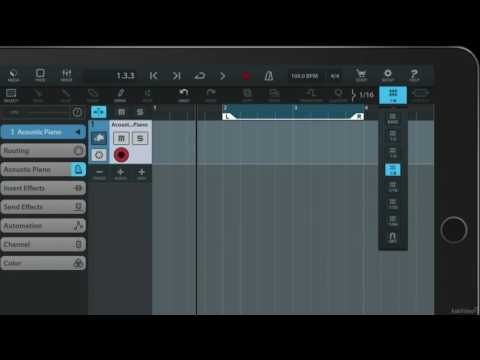
Anyway, how recording modes work in Cubasis ...
Cubasis 2.1, a sheltered spot in the mountain for you and your favourite midi data to hang out, build a fire and party.
Dude that was awesome!!! Thanks for the tutorial link
There are many funny and amusing posts on this forum. I don't often LOL, but this was a LOL moment for me.
LOL!!
@richtowns Finding the same comfort and ease using Cubasis to record live multi-track in-device midi from Modstep. Thanks for your post above, never would've tried Modstep and Cubasis this way.
I'm really enjoying Cubasis' new reverb! Makes synths sound huge!
Check out this really short clip playing Addictive Pro Synth into the reverb with Drum Session playing drums pure joy!!!! Hope you enjoy it.
Drum Session & Cubasis MM4C at MM4C by MusicMan4Christ on #SoundCloud
Did the drums receive the same reverb or just synth?
Just synth. I really like the ambience on the drums, so glad we also have the dry kit.
That was a dry kit? It sounded really good.
No I think it was the rock kit. Thanks man!
Dear all,
Thanks for all the great feedbacks on Cubasis 2.1 and the kind ratings so far!
In case you’ve missed it:
We have a great Cubasis 2.1 tutorial available online to get familiar with all the new features, workflows and much more in just a few minutes.
Cubasis 2.1 Tutorial
I promise it’s worth taking a look…
Best,
Lars
Hi!
@LFS regarding the 'vertical zoom' of the piano-roll (to make it bigger) it would make sense to 'snap it' to the top toolbar so it doesn't get covered.
Often when I zoom the piano roll I just drag it up and sometimes when I'm not careful I covers the toolbar...
This does it no way affect the functionality but when I go to look for pen or select tool they are covered by the editor.
Thanks to you and your team for a nice update
This is so far he best update ever!!! For. E editing midi is as good if not better than Gadget but then again I'm not a deep midi guy. I still like to fix notes here and there and this new update is so much smoother and just feels So much more Pro!!
Question; I recorded Addictive SynthvPro and when I went to freeze it the resulting audio track was way longer than the 16 original bars. Any ideas? Forgot to mention synth is being used as AUv3.
Hi Samu,
Thanks for the kind words.
The same mimic is used for the keys, pads, audio, MIDI and automation editor, and MediaBay.
It is intended to allow zooming these sections over the sub menu, since there are many cases where it makes sense to have that extra space. Should not be a big deal to put it where you want it to be in my view.
Best,
Lars
Got it!
Just wondered because the Audio Editor does have the all needed tools available in the left sidebar and does not heavily rely on the top toolbar while the piano editor does rely on top toolbar for select, erase and pen...
So in order to maximise the usefulness of the extra vertical space for editing the notes the Select, Pen and Erase tools could join the other tools(Lock, Velocity, Move, Length) in the left sidebar.(If It's an issue of space a toggle between edit/select could be a work-around).
This would also make logical sense by keeping the tools related to the editor at the same location.
See this as 'personal preference'.
Just as it is possible to choose where the AudioBus toolbar pops up on the screen the same could apply to the editor-tools as well.
It's all about stream-lining the flow.
/Samuel
@Lars, what are the chances of adding to Cubasis a "Capture Buffer" like the one available in the new Looperverse app by Retronyms? Just yesterday, was noodling in Cubasis and wow, just really wished it had behind the scenes captured some stuff i was noodling. I tried to make it sound the same but it was gone out of my mind. I would love that feature, even if it was just for like 10 seconds. I think i will buy that app, just for that feauture alone as right now I don't have anything that comes close to having that option on the iPhone or iPad.
Thanks in advance.
Hi MusicMan4Christ,
While I'm not able to provide an info when this feature might make it into Cubasis, I've added it to the backlog.
BTW, Cubase (not Cubasis) includes a similar feature dedicated to MIDI called retrospective record.
Best,
Lars
Sweet!!!!
but would it be possible to allow the same flexibility for the mixer page. I know it's currently a fixed graphic but only the faders would have to extend, everything else can remain as is, if its to much graphic messing to allow different lengths then perhaps you could just have two default mixer pages, the current one and then an extended fader one that goes up to the toolbar when you pull the handle?
would be most lovely,
thank you for listening Lars
Yes, I would like this also.
And I think micrologue is underrated as a synth. You guys from Steinberg should make presets and sell them as IAP.
I already have Auria Pro. I really need Cubase?