Loopy Pro: Create music, your way.
What is Loopy Pro? — Loopy Pro is a powerful, flexible, and intuitive live looper, sampler, clip launcher and DAW for iPhone and iPad. At its core, it allows you to record and layer sounds in real-time to create complex musical arrangements. But it doesn’t stop there—Loopy Pro offers advanced tools to customize your workflow, build dynamic performance setups, and create a seamless connection between instruments, effects, and external gear.
Use it for live looping, sequencing, arranging, mixing, and much more. Whether you're a live performer, a producer, or just experimenting with sound, Loopy Pro helps you take control of your creative process.
Download on the App StoreLoopy Pro is your all-in-one musical toolkit. Try it for free today.
Comments
Partner video
Wow! That’s awesome
Of course i have to figure out how to get them into DS but i can’t imagine that’s too hard
Yes.
Gonna have to check this out again. I was experiencing all kinds of crashing and stability issues after i saw the original news on this. Thanks for the vids. 👊🏼™️
Starting at 5:02 to approximately 5:48 of the video posted below (and above in a previous post)
How do you add these ?
This is me failing LOL...
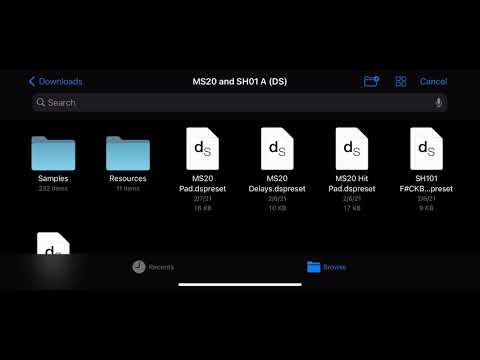
@reasOne oh boy, thats not the end... we need to intestigate further... the winter voices things works like a charm. We may have to hit Dave to get insight into this...
I saw a segment of video from the DS guy stating that the sample set must be zipped and then have the extension changed *.dslibrary
He mentions this at the 5:30 mark of the David Hilowitz announcement video.
Can we get a patch storage community going for these files with suitable extensions? Maybe Piano Book will start to value the IOS users and may options for us too.
.dslibrary
That did the trick!

Works in the auv3 as well
Got it working! Can’t find a way to save them other than auv3 state save but that’s good for me
This is what the maestro said to our problem. Works like a charm also with these who doesn’t ship with *.dslibrary
@reasOne
Ya man great find! I downloaded a few of them and renamed them in the documents app! Such great sounds!!!
This method only works in stand-alone mode. If you open Decent sampler in AUv3 and you try to load the patch, it gives you error, even though the patch was loaded correctly in standalone.
After the error in AUv3 mode, it also stops you from loading the patch in standalone
I tested it in aum and it loads in auv3 , i don’t know if it cubasis causing the error but it could be host related
I enjoy it but it constantly crashes for me
@Paa89 was importing the MS20 SH1 Pad thing inside AUM with the AU plugin without any problem too...
that is very strange
i just did a testin GarageBand, Drambo and Auria Same issue.
@Paa89 In DecentSampler, have you tried loading instruments from the files menu on the right side rather from the browse menu on the left? This works for me in multiple AU host apps whereas trying to load them from the browse menu consistently fails for instruments downloaded from the pianobook website.
@Paa89 as @Paulinko said I always tried loading it directly from the files menu on the right and choosing the library files in my downlaodsfolder. Check if that works for you too 👊🏼
Thanks guys. I thought once you load them, DS saves them and you can use when required. Sorted thanks 💪🏾💪🏾
I think the DecentSampler app should work as you expect so either there’s a problem with the app or the *.dslibrary files that results in this problem.
If you create individual *.dslibrary files with just one preset in them in the directory On My iPad/DecentSampler you can load them once and then they’ll appear in your library and can be loaded from there in the standalone DecentSampler.
In AUM, I have to load the instrument from the file and then I can load it from the library even if I close a particular project and open another, but as soon as I close and reopen AUM I need to load it from files again. Fortunately, the correct DecentSampler instruments are recalled in presets.
There are instruments available on the store inside the DecentSampler app such as the Slinky Violin that you can download which have multiple presets in them and you get a false error message like in the screenshot but if you select one of the presets and exit to the main screen, the selected preset loads correctly.

I haven’t figured out how to create *.dslibrary files with multiple presets that work correctly.
I was able to edit a basic *.sfz file with the Textastic app into a *.dspreset and use the same samples along with a graphic file I created which I zipped together and then renamed to a *.dslibrary file which loads in and plays as expected.

Clearly there are some rough edges with preset loading in DecentSampler that will hopefully be eventually ironed out.
I downloaded 36 PianoBook DecentSampler files to my Mac and renamed the extensions to *dslibrary putting them into my iCloud folder. Then I imported them into my iPad and iPhone instances of DecentSampler. There are some interesting sounds and they all have a ton of air.
I wanted to share some of the sounds to encourage some to follow in my steps and get these free sounds. I used the "TripleFelt" piano for the bass, the mRhodes, the CreamSodaCan pad and the DecentChoir overlaying performances in AUM adding a new voice with each pass:
I can’t save the sample but audio unit recall on a saved aum project so far reloads DS as i left it with the sound intact
Nice one @McD
I went back and found 5 more Decent Sampler formatted downloads today.
I suspect we could use AudioLayer and make our own "kitchen sounds" instruments
that have similar qualities.
Anytime there's a singer that holds an acapella note out for 5 seconds we might make
another choir out of it.
If I keep hanging out listening to the uploads to Piano Book, I could see myself wanting
Kontakt. It's dangerous to hang with the people that sink $1,000's into their toys.
But Decent Samples is free and Piano Book has 40+ project to download and make
stuff with.
@McD is there any easy way to locate the DS ones on pianobook?