Loopy Pro: Create music, your way.
What is Loopy Pro? — Loopy Pro is a powerful, flexible, and intuitive live looper, sampler, clip launcher and DAW for iPhone and iPad. At its core, it allows you to record and layer sounds in real-time to create complex musical arrangements. But it doesn’t stop there—Loopy Pro offers advanced tools to customize your workflow, build dynamic performance setups, and create a seamless connection between instruments, effects, and external gear.
Use it for live looping, sequencing, arranging, mixing, and much more. Whether you're a live performer, a producer, or just experimenting with sound, Loopy Pro helps you take control of your creative process.
Download on the App StoreLoopy Pro is your all-in-one musical toolkit. Try it for free today.
Comments
I tried the obvious “time” components but none caused the sequencer to reset. It’d be nice if the sequencer had a reset input but...
Only thing I’ve found is using an x-fader or a n-1 switch that toggles between the clock and nothing. Be sure to hook up the first input to the track’s clock signal. Unfortunately I haven’t been able to figure out how to incorporate a trigger button for a single-press activation so you need to double-tap a switch button as shown in this video...
That’s a good manual solution. It took me a few tries to reproduce because I didn’t realize you connected the clock from the Euclidean sequencer to the n-1 switch.
@xraydash @xor
There is a way to start/stop the Euclidean sequencer using rs2000’s Loop Launcher v1 patch.
Here’s the link again.
https://patchstorage.com/loop-launcher-v1/
Open up the Loop Launcher instrument rack.
Delete the ,’Flexi Sampler’, module.
Copy the remaining contents.
Create a ,’Midi rack’, and paste the contents into the ,’Midi rack’.
Next add a ,’Midi to cv’, module and a Euclidean sequencer
alongside the contents you’ve copied into the ,’Midi Rack’.
Connect the ,’Euclidean sequencer’, time input to the module, ‘Length’.
The top connector on the ,’Length”, module should
be connected to the midi rack time signal.
Type in 0.2501 for ‘Trigs/Beat’.
There’s a bug with 0.25, it’s mentioned in the Loop Launcher itself.
Connect time signal to the ,’Midi rack’.
The top signal in the ,’Function module’, should be
connected to velocity in the ,’midi to cv’, module.
I disconnected the midi input on the Euclidean sequencer
because it double triggers the instrument I was using to test this.
rs2000’s version of the Loop Launcher is designed to be
triggered using the onscreen pads with velocity enabled.
So tap hi and it’ll start, tap low and it’ll stop.
There is a way to do it using one midi note, let’s get this happening first though.
Here’s a screenshot of what you should have.
I got it going, sort of. No sound, but the sequencer runs when I tap the pad. I'll take another look again tomorrow and see what connections I missed.
I thought that might happen.
I just double checked it myself.
Add a ,’midi to cv module’, in between
the ,’Midi Rack’, and the ,’Instrument Rack’,
you’re using or set the ,’Instrument’, to midi.
That would require require a bunch of buttons that I don't have. I want to solo the active track, not track Nr. xx
The complicated method is to listen to that button/cc on every track(I only get midi on the active track), send a new cc back to drambo that will solo this only track, but I was hoping for something easier.
Thanks anyway
It would be nice to have midi learn for active track: volume,mute,solo,sends, auv view activation with prev,next view,..
In the meantime a MIDI CC modulator, CC generator(different CC on each track), a Midi output (to drambo) and an atom js script (loopback drambo out -> drambo in) will do.
A "Drambo Control" fake port selectable in a midi output module would be top.
@Gravitas @xor
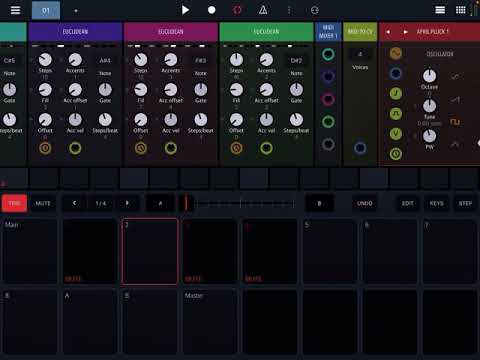
Got it! Using p-locks for xor’s switch idea on the first and last steps of a four bar pattern, you can automate the resync. Here’s the breakdown:
As long as you got it working
the way you need it to.
Well done.
That’s awesome. Here’s an automated version that resets every 10 steps...
If you want to set this up yourself pay close attention to the delay configuration. I found that about 30ms is needed to properly reset the euclidian sequencer. Set the “number” component to one less than the number of steps you want before the reset.
There’s one headache with this approach. The euclidian sequencer automatically resets when the transport starts. The counter does not. This messes up the auto-reset behavior. I’ve run into these inconsistencies before in Drambo and I don’t know if they’re intentional design choices or just accidental behavior. As a really hacky workaround I use the trigger button to manually reset the counter before I hit start. That way the sequencer, counter, and transport are all in sync. Wouldn’t it be nice if the track had a start trigger that you could use? Maybe @giku_beepstreet or @rs2000 might know of a better solution.
@xor can you send me the project file?
https://www.dropbox.com/s/joei1sagk5r32vb/Auto-reset euclidian sequencer.drproject?dl=0
Thanks. Can you explain why you've chosen that rather complicated setup?
What are you trying to achieve by modifying the Euclidian's time signal?
Edit: Just found an inconsistency in how the Euclidean sequencer handles the time signal. To be continued 😉
There’s a post back on https://forum.audiob.us/discussion/42554/drambo-is-an-au-host-now-the-new-drambo-mega-thread/p50 asking how to reset the euclidian sequencer. It doesn’t have a reset input (new feature request?). It doesn’t reset when a reset time module resets (probably a good thing since there’s no way to differentiate a reset from a wrap-to-zero).
I figured out that if you remove the clock for a short period of time that it resets. I tried using an x-fader but couldn’t get the binary a/b automation working so settled on a n-1 switch.
Every Nth step we want to briefly toggle the output of the switch from the clock to nothing. We can use a counter (of a clock generator, the track’s clock wouldn’t work) and an A>B function as the switch’s index input and then route that back to the counter’s reset input via feedback so the counter resets back to 0 whenever the clock is cut. I found that the delay had to be about 30ms or the euclidian sequencer wouldn’t recognize the absence of the clock signal.
The euclidian sequencer automatically resets when transport starts but a counter doesn’t. (It seems like it would be nice if everything behaved in the same way or at least had the option to). If you stop and restart transport the counter and euclidian sequencer are now out-of-sync. I couldn’t figure out any way to auto-clear the counter on transport start so hooked up a button you could press to clear it manually. (It might be nice to have a transport start signal available either through a plug in the track header or a separate module so that you could clear a counter. A fallback would to add a reset-on-start option to the counter and other modules that might benefit from it.)
Hope that clears it all up.
Couple of questions...
1. What does the little 1 in a circle mean for the Audio Output module? It's visible when you go to load it from the library.
Does it output a mono signal? Is that different to a multi-bus out channel? I thought they were stereo? (Using Drambo hosted in AUM) I can see how an audio output to a soundcard would be mono, but I thought the multi-bus outs were stereo?
@xor You know, the time signal is like a rising linear ramp that is evaluated by a number of modules as the beat position inside the pattern. Changing that voltage will make a module with CV input jump to the respective time position.
The Euclidean sequencer seems to be the only one which does not follow this behavior and in addition to "fixing" it, I've suggested to add a menu option that lets you choose whether to reset with each pattern wraparound.
As for your suggestion to have a transport module with various outputs regarding transport state, position 1 indicator etc., this is planned indeed.
But my question was rather about what you wanted to achieve with your project in the first place. Is it that you want the Euclidean seq to pause for 1 step duration every 9th step and then continue where it had paused?
I'm asking because that could be done by modulating the offset knob.
I think they just wanted to reset all the sequencers back to their initial positions after a number of bars, here was the initial conversation...
Ah OK, thanks, let's first wait for the response from @giku_beepstreet regarding the Euclidean seq, how it handles the time signal and the future transport module.
@0tolerance4silence thanks
I'm wanting a modular drum machine. Thought I might try Drambo for this. Is there one already baked? Failing that, where do I start please?
Whats the best way to remove a sequence if you dont see screen?
Say a kick drum to the standard sequencer only.
Ideally via a knob from right to left or just a button press.
This would also be a good system for melodies that work on a track basis ( not a pattern to pattern basis )
and the knob version could also be a good system for the track length update but as I say might also be good if it can remove midi from grid.
I think.
edit. I can test with the screen visible.
You can start with Patchstorage and the Sampler modules in the D itself.
Patches for an 808 hi-hat and Buchla type percussion were uploaded recently
and there are plenty of other ready made percussive sounds available.
A very incomplete list:
https://patchstorage.com/drambotonic-multi/
https://patchstorage.com/tomlj-rs2000-synthetic-drum-collaboration/
https://patchstorage.com/drumex-1000-light-n-easy/
https://patchstorage.com/3sleeves_funkboxds1/
https://patchstorage.com/dr-ambo-drum-synthesizer/
https://patchstorage.com/drum-designer/
https://patchstorage.com/drambo-8-channels-drums/
https://patchstorage.com/random-percussion-generator-v2/
https://patchstorage.com/tlj-syn-drm/
https://patchstorage.com/808-rim-shot/
https://patchstorage.com/snare-drum-physical-model-with-live-drum-beat/
https://patchstorage.com/sequenced-physical-models/
https://patchstorage.com/simmons-sds7/
Is there a way to keep the smooth transition of transposing Euclidean via midi. Like when you disconnect the midi in the euclidean but also be able add notes via screen based on what the euclidean note is but also transpose every note on the standard sequencer, when you transpose the euclidean sequencer via midi.
Only thing I can think of keeping the sequencer highlighted green but you cant add any note in any position on sequencer.
So need to transpose Euclidean as I were shown and to not get the additional note from a keyboard when changing euclidean note. This still allow notes to normal sequencer via screen based on what you euclidean note is and master transpose all notes on normal sequencer when transposing or changing note on euclidean via midi.
Goal is to use normal sequencer to add rolls/repeats to Euclidean sequencer.
Thanks.
If I disconnect midi in Euclidean the notes on normal sequencer dont play. Although I think they still set the note of the Euclidean. Adding a note on the sequencer additionally to the Euclidean sequence creates good rolls/repates. Id need to turn off midi in Euclidean. So that changing note dosent re-trigger via keyboard. That were fixed by Tahiche ( the genius ) and said theres a way to then go to normal sequencer mode.
Be able to input normal sequencer notes on screen to what the euclidean note is set to but also change all the note steps on normal sequencer, when I change note of the euclidean.
Thats all I need. An aum master volume side. Adding additional kick notes via screen that dont affect the euclidean note but both respond to midi keyboard. A sequencer wipe via knob for synths so that I can switch presets of synths in Aum, without spiking cpu? And then a global kit launch via Drambo, which would only work for me, when Drambo can be more than 8 multiouts.
Thanks.
Edit.
Adding beats on sequencer live isnt good. Unless you find a rythum or maybe add beats to patterns ( after a track ) sort of editing.
Thanks @Gravitas and @rs2000 .
Quick question for all you drambo masters. Been searching but I haven't yet found a solution. I am trying to get a flexisampler to respond to velocity when set to loop. I turn up the velocity knob and works fine in 1-shot or 1-slice but when set to loop triggering the loops is at a fixed volume. Thanks in advance to someone that can help with this hopefully simple oversight?
never mind - looks like just an amp env after Flexi - sorry.> @mikewb said:
Euclidean Launcher v1.
Though based upon rs2000’s Loop Launcher v1,
this Euclidean sequencer patch is
launched using midi notes rather than
using the velocity pads on the screen.
Assign the required midi note using the ,’midi filter’, module
and hit start and stop in the time with ,’Transport’.
The default note is C3.
To change the sound and the default midi note?
Expand the instrument rack and you will
see both the ,’midi filter’, module
and the ,’Flexi Sampler’, module.
Enjoy.
https://patchstorage.com/euclidean-launcher-v1/