Loopy Pro: Create music, your way.
What is Loopy Pro? — Loopy Pro is a powerful, flexible, and intuitive live looper, sampler, clip launcher and DAW for iPhone and iPad. At its core, it allows you to record and layer sounds in real-time to create complex musical arrangements. But it doesn’t stop there—Loopy Pro offers advanced tools to customize your workflow, build dynamic performance setups, and create a seamless connection between instruments, effects, and external gear.
Use it for live looping, sequencing, arranging, mixing, and much more. Whether you're a live performer, a producer, or just experimenting with sound, Loopy Pro helps you take control of your creative process.
Download on the App StoreLoopy Pro is your all-in-one musical toolkit. Try it for free today.
Comments
No problem. I enjoy helping and it is all the more enjoyable when the apps are this good.
hmmm... when I control softsynths in AUM I can set up a channel for each track, and then in AUM i can filter midi channels so that each track only reaches one softsynth. Nice.
But how do I do the same for external midi? I can't select the midi outputs within LK, the dropdown menu only shows LK out and my APCkey25... and i can't find an option to filter midi channels for external midi outputs in AUM?
Do I have to use an external app like MIDIflow to do the filtering?
(it would be nice if i didn't have to set the synths to certain channels, because then all the "setup" would be contained within aum...)
@sinosoidal I hadn’t thought about exposing next/previous scene in the UI but now that you mention it, it’s likely a good idea to allow for MIDI mapping (which is so easy in LK). I know there’s only one open slot down here:
but do you need to label Master? Or perhaps the user can toggle between Next and Previous in that one slot using the shift key? Anyway thanks for considering it as i use the arrow keys in Live as @branis suggests and it saves time and/or conserves controller buttons.
Here’s a starter LK + Drambo setup file for you to use if this is your workflow:
https://www.icloud.com/iclouddrive/09P33r5yNui8oWfCqIpV5i98Q#LK_Setup
I placed LK in the Main Track so you can access it all from a single view to launch clips for all midi channels.
@sinosoidal @reasOne @rs2000 @wim and others 👊🏼™️
Thanks..
Is "map to pads" or"map to whites" function also available in Lk when recording drums? ( using the launchpad mini mk3)
Cool stuff! Thanks @echoopera
I’m still a Drambo noob, so can I ask you a couple questions how you have the midi rerouting setup?
1) on tracks 2 and 3, they are set to receive midi on channels 2 and 3, but you still have a channel filter on them. Any reason? (Or should they be set to receive any like on track 1 and use the midi channel filter)
2) Are you still using your Drambo layout for the LPX from your “thing of beauty” thread? And if so, the template you posted here, how would you introduce something like scalebud to affect incoming midi to LK (I assume putting one right before LK) and also improve stuff on track 2 or 3 without having to play through the master channel? (Using your 2 octaves of Cm on you LPX template)
Basically a global scaler. Key change anything going into LK to be recorded or any track selected without putting a scaler on every individual track?
Again.....sry for being such a noob. Been trying to wrap my head around midi routing in Drambo. Just so used to the AUM matrix thing.
Had a little play with the posted project and the Note Randomizer.:
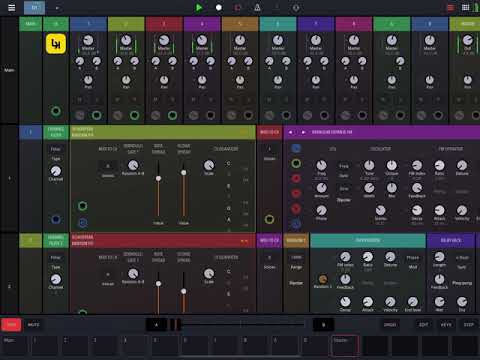
I kept this from an earlier build. It may or may not be needed...but i just wanted to be sure the notes were mapped to the right tracks.
I use it when connected. I don’t use scale bud...i just use the CV Quantizer to lock my notes to a specific Scale.
CV Quantizer is your friend.
No worries. The routing is flexible in Drambo...it’s just a different workflow which takes time to learn and get comfortable with.
Where would you place this to be able to 1)record into LK and 2) jam on something on track n without running through LK?
Only way I know would to be to put the quantizer on each track+master, but I’d have to change them all per track if I were to do a key change mid performance. (Unless there’s some secret way I could change the scale on all of them simultaneously, but would still prefer 1 instance rather than 17).
I assume midi coming from externally on track 2 would run concurrently with the midi from LK on track 2. Is this correct?
Currently I use a fair amount of the generative stuff in LK, play overtop of it externally from LK, then eventually play it back into LK in overdub.
Long story short, I’m looking to be able to switch between all major scales , and their 3 minor versions with relative ease.
Just use the many keyboards available to you in LK to play and jam on an instrument, and then record those takes to various clips within LK.
This is the power and flexibility of LK 😉
If you’re playing externally I’m not sure how to setup the routing. I use a LaunchPad X MK3 to keep me honest playing to a locked scale on the unit.
Launchpad Mini 3 setup (and a knob box for cc messages) Locked 4 octave scale (and locked midi channel). Right now I do LP--->LK+AUM (really one used for midi matrix routing and sale bud to convert the locked scales) ---> Drambo. But it seems I would have to have a scaler/cv quantizer on every channel. (drambo tracks are set to receives midi only when active).
I’m not in front of my LP at the moment, but can’t we switch Midi Channel Out on the fly? Drambo allows Midi In to be Always On or when Track Selected.
You could then set the routing to work via this live switching. Just a thought.
This works in notes mode on the x and pro, but not a mini. Just whatever you set in components. So the pads are locked to a midi channel. It’s all good. I’ll figure it out.
My current setup works, but my question originally was to help me wrap my noggin’ around midi routing. It’s def not as straightforward as AUM matrix.
I think I derailed this LK thread enough. If I have to go down this rabbit hole further, I’ll pick it up in the Drambo thread.
Thanks @echoopera
Sorry @sinosoidal, you can have your thread back now.
I don't own the thread. The community does!
@sinosoidal I went back and looked at Live and recalled that there is a preference option for MIDI mapping “play next scene” with one controller button:
https://forum.ableton.com/viewtopic.php?t=174044
You may not get affirmation here at AB forums since everyone seems to have a launchpad X or whatever but you’d be opening LK up to the army of guitar players and keyboard players who play live with limited buttons and their hands full by offering this option.
Interesting. Never seen this before. We will see what we can do.
Thank you! If you can figure it out and get it in I’ll do a video and start a thread about using LK for live sets with an instrument in your hands. Might open up a new market segment for you if you market the feature a bit. Competitors are Camelot, Setlistmaker, etc. LK is better because many musicians are already familiar with Live.
@sinosoidal I was going to email you via Testflight, but I can't seem to attach the movie file. Noticing a very weird scale/transition bug when you move from view to view in AUM. See attached .zip file for screen recording.
This bug doesn't appear in StandAlone...but is evident in AUM, Drambo UI workflows. Let me know if you need more details. This is from the latest shipping version...and still present in the latest Beta in TestFlight.
Cheers.
This one is affecting other user here. I'm planning to remove this animation to make things smoother. Let's see if it fixes the problem.
We've just made available 1.10.7 (build 234) for beta testing. In this build we have removed the animations when switching modules. Can you please let me know if this resolves the problem you were having? Thx!
@echoopera yeah that’s what I have too! Here it’s even a longer delay.
@sinosoidal of to try it now!
Edit: confirm it works much, much better for me without the animations! No more scaling and feels instant now! Thanks again!
That's great news! Thanks for confirming.
Hi @sinosoidal , would it be possible in LaunchKey Mini MK3 that the pads in Drums mode were enlightened?
Thanks
I take this opportunity to tell you that the new firmware of the LKMK3 (1.1) doesn't break the integration with LK
We need to investigate.
We are uploading a new build of version 1.10.7 (build 235) with the following changes:
🔥🔥🔥🔥🔥🔥🔥🔥🔥🔥
So stoked! Thank you!
Please let me know how it works for you!
how do you record drums again? using a midi controller ( lp mini mk3 ..in my case)